

What Is Short Throw Projector
Updated for March 2026
If you're trying to fill a wall with a big picture but your room isn't deep enough for a traditional projector, a short throw projector is usually the answer. The key spec isn't the smart platform, brightness, or speaker quality. It's throw ratio, which tells you how far the projector needs to sit from the screen to make a given image size.
A lot of first-time buyers run into the same problem. They want a movie-night-sized image, but they don't want a projector hanging over the couch, cables running across the ceiling, or shadows every time someone stands up. That's exactly where short throw models make sense.
At digidevice.shop, we usually see this from apartment dwellers, gamers with compact desk setups, and anyone trying to replace a big TV in a shallow room. If you've been reading spec sheets and still wondering what is short throw projector really means in practice, the answer starts with room geometry, not marketing.
Quick buying takeaway:
- Short throw means the projector can make a large image from a short distance
- The defining measurement is throw ratio
- In most cases, 0.4:1 to 1.0:1 is the range used for short throw models (AVIXA definition summary via EduTechWiki)
- The lower the ratio, the closer the projector can sit to the wall
Insert image of a short throw projector on a coffee table in a small apartment living room.
The Short Throw Projector Definition That Actually Matters
A short throw projector is defined by throw ratio. That's the distance from the projector lens to the screen, divided by the image width. Across industry guidance, short throw models are generally placed in the 0.4:1 to 1.0:1 range (ProjectorCentral throw guidance).
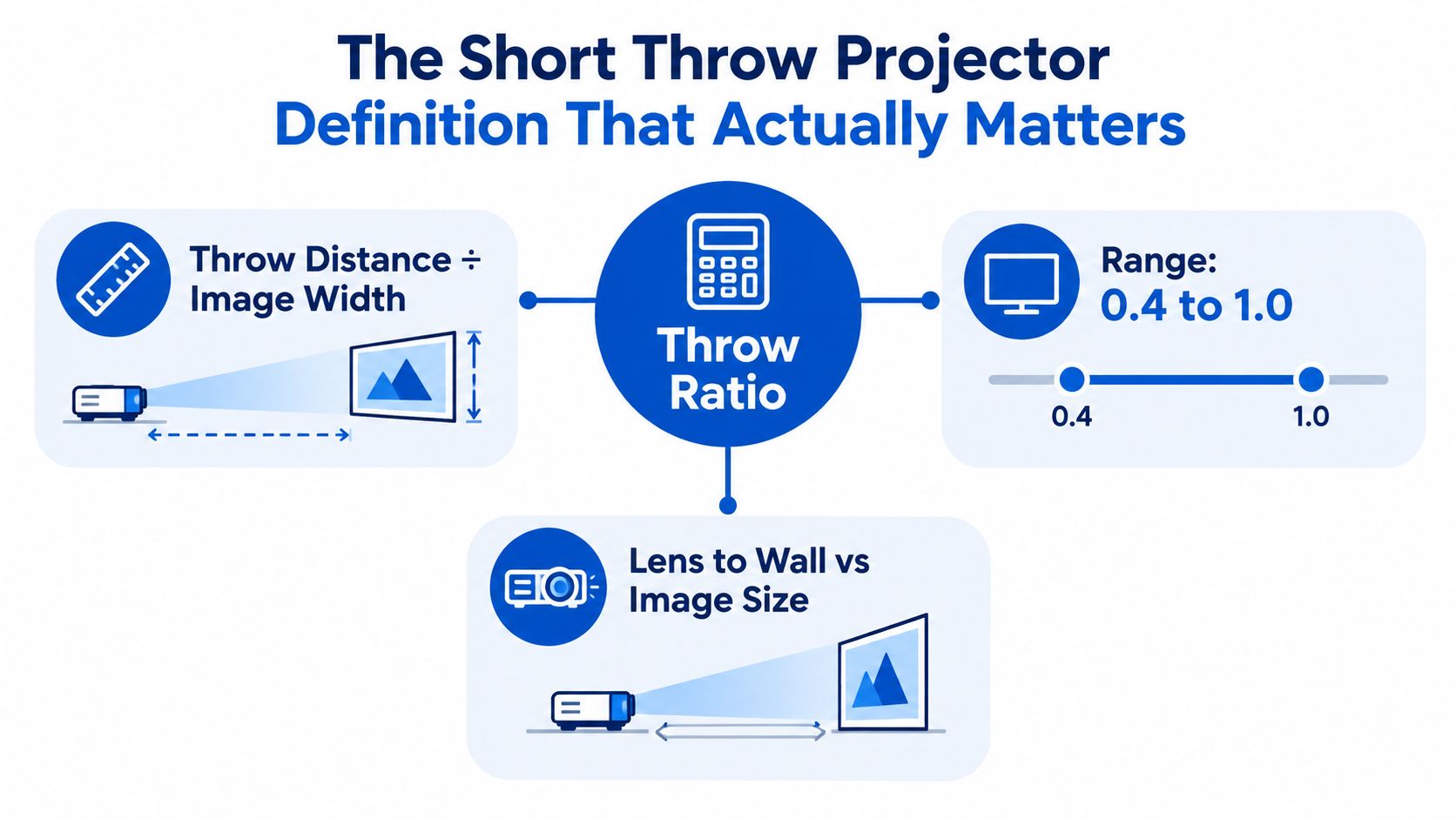
The one formula that matters
The formula is simple:
- Throw Ratio = Throw Distance / Image Width
That means you can also flip it around when planning your room:
- Throw Distance = Throw Ratio × Image Width
A concrete example helps. If a projector has a 0.5:1 throw ratio, and you place it 1 meter from the wall, it can create an image about 2 meters wide. That's close to a 90-inch diagonal image in a typical widescreen shape.
If you compare that with a 1.5:1 projector, that same 2-meter-wide image would need about 3 meters of throw distance instead. That's the whole appeal of short throw. You get a large image without needing a deep room.
Practical rule: If you only remember one spec on the box, remember throw ratio. Everything else comes after that.
What short throw does not mean
Buyers get tripped up.
Short throw does not automatically mean:
- Brighter image
- Sharper picture
- Better contrast
- Smarter streaming features
- Lower gaming lag
It only describes the geometry of the projection setup. BenQ's explainer puts the practical idea clearly: many short throw models can produce a 100-inch image from less than 9 feet, and modern short throw units are often described around 0.4 to 1.0, while traditional projectors commonly sat nearer 2.0 in throw ratio (BenQ short throw guide).
Why this matters before you shop
Once you understand throw ratio, the rest of the buying process gets easier.
You can:
- Measure your wall
- Measure the distance available in your room
- Check whether the projector fits physically before worrying about apps, HDR, or speakers
If you're browsing compact projector options, DigiDevice lists models such as the HY300 Plus HD projector, which is presented as a portable Android LED home theater projector. That's useful if you're comparing small-space placement needs with more traditional room setups.
Short Throw vs Standard Throw vs Ultra Short Throw
The simplest way to understand the categories is to compare how far each type must sit from the screen. Forget the branding for a minute. Focus on the math.
The three projector classes
| Throw Type | Throw Ratio | Distance from Screen | Typical Placement |
|---|---|---|---|
| Standard Throw | Around 1.5:1 to 2.0:1 | Farther back in the room | Ceiling mount or rear shelf |
| Short Throw | About 0.4:1 to 1.0:1 | Much closer to the wall | Coffee table, front shelf, close ceiling mount |
| Ultra Short Throw | Below 0.4:1 | Almost flush to the wall | Media console directly under screen |
Ultra-short-throw models are a separate category. Industry guidance places them below 0.4:1, and Christie notes that many current UST units fall around 0.16:1 to 0.22:1 (Christie UST overview).
What that looks like with a 100-inch image
For a 100-inch picture, the placement difference is dramatic:
- Standard throw often needs the projector several meters back
- Short throw can usually work from a much shorter front-of-room distance
- Ultra short throw may sit less than a foot from the wall
GamesRadar makes the distinction useful: short throw models can place a 100-inch image from roughly 3 to 8 feet away, while ultra-short-throw units can do it from less than a foot (GamesRadar throw ratio guide).
If you're comparing living-room-friendly options, this ultra short throw laser projector 4K guide is a good next read because it frames UST as a front-of-room setup rather than a ceiling install.
A standard projector asks, "How deep is your room?" A short throw model asks, "How much wall do you have near the front?"
The trade-offs are real
Shorter throw doesn't mean zero compromises.
Standard throw usually gives you:
- More forgiving placement
- Less sensitivity to tiny alignment errors
- More flexibility with cheaper screens
Short throw and ultra short throw usually ask for:
- More precise placement
- Flatter projection surfaces
- Better control of image geometry
Ultra short throw is often the most furniture-friendly option, but it's also the least forgiving about wall flatness. Short throw sits in the middle. It still needs some clearance from the wall, but it's much easier to fit into a compact room than a classic rear-mounted projector.
Why a Low Throw Ratio Changes the Whole Room
A lower throw ratio doesn't just change where the projector sits. It changes how the whole room behaves.
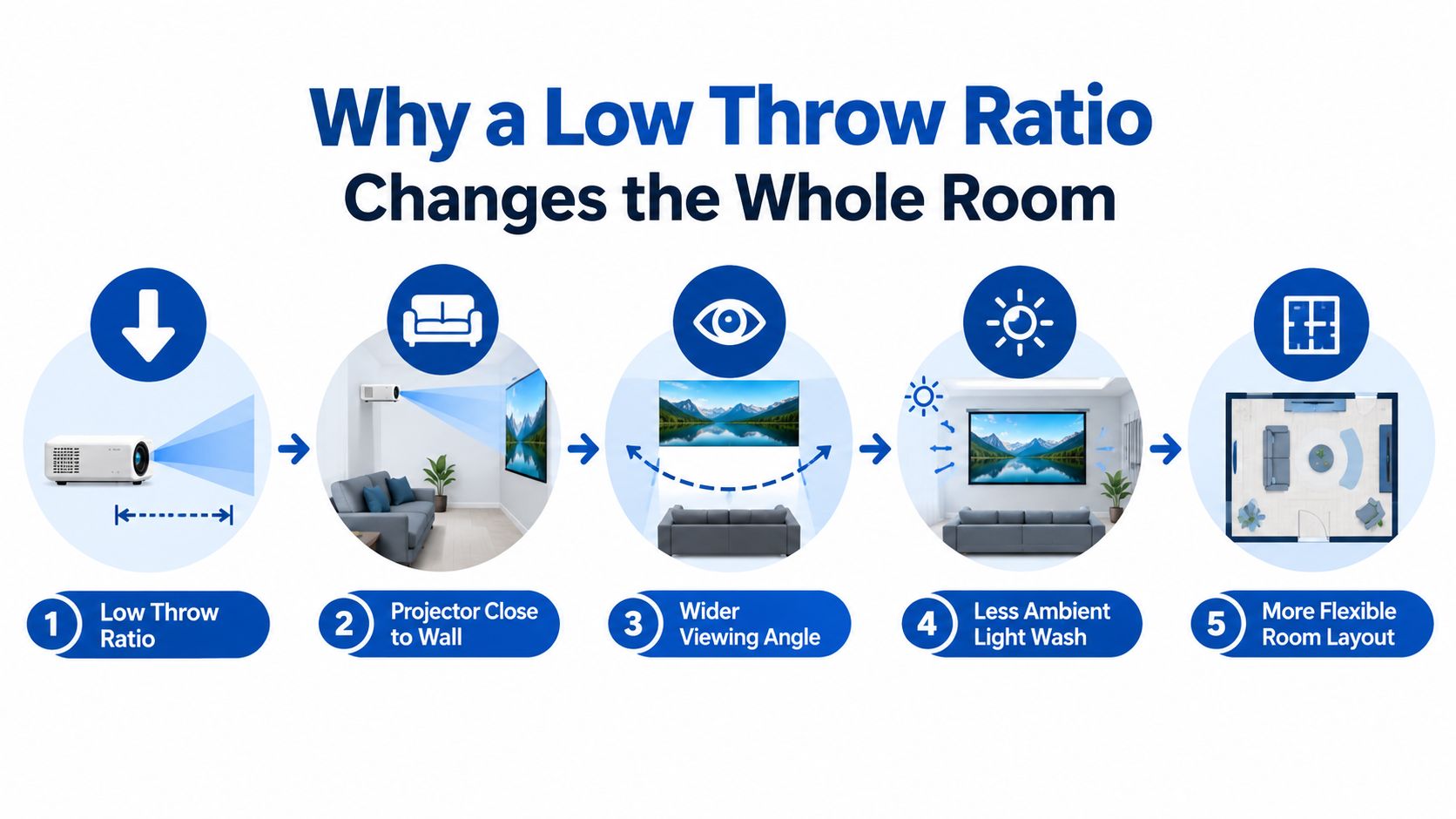
When the projector moves toward the front wall, the light path gets shorter. That solves several everyday annoyances at once, especially in living rooms, classrooms, and gaming spaces.
What improves in a real room
In our testing, the first thing people notice isn't image quality. It's the absence of interruption.
A low throw ratio helps because:
- Shadows drop dramatically when someone walks near the screen
- Mounting gets easier because the projector can live on a low table, front shelf, or close ceiling mount
- Rear-room space opens up for seating instead of projector hardware
- Cable runs get shorter in many front-of-room setups
In education and other tight spaces, this practical advantage has helped make short throw a major category rather than a niche one. One market report says short throw models with throw ratios between 0.4 and 1.0 held about 32.6% of the education projector market in 2025 and are projected to grow at an 8.1% CAGR, while another report puts share at 36.7% in the same year (DataIntelo education projector market).
Why alignment gets fussier
The trade-off is geometry sensitivity.
A short-throw setup can produce a 100-inch image from roughly 3 to 7 feet, but small changes in distance or angle create larger shifts in image size and shape than they would with a standard-throw projector (Soundcore short throw explainer). That's why careful measuring matters more here.
What we noticed: buyers often blame the projector for warped corners when the real issue is placement that is a little too high, too low, or slightly off-center.
You can watch the room-layout logic in action here:
Room solving beats feature chasing
A short throw projector is often the right answer when your wall is usable but your room depth isn't.
That makes it a room-solving decision, not just a feature upgrade. If your biggest problem is, "I can't put a projector far enough back," then a lower throw ratio fixes the root issue in a way extra brightness or a smarter interface can't.
Real Rooms Where Short Throw Makes Sense
A lot of rooms look projector-friendly until you map the furniture. The wall is open, but the couch sits only a few feet away. The desk is pushed right up against the wall. The coffee table is the only realistic place for the projector. Those are the spaces where short throw earns its keep, because room depth, not screen size, is the limiting factor.
A simple way to judge it is to picture a 100-inch image in your room. That image is about 87 inches wide. If your projector has a 0.5 throw ratio, the lens needs to sit about 43.5 inches from the wall. If your room can handle that distance cleanly, short throw is probably worth a serious look.
Three setups that come up all the time
| Room Scenario | Approx. Size | Best Projector Type | Why It Fits |
|---|---|---|---|
| Small apartment living room | Compact living area | Short Throw | Large image from a coffee table or media console, without placing the projector behind the sofa |
| Dorm or bedroom gaming setup | Tight desk-to-wall layout | Short Throw or Ultra Short Throw | Keeps the projector close to the wall and reduces the chance of people crossing the light path |
| Backyard movie night | Open temporary setup | Depends on surface and distance | Placement still matters, but screen stability and ambient light usually matter more |
Small apartment living room
This is one of the clearest short-throw use cases.
In a shallow living room, a standard projector often wants to sit where people walk, where a ceiling mount would be awkward, or where a rear shelf does not exist. A short throw model shifts that placement forward. You can get a big picture from a front shelf, media unit, or coffee table, which matches how many apartment living rooms are arranged.
If you are shopping for that kind of setup, this guide to best 4K portable projectors for small apartments can help narrow down models that suit tighter spaces.
Dorm or bedroom gaming setup
Bedrooms and dorms often have one working wall and very little extra depth. That changes the buying decision fast.
A short throw projector makes sense when the bed, desk, or chair already sits close to the screen wall, and you still want a large image for gaming. The practical win is simple. The projector can stay near the front of the room instead of beaming over your shoulder from farther back. That usually means fewer shadows, less chance of bumping the setup, and tidier cable runs around a desk.
Ultra short throw can fit even better if the projector will live right at the front edge of a cabinet or desk. Short throw is usually the better middle ground if you have a bit more space and want more placement flexibility.
Backyard movie night
Outdoor setups follow different rules.
Short throw can work well if you have a stable table close to the screen and enough control over projector height and angle. But a backyard is less forgiving than a living room. Grass is uneven. Folding tables wobble. Screens move in the breeze. In that situation, image stability and brightness often matter more than squeezing the projector closer to the screen.
Insert image of an outdoor projector setup aimed at a backyard screen near sunset.
The main question is not whether short throw sounds better on a spec sheet. It is whether your room lets the projector sit in a spot that is practical, stable, and free of foot traffic. That is the point where short throw stops being a category label and starts being the right tool for the room.
Calculating Placement Distance Without Guesswork
This is the part that saves people from returns.
The core formula is straightforward: throw ratio = throw distance ÷ image width. Rearranged for shopping and setup, that becomes throw distance = throw ratio × image width.
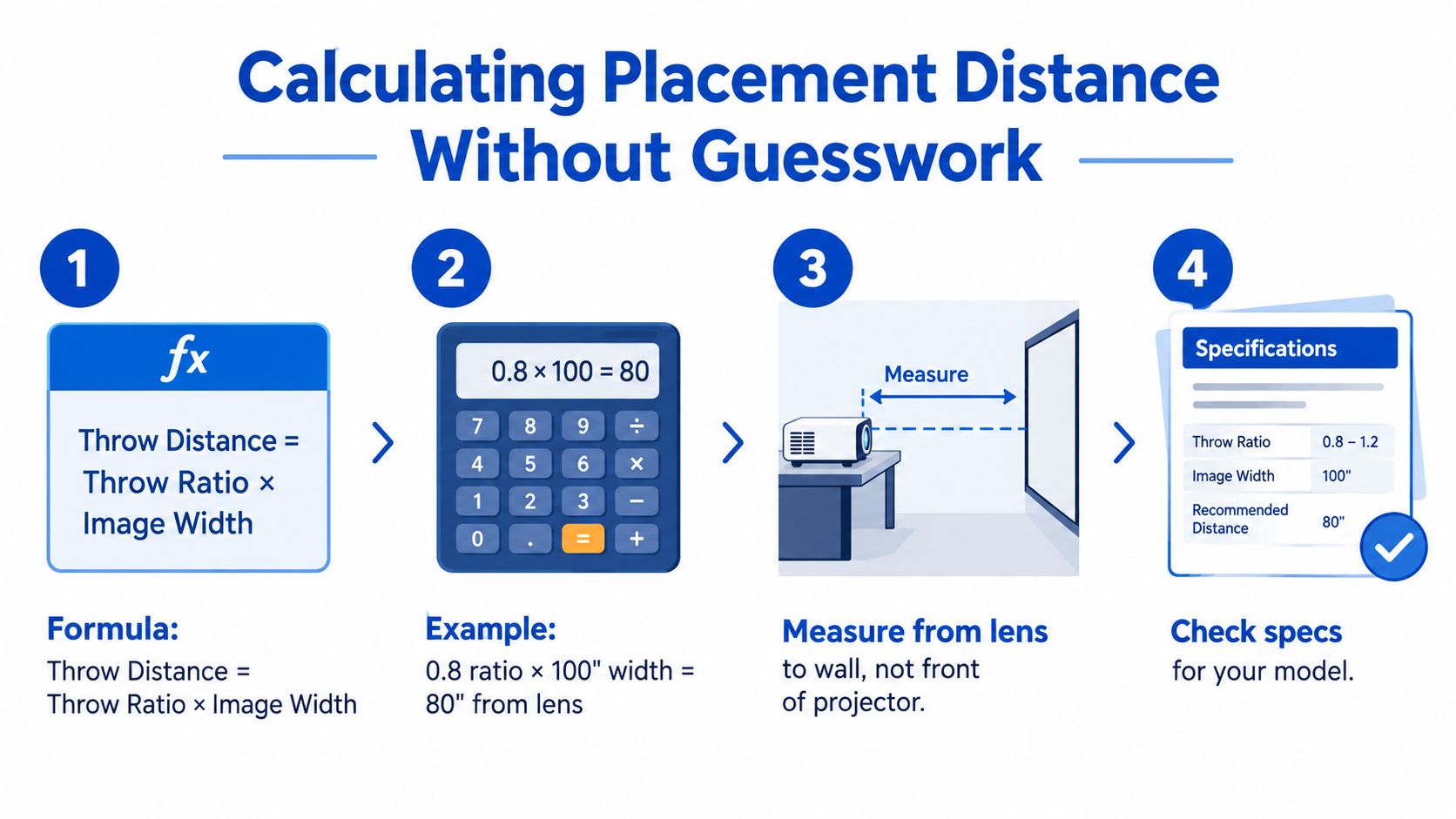
A real 100-inch example
Let's use a projector with a 0.5 throw ratio and target a 100-inch diagonal 16:9 image.
A 100-inch 16:9 image is roughly 87 inches wide. Multiply that width by the throw ratio:
- 0.5 × 87 inches = 43.5 inches
So the lens needs to sit about 43.5 inches from the wall or screen. That's close enough for many media consoles, front shelves, or coffee-table setups.
The pre-measure routine
Before buying, I recommend this simple sequence:
-
Measure your wall width
Leave a little breathing room around the image so it doesn't feel crammed. -
Choose your target picture size
A wall might fit a huge image, but your seating distance still has to feel comfortable. -
Note obstacles
Light switches, outlets, trim, shelves, and soundbars affect where the image can land. -
Mark the lens position
Painter's tape on the floor or shelf helps you visualize placement before the projector arrives.
If you're planning a permanent install, this how to mount a projector guide pairs well with the math above.
Setup habit: Measure from the lens to the screen, not from the back of the projector chassis. The lens position is what the throw-ratio formula uses.
Why physical placement beats keystone correction
Digital keystone is helpful, but it shouldn't be your main plan.
When you place the projector too far off-axis, the image gets stretched, corner sharpness can suffer, and the whole picture can look less clean. With short throw models, that penalty shows up faster because the geometry is more sensitive. A careful tape-measure setup usually looks better than a sloppy setup rescued by software.
What to Look for in a Short Throw Projector
Once the throw ratio fits your room, the rest of the spec sheet starts to matter. I like to sort short throw buying into four buckets so you don't get distracted by marketing fluff.
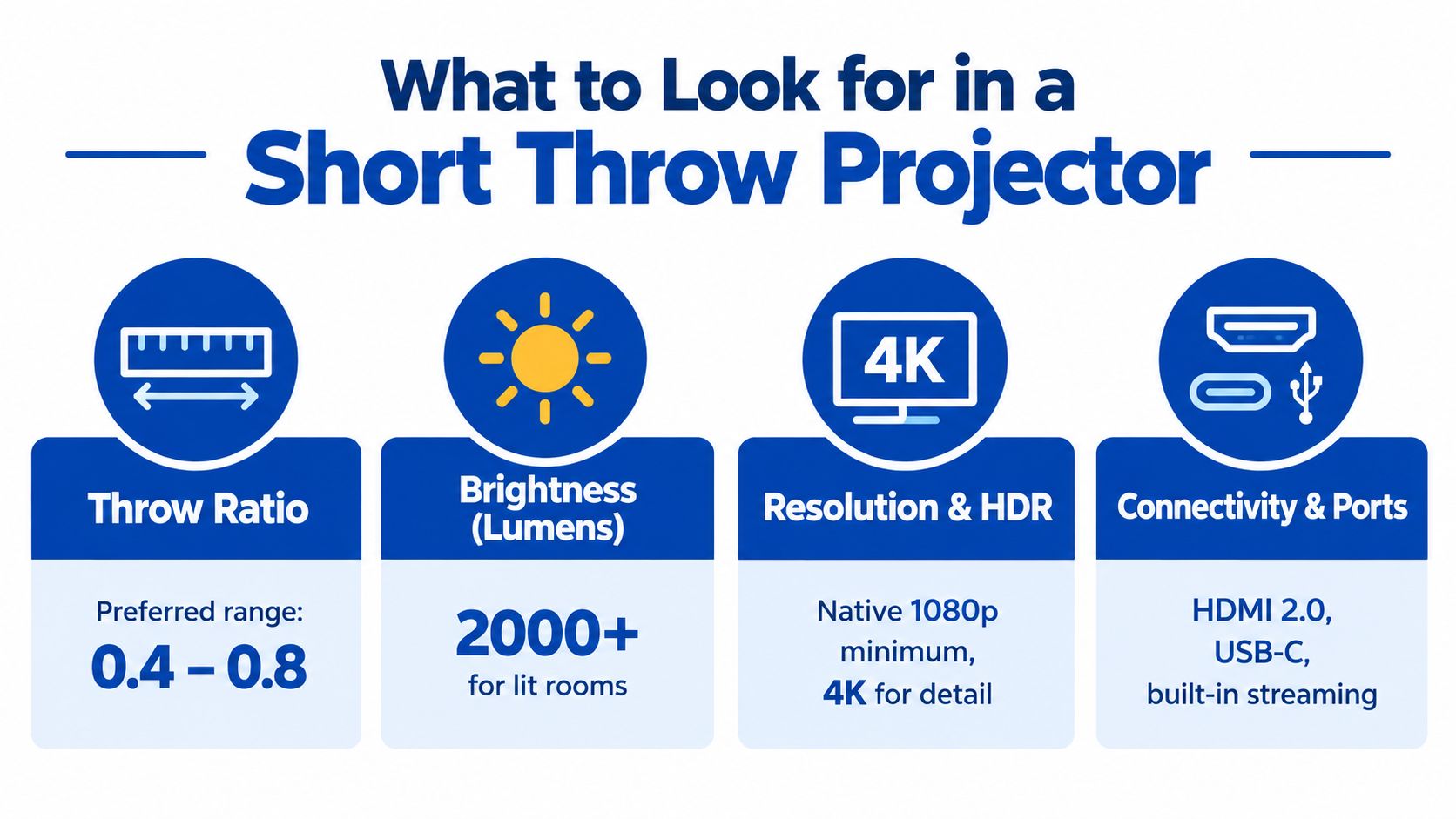
Image quality specs that matter
For a large wall-filling picture, I'd treat native 1080p as the sensible floor. 4K input support can be useful, but what matters most is how sharp the projector looks at the screen size you plan to use.
Brightness also matters, but only in context.
Check these first:
- Resolution: Native 1080p is a comfortable starting point for a big image
- Brightness rating: More important if your room isn't fully dark
- Contrast behavior: Especially relevant for movies with dark scenes
For daytime and mixed-light rooms, this guide on comparing lumen brightness for daytime projector use helps translate brightness claims into room reality.
Gaming and connectivity
If you're gaming, the shopping priorities shift fast.
Look for:
- Low input lag
- HDMI 2.0 or higher
- Stable game mode behavior
- Easy console connectivity at the front of the room
A great movie projector can still feel sluggish for gaming if the input response isn't tuned for it.
Convenience and portability
This category matters more than people expect in small homes.
Useful setup features include:
- Autofocus if you move the projector often
- Auto keystone for quick temporary setup
- Side projection correction when furniture forces awkward placement
- USB-C power or battery support for flexible use
- LED or laser light source if you want less maintenance over time
Buy for your dominant use case. For gaming, prioritize lag. For an apartment, prioritize throw ratio. For portable use, prioritize weight and brightness balance.
Projector or TV in a Small Space and Your Next Step
A lot of people ask the wrong question. They ask whether a projector is better than a TV in general.
The question is whether your wall space and room depth make projection practical.
When short throw wins
Short throw usually wins when:
- You want a much larger image than a TV would comfortably provide
- Your room is shallow
- You don't want a rear ceiling mount
- You can control light at least somewhat
A TV still wins in bright rooms where sunlight dominates the space for most viewing sessions. It also stays simpler if your target size is modest and you want zero setup fuss.
A cleaner decision test
Ask yourself these four things:
- How much wall do I have?
- How deep is the room from wall to projector position?
- How bright is the room when I watch things?
- Do I want a front-of-room setup or a fixed TV panel?
If you're weighing both sides, this home theater projector vs TV comparison is the right next step.
Install checklist before you buy
Keep this short list handy:
- Mount height: Make sure the projected image lands where your eyes naturally sit
- Cable routing: Plan HDMI and power before the projector arrives
- Ventilation: Leave breathing room around the chassis
- Focus calibration: Fine-tune after the projector is in its final spot, not during a quick test
The best short throw setup doesn't come from chasing the fanciest model. It comes from matching the projector's geometry to the room you already have.
Short Throw Projector Questions Real Shoppers Ask
1. Can a short throw projector work in daylight
Yes, but daylight is where reality hits.
A short throw projector can work in a bright room better than many people expect, but the result depends on room light, screen surface, and where the light is coming from. If your room has a lot of uncontrolled sunlight, a TV is often the easier choice. If the room has moderate light and you can manage glare, a brighter projector paired with an appropriate screen can still be very watchable.
Use this rule of thumb:
- Controlled light: projector is a strong option
- Mixed light: projector can work with the right screen
- Direct daylight: TV is usually easier to live with
2. Can you ceiling-mount a short throw projector
Yes, many short throw projectors can be ceiling-mounted.
The catch is alignment. Because short throw geometry is less forgiving, mount height, projector angle, and lens position all matter more. You want the lens centered correctly so you don't have to lean on keystone correction. You also need enough ventilation space around the projector body, especially if it's mounted close to the wall or ceiling.
3. Is a screen worth it, or can I just use a wall
A smooth, flat wall can work. A proper screen usually works better.
Short throw projection is less forgiving of wall texture than many first-time buyers expect. Small bumps, waviness, and uneven paint can show up more clearly once the image gets large. If you care about consistent contrast, cleaner edges, and more predictable color, a screen is the safer move. If you're testing the waters in a rental, a well-prepared wall is still a reasonable starting point.
If you're measuring a small room and trying to decide between a portable projector, a short throw model, or a TV, DigiDevice has projectors, accessories, and practical buying guides aimed at real home setups rather than showroom demos. Visit DigiDevice to compare compact home entertainment gear and find a setup that fits your wall, viewing distance, and room layout.