

Ultra Short Throw Laser Projector 4K: A Complete Buyer Guide
You're trying to trade a bulky TV wall for a cleaner living room, but you don't want to give up on a big image. That's exactly where an ultra short throw laser projector 4K makes sense, and it's also where buyers get misled fastest, because the room and the furniture decide the outcome before the projector does.
Why an Ultra Short Throw Laser Projector 4K Is Built for Small Living Rooms
A small living room exposes the constraint fast. The wall may handle a 100-inch-class image, but the ceiling might rule out a traditional mount, and a long HDMI run across the room can ruin the layout. Ultra short throw (UST) solves that layout problem because these projectors are usually defined by a throw ratio below 0.4:1, which lets them sit very close to the wall or screen and still fill a large picture.
That changes the category from a projector purchase to a room-planning decision. The best way to judge a UST is to treat the cabinet, screen, seating distance, and cable path as the first spec sheet, then the projector itself comes second. A compact living room can handle a serious image if the furniture is measured correctly and the screen choice is matched to the room, which is why a proper theatre-in-a-box setup guide matters before anyone starts comparing marketing photos.
A unit like Samsung's Premiere LSP9T makes the point with a 0.189 throw ratio and 2,800 ANSI lumens (source). That kind of placement lets the projector sit on a console instead of taking over the ceiling. The appeal is simple, the room stays livable while the screen still scales up to something that feels like a theater.
Why the laser part matters
The 4K laser part is not window dressing. A laser light source stays usable for years, keeps the image bright enough for daytime viewing, and lets the projector live on a media console like a piece of furniture instead of a permanent installation. CTA-approved True 4K UHD projectors are described as projecting 8.3 million on-screen pixels, which corresponds to 3,840 × 2,160 resolution (source).
That combination solves the old projector problem, room depth. You do not need a long room to get a big image, and you do not need to treat the projector like a temporary guest. A laser UST fits the way small living rooms are used, where the display has to share space with storage, speakers, and daily traffic without turning the room into a dedicated theater.
Epson's 2026 LS970 example pushes that idea further with a claimed 150-inch image from centimeters away, 4,000 lumens, and a 20,000-hour laser light source rating (source). That is the kind of spec set that only works if the cabinet depth, screen placement, and ambient light are handled correctly. In other words, the projector matters, but the room decides whether the promise becomes a usable setup.
Practical rule: If your room works better with a console than a ceiling mount, UST is the right projector class to consider.
Read the theatre-in-a-box setup guide
The Specs That Matter on a 4K UST Laser Projector
The spec sheet gets noisy fast, so I strip it down to five things that change the result in your room. Ignore the shiny extras until these are nailed down.
The numbers that decide performance
The first spec is throw ratio, because it decides whether the projector fits your cabinet and your target screen. A model like ViewSonic's X2000L-4K uses a 0.22 throw ratio, projects a 65"–150" image from 0.082–0.520 m, and supports 3840×2160 resolution with 40 ms input lag (source). That is the difference between a setup that fits the furniture and one that does not.
Brightness comes next, but the number only matters in context. ANSI lumens tell part of the story, and in UST setups I care just as much about how the image holds up in a lit room. Optoma's GT4000UHD combines 4,000 lumens, a 0.25:1 throw ratio, and a 30,000-hour DuraCore laser light source (source). Epson's Lifestudio Grand UST lists 3,600 lumens of color brightness and 3,600 lumens of white brightness, which is the sort of dual figure that gives you a better read on performance with ambient light (source).
What I notice in testing: brightness claims only matter when you pair them with a screen and a room. A bright projector on the wrong wall still looks wrong.
What to prioritize first
For movies in mixed light, I put brightness, throw ratio, and laser life ahead of gaming extras. For gaming, input lag moves higher on the list. For mixed use, I want honest 4K-class resolution, stable brightness, and a chassis that lands where the furniture says it can land.
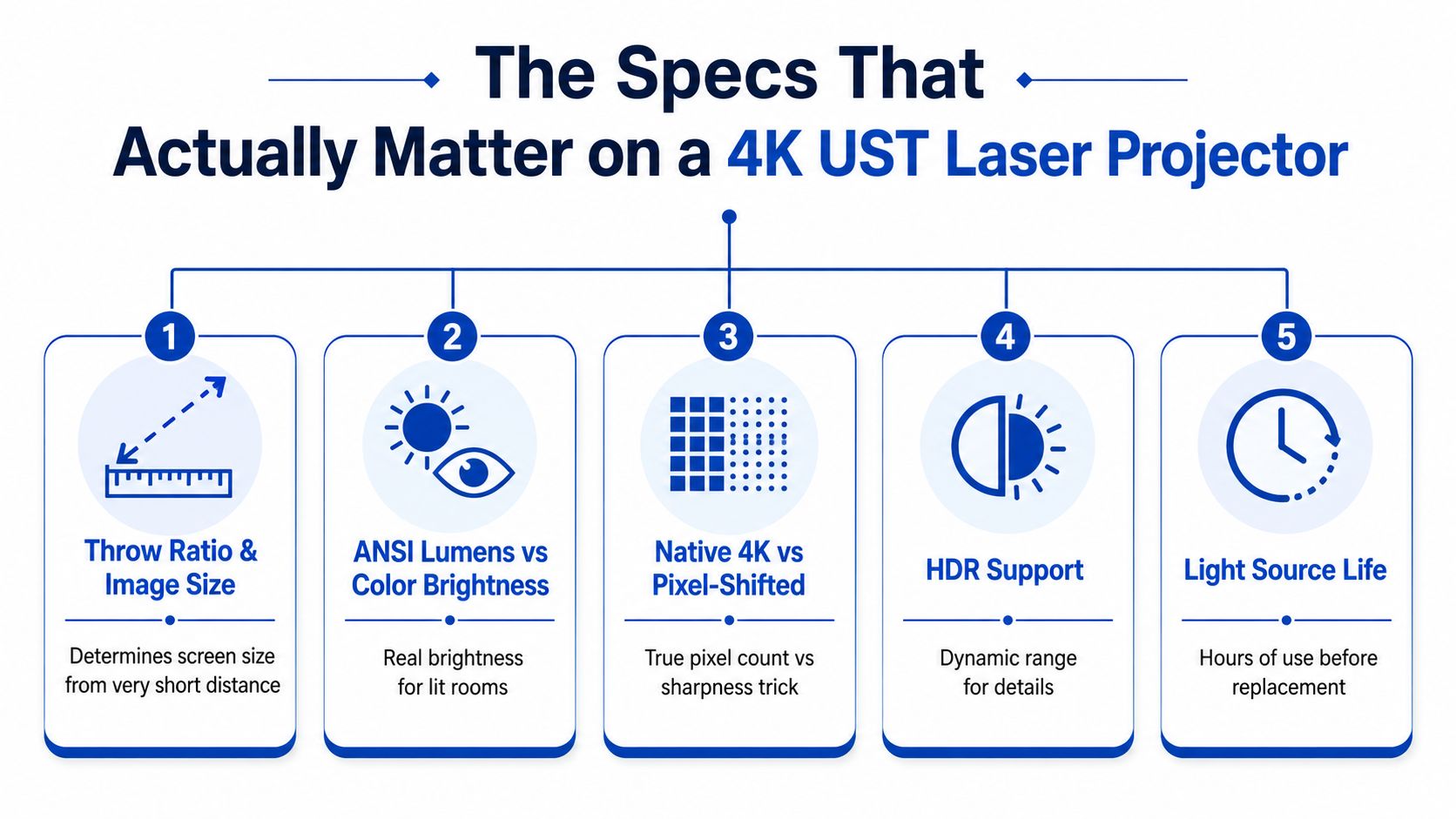
| Spec | What to look for | Why it matters |
|---|---|---|
| Throw ratio | Near 0.19 to 0.25 for common UST layouts | Decides cabinet fit and screen size |
| Brightness | High lumen output, plus clear color brightness figures | Keeps the image usable in ambient light |
| 4K resolution | 3,840 × 2,160 or an honest disclosure of pixel-shift | Separates real detail from signal support |
| Input lag | Lower is better for gaming, especially with consoles | Controls responsiveness in play |
| Laser life | Long-rated light source life in hours | Reduces maintenance and replacement anxiety |
If you are comparing brightness for a daytime room, use this side-by-side look at lumen brightness and judge it against your screen and window exposure, not the marketing headline.
A projector can look excellent on paper and still fail in a real living room. That is why I also push buyers to how to choose a TV stand, because cabinet depth, surface height, and storage clearance decide whether the projector sits where it should or becomes a compromise from day one.
Measuring Your Room and Your Media Console Before You Buy
The cabinet comes first, not the projector. I've measured too many setups where the buyer fell in love with the spec sheet, then discovered the console was two inches too shallow or the wall space was tighter than the ad made it look.
Start with the actual depth
A UST projector sits close to the wall, but the usable footprint is not just the physical body. You need to add the projector's throw distance to its physical depth to get the total cabinet clearance, then account for vertical offset so the image lands where you want it. That's the part people skip, and it's why “easy to install” doesn't mean “drop-in replacement.”
A 100-inch image from roughly 9 to 12 inches off the wall is a very different furniture problem from a 120-inch image that needs a bit more breathing room. Formovie's Theater UST is a concrete example, with a 0.23:1 throw ratio and a specified 100-inch image from just 9 inches away (source). That's the kind of number you should use when you measure your room, not the marketing shot.
Screen choice is part of the room plan
If the room has windows or overhead lights, I'd strongly favor an ALR screen. Bare walls can work in dark rooms, but they're a compromise in bright spaces. Buyers who are also shopping furniture should read a solid guide to how to choose a TV stand because a UST setup lives or dies by stand depth, shelf height, and cable routing.
For sizing, think in terms of what your eyes can comfortably handle from the seating distance, not what looks biggest on a product page. A 100-inch setup is the safer starting point for compact rooms. A 120-inch screen is for people who've already measured their wall and console, not for impulse buyers.
My rule of thumb: if you need to move the furniture after the projector arrives, you measured too late.
See projector screen sizing guidance
UST Laser Projector vs Traditional Projector vs Big TV
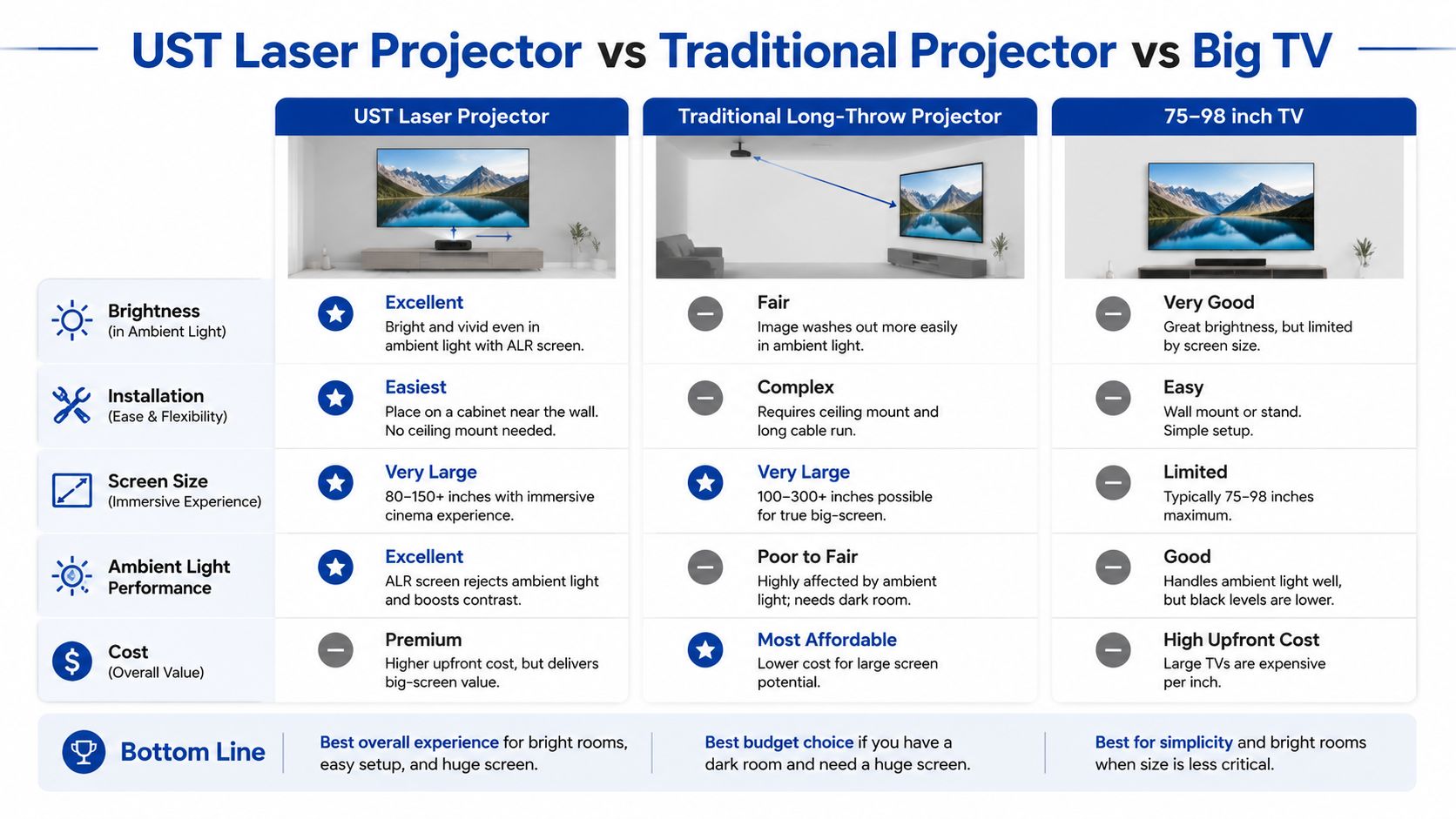
A UST projector is the best answer when you want a screen bigger than a normal TV without turning the room into a theater build. Traditional long-throw projectors still make sense for dark dedicated rooms, and a big TV still wins when the room is sun-flooded and you want zero setup drama.
Where each one wins
UST laser projector. Best when you want a giant image on a console, with no ceiling mount and no long cable run. It also wins for a living room because the placement is simple and the screen can be huge without the room looking like a lab.
Traditional long-throw projector. Best in a dark room where black level matters more than convenience. It usually asks for more installation effort, but it can still be the better pure cinema tool.
75 to 98-inch TV. Best when the room gets blasted by sunlight and you want peak convenience. It's the easiest thing to use, but once you start chasing screen sizes above 100 inches, the cost and wall dominance change the argument.
The short version is simple. If your goal is a big living-room picture and you want the setup to feel furniture-like, UST is the smartest category. If your room is a dedicated theater, I'd still consider a long-throw projector. If you want the cleanest plug-in experience, buy the bigger TV.
Browse the best 4K portable projector options for small apartments
Matching the Right UST Projector to Your Use Case
Apartment dwellers, gamers, and theater fans should not buy the same ultra short throw projector. They may all point it at the same wall, but the failure points are different, and those differences matter more than brand gloss or a shiny spec sheet.
Apartment dwellers should spend on quiet convenience
If you stream at night, put quiet operation and solid built-in apps at the top of the list. A chassis that sits low in the cabinet and stays out of the way matters just as much. Brightness still matters, but a small apartment is not the place to chase reference-level output. You are trying to keep the room calm, uncluttered, and easy to live with.
Gamers should spend on latency and HDMI behavior
Console gamers should focus on input lag below about 30 ms at 4K, plus a game mode that does not get in the way. That matters more than marketing phrases about gaming support. ViewSonic's X2000L-4K lists 40 ms input lag, which is usable but not the sharpest choice for fast play, while Optoma's UHZ35ST advertises input lag as low as 4.4 ms at 1080p/240Hz (source, source). If you care about controller feel, that spread is the difference between acceptable and seriously responsive.
Theater fans should spend on brightness and screen pairing
Dedicated home-theater buyers should put more money into lumen output, HDR behavior, and a proper ALR screen. Mixed-light rooms punish weak screen matching fast, so the screen is part of the system, not an accessory. If installation planning matters before you commit to a cabinet and screen layout, compare installation options with Famous Movie Posters and use that to judge how much help you want before the gear lands in the room.
Spend your budget here: apartment users, convenience. Gamers, latency. Theater fans, brightness and screen quality.
Common Misconceptions That Get Buyers in Trouble
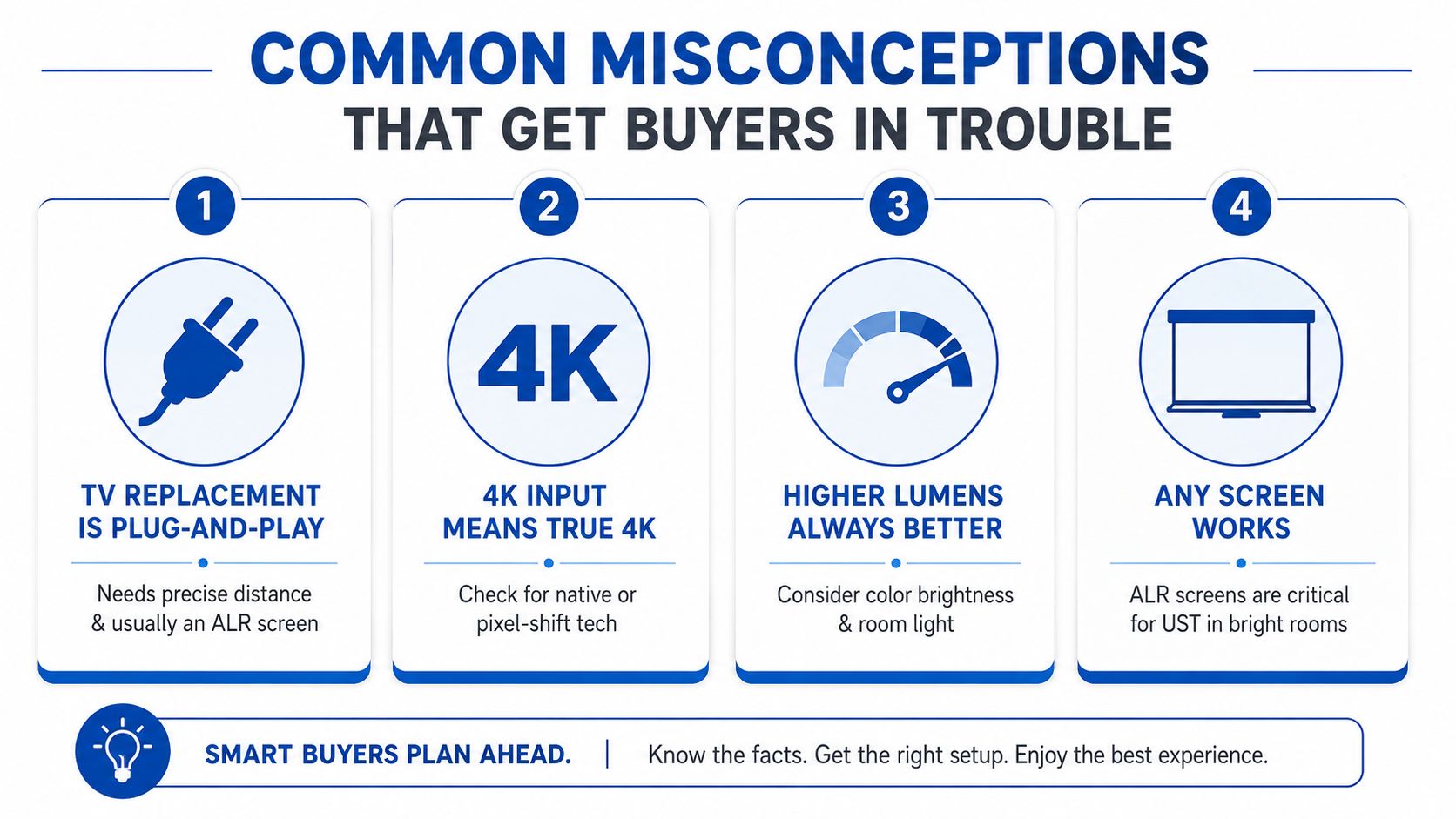
The biggest mistake is treating a UST like a TV that happens to project. It is a room-and-furniture problem first, then a projector choice. If the cabinet is wrong, the screen is wrong, or the room stays bright, the setup will disappoint no matter how good the spec sheet looks.
The traps I see most often
- TV replacement is not plug-and-play. You still need exact distance, the right vertical offset, and usually an ALR screen if the room has real ambient light. The furniture has to work with the projector, not just hold it.
- 4K input is not the same as true 4K behavior. Some models accept a 4K signal but still rely on pixel shifting, while true 4K projection means 3,840 × 2,160 and 8.3 million on-screen pixels.
- Throw ratios below 0.2 are not automatically better. A very short throw can make cabinet tolerances tighter, and that raises the risk of misalignment. Small errors become visible fast.
- Laser light is long-lasting, not infinite. A long-rated light source cuts maintenance, but it still has a finite life, so check the hour rating before you buy and plan for replacement eventually.
The other myth is that any wall works. In bright rooms, the screen matters as much as the projector. Some buyers blame the projector when the real problem is the wall finish, the furniture height, or no screen control at all. If your room is small and you want a realistic layout, how to set up a 100-inch cinema in a bedroom is the kind of planning guide that keeps you from guessing.
Your UST 4K Laser Projector Buying Checklist
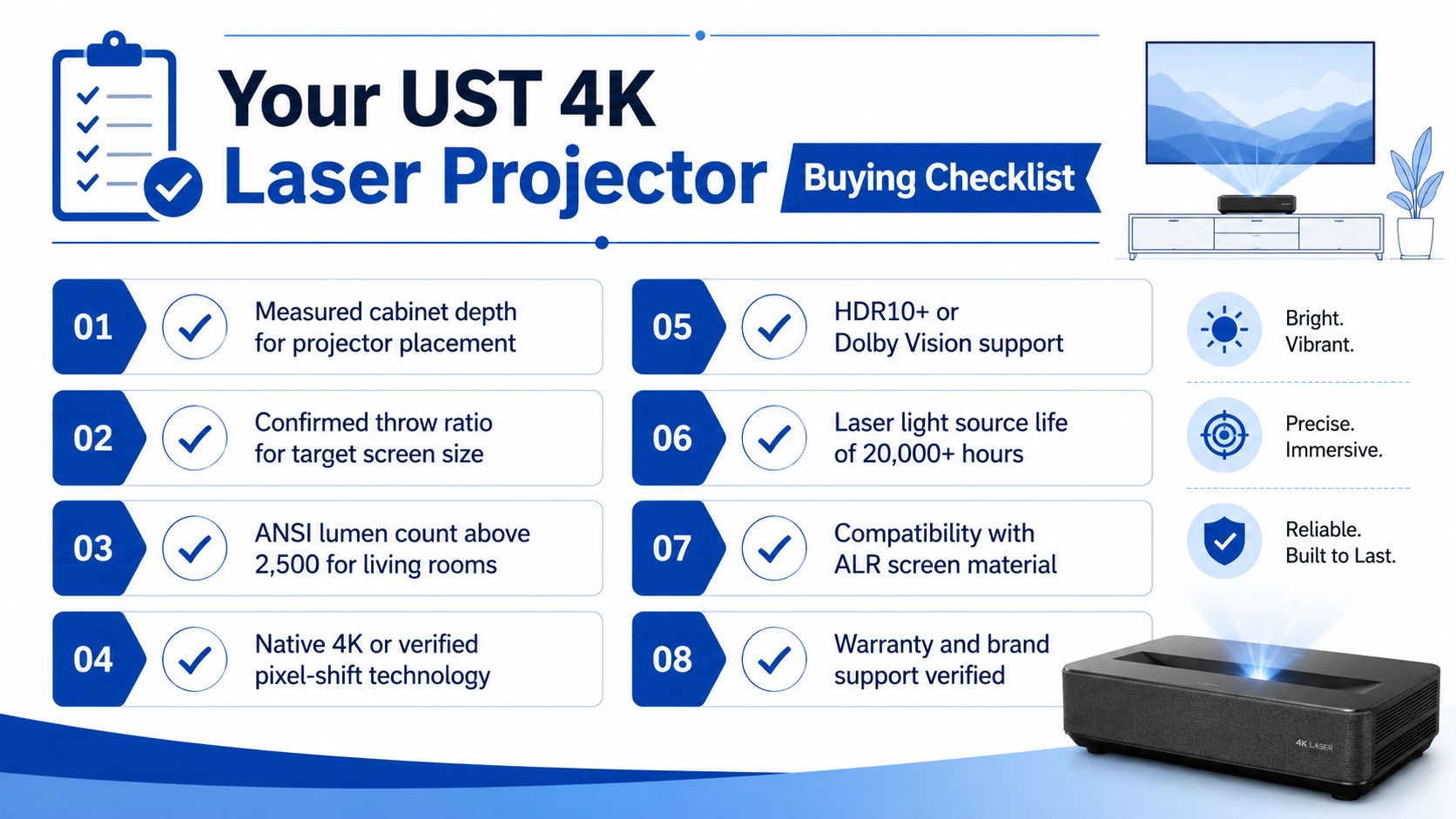
Before you buy, run through this list in order. It will save you from the classic mistake of shopping with your eyes instead of your tape measure.
My eight-point buying filter
- Measure cabinet depth and confirm the projector can sit where the wall allows.
- Confirm throw ratio for the exact screen size you want.
- Check brightness and look for 2,500 lumens or more for living-room use.
- Verify 4K claims and read whether the model is native 4K or pixel-shifted.
- Check input lag if you game at all.
- Confirm HDR support before you assume it'll handle your streaming apps well.
- Plan for an ALR screen if your room has windows or open sightlines.
- Budget for the screen if you don't already own one, because the projector alone doesn't complete the setup.
If you're comparing compact models that accept 4K input, that's a smart place to start, especially for a room that won't support a ceiling mount. I'd also read how to set up a 100-inch cinema in a bedroom if your room is small and you want a realistic setup path.
Questions Buyers Ask Right Before They Click Buy
Buyers usually ask the same three questions right before they commit. Will it work in a bright room, can it handle gaming, and how long will the light source hold up. Those are the right questions, because UST shopping goes wrong when people chase a spec sheet before they solve the room.
Will a UST projector replace my TV in a bright living room? Yes, if you match it with the right screen and enough brightness. A TV still wins in direct sunlight, but a bright UST paired with an ALR screen can work very well in a normal living room, especially when the cabinet depth and screen placement are planned properly.
Can I game on a 4K UST without lag? Yes, if you check the lag number before you buy. Some models are built more for film and streaming, while others are tuned for gaming and respond much faster. That difference is not minor. It changes whether the projector feels quick enough for action games or too sluggish for anything competitive.
How long will the laser last and what happens when it dies? Look at the hour rating and read it as a long-service estimate, not a free pass to ignore the rest of the design. Common ratings include 20,000 hours, 25,000+ hours, and 30,000 hours in the models referenced earlier (source). That tells you the light source is meant for years of use, but it does not excuse a weak picture, poor placement flexibility, or a screen mismatch.
If you are close to buying, stop browsing projector names and measure the furniture first. Check the cabinet, check the wall, check the screen plan, then compare the remaining options against that real layout. DigiDevice carries practical home-entertainment gear for buyers who want performance without the theater-installation headache, so visit DigiDevice and compare the projector category against your own room before you spend money.