

Magnetic Leather Phone Case: Charging, Materials and Fit
A stronger magnet doesn't automatically make a better magnetic leather phone case. If the magnet ring sits off-center, the leather creates too much separation, or hidden metal blocks the charging area, a case can snap on firmly and still charge poorly.
Direct answer: Choose a case made for your exact phone model, with clear MagSafe or Qi2 compatibility and a ring positioned to align with its charging coil. Then check charging, NFC and everyday fit with the case installed, not just the bare phone.
What a Magnetic Leather Case Actually Does
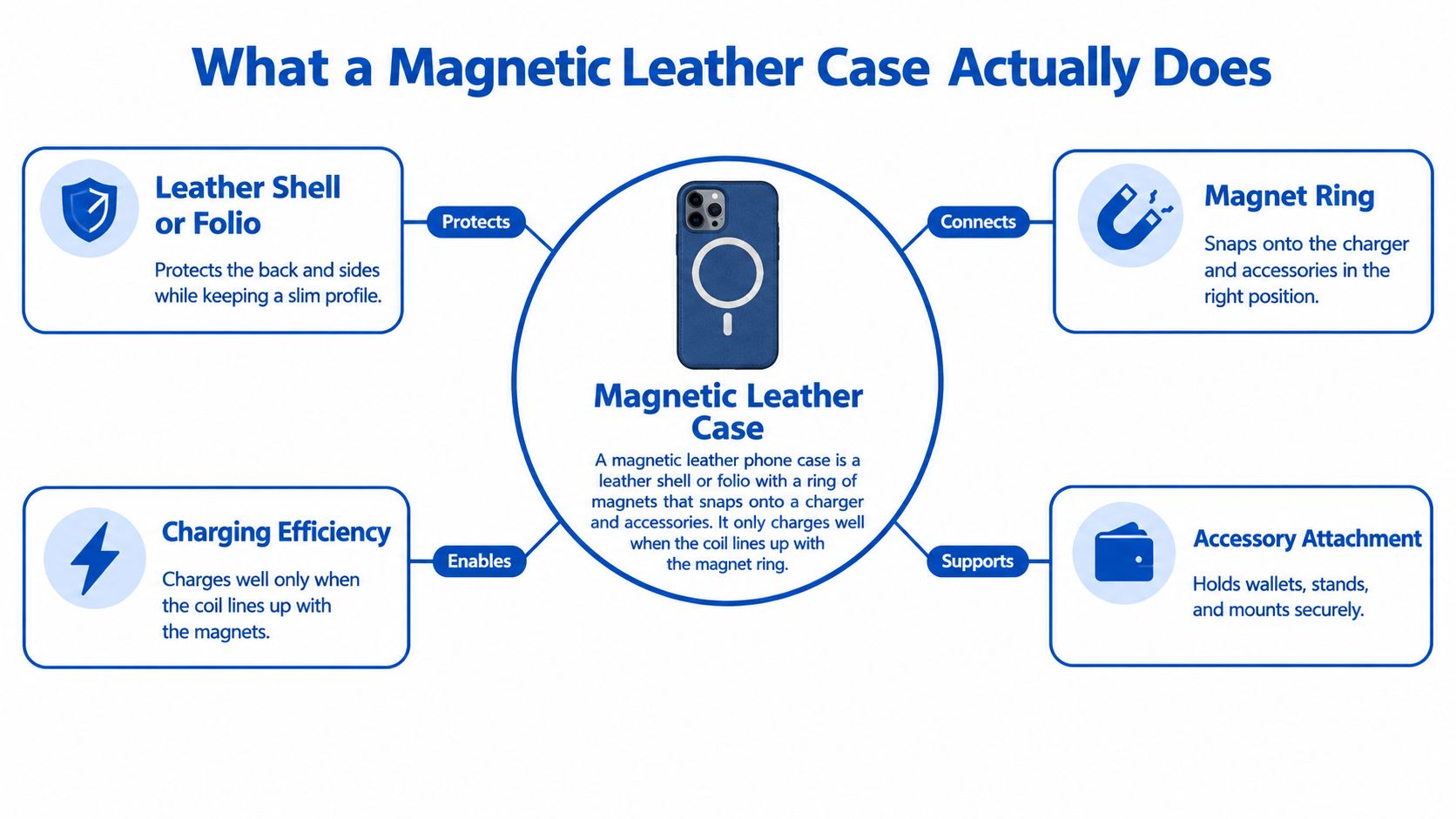
A magnetic leather phone case is a leather shell or folio with embedded magnets that attach it to compatible chargers and accessories. It charges reliably only when the magnet ring positions the charger over the phone's charging coil. Think of the ring as a key cut for one lock: a generic ring may look close, but still fail to engage the mechanism correctly.
Apple introduced MagSafe with the iPhone 12 on October 13, 2020. The system uses an array of magnets around the wireless-charging coil to align chargers and attach accessories such as wallets and mounts. Apple explains that, on supported iPhones, MagSafe chargers attach to the phone or a MagSafe case, and the magnets help maintain alignment for wireless charging (Apple's MagSafe charger guidance).
The leather provides a protective surface and a particular feel. The embedded magnets and the case's construction determine whether accessories attach and whether the charger can maintain a useful position. The phone's charging coil, magnet ring, leather layer and accessory all have to work together.
The phone also relies on components beyond the charging coil. Its magnetometer and NFC hardware have their own functions, so a case should preserve accessory recognition and avoid putting obstructive material where it can interfere. A case described only as “magnetic” doesn't prove that it supports full MagSafe functionality.
Practical rule: Check the exact phone model and the case's stated charging profile. Don't treat a firm snap as evidence of correct charging alignment.
Updated for March 2026.
For a broader explanation of case fit and magnetic attachment, see DigiDevice's guide to phone cases with MagSafe. If you're comparing materials and styles, browse the magnetic leather case range.
Leather Grades, Thickness and Daily Care
Leather labels tell you something about the surface, but not necessarily how a case will charge or wear. Full-grain keeps the hide's outer grain intact and develops a patina with use. Top-grain is sanded and finished for a more uniform appearance. Genuine or split leather comes from lower layers of the hide, while PU or bonded leather uses a coated surface over a fabric or reconstituted base.
The table uses relative thickness descriptions rather than a universal measurement. Case construction varies, so confirm the seller's specification and look for the thickness over the coil area, not just the overall case depth.
| Leather type | Charging impact | Care approach |
|---|---|---|
| Full-grain | Thickest option; widest potential air gap | Condition twice a year |
| Top-grain | Moderate gap; check the coil area | Wipe and condition lightly |
| Genuine (split) | Can be thin but uneven if poorly cut | Keep dry and wipe often |
| PU or bonded | Often thin and consistent | Use mild soap, never solvent |
Every extra layer between the phone and charger adds separation. A leather panel can be perfectly attractive and still make charging less dependable if the ring is weak or misplaced. Decorative plates, closure magnets and RFID foil also deserve attention: hidden metal can interfere with wireless charging, and foil or cards can affect NFC if they sit over the relevant area.
Mordor Intelligence projected the genuine and PU leather mobile-protective-case segments to grow at a 6.68% compound annual growth rate through 2030, based on its 2024 market assessment (Mordor Intelligence's mobile protective cases market report). More choice across price points makes it especially important to judge the case's construction, not just the word “leather” on its listing.
Keep the surface clean without over-conditioning it
Wipe the case with a barely damp microfibre cloth. For full-grain leather, use a neutral conditioner sparingly, and avoid soaking the case or leaving it on a hot dashboard. Check the corner stitching regularly for loose threads.
Clean PU with mild soap and a damp cloth, then dry it. Solvents can damage its coated surface. For shoppers weighing natural grain against a more uniform finish, compare the full-grain leather case options.
Charging Standards for Magnetic Cases Compared
A stronger magnet does not guarantee better charging. Ring alignment, leather thickness and hidden metal all affect whether the phone and charger connect reliably. Check the phone's supported standard and the case's certification rather than relying on a “magnetic” label.
| Standard | Alignment method | What to verify on the listing |
|---|---|---|
| MagSafe | Apple magnet array | Model-specific MagSafe compatibility |
| Qi2 | WPC Magnetic Power Profile | Qi2 certification mark |
| Standard Qi | Charging coil, without magnetic alignment | Coil position through the case |
| Generic magnetic ring | Varies by product | Certification evidence |
Maximum charging power depends on the standard supported by the phone and the charger. The WPC's explanation of magnetic chargers describes Qi2 certification requirements, including ring geometry, magnet layout, holding force and electrical performance. Certification gives you more to rely on than a generic magnetic claim: a ring may attach to a charger without aligning the coils.
Leather adds distance between the charging surfaces. A thick panel or misplaced ring can make charging unstable, while metal plates or foil in the charging path may prevent charging or trigger foreign-object detection. Choose a case with a ring positioned for your phone and a suitable charging surface. The goal is reliable alignment, not the strongest magnet.
Before buying, check three things:
- Phone capability: Confirm the wireless-charging standard your phone supports.
- Case profile: Look for explicit MagSafe compatibility or Qi2 certification.
- Charger output: Match the charger and adapter to the phone's supported standard.
Test charging with the case fitted. If charging starts and stops or fails to begin, check the ring alignment and whether the case adds too much separation. DigiDevice's wireless-charging guide covers the basics. Compare its MagSafe-compatible chargers with the compatibility listed for your case.
Protection Versus Style Tradeoffs
Leather thickness isn't a substitute for impact protection. A raised lip helps keep the display from contacting a flat surface, while corner bumpers and a supportive inner shell help manage impacts. A soft leather back without a raised edge may look refined but offers little protection to a screen that lands face-down.
| Design | Drop protection | Grip and feel | Wear pattern | Bulk |
|---|---|---|---|---|
| Folio wallet | Medium; flap covers screen only when closed | Strong hand grip | Flap creases; card slots stretch | High |
| Slim leather back with raised lip | Good at screen edge if lip is high | Smooth; can slide on desks | Corners and edges scuff first | Low |
| Leather over TPU shell | High; shell absorbs impact | Grippy at edges | Leather can separate at seams | Medium |
| Flush leather wrap, no lip | Low | Smooth; slides easily | Scuffs quickly | Lowest |
A folio adds a cover over the display and storage for cards, but it's bulkier and its flap can crease. A slim back case is easier to pocket, though smooth leather may slide on a desk or car mount. Magnets add another layer of material and weight, so assess the whole setup rather than judging the case by its back panel alone.
A screen-covering flap protects the display only while it's closed. If you carry the phone open in your hand, the folio doesn't replace a raised screen edge.
For a commuter who carries cards and wants the display covered, I'd choose a folio with a raised lip. For a desk-and-pocket setup, a slim leather back with a raised edge is the better balance. If the phone regularly faces drops at a job site, I'd favor leather over a TPU shell for the impact-absorbing structure, not for the leather itself.
See DigiDevice's guide to protective phone cases when comparing shell construction, and browse its slim and folio magnetic leather cases for different carry styles.
How to Choose the Right Model for Your Phone
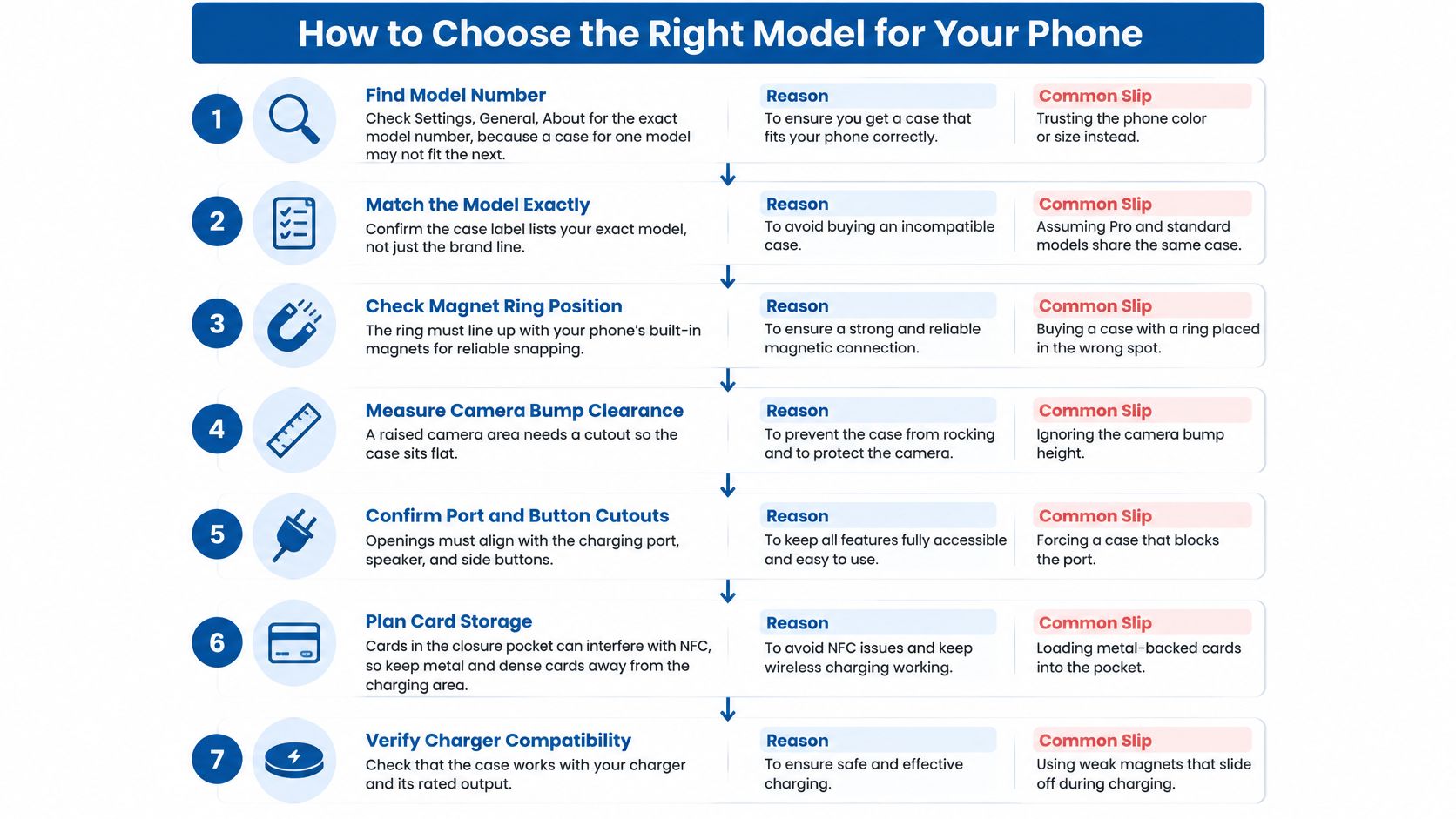
- Find the exact model number. On an iPhone, check Settings, General, About; the same brand name doesn't guarantee identical dimensions. Don't choose by phone color or screen size alone.
- Confirm wireless-charging support. Check whether the phone supports MagSafe or Qi2, or relies on standard Qi. A case listing for the wrong charging setup can leave you with an accessory that attaches poorly or charges below your expectations.
- Choose a model-specific certified ring. Look for a MagSafe-compatible or Qi2-certified case identified for your exact phone. Avoid listings that say only “magnetic”; compare the MagSafe-compatible case selection.
- Inspect camera and button clearance. Compare the listing photos with your phone's camera bump, lens cut-outs and side controls. A tight camera opening or covered button can make an otherwise attractive case impractical.
- Match leather to your use. A thinner, even layer over the charging coil is the safer choice if wireless charging matters most. Choose thicker full-grain leather when material character and wear are higher priorities than the slimmest profile.
- Match the charger and adapter to the case. Check the stated wattage and make sure the phone, charger and adapter support the same profile. The weakest part of the setup sets the practical ceiling.
- Test the case when it arrives. Check whether charging starts reliably, whether the phone becomes unusually warm, and whether a magnetic battery pack stays attached while you walk. Then test contactless payment and compass behavior with the case installed.
Use DigiDevice's iPhone case guide if you're narrowing the choice by model. The product listing should name the phone, magnetic standard and charging limit clearly.
For a visual walkthrough, watch this phone-case selection video.
NFC, Cards and Other Edge Cases
A stronger magnet does not guarantee better performance. Ring alignment, leather thickness, and hidden metal all affect how a case interacts with charging and NFC. A metal plate over the charging area, dense RFID foil, cards in a closure pocket, or a magnetic accessory can each cause different issues.
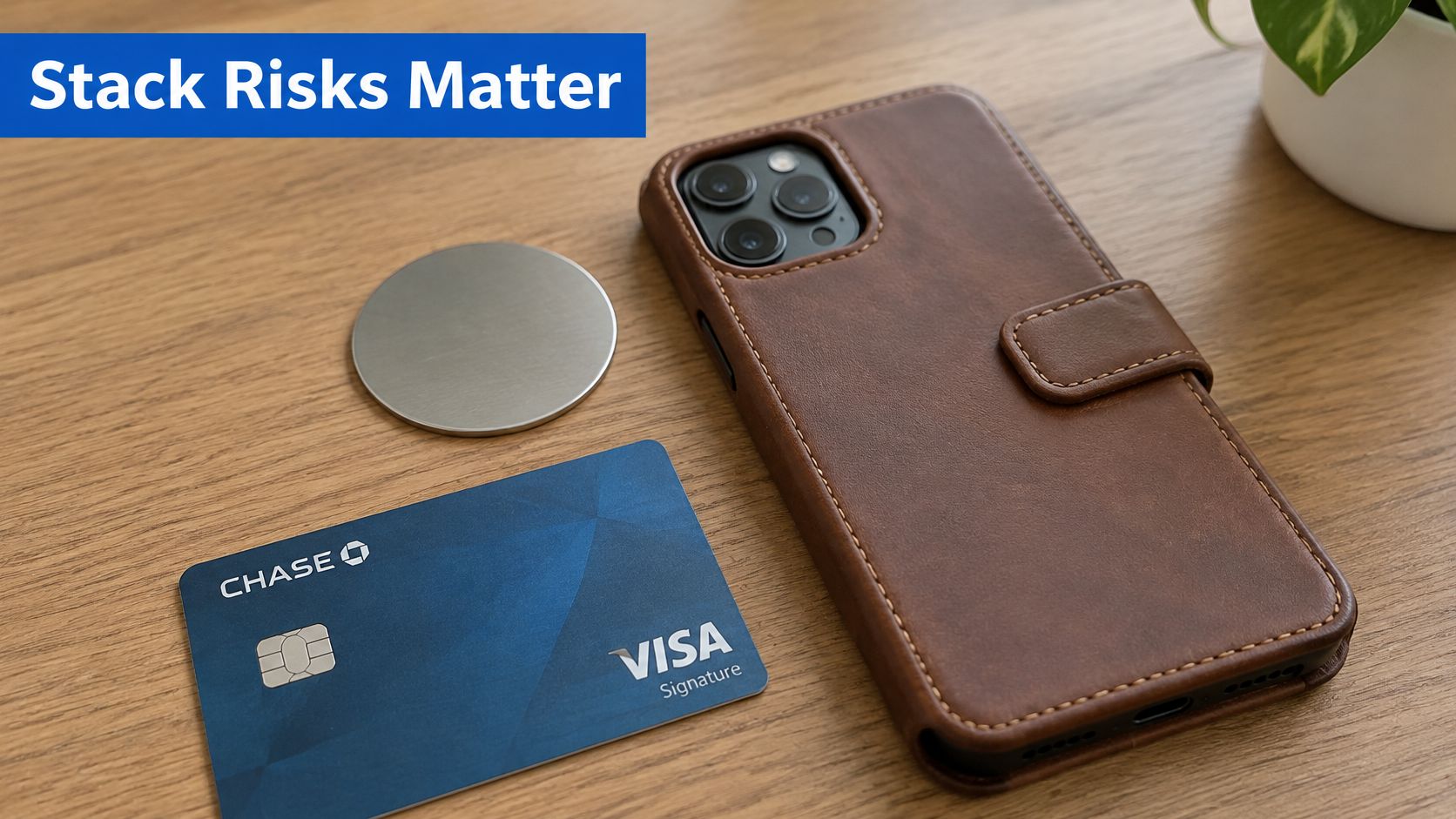
After fitting the case, try Apple Pay or Google Wallet where you normally pay. If you use transit passes, test one at a station reader as well. NFC depends on where obstructive material sits relative to the phone's hardware, so one successful payment does not confirm that every reader will work.
Magnetic cases and mounts can affect compass readings. If navigation drifts, recalibrate the compass and compare its heading with the case removed. Take off magnetic styluses and mounts when they are not needed, instead of stacking extra accessories on the phone.
Keep magnetic accessories away from implanted medical devices, and follow the device manufacturer's and clinician's guidance. A phone case cannot amplify cellular signal. If dropped calls persist, a separate signal booster is a connectivity product to consider; check its FCC approval and carrier registration requirements. DigiDevice's magnetic case page describes a case, not a signal booster.
- Check charging: Confirm the phone charges consistently with the case installed.
- Test NFC: Try a contactless payment and, if relevant, a transit reader.
- Inspect the pocket: Remove cards or foil if payment or charging becomes unreliable.
- Check navigation: Recalibrate and compare compass readings with and without the case or mount.
- Separate signal issues: Consider a separate signal booster if calls keep dropping; a magnetic case will not improve reception.
Buying Decision and Common Questions
| Price tier | Typical construction | What you usually get | Main trade-off |
|---|---|---|---|
| Under $25 | PU or bonded leather | Basic magnet ring, variable alignment | Certification often unclear |
| $25–$50 | Top-grain or genuine leather | Qi2 or MagSafe ring in many listings | Warranty short or unstated |
| $50–$80 | Model-specific leather construction | Clearer fit and certification details | Check that certification applies to the exact model |
| Above $80 | Full-grain leather | Higher-end materials, tested alignment and a longer warranty | Price doesn't replace compatibility checks |
Treat these as shopping tiers, not a guarantee of what any individual listing contains. Before paying, check the warranty length, return window and whether the magnet ring is integrated into the case rather than glued on. Prefer brands that publish model-specific fit and certification details, and be wary of claims that one case fits every phone.
Research Intelo valued the global magnetic wallet phone-case market at $2.1 billion in 2024 and projected it to reach $5.8 billion by 2033, representing an 11.7% CAGR (Research Intelo's magnetic wallet phone-case market report). A growing range of wallet designs makes it especially important to inspect whether cards sit between the phone and charger or near the NFC area.
Common questions
Will leather scratch my phone? Grit trapped between the case and phone can scratch the finish. Keep the inside clean and check the raised lip for trapped dust when you remove the case.
Can I use a magnetic leather case with a car mount? Yes, if the mount is compatible and the case's ring aligns with it. Test the hold while parked before relying on it during a drive.
Can magnets erase cards? Keep transit cards and other contactless cards away from the magnet ring rather than storing them against it. If you want a complete travel setup, compare DigiDevice's magnetic battery packs and chargers.
My recommendation is firm: buy only a model-specific case with clearly stated MagSafe compatibility or Qi2 certification, then test charging and NFC before relying on it. Check Price: shop DigiDevice's magnetic leather covers.
DigiDevice carries mobile accessories including magnetic leather covers, cases and chargers for shoppers building a phone-protection setup. Visit DigiDevice to compare available options and choose a case that matches your phone.