

Best Phone Cases for iPhone: A 2026 Buyer's Guide
The best phone cases for iPhone aren't the most expensive or the thickest. The right choice depends on how you use your phone: choose dual-layer protection for hard impacts, MagSafe when you rely on magnetic accessories, a slim material when pocket comfort matters, and precise camera clearance if you shoot regularly. Updated for March 2026, this guide matches each case type to a real user instead of pretending one case fits everyone.
You've just unboxed a new iPhone. It's still perfectly clean, the camera plateau is untouched, and you're staring at hundreds of listings that look almost identical. Some are feather-thin, some are built like armor, and most use vague phrases such as “military-grade” without telling you what was tested.
The practical answer starts with your main risk. A construction worker, a desk-based commuter, a MagSafe user, and a mobile photographer need different protection. The sections below compare protection levels, materials, charging compatibility, drop-test language, fit, and daily maintenance so you can buy one case that suits your routine instead of cycling through several disappointing options.
Why Picking the Right iPhone Case Matters in 2026
The iPhone case market is large enough to support a global category measured in the tens of billions of dollars. One recent industry snapshot estimated the global iPhone case market at $14.2 billion in 2025, with a 5.3% CAGR since 2020, while another analysis estimated Apple phone cases at $12.8 billion globally in 2025. That analysis also reported MagSafe-compatible designs at 68% of premium sales, shockproof cases at 32.1% share, and wallet cases growing 24.1% year over year. These figures come from the iPhone case market snapshot, and they explain why shoppers face so many overlapping designs.
The choice is harder because cases now do more than cover scratches. They need to coexist with magnetic wallets, battery packs, car mounts, charging stands, camera accessories, and increasingly large camera plateaus. A case that protects the back beautifully can still be a poor buy if its buttons feel stiff, its camera opening catches dust, or its magnetic ring doesn't line up with your mount.
Start with the way you carry your phone
A tradesperson needs grip, sealed ports, corner reinforcement, and a shell that can absorb repeated impacts. A desk worker may care more about low bulk, comfortable edges, and easy wireless charging. A content creator or photographer needs stable handling and an unobstructed camera system, while a minimalist may accept modest protection to preserve the iPhone's original shape.
The useful questions are simple:
- What is your main danger? Drops, scratches, water, pocket pressure, or accessory incompatibility?
- What do you use every day? A magnetic mount, wireless charger, wallet, grip, tripod, or lens attachment?
- What are you willing to carry? More protection always takes up some combination of space, weight, or visual bulk.
- Which iPhone model do you own? A case for one generation may not align with another model's buttons, camera control, ports, or camera plateau.
Practical rule: Buy for the accident you actually have, not the feature list you might use someday.
My position is straightforward. If you've cracked a phone before, skip decorative ultra-thin shells. If you never use magnetic accessories, don't automatically pay for a magnetic ring. If you shoot with your iPhone, camera clearance and button feel matter more than a dramatic drop claim. By the end, you'll know which case archetype fits your model and daily routine, so you can buy once rather than iterate through three cases that each solve the wrong problem.
The Four Levels of iPhone Protection Explained
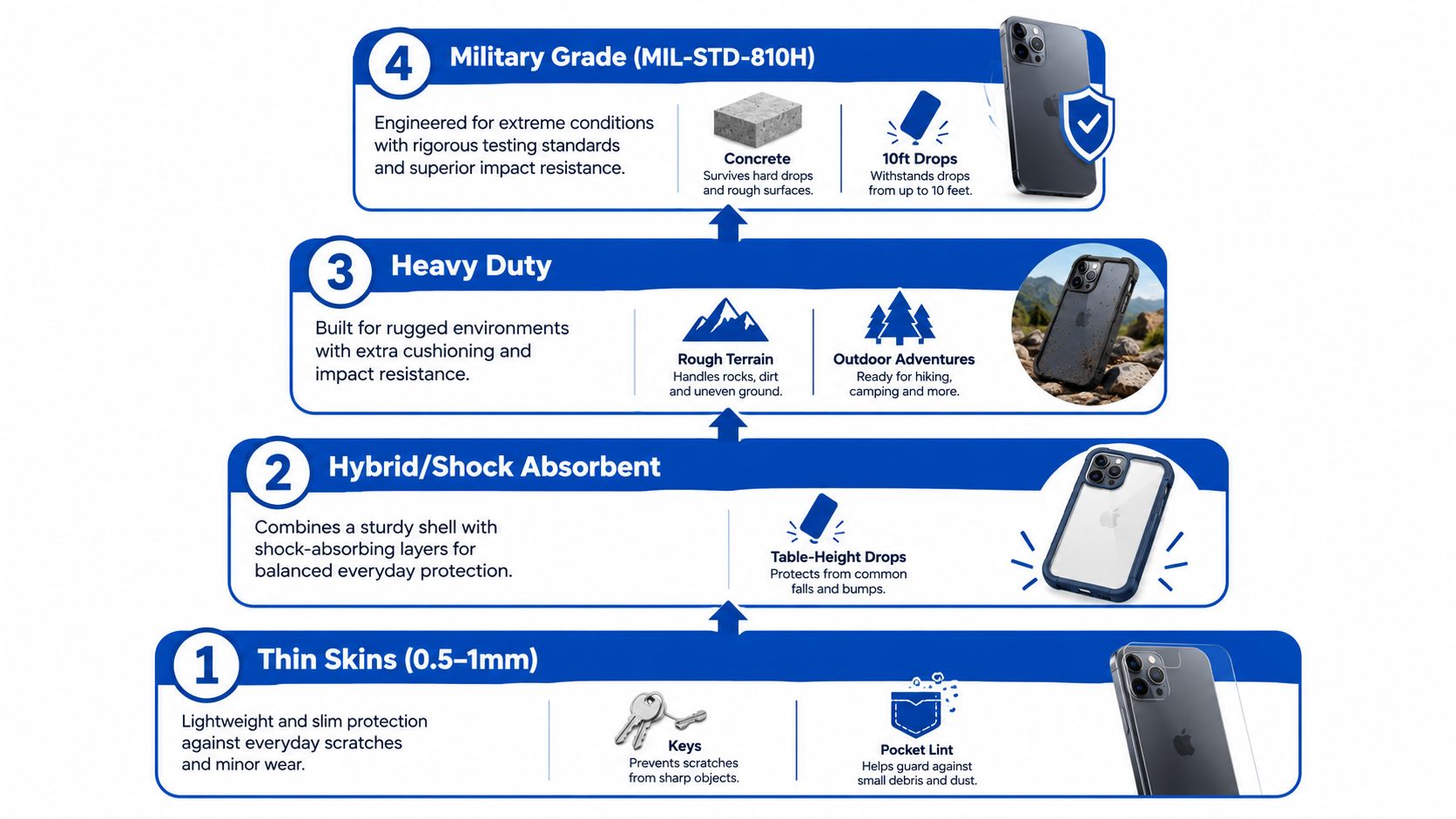
Protection levels are more useful than marketing names. A slim case can be excellent for scratch prevention and still be a poor choice for a fall onto concrete. Place yourself in the tier that matches your normal environment, then compare materials inside that tier.
Level 1 is for minimal coverage
Thin skins and very slim shells protect against keys, pocket grit, light scuffs, and day-to-day handling. They add little bulk and preserve the iPhone's shape, but they offer limited corner cushioning and little defense against a hard drop. The camera area may receive a raised rim, while the screen usually gets only modest face-down clearance.
Choose this tier if your phone stays on a desk, you handle it carefully, and scratches bother you more than impact damage. Skip it if you regularly work outdoors or have already broken a screen.
Level 2 handles ordinary daily accidents
Everyday TPU and silicone cases add a flexible bumper around the frame. They're suited to slips from a table, a pocket, or a short standing height onto forgiving surfaces, and they usually provide useful screen and camera lips without feeling cumbersome.
This is the sensible middle ground for careful commuters, office workers, and people who want grip without a rugged shell. It won't provide the same impact management as a properly layered design, especially at exposed corners.
Level 3 is the default for frequent droppers
Rugged cases usually combine a rigid outer shell with a softer inner layer, raised edges, reinforced corners, and sometimes port covers. They're built for harder falls, rougher surfaces, and repeated handling around stairs, vehicles, workshops, or children.
The trade-off is obvious. You'll feel more material in a pocket, and the case may make the iPhone look less refined. For anyone who has cracked a screen in the past two years, this is the minimum level I'd seriously consider.
For a more protective option, compare the military-grade anti-fall iPhone case against the fit and accessory needs of your specific model.
Level 4 is for hostile environments
Pro and ultra-rugged cases add multiple layers, air pockets, foam, sealed openings, or integrated stands and clips. They make sense on job sites, during outdoor work, or anywhere a phone faces repeated impact rather than an occasional accident.
They aren't automatically better for everyone. Extra bulk can make one-handed use awkward, interfere with some mounts, and reduce the appeal of a premium iPhone. If your phone spends most of its time beside a laptop, this tier is probably overkill.
Most buyers either overestimate their needs because “military-grade” sounds impressive or underestimate them because a slim case looks cleaner. Match the case to the surfaces and situations around you. That decision prevents wasted spending better than any ranked list.
Materials Compared and What They Actually Do
Case material changes how the phone feels before it changes how it survives. Silicone feels soft and grippy, TPU bends around the frame, polycarbonate gives the case structure, leather prioritizes texture, and aramid fiber keeps the profile low. None is universally superior.
The strongest general-purpose design is a hybrid construction, usually a rigid polycarbonate outer shell over a softer TPU inner core. The hard layer spreads the initial force while the flexible layer absorbs vibration, as described in this technical guide to TPU and polycarbonate phone-case construction.
Independent test summaries reported about 89% survival for dual-layer designs, compared with 58% for silicone, 72% for TPU-only, and 64% for polycarbonate-only designs across repeated drops from 1.2 meters. The results are detailed in this dual-layer iPhone case testing paper. The exact result for a case in your hand will vary, but the direction is useful: layering generally gives impact a better path to disperse.
| Material | Strengths | Weaknesses | Best fit | Typical price |
|---|---|---|---|---|
| Silicone | Soft touch, comfortable grip, easy to hold | Attracts lint, can stretch, may feel loose over time | Style-focused users and indoor daily use | Lower to mid-range |
| TPU | Flexible, impact-friendly, affordable, easy to install | Can yellow with UV exposure, may soften with heat | Everyday users and hybrid bumpers | Lower to mid-range |
| Polycarbonate | Rigid structure, clean finish, good scratch resistance | Can scratch or crack at hard corners | Clear cases, flat-back designs, structured shells | Lower to premium |
| Leather | Premium hand feel, develops character, understated appearance | Poorer water resistance and limited impact absorption | Pro-model owners prioritizing style | Premium |
| Aramid fiber or Kevlar hybrid | Very thin, strong, distinctive texture | Expensive, fewer color choices, limited cushioning | Minimalists who still drop phones | Premium |
My material recommendations
Choose silicone when grip and comfort matter more than maximum impact protection. It feels excellent in dry hands, but lint and pocket debris quickly become part of the ownership experience.
Choose TPU for a flexible everyday case or as the inner layer of a rugged hybrid. TPU is the material I'd trust more than a hard single-piece shell for ordinary drops because it can flex instead of transferring every shock directly to the frame.
Choose polycarbonate when you want a clear back, crisp edges, or a more structured case. It works especially well in a hybrid design, but I wouldn't rely on a rigid single-material case for harsh impacts.
Leather is a style purchase. It can develop a pleasing patina and make a Pro iPhone feel less like a piece of equipment, but it isn't the material I'd select for wet outdoor work or repeated drops.
Aramid fiber is the specialist option. It suits someone who hates bulk but knows they need more than a skin. It won't offer the same corner cushioning as a thick hybrid, so don't confuse thin strength with complete impact protection. For an alternative material and a more distinctive finish, inspect this biodegradable iPhone case with a matte surface.
MagSafe and Wireless Charging Trade-Offs
MagSafe is worth paying for when you use the ecosystem, not because the logo appears on the box. Start with your routine. Do you attach a car mount each day? Do you use a magnetic wallet, battery pack, desk stand, or grip? If yes, the magnetic ring can turn several separate accessories into a much smoother setup.
If you only place the phone on a charging pad at night, a non-MagSafe case may be the smarter purchase. You can avoid extra thickness, weight, and cost while keeping ordinary wireless charging available, provided the case isn't excessively thick or made with a charging-blocking material.
The MagSafe phone-case guide is useful when you're comparing ring placement and accessory compatibility rather than just looking for a magnetic label.
| Factor | MagSafe case | Standard wireless case |
|---|---|---|
| Magnetic mounts | Snaps directly to compatible mounts | Requires a separate mount, adhesive ring, or different holder |
| Wallets and grips | Designed for magnetic accessories | Usually needs a physical attachment |
| Desk charging | Easier alignment and repositioning | Works if the charger and case align properly |
| Thickness | May add a ring and additional structure | Often simpler and thinner |
| Accessory flexibility | Better for an ecosystem setup | Better for a minimalist setup |
| Main risk | Poor ring alignment or a thick back can weaken charging | Less convenient for magnetic accessories |
Metal-backed cases can interfere with wireless charging, so avoid them unless the manufacturer clearly explains how the charging path remains open. Leather can work well when the construction stays slim, while polycarbonate is usually the most predictable material for consistent charging.
A strong magnet doesn't rescue a badly designed case. The ring must sit accurately over the phone's charging area, the back must remain flat enough for the charger, and the case shouldn't lift the device away from the pad. For a daily car mount or magnetic battery pack, choose MagSafe. For a phone that charges once overnight and otherwise stays alone, standard wireless compatibility is enough.
How to Read Drop-Test Ratings Without Getting Fooled
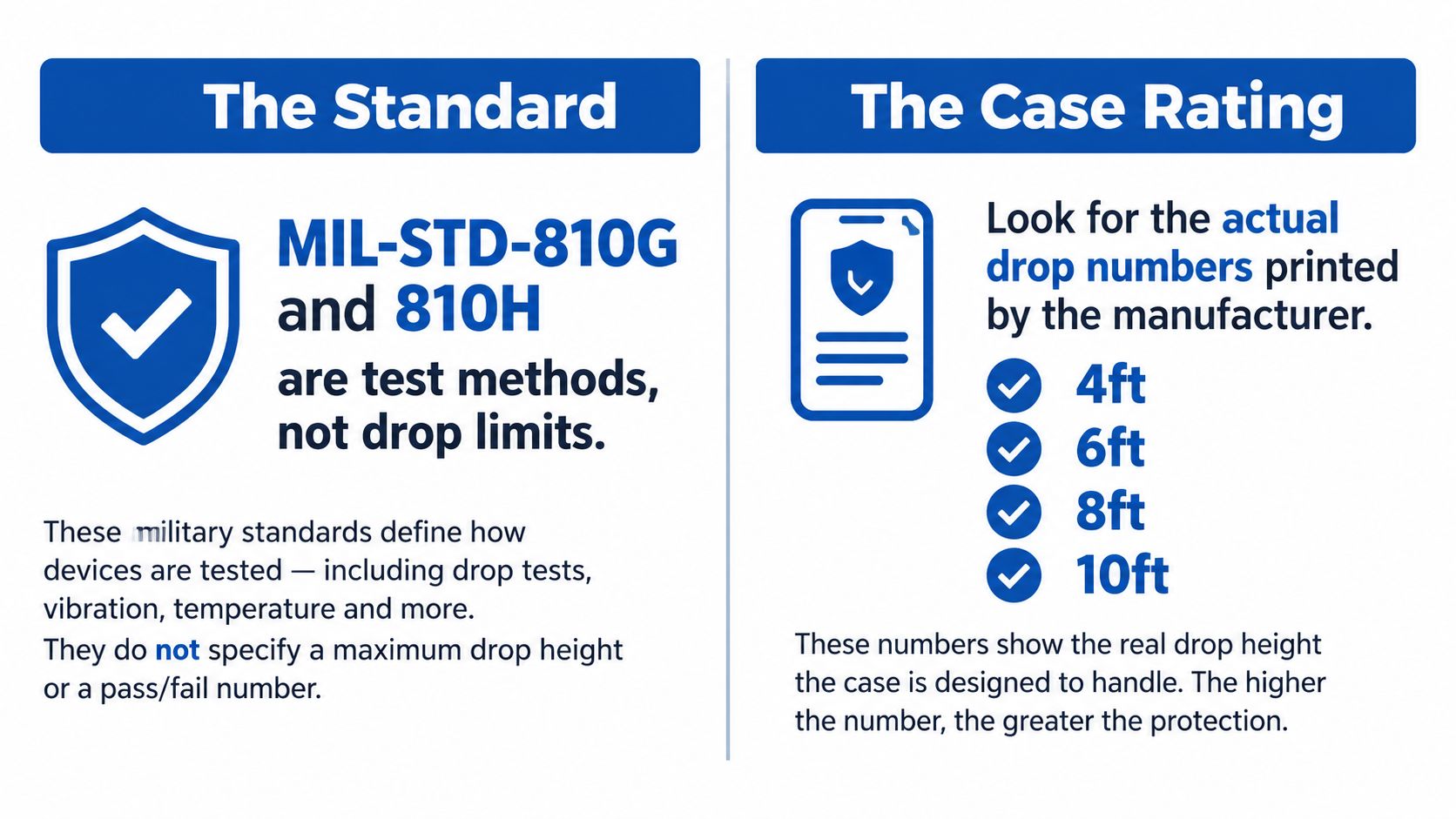
“MIL-STD-810G” and “MIL-STD-810H” are test standards, not complete drop ratings. The useful detail is the method, height, surface, orientation, number of impacts, and whether a third party performed the test.
The older MIL-STD-810G Method 516.6 transit drop procedure is widely described as requiring 26 drops from 4 feet, or 1.2 meters, across faces, corners, and edges. Some testing descriptions use multiple samples to complete the sequence. The later MIL-STD-810H revision raised the drop height to as much as 60 inches and changed the test surface to concrete-backed steel in 2019. The history and limitations are explained in this military-style phone-case testing overview.
Read the claim in this order
- Find the actual height. Look for a stated drop height rather than only “military-grade.”
- Check the surface. Concrete, steel-backed surfaces, plywood, and laboratory flooring don't produce identical impacts.
- Look for repeated drops. A single successful fall tells you very little. Consumer testing guidance notes that durability programs may extend to 50 or even 100 drops, as described in this phone-case protection guide.
- Identify the testing party. A controlled third-party test is more informative than a self-declared badge.
- Inspect the geometry. Corner reinforcement, a raised camera lip, a raised screen rim, and full edge coverage matter as much as the label.
Read the number beside the standard, not the standard by itself.
A certification label alone doesn't guarantee meaningful protection. Controlled height, impact surface, angle, repetition, and the phone's working condition all matter. This explanation of MIL-STD-810G claims makes the key distinction: the standard is real, but “military-grade” isn't proof that every case bearing the phrase received the same testing.
A case maker that publishes the procedure gives you something useful to compare. A case maker that only prints a shield icon gives you a slogan.
Best Case Archetypes by User Persona
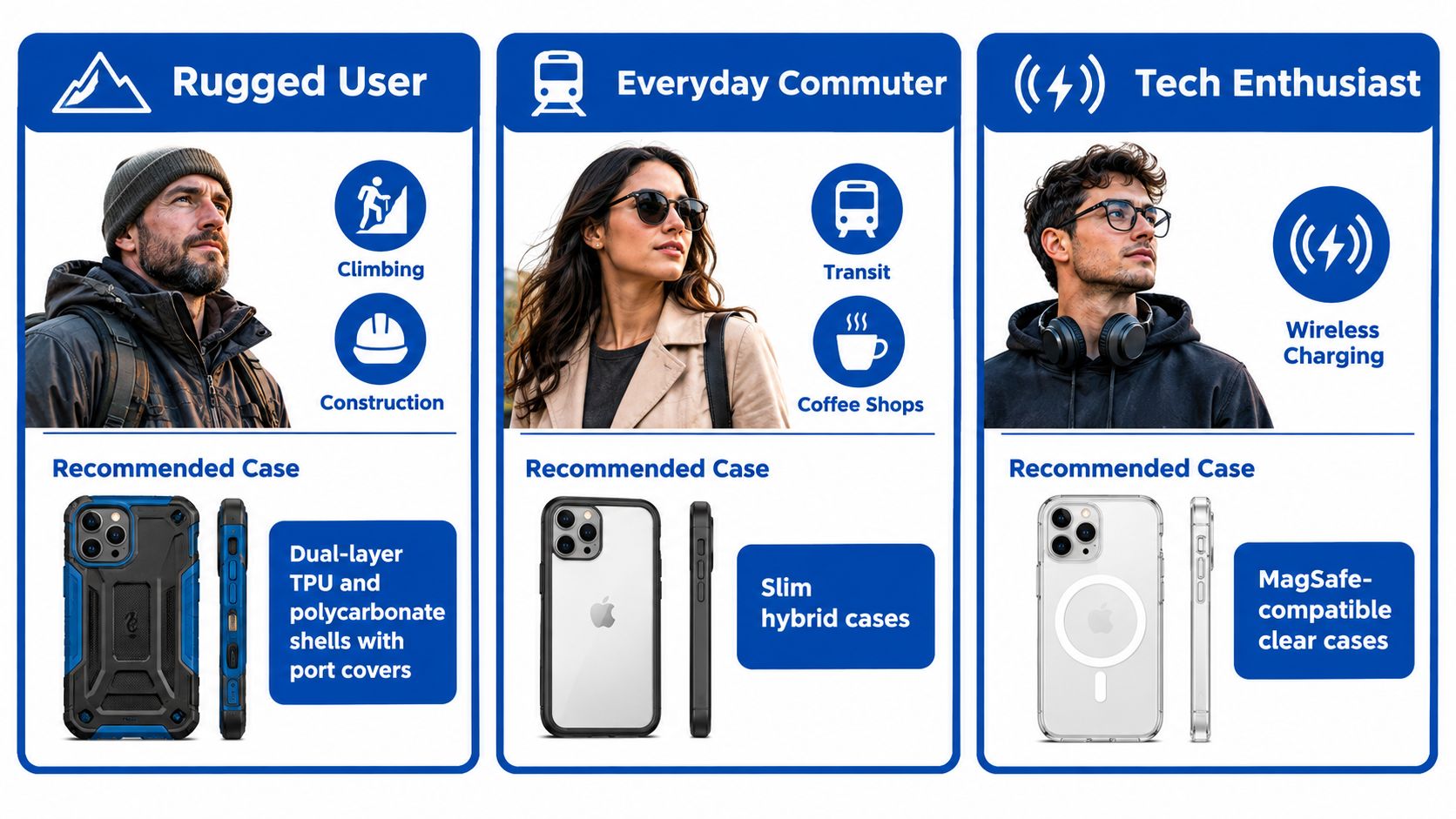
Stop shopping by brand first. Start with the person carrying the phone, then choose the construction that solves that person's main problem.
The rugged user
You climb, cycle, work around tools, or spend time on construction sites. Choose a dual-layer TPU and polycarbonate shell with reinforced corners, grippy side rails, and port covers if dust or debris is part of your day. A published MIL-STD-810H procedure is useful, but only when the maker also states the height and testing conditions.
The cost is bulk. You'll gain protection and grip while losing some pocket comfort and visual simplicity. Don't compromise here for a thin case that you'll replace after the first serious fall.
The style-conscious owner
You want the iPhone's silhouette and color to remain visible. Choose leather, premium silicone, or a slim colored shell with a raised camera rim. This is the right fit for someone who keeps the phone in a bag or on a desk and values hand feel as much as impact protection.
The trade-off is a lower protection ceiling. Style cases can handle ordinary scuffs and small accidents, but they shouldn't be sold as substitutes for a rugged bumper.
The wireless-charger-first user
Your phone moves between a desk charger, car mount, magnetic battery, and wallet. Choose a flat-back polycarbonate or thin aramid case with a well-aligned, flush magnetic ring. The case must hold securely without lifting the phone away from the charger.
The compromise is impact absorption. Thin, flat designs leave less room for cushioning, so use a grippy finish and avoid treating accessory compatibility as a replacement for corner protection.
The photographer
You care about the camera more than the logo on the case. Look for a precise raised lip around the lenses, responsive buttons that won't trigger accidentally during a long shoot, and openings that don't interfere with lens attachments, tripods, or gimbals.
Camera clearance is the deciding feature. A bulky case can be protective but unusable with your rig, while a soft case with a loose opening can collect grit around the lenses. Verify the exact iPhone model before buying, especially when the camera layout or control button changes between generations.
| Persona | Recommended archetype | Non-negotiable feature | Accept the compromise |
|---|---|---|---|
| Rugged user | Dual-layer protective shell | Grip, reinforced corners, port coverage | More bulk |
| Style-conscious owner | Leather, silicone, or slim finish | Comfortable texture and clean fit | Less impact protection |
| Wireless-charger-first user | Flat MagSafe-compatible case | Accurate ring alignment | Less cushioning |
| Photographer | Camera-focused hybrid or slim shell | Clear lens perimeter and tactile buttons | Fewer compatible accessories |
The right case should disappear from your routine, not force you to adapt your routine around it.
Fit, Camera Clearance, and Daily Care
A case can have excellent materials and still be a bad fit. Before checkout, confirm that the model name matches your exact iPhone, then inspect the areas that determine daily comfort.
Check the physical fit
Press every covered button. It should click without excessive force, and the cover shouldn't flex sideways when you use volume controls. Examine the charging port and speaker cutouts for clean alignment. A narrow opening can make cable insertion awkward and may collect pocket debris.
The screen and camera lips should sit above the glass when the phone rests face-down. Around the camera plateau, look for a stable rim that doesn't flex into the lenses. A loose opening can trap dust and create glare around the flash, while an overly thick rim may interfere with lens accessories.
Wireless charging deserves a hands-on test if possible. Place the cased phone on the charger, check that it aligns naturally, and confirm that a magnetic mount holds the phone without slipping. If you use a screen protector, check that the case edge doesn't push against it and create lifting at the corners. Pair the case with a phone screen protector glass option rather than assuming every protector has the same edge shape.
Keep the case in working condition
Wipe the case regularly with a suitable cleaning solution and remove grit from the camera rim and magnetic ring. Keep TPU away from prolonged heat, which can affect its shape and feel. Replace the case when corners turn visibly yellow, the bumper loosens, the raised lip compresses, or the phone begins moving inside the shell.
Save this four-point checkout list:
- Buttons: Confirm a tactile click and comfortable cover stiffness.
- Ports: Verify accurate charging and speaker cutouts.
- Clearance: Check raised protection around the screen and camera.
- Charging: Test wireless charging and magnetic alignment with your accessories.
Choosing Your Case and Where to Buy
Choose your case by matching protection to the way you use your iPhone. Start with your primary risk, select the feature you will use most, then decide how much bulk and cost fits your routine.
For frequent drops, a dual-layer rugged case is the clear choice. Its rigid outer structure and flexible inner layer handle impact better than a thin shell, though the trade-off is extra weight in a pocket. For appearance and hand feel, choose leather, silicone, or a slim structured case. If chargers and mounts shape your daily setup, choose a MagSafe case with an accurately positioned ring. Photographers should prioritize camera clearance, button access, and compatibility with lenses, grips, and gimbals over decorative finishes.
| Persona | Case archetype | Must-have feature | Skip if... |
|---|---|---|---|
| Rugged user | Dual-layer armor shell | Reinforced corners and grip | You rarely leave a desk |
| Style-conscious owner | Leather or premium silicone | Comfortable texture and clean profile | You work around hard surfaces |
| MagSafe-first owner | Flat magnetic hybrid | Accurate ring alignment | You need maximum drop protection |
| Photographer | Camera-clearance hybrid | Lens protection and tactile buttons | Your case blocks lenses or gimbals |
Choose the lightest protection tier that matches your actual risks. TPU and hybrid designs make more sense when impact protection leads the decision. Leather and aramid suit owners who value a refined feel or low bulk. Magnetic hardware deserves the extra cost only when you use magnetic accessories regularly.
The seller matters because a case that fits the wrong iPhone model is useless. Check for an exact model match, a clear return policy, and practical warranty support. First-party stores and authorized retailers can make returns simpler. Specialist online shops may offer more niche materials and case styles. Before opening the packaging, verify the model number, button layout, camera opening, and accessory compatibility.
You can browse tough phone cases if stronger everyday protection matters more than the thinnest profile. Compare the actual bumper, corner structure, raised edges, and stated test details instead of relying on a badge or product photo.
Frequently asked questions
Are MagSafe cases worth paying for?
Yes, if you regularly use magnetic car mounts, wallets, grips, battery packs, or desk chargers. If your iPhone rests on a standard charging pad at night, a non-MagSafe case is usually simpler and avoids hardware you will not use.
Is a dual-layer case better than a single-material case?
For impact protection, a well-designed dual-layer case is generally the stronger option because its rigid layer spreads force while its flexible layer absorbs energy. It will feel bulkier than a single-material shell, so choose it when drop protection matters more than pocket comfort.
What does a military-grade iPhone case actually prove?
The label proves little by itself. Look for the test method, drop height, surface, orientations, repetition, and testing party. MIL-STD-810G and MIL-STD-810H describe testing methods. The product's specific drop claim explains what the manufacturer says the case survived.
DigiDevice offers a curated selection of iPhone cases and mobile accessories, including rugged, magnetic, leather, and alternative-material designs for different daily setups. Visit DigiDevice to compare available styles, confirm compatibility with your iPhone model, and select protection that suits your routine.