

Phone Case with MagSafe: A Practical Buyer's Guide
You wake up, reach for your phone, and find it sitting beside the charger instead of attached to it. The case looked magnetic in the product photos, but the battery is at 3% because the charger never stayed aligned. A good phone case with MagSafe should make charging and accessories feel as simple as snapping Lego pieces together, but the ring, case thickness, coil gap, and accessory design all matter.
Direct answer: choose a case with a precisely placed magnetic ring, a non-metal construction, and a total thickness close to or below the practical 3 mm wireless-charging limit. Confirm that your phone supports native MagSafe or Qi2, then test the actual wallet, stand, car mount, and charger you plan to use.
How MagSafe Works on a Phone Case
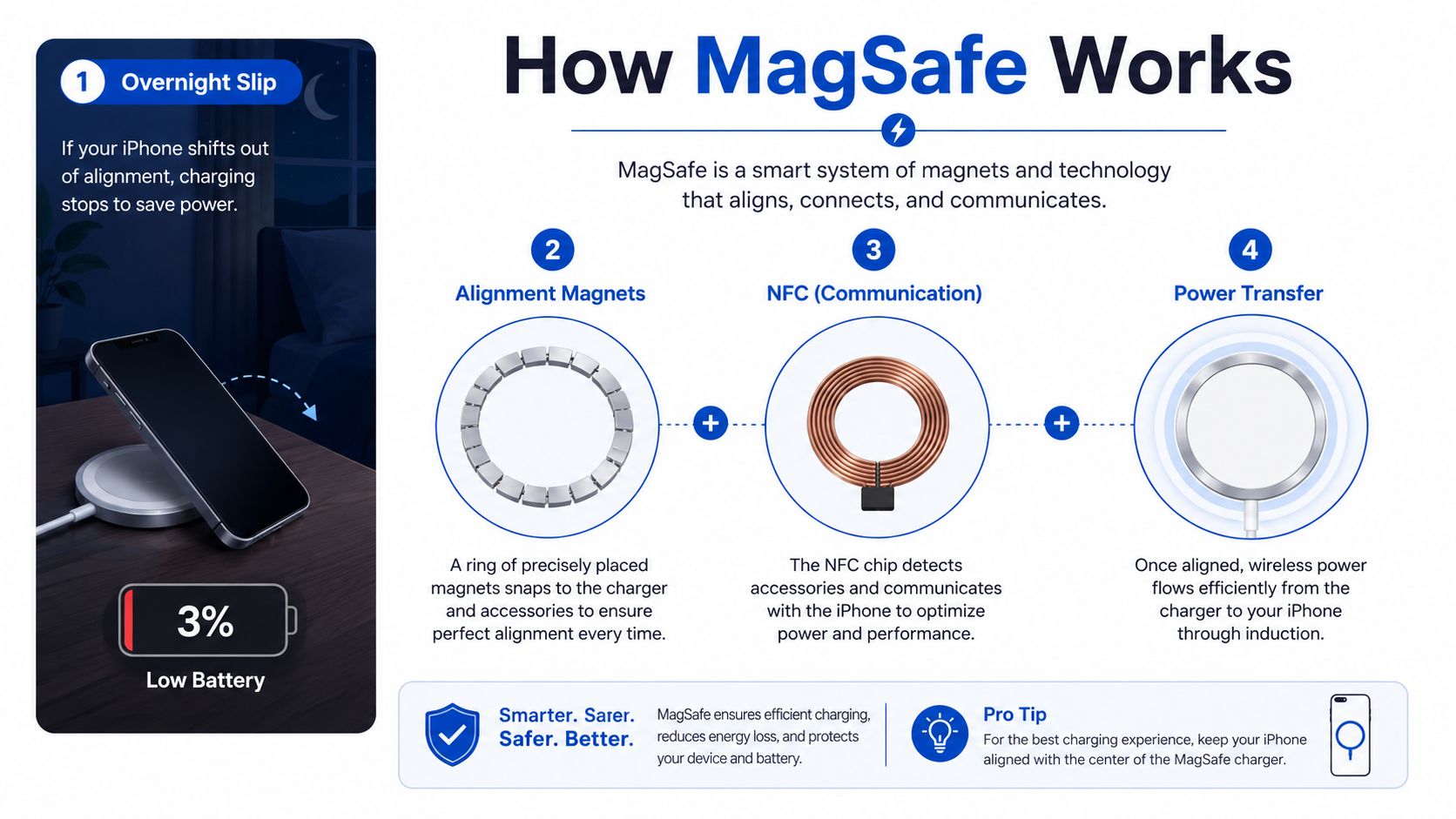
A charger can snap firmly to a case and still charge poorly. The reason is alignment: magnets hold the accessory in place, while the phone and charger must also line up their wireless-charging coils. MagSafe combines those jobs into one accessory system, rather than treating magnets as decoration. You can read more about the platform in this magnetic phone case guide.
The system works like three Lego layers:
- The magnetic layer pulls the accessory into the intended position.
- The charging layer places the phone's induction coil over the charger's coil.
- The communication layer helps compatible devices identify and manage the accessory.
A case does not create wireless charging by itself. Its ring must sit accurately over the phone's charging area, use the correct polarity, and provide enough controlled pull to keep a charger, wallet, or mount attached. A ring that sits slightly off-center may still click into place, yet transfer power less efficiently, generate extra heat, or disconnect when the phone moves.
Compatible is not the same as certified
A MagSafe-compatible case generally has magnets arranged for magnetic accessories. That label does not confirm that the ring is strong, centered, thermally efficient, or tested with different chargers. Case construction matters too. Metal parts, extra thickness, and a larger coil gap can change how the system behaves, even when the accessory attaches securely.
A certified-style design follows tighter requirements for magnetic-array placement and materials. Apple accessory guidance has been reported to specify a dislodge force around 800 to 1100 gf for a case attached to an iPhone 12, while the array must limit unwanted interference with the compass, NFC, and other sensors. The target is balanced pull force, not the strongest possible magnet.
Qi2 carries the magnetic-alignment approach beyond Apple. It uses the Qi v2.0 specification and Magnetic Power Profile, and a phone displaying the Qi2 logo must include magnets. For Android buyers, actual Qi2 certification is a more useful check than a generic claim that a case has a magnetic ring. A magnetic case may hold an accessory, but that alone does not guarantee the same charging, heat, or accessory behavior as a defined system.
Phone and Model Compatibility Explained
The first question isn't “does this case have magnets?” It's “what does the phone itself support?” A case can add attachment to a phone that lacks native magnets, but it can't transform older hardware into a fully native MagSafe device.
iPhone 12 and later models include Apple's magnetic system, while iPhone 11 and earlier models support Qi wireless charging without native MagSafe alignment. An older iPhone can use a magnetic sticker ring or magnetic case for accessory attachment, but the case won't add Apple's full hardware behavior.
Apple states that its MagSafe Charger supports up to 15W faster wireless charging for iPhone 12 and later when paired with a 20W or greater USB-C power adapter. The iPhone 13 mini and iPhone 12 mini can reach up to 12W under Apple's stated conditions. Those are phone-and-charger limits, not automatic promises from every case.
Compatibility matrix
| Phone Model | MagSafe Native | Qi2 Certified | Max Wireless Speed | Notes |
|---|---|---|---|---|
| iPhone 12 | Yes | Qi2 accessory compatibility | Up to 15W | Native magnetic alignment |
| iPhone 12 mini | Yes | Qi2 accessory compatibility | Up to 12W under Apple's stated conditions | Smaller model has a lower stated MagSafe limit |
| iPhone 13 | Yes | Qi2 accessory compatibility | Up to 15W | Use a thin, non-metal case |
| iPhone 13 mini | Yes | Qi2 accessory compatibility | Up to 12W under Apple's stated conditions | Case precision matters because available space is limited |
| iPhone 14 | Yes | Qi2 accessory compatibility | Up to 15W | Native MagSafe ring |
| iPhone 15 | Yes | Qi2 accessory compatibility | Up to 15W | Compatible cases support magnetic accessories |
| iPhone 16 | Yes | Qi2 accessory compatibility | Up to 15W with Apple's stated MagSafe setup | Check the case model and charger pairing |
| Older iPhone models | No native MagSafe | No native magnetic profile | Qi charging varies by model | A magnetic ring can add attachment, not native MagSafe hardware |
| Samsung and Pixel models | Model-dependent | Model-dependent | Model-dependent | Verify the exact phone and whether the case supplies the magnetic ring |
Android compatibility remains fragmented. Some current devices and case systems support magnetic alignment through Qi2 or a MagSafe-style case, while other phones only gain accessory attachment without a charging-speed increase. For Samsung owners, compare the exact device fit in this MagSafe magnetic case for Samsung Galaxy models, rather than relying on a broad “Galaxy compatible” claim.
Case Materials and Thickness Compared
The material changes more than the way the case feels in your hand. It affects shock absorption, heat movement, grip, pocket friction, and the distance between the phone's coil and the charger.
Silicone is forgiving and grippy. It can make a slippery phone easier to hold and can soften everyday impacts, but it attracts lint and may retain more heat during sustained wireless charging. Leather offers a warmer, more refined hand feel and can develop character over time, yet it generally gives up some drop protection and costs more.
Clear polycarbonate has a clean appearance and lets the phone's design show through. Low-cost clear cases may use a weak or poorly centered ring, and some clear plastics change appearance with age. A transparent back also doesn't tell you whether the internal magnetic array is engineered properly.
Rugged cases combine materials such as TPU, polycarbonate, and corner cushioning. They protect better against serious drops, but the extra layers can move the charging coil too far from the accessory.
| Material | Drop Protection | Typical Thickness | Magnet Strength Retention | Heat Behavior | Price Range |
|---|---|---|---|---|---|
| Silicone | Good for everyday knocks | Slim to moderate | Depends on the embedded ring | Can retain heat during charging | Budget to premium |
| Leather | Moderate | Slim to moderate | Depends on construction and lining | Often feels cooler in use | Premium |
| Clear polycarbonate | Moderate | Slim to moderate | Low-cost rings may be inconsistent | Usually sheds heat better than thick builds | Budget to mid-range |
| Rugged TPU and polycarbonate | High | Moderate to thick | Strong designs can hold well, but distance matters | More likely to warm during charging | Mid-range to premium |
Material rule: don't buy a rugged case for a slim charging experience, or a thin leather case for heavy drop protection. Choose the compromise you actually need.
Independent testing summaries commonly place about 3 mm of case thickness near the practical upper limit for reliable wireless charging, with thicker rugged or wallet-style builds showing larger slowdowns. A metal-heavy case can also block or disrupt charging. For a heat-focused design, compare the construction of this PC magnetic phone case with heat-dissipation plating against your phone's charging habits.
Charging Speeds and Accessory Performance
MagSafe performance depends on alignment twice. The magnets must center the accessory on the phone, and the charging coils must remain close enough for efficient inductive transfer. A ring can feel strong in your hand while still placing the charging coils too far apart.
Apple's stated MagSafe ceiling is up to 15W for supported iPhones and charger combinations, but the case can prevent the phone from reaching that ceiling. A slim, non-metal case generally gives the charger a shorter path. A thick rugged case adds separation, and even a small alignment error increases coil losses and heat. The phone may reduce power to manage temperature, charge more slowly, or stop recognizing the charger.
The difference is easy to miss. A phone may show the charging icon while taking much longer to reach full charge, so a short bedside test can be misleading.
| Case Type | Typical Thickness | Charging Speed | Magnet Hold Strength | Accessory Compatibility |
|---|---|---|---|---|
| Slim silicone | Slim | Usually favorable when correctly aligned | Moderate to strong, depending on ring | Chargers, wallets, stands, and mounts |
| Thin leather | Slim to moderate | Usually favorable if non-metal | Moderate | Good for wallets and desk accessories |
| Clear polycarbonate | Slim to moderate | Good when the ring is centered | Varies widely by manufacturer | Check each accessory before relying on it |
| Rugged multi-layer | Moderate to thick | May slow substantially or fail to align | Can be strong, but the gap reduces practical performance | Accessory fit is case and mount dependent |
| Wallet-style case | Moderate to thick | More likely to slow charging | Attachment can be secure while charging remains limited | Often requires removing the wallet to charge |
Wireless charging itself is based on electromagnetic induction, not a cable hidden inside the phone. This wireless charging explainer is useful if you want the underlying charging process explained separately.
Non-charging accessories expose weak designs quickly. A wallet may stay attached on a desk but peel away when pulled from a pocket. A car mount may hold on a smooth road and release over a bump. A stand may wobble because the case ring is misaligned, not because the stand is defective.
For highway use, test the complete combination, case plus mount plus phone. Don't treat “MagSafe compatible” as a universal guarantee of locked attachment.
Installing and Caring for Your MagSafe Case
Start with a clean phone and a clean case. Dust between the phone and the case can create pressure points, while lint on the outer ring can reduce contact with wallets and mounts.
The correct fit should feel even around the camera, buttons, and lower corners. Press the top and bottom edges into place rather than forcing one corner down first. Once installed, place a MagSafe charger on the back and check that it snaps to the center instead of drifting toward an edge.
A practical first-fit routine
- Inspect the ring. Look for lifted material, exposed adhesive, or a ring that appears visibly off-center.
- Fit the lower edge. Seat the phone into the bottom corners, then press the upper corners into the frame.
- Run a snap test. Attach a charger, wallet, and stand. Each should center itself without scraping across the case.
- Check charging. Leave the charger attached while moving the phone gently. A stable icon doesn't prove ideal speed, but repeated disconnects reveal poor alignment.
- Check the camera and ports. Make sure the case doesn't press against lenses or obstruct the USB-C opening.
Use a dry microfiber cloth on the magnetic area. This high-density microfiber cleaning cloth can remove pocket lint without adding moisture around the ring.
Avoid storing keys, metal cards, or loose metal objects against the case. Don't leave the phone on a hot dashboard for long periods, because heat can weaken adhesive-backed rings and raise charging temperature.
If the phone gets hot during gaming or sustained wireless charging, remove the case temporarily. After a hard drop, inspect whether the ring has shifted, warped, or developed a soft spot before attaching a car mount.
A visual fitting reference can help if the case feels tight or uneven.
Common Problems and Smart Fixes
A case can carry the MagSafe label and still deliver a disappointing experience. The most common failures come from a mismatch between the case design and the accessory, not from wireless charging as a concept.
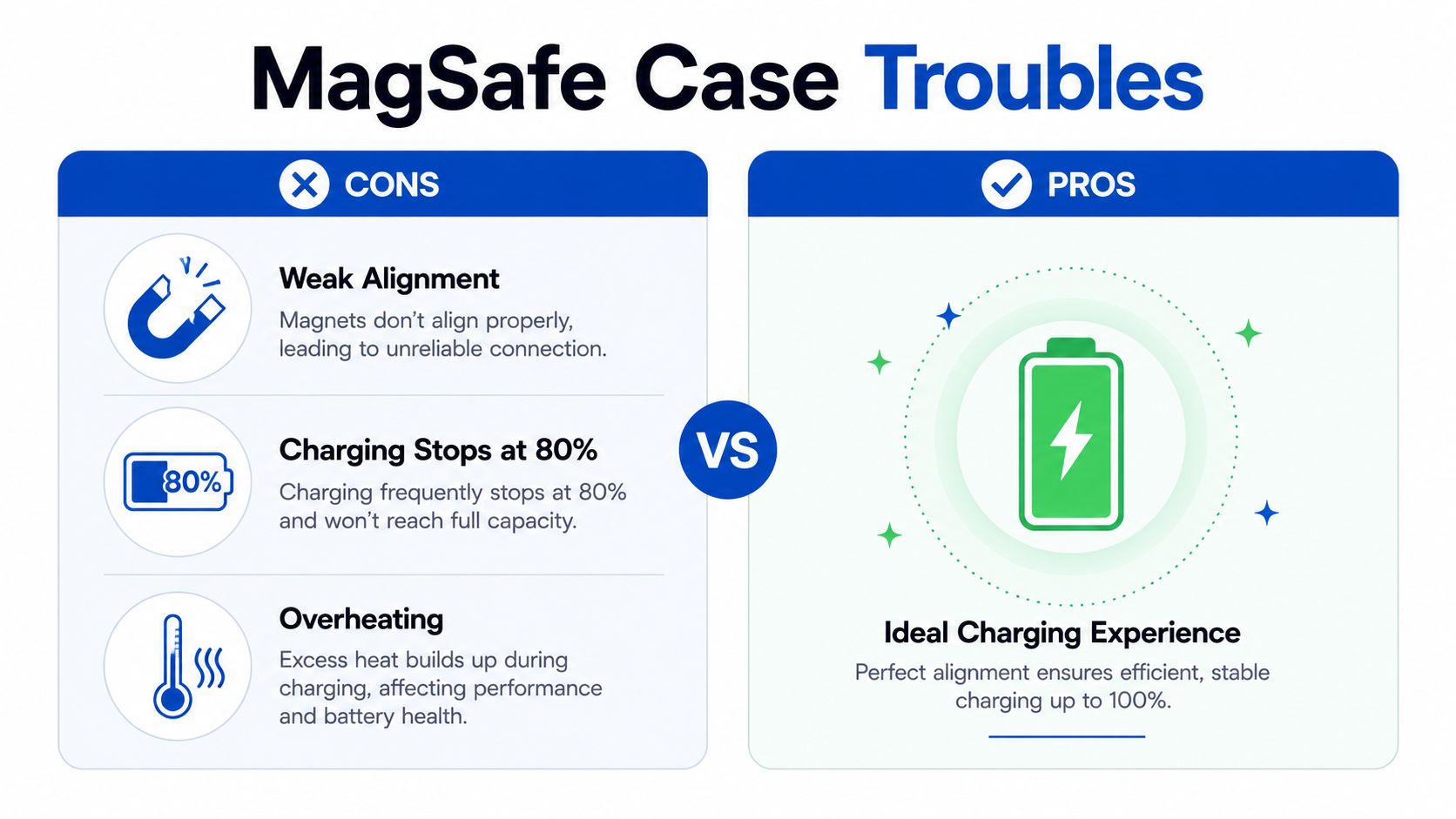
The charger stops or slows during charging. A thick case increases the coil gap, and heat can trigger the phone or charger to reduce power. Remove the case and compare behavior. If charging improves immediately, switch to a thinner non-metal case or accept that the rugged design prioritizes impact protection.
The car mount releases on bumps. A ring may contain magnets but lack a carefully tuned array or sufficient practical pull through the case. Test the mount with the case installed, not against the bare phone, and check whether the mount manufacturer gives a meaningful force specification.
The wallet slips when you pull the phone from a pocket. Pocket friction can apply a twisting force that a desk test never reveals. Look for a complete, centered ring rather than a single magnet or a decorative magnetic strip, then test the wallet with cards inside.
The phone shows inconsistent accessory behavior. Some Android phones can experience sensor or compass issues with poorly placed magnetic rings. If navigation or sensor behavior changes after fitting the case, remove it and compare. A correctly designed array should balance attachment with sensor compatibility rather than just maximizing magnet strength.
NFC features stop working. A thick or poorly placed case can interfere with the NFC antenna used for features such as tap-to-pay or car-key functions. Test those features before committing to the case, especially if the product uses extra metal plates or shielding.
Troubleshooting order: remove the case, clean the ring, test a known-compatible charger, then test the accessory that failed. Changing several parts at once hides the real cause.
“MagSafe compatible” and “Qi2 certified” also mean different things. Qi2 certification gives shoppers a defined standard to look for, while a generic magnetic claim may describe little more than the presence of magnets. If the phone itself is damaged or the charging behavior remains abnormal without the case, consult this iPhone MagSafe repair help from Repair My Crack.
Power-User Checklist Before You Buy
A power user doesn't need the most decorated case. You need a case whose physical design matches the accessories already on your desk, in your car, and in your travel bag.
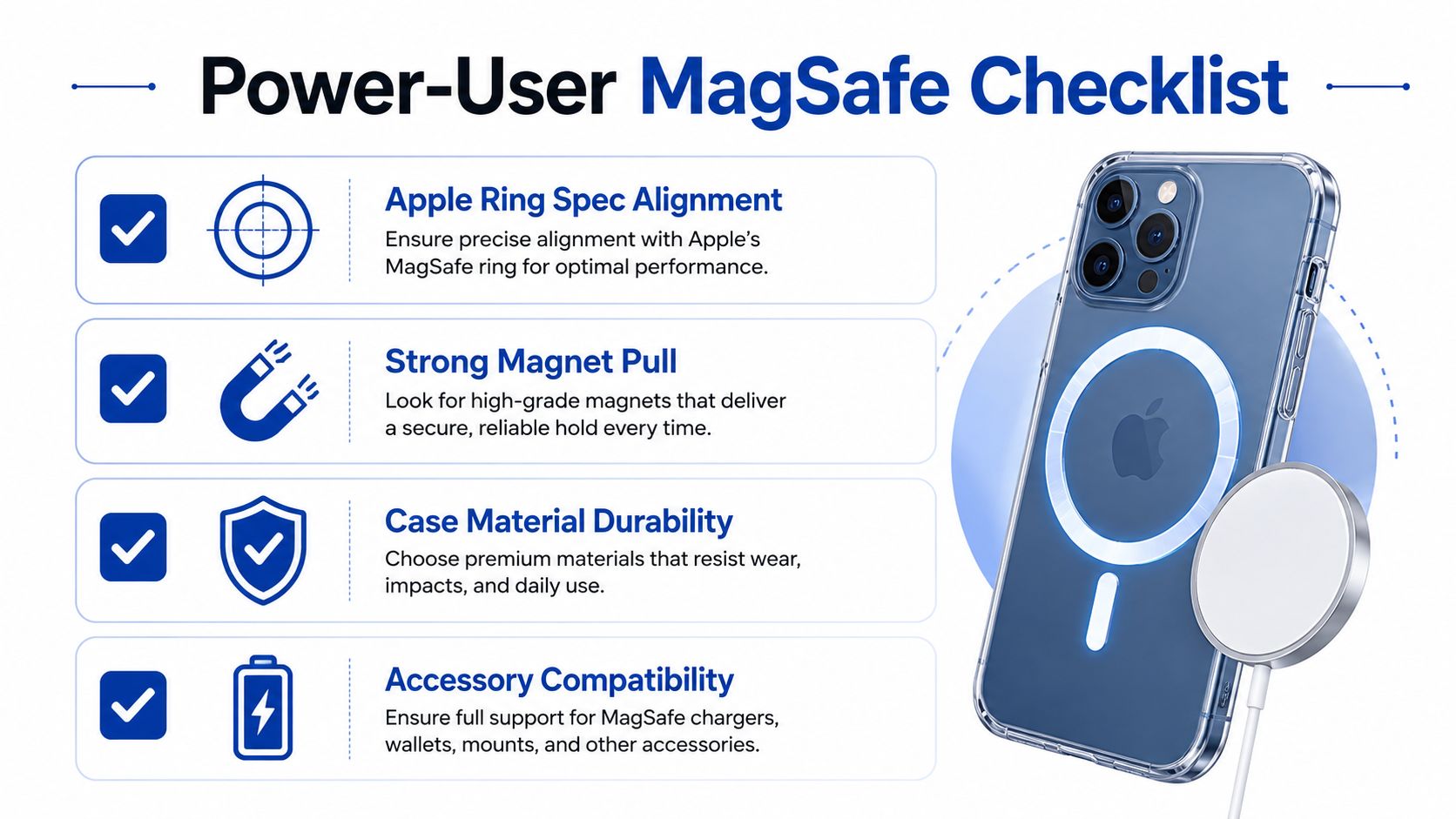
Run this checklist before checkout:
- Confirm the phone model. Match the exact generation, camera layout, button placement, and regional variant. A case that fits an iPhone family broadly may still miss a camera control or port opening.
- Verify the magnetic profile. Look for a precisely centered ring and clear information about the array. “Magnetic” alone doesn't tell you whether a wallet or charger will hold.
- Check total thickness. Keep the case near or below the practical 3 mm charging threshold where possible, especially if you plan to use battery packs or stands.
- Look for the right charging claim. Confirm Apple MagSafe support for an iPhone, or Qi2 certification for a compatible Android setup. Don't confuse a magnetic sticker with a charging standard.
- Test pull strength. Attach your actual wallet and car mount. Pull the phone straight off, twist it, and simulate the movement of removing it from a pocket.
- Inspect protection details. Raised camera lips, a screen bezel, flexible corners, responsive buttons, and accurate port cutouts matter more than decorative textures.
- Check thermal design. Avoid cases that bury the back in unnecessary metal or add thick layers without explaining how heat leaves the phone.
- Review the warranty. A warranty of at least 12 months gives you a useful durability signal, although warranty length alone doesn't prove magnetic performance.
- Test NFC. Verify tap-to-pay, transit functions, and any phone-based car-key feature before making the case your daily setup.
The ten-minute reality check
After installation, attach the wallet and stand, then remove the phone from a pocket several times. Run a charging session with the accessory attached, compare it with the case removed if the phone becomes warm, and test the car mount on the roads where you drive.
Don't perform a dangerous driving test by handling the phone. Secure the mount first, keep your eyes on the road, and inspect whether the phone remains centered after the journey. The cheapest case often isn't the best value once you account for replacing a slipping wallet, losing charging speed, or compromising drop protection.
Updated for March 2026.
People Also Ask
Does a MagSafe case make any phone compatible with MagSafe
No. A case can add magnetic attachment to some phones, but it can't add native MagSafe hardware or guarantee a higher charging speed. Check whether your model supports MagSafe or Qi2 before buying.
Will a thick MagSafe case charge wirelessly
It may charge, but thicker cases increase the coil gap and can reduce efficiency, add heat, or cause charging to stop. Cases around 3 mm or less are generally the safer choice for reliable wireless charging, according to independent testing summaries and neutral industry guidance.
Are wallets and car mounts guaranteed to work with every MagSafe case
No. Magnetic force, ring placement, case thickness, and accessory design all affect performance. Test the complete case and accessory combination, especially before relying on a mount during travel.
DigiDevice offers phone cases, magnetic covers, chargers, cables, and other mobile accessories for shoppers building a practical charging setup. Visit DigiDevice to compare a case with MagSafe against the accessories you already use, then choose the combination that fits your phone, charging routine, and protection needs.