

GaN Charger vs Normal: The Honest Comparison for 2026
You're halfway through a travel day, your phone is low, your laptop needs power, and the old charger in your bag occupies the space of a small paperback. That's the practical reason GaN charger vs normal charger comparisons matter in 2026. Charging speed still depends mainly on wattage and compatibility, but GaN can make the same power setup smaller, cooler, and easier to live with.
Direct answer: choose a GaN charger if you travel, charge several devices, or need compact laptop power. A normal silicon charger remains perfectly sensible for basic, low-power charging when size and heat aren't concerns. The key difference is not automatic speed. It's power density, heat management, and portability.
| Feature | GaN charger | Normal silicon charger |
|---|---|---|
| Semiconductor technology | Gallium nitride | Traditional silicon |
| Typical efficiency | Around 90–95% according to independent and manufacturer-adjacent comparisons (ChargeTech Lab comparison) | About 80–85% in the same comparison (ChargeTech Lab comparison) |
| Physical size | Typically smaller at comparable output | Usually larger at higher power |
| Heat | Generally lower under load | More energy becomes heat |
| Charging speed | Depends on wattage, protocol, cable, and device | Depends on wattage, protocol, cable, and device |
| Best fit | Travel, laptops, multi-device desks | Basic charging and cost-conscious setups |
Why Your Old Charger Feels Like a Brick in 2026
You unpack after a long flight and find the usual mess: cables folded into knots, a phone adapter wedged between socks, and a laptop brick that seems to have gained weight since the last trip. It works, but it consumes valuable bag space and leaves little room around a crowded hotel outlet.
That familiar bulk comes from the limits of traditional silicon power electronics. Gallium nitride, or GaN, lets power semiconductors switch faster and waste less energy as heat than silicon, which gives engineers more freedom to build compact power-conversion circuits. The result isn't magic. It's a different material allowing a more compact design.
A normal charger still converts wall power into the form your device needs. It can charge a phone, tablet, or compatible laptop reliably when its output matches the device. The problem appears when manufacturers ask a silicon design to deliver more power. Heat management and larger components tend to make the enclosure more substantial.

What GaN changes in everyday use
GaN chargers became a major consumer power-accessory category in the 2020s because they solve a problem people feel immediately: carrying too much hardware. Manufacturers can package higher output into smaller adapters, including compact designs for USB-C laptops and multi-port charging stations.
The technology has also moved beyond specialist hardware. Navitas reported surpassing 75 million GaN power shipments by March 20, 2023, a milestone documented in the GaN-powered chargers market overview. That doesn't mean every GaN charger is well made, but it does show that the category is no longer a curiosity for enthusiasts.
For a practical overview of connector formats and adapter categories, DigiDevice's charger and adapter types guide is a useful reference. The important distinction is simple: GaN changes the charger's internal power design, not the charging port itself.
Practical rule: If your current adapter fits easily in your bag, stays comfortable under normal use, and supplies enough power, GaN isn't an urgent upgrade. If it crowds your luggage or runs hot while powering a laptop, the difference becomes much easier to justify.
Heat and Efficiency Differences That Matter
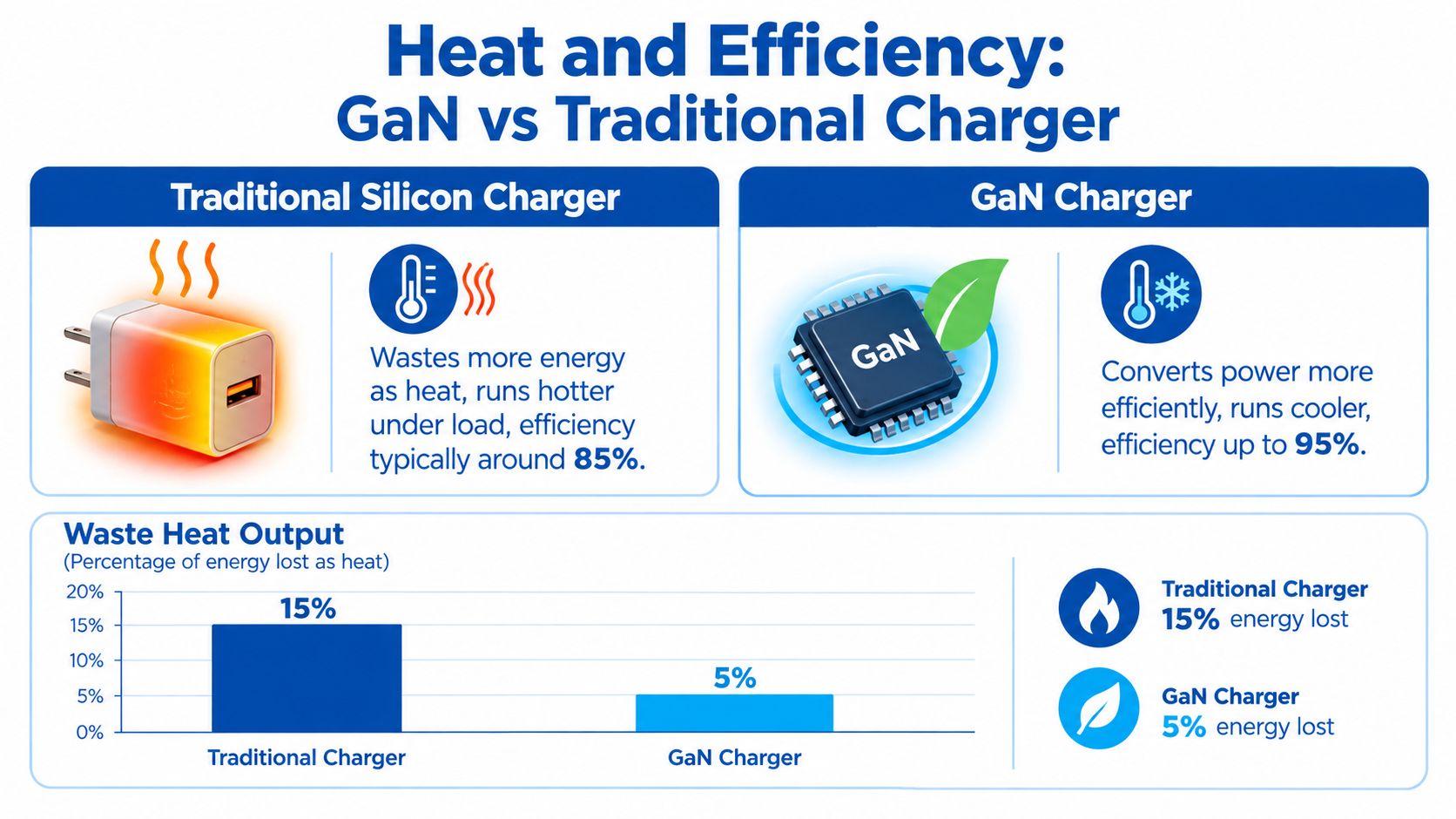
A charger's efficiency is the share of incoming electricity that reaches the device instead of becoming heat inside the adapter. Traditional silicon chargers commonly operate in the 80–88% range, while GaN models are often around 90–95%, depending on the circuit and load, as summarized by ZDNET's GaN charger comparison.
That difference amounts to single-digit percentage points, yet it is meaningful at laptop power levels. At 65W, it can represent roughly 3–7W less energy lost as heat, based on the comparison cited earlier. A charger does not convert every watt into useful output, so lower conversion loss helps the enclosure stay easier to handle during sustained use.
Why a cooler brick feels better
Heat matters most when an adapter runs for hours in a restricted space. A conventional charger powering a demanding device can become noticeably warm behind furniture, beside other adapters, or on a crowded extension strip. GaN chargers still produce heat, since every power converter does, but a well-designed model generally sheds less of it.
Independent summaries commonly report GaN chargers operating about 10–15°C cooler, or up to roughly 45% cooler under load, than comparable silicon designs. Treat those figures as comparison points rather than a guarantee. Internal layout, room temperature, ventilation, and charging demand all affect the result.
Reduced heat may also lessen stress on components, although it does not guarantee longer service life. Capacitors, insulation, soldering, firmware, protection circuits, and manufacturing quality remain important. Poor engineering can undermine the benefits of GaN.
The practical laptop scenario
The difference becomes easier to feel when one compact adapter powers a laptop and charges another device at the same time. A silicon charger can handle that workload, but its enclosure may run hotter. A GaN design typically has more thermal headroom because less energy is lost during conversion.
For a commuter, that means less concern about placing a warm brick beside a notebook or inside a tightly packed pouch. At a hotel desk, cooler operation makes it easier to keep several devices connected without turning the charging area into a cluster of hot adapters.
DigiDevice's selection of GaN chargers is best evaluated by output, port allocation, and safety information, rather than the “GaN” label alone. The semiconductor helps, but the complete charger design determines how well it performs.
Size, Weight, and the Travel Advantage
For travelers, the strongest case in the GaN charger vs normal debate is often the space saved, not the charging speed. A charger that delivers comparable output from a smaller enclosure leaves room for another cable or a power bank in your day bag.
Infineon describes typical silicon charger power density at around 3–5 W/in³, compared with approximately 9–18+ W/in³ for GaN designs. That represents roughly a 3–4x increase in electrical power packed into the same physical volume, according to the technical comparison in this charger power-density research PDF.
Physical density comparison
| Technology | Typical power density |
|---|---|
| Traditional silicon | 3–5 W/in³ |
| GaN | 9–18+ W/in³ |
The density difference helps high-output GaN adapters fit where older laptop bricks did not. It also makes multi-port designs practical. One desktop charger can replace separate phone, tablet, and laptop adapters, provided its total output and port-sharing behavior suit the devices connected to it.
A cited comparison places a 65W GaN charger at roughly 50 × 37 × 31 mm, versus about 75 × 55 × 28 mm for a comparable silicon charger (Smart Gear Outlet comparison). These dimensions are not universal, but the shape difference matters in a packed bag. The GaN model is shorter and narrower, while the silicon adapter can be thinner yet broader overall.
Where the smaller size pays off
A compact charger earns its space in three common situations:
- Carry-on pockets: The adapter leaves more room beside a laptop and its accessories.
- Hotel desks: A smaller body reduces outlet obstruction and leaves space for another plug.
- Shared workspaces: One multi-port unit can serve several devices without a row of heavy bricks.
The trade-off is easier misplacement and more complicated power distribution. A charger with high total output may divide that capacity across ports instead of delivering its maximum rating to every connected device.
Packing rule: Count devices first, then ports, then wattage. A tiny charger with the wrong port mix is less useful than a slightly larger unit that powers the equipment in your bag.
Travelers who need battery capacity can compare the charger with DigiDevice's best power banks for travel guide. A power bank addresses a different constraint, but the pairing is practical: the charger works where an outlet is available, while the power bank covers time away from one.
Charging Speed Myth vs Reality for Phones and Laptops
A GaN charger does not automatically charge a phone faster. If a GaN and silicon charger deliver the same usable wattage, support the same charging protocol, and use suitable cables with the same device, their charging speeds should be similar, as explained in Belkin's guide to GaN chargers.
The phone sets the limit. The charger reports its capabilities, the device negotiates a supported level, and the cable must carry that connection. A weak link in any part of the chain limits charging, regardless of the number printed on the adapter.
What determines your charging rate
For a phone, check its maximum input, the charger's USB-C Power Delivery or other relevant protocol, and the cable's rating. A high-wattage charger can safely power a lower-wattage phone because the phone draws only what it can use. The spare capacity becomes useful when you add another device or charge a laptop.
Laptop compatibility requires a closer check. Confirm the computer's recommended USB-C charging wattage and whether it supports charging through USB-C at all. A compact, high-output GaN adapter can replace a proprietary brick only when the laptop accepts the required power profile.
DigiDevice's guide to what makes a fast charger fast provides a practical buying checklist. Evaluate the charger, device, protocol, and cable as one system instead of treating GaN as a speed specification.
Where GaN still improves the experience
GaN's speed benefit is indirect. Its efficiency and thermal characteristics help manufacturers build compact chargers with laptop-class output, reducing the bulk in a travel bag. A well-designed unit may also handle sustained loads more comfortably, although that depends on its thermal layout and firmware.
For travelers, use this order:
- Match the wattage to the most demanding device.
- Confirm port protocols for phones, tablets, and laptops.
- Use a suitable cable for the intended output.
- Check shared-output behavior when several ports are active.
- Choose GaN for the smaller enclosure, not a guaranteed speed multiplier.
This approach avoids carrying unused power while preserving the practical gain: fewer bricks, less bag clutter, and one charger that can cover more of the devices used on a trip.
Safety, Compatibility, and Long-Term Reliability
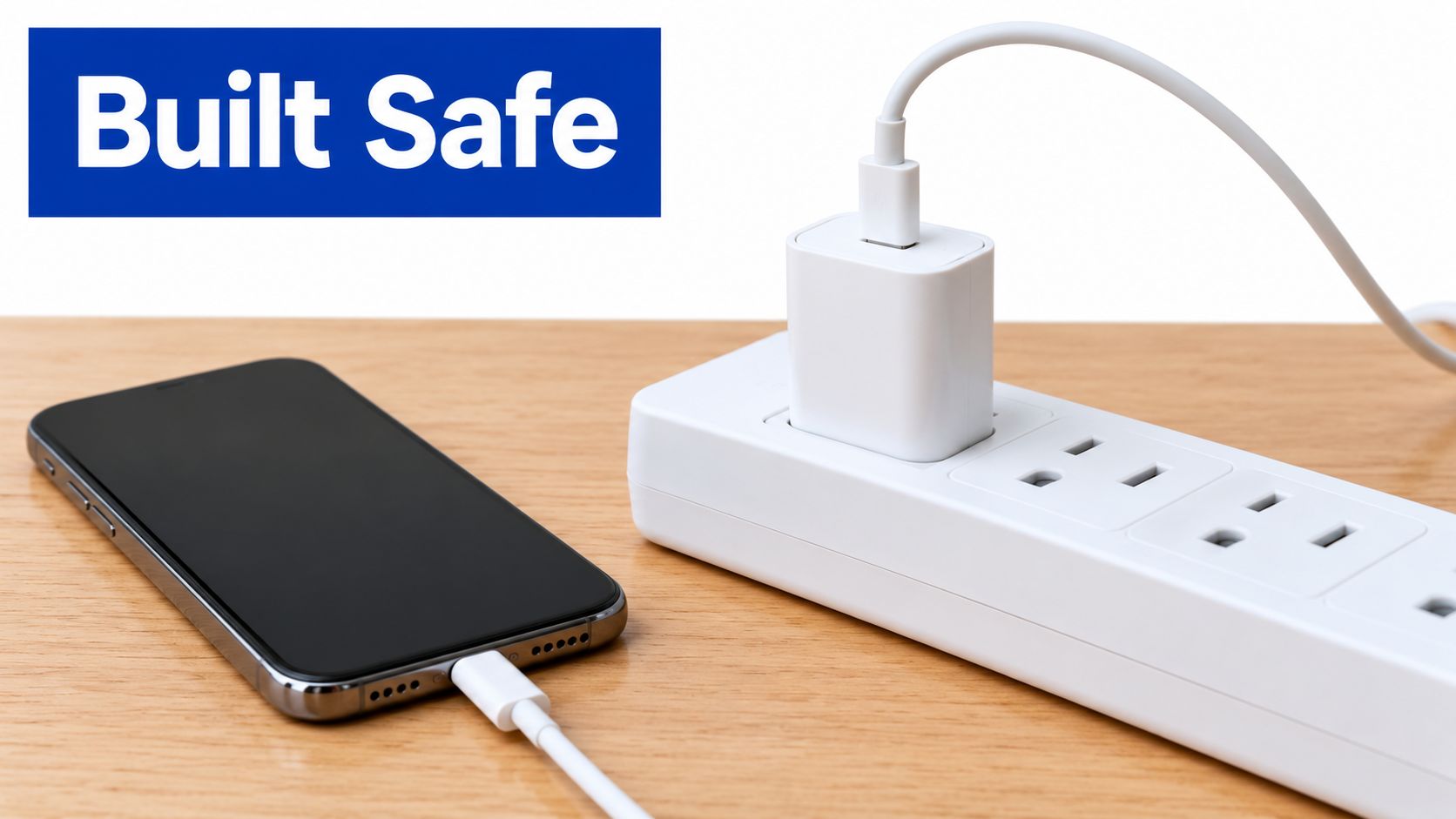
A charger's material is only one part of its safety profile. A reputable adapter should manage over-voltage, over-current, short-circuit, and over-temperature conditions, while maintaining stable output when the connected device changes its demand.
GaN doesn't make an unsafe circuit safe. It gives engineers a more efficient switching component, but the finished product still depends on insulation, thermal layout, protection systems, component quality, and testing. The safest purchase is a properly specified charger from a credible seller, not just the smallest product with the highest number printed on it.
Compatibility is a specification check
Modern USB-C chargers generally negotiate power with connected devices. A phone won't suddenly consume the full output of a laptop-oriented adapter just because the adapter can provide it. The device, charger, cable, and protocol must agree on a supported operating level.
Check these details before purchase:
- Output profiles: Confirm that the charger lists the voltage and wattage profiles your laptop or phone expects.
- Port type: USB-C and USB-A ports may support different protocols and output levels.
- Total output: Multi-port chargers can reduce available power when several devices are connected.
- Cable rating: A capable adapter paired with an unsuitable cable may not reach its expected output.
- Physical design: Folding plugs, stable connectors, and adequate ventilation matter during travel.
For a broader look at USB charging accessories, DigiDevice's battery charger and USB guide gives you a starting point for sorting cables, adapters, and charging use cases.
A normal silicon charger can be the better value when you already own a reliable unit that meets your needs. Paying more for GaN makes practical sense when the smaller enclosure, lower heat, or multi-port consolidation solves a problem you have repeatedly encountered.
A short demonstration can help clarify what to inspect on a charger, including its ports, labeling, and physical construction.
Avoid unknown products with incomplete specifications, exaggerated output claims, or unclear safety information. The charger sits between mains power and expensive electronics, so a low price isn't a bargain if the product provides no confidence about its design or support.
Which Charger Is Right for Your Setup
The decision is straightforward once you stop treating GaN as a speed feature. Match the charger to your devices, then decide whether the smaller enclosure and cooler operation justify the price.
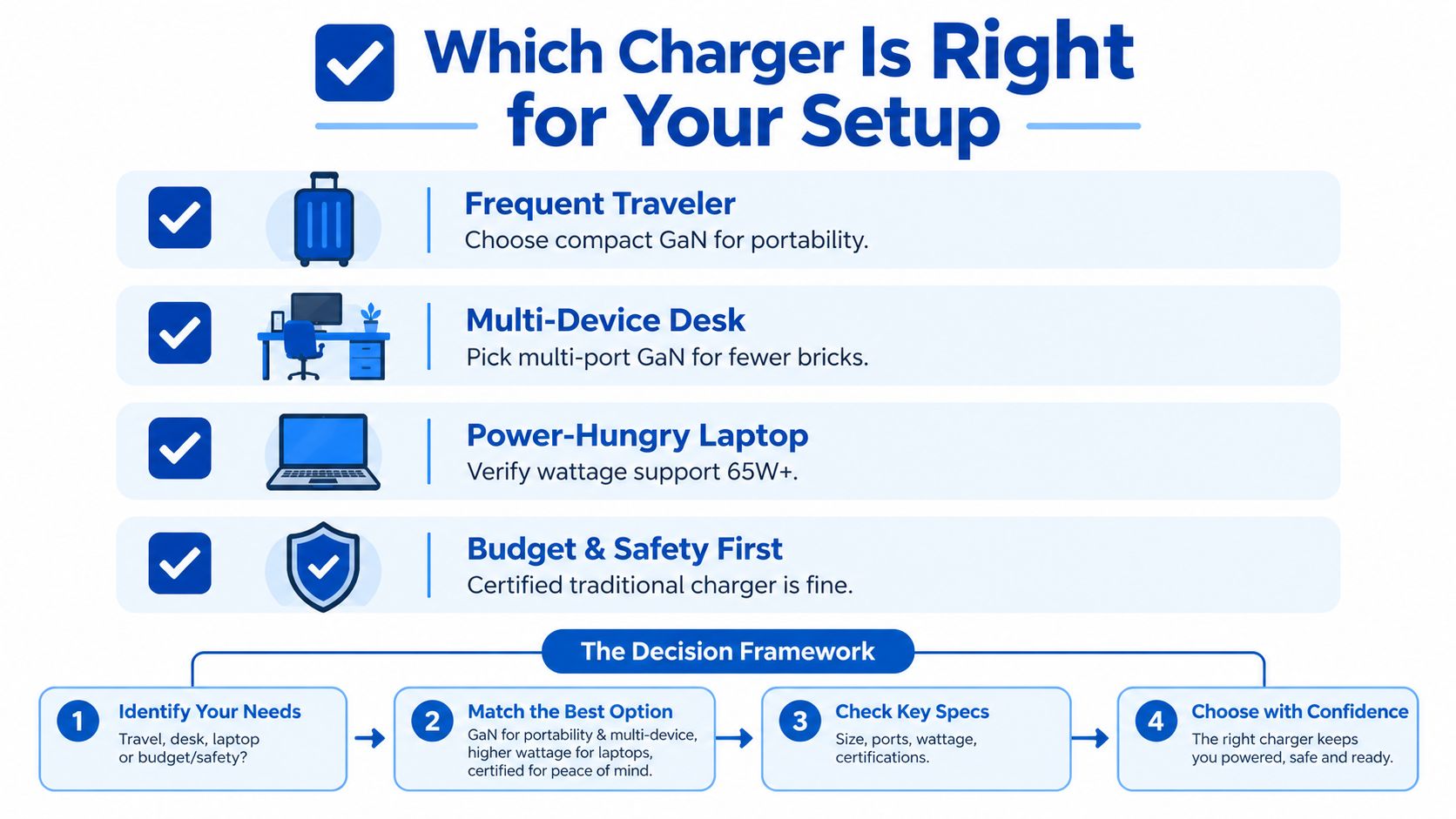
Choose GaN when:
- You travel often: A smaller, lighter adapter earns its space in a carry-on.
- You charge several devices: A suitable multi-port model can reduce the number of bricks you pack.
- You power a USB-C laptop: Compact high-output designs are easier to carry than traditional laptop adapters.
- Heat bothers you: Lower conversion losses generally mean less warmth under comparable load.
Choose normal silicon when your charger stays at home, you power only basic devices, and your existing adapter already offers the required output and protections. There's no practical reason to replace a sound charger just because newer technology exists.
If you're building an emergency or outdoor kit, it also helps to separate charging needs from lighting needs. This comparison of camping lantern vs phone charger models is useful when deciding which equipment belongs in a travel or camping setup.
For a daily publishing strategy, practical product education works best when most articles answer informational questions, supported by a smaller stream of commercial comparisons and troubleshooting content. That balance gives readers useful guidance before they reach a buying decision.
DigiDevice offers mobile accessories, chargers, adapters, cables, and other practical electronics for people building compact travel and desk setups. Review the specifications first, then visit DigiDevice to compare suitable charging equipment and check the current price before purchasing.