

Battery Charger USB: How to Pick the Right One
You've got a phone at 18%, earbuds nearly empty, and a laptop that's been plugged in long enough to make you suspicious. All three are connected to one old wall charger, yet every battery seems to be crawling upward.
A battery charger USB setup usually feels broken because the hardware doesn't agree on power, protocols, cables, or port allocation. This guide shows how to choose the right wattage, understand USB-C Power Delivery and Quick Charge, decide whether GaN is useful for travel, size a power bank, and verify that your cables can carry the negotiated power.
Why Your Battery Charger USB Setup Feels Broken
A charger's number on the box is only part of the story. A multi-port adapter might advertise a high total output while reducing individual ports when several devices connect. Your laptop may need a particular USB Power Delivery profile, your phone may prefer PPS, and your earbuds may fall back to basic charging.
That doesn't mean you've chosen everything badly. It usually means the charger, cable, device, and protocol aren't negotiating the same way.
The five decisions that matter most are:
- Choose enough wattage, without paying for power your devices can't use.
- Pick USB-C PD, Quick Charge, or both, based on your devices.
- Decide whether GaN matters, especially if you travel with a laptop.
- Size a power bank realistically, rather than trusting only its label.
- Confirm cable and protocol support, because USB-C describes a connector, not charging speed.
Practical rule: Treat the printed wattage as a ceiling, not a promise that every port will deliver it simultaneously.
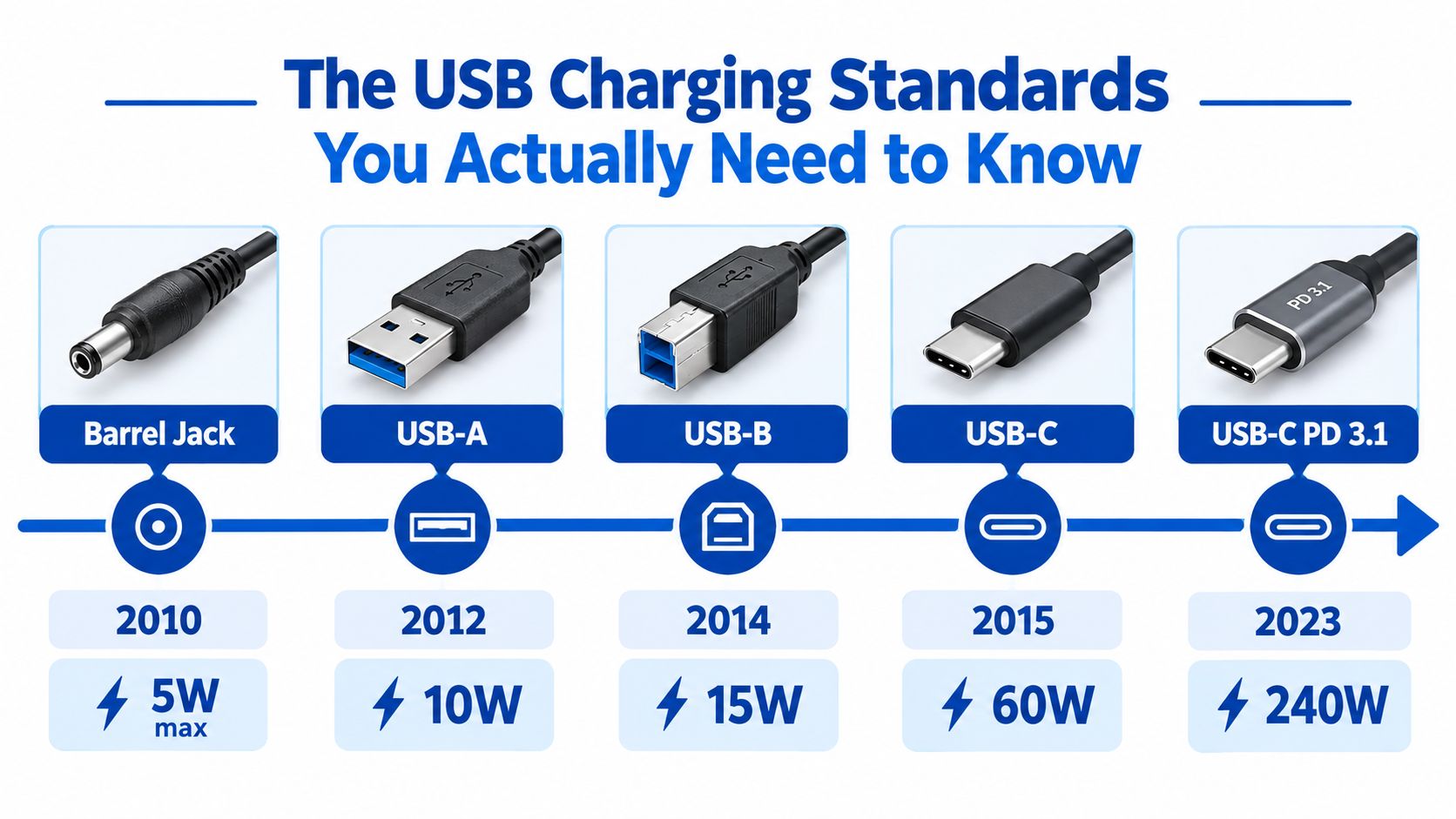
USB charging has also changed considerably. Mini-USB gained adoption in the early 2000s, micro-USB launched in 2007 and became common during the Android era, and USB Type-C emerged in 2014 as the next-generation connector. USB Battery Charging 1.2 later formalized higher-current charging, while USB Power Delivery expanded the system from basic accessories to phones, tablets, laptops, and other high-draw electronics. The USB charging standards white paper gives useful historical context.
By the end, you should be able to read a charger's port table, spot hidden power sharing, and build a setup that charges your devices at their advertised speed instead of merely lighting up the battery icon.
The USB Charging Standards You Actually Need to Know
USB charging is easier to understand when you separate the connector from the charging protocol. USB-A, micro-USB, and USB-C describe physical interfaces. USB Power Delivery, PPS, Quick Charge, and BC1.2 describe how the charger and device decide what power is safe.
The early progression moved from low-power USB ports to dedicated charging systems. A standard USB 2.0 port can supply up to 500 mA, while a USB 3.0 or USB 3.1 Gen 1 port can supply up to 900 mA. Devices that need more must complete a charging handshake before drawing extra current, as explained in Microchip's USB charging guidance.
BC1.2 created a practical distinction between data ports and charging ports. Its categories include the Standard Downstream Port, Dedicated Charging Port, and Charging Downstream Port. Certain charging-capable ports can provide up to 1.5 A, according to Analog Devices' BC1.2 overview.
USB-C changed the negotiation model
USB-C brought reversible connectors and dedicated configuration pins, but USB-C alone doesn't guarantee fast charging. A basic USB-C source may provide only an entry-level power profile, while a USB-C PD charger can advertise several voltage and current combinations.
USB Power Delivery moved from an earlier 100W ceiling to 240W through Extended Power Range in USB PD 3.1 and 3.2. The higher-power profiles use fixed EPR voltages of 28V, 36V, and 48V. Higher voltage allows the same power at lower current, which reduces cable losses and heat. The USB-IF charger and Power Delivery information explains the standard's power approach.
PPS, or Programmable Power Supply, gives compatible phones finer control over voltage. Instead of jumping only between fixed levels, the charger and phone can adjust the supply in small increments. That can reduce conversion losses inside the phone and help manage heat during fast charging.
Quick Charge remains relevant on compatible Android hardware, especially where a phone and charger share Qualcomm's ecosystem. Modern USB-C chargers often combine PD, PPS, and QC support, but you should still check the device specification.
For most buyers in 2026, the four labels worth recognizing are:
- USB Battery Charging 1.2, the legacy charging baseline.
- USB Power Delivery, the broad USB-C standard for phones, tablets, and laptops.
- PPS, the adjustable mode used by compatible fast-charging phones.
- Qualcomm Quick Charge, a separate fast-charging family with varying compatibility.
For a simple connector refresher, compare the USB charger and adapter types guide. The key takeaway is simple: the connector gets the devices connected, but the protocol decides how quickly they charge.
Wattage, Volts, Amps, and mAh Demystified
The quickest formula on any charger label is watts = volts × amps. Voltage is the electrical pressure, amperage is the current flow, and wattage is the resulting power. A 5V/3A charger provides 15W, while a 9V/3A profile provides 27W.
mAh describes battery capacity, but it isn't directly comparable with charger wattage until voltage enters the calculation. For a rough example, take a phone battery rated at 5,000 mAh and approximate its battery voltage at 3.7V. Convert capacity to amp-hours, then multiply by voltage:
5 Ah × 3.7V = 18.5 Wh
A 30W USB-C PD brick could theoretically provide that energy in less than an hour, but real charging includes conversion losses, heat management, and a slower final charging phase. Using an illustrative 80% efficiency assumption, the required wall energy would be about 23.1Wh. That estimate is a calculation, not a guaranteed charge time, because the phone controls its charging curve.
The voltage comparison is more useful than the raw capacity label. A 5V/3A, 15W charger has less available input power than a 9V/3A, 27W PD profile, assuming the phone supports and requests the latter.
| Charger Output | Protocol | Estimated Time |
|---|---|---|
| 5V/3A, 15W | Basic USB-C or charging fallback | Roughly 1.5 hours under the simplified energy estimate |
| 9V/3A, 27W | USB-C PD | Roughly 50 minutes under the simplified energy estimate |
| 30W USB-C PD | USB-C PD | Roughly 46 minutes under the simplified energy estimate |
These are theoretical estimates based on the stated battery assumption and 80% efficiency, not promises from a particular phone or charger. The phone may draw less power, especially as the battery fills.
Small devices rarely need the largest brick. Earbuds and AR glasses with batteries under 200 mAh usually won't gain much from a charger offering more than 10W. Their charging circuits set the limit, not the adapter's maximum rating.
For cable selection and practical fast-charging checks, use this USB-C cable fast-charging guide.
Every Type of Battery Charger USB Worth Owning
The right charger answers a real use problem. Start with where you charge, how many devices you connect, and whether the power source needs to travel with you.
| Charger Type | Question It Answers | Typical Power | Best For |
|---|---|---|---|
| USB wall brick | Where does power come from at home or a hotel desk? | 20W to 100W | Phones, tablets, and everyday laptop charging |
| GaN charger | How can I carry laptop power in a smaller package? | Up to laptop-class output | Travel and compact desk setups |
| USB-powered AA/AAA cradle | How do I recharge household cells without buying alkaline batteries? | Device-dependent | Remotes, flashes, toys, and headphones |
| Power bank | How do I keep devices running away from an outlet? | 10,000 mAh to 26,800 mAh | Travel, commuting, and emergency backup |
Wall bricks for predictable daily charging
A conventional USB wall charger remains the simplest choice when an outlet is nearby. A single-port model keeps power allocation straightforward, while a multi-port model reduces clutter. Look for a clear port table rather than only a large combined number.
Foldable prongs help in a suitcase, but plug compatibility still matters. A charger that fits physically may not be appropriate for every local voltage system, so check the manufacturer's input specification before traveling.
GaN for smaller travel kits
Gallium nitride, or GaN, allows charger designers to build compact high-power adapters with efficient switching components. The practical benefit is less bulk in a laptop sleeve, not magic charging speed. Your laptop still needs to support the negotiated profile, and the cable still needs to carry it.
The guide to the best GaN chargers is a useful place to compare compact designs, port layouts, and power allocation behavior.
USB battery cradles and power banks
A USB-powered AA/AAA cradle makes sense if you regularly use rechargeable NiMH cells in remotes, camera flashes, or headphones. It turns a familiar battery format into a rechargeable system without requiring a dedicated wall adapter.
A power bank is different from a charger because it acts as both energy storage and a power source. Features such as pass-through charging and PPS support can matter, but the bank's output profile must match the device you plan to carry.
Use this quick decision cue:
- Outlet nearby: Choose a wall brick or GaN unit.
- Replaceable batteries: Choose a USB-powered cradle.
- No outlet available: Choose a power bank.
- Several devices at once: Check dynamic sharing before buying.
How Protocols Decide Real Charging Speed
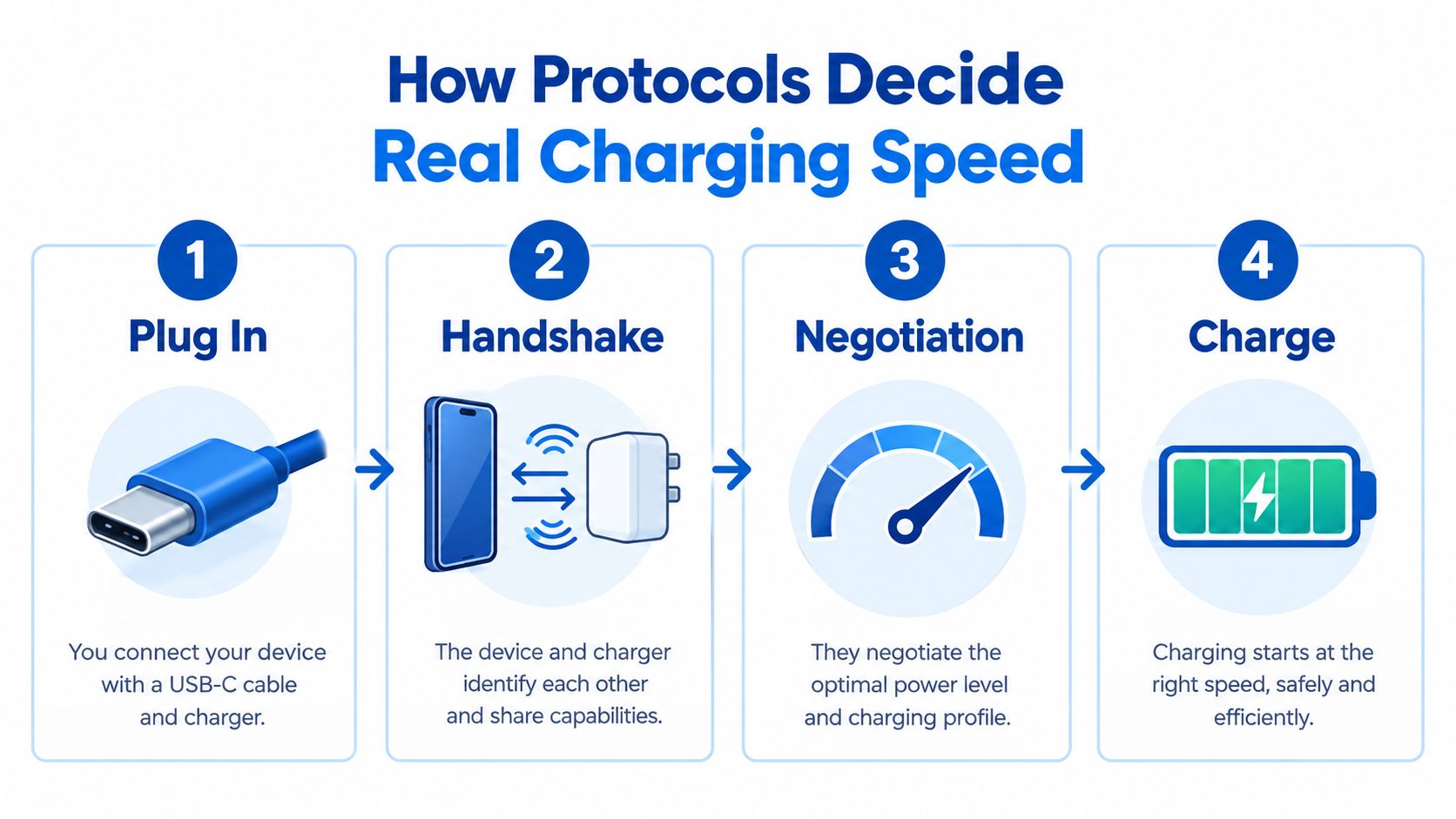
The wattage printed on a charger is a ceiling. When you connect a USB-C device, the charger advertises available power profiles, the device evaluates them, and the device requests a suitable option. The charger confirms the request before delivering the negotiated power.
That exchange happens quickly, but it determines whether your phone receives a fast profile or falls back to basic charging. A USB-C connector without PD support may look identical to a high-performance USB-C PD port.
Why multi-port chargers slow down
Suppose a desktop GaN charger has one laptop connected to its first port and a second laptop plus a phone connected to other ports. If total demand exceeds the adapter's available budget, its controller reallocates power.
A capable design can update its power allocation dynamically. One port may move from 100W to 60W, while another receives 35W, depending on the connected devices and the charger's programmed profiles. A simpler design may reset or apply a fixed split instead.
That's why the phrase “240W total” doesn't tell you what happens when every port is occupied. Read the per-port output table at full load, not just the headline maximum.
Buyer check: Look for “dynamic power allocation” or “intelligent power distribution,” then verify that the manufacturer lists each port's output when other ports are active.
The most useful verification steps are:
- Find the PDO table, which lists the charger's Power Data Objects.
- Check combined-output scenarios, such as two USB-C ports operating together.
- Confirm the laptop port remains above its required input, especially if a phone activates another port.
- Look for independent port ratings, not only a combined maximum.
- Check cable requirements, because a high-power profile can be limited by the cable.
Readers comparing portable capacity can also consult this practical resource on real charge times for power banks. For a protocol-focused explanation of charger behavior, see DigiDevice's guide to what makes a fast charger fast.
Safety, Counterfeits, and the Features That Matter
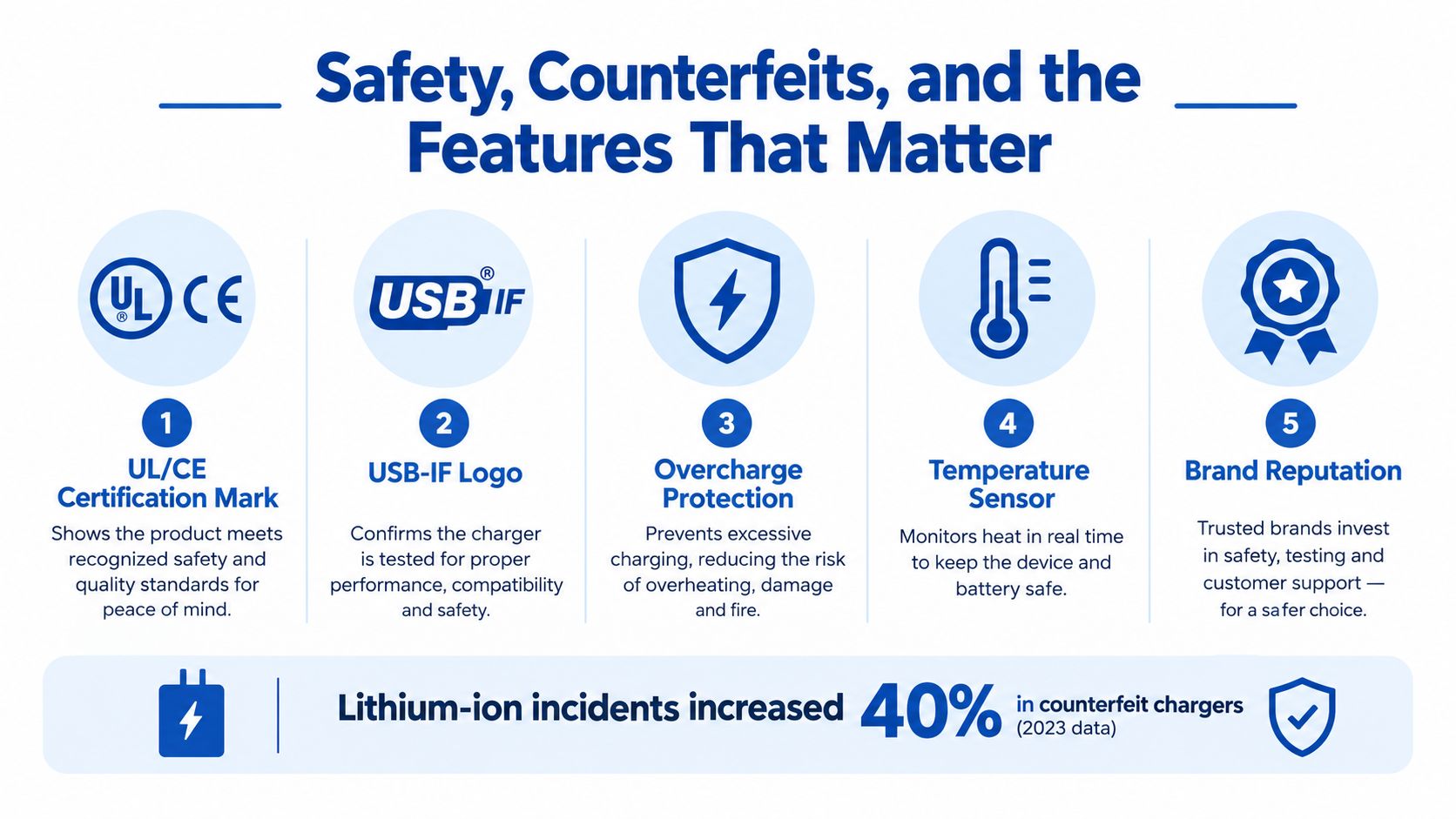
A charger can be electrically compatible and still be a poor purchase. Independent safety guidance recommends keeping USB chargers away from heat and liquids, avoiding unattended operation, and replacing units that show burn marks or unusual overheating. A 2025 UK enforcement case involving a counterfeit Apple USB-C adapter was classified as a serious risk of fire and electric shock, according to Electrical Safety First's USB charger guidance.
The useful response isn't panic. It's a short inspection before you buy.
What a trustworthy charger should disclose
Look for a manufacturer name, a traceable address, clear input and output ratings, and safety protections such as:
- Over-current protection: Limits excessive current.
- Over-voltage protection: Prevents an unsafe voltage condition.
- Over-temperature protection: Reduces output or shuts down during overheating.
- Short-circuit protection: Stops delivery when a fault occurs.
- Over-power protection: Prevents the adapter from exceeding its designed output.
Certification marks matter, but a printed logo alone isn't proof. Check whether the brand identifies the certification and whether the product documentation is consistent.
The cable deserves equal attention. A cable designed for currents above the ordinary baseline should identify its capability electronically. For high-power USB-C charging, verify that the cable is appropriately rated and includes an E-Marker where required by the charger and device combination.
A five-minute buying checklist
- Read the safety section: Reputable manufacturers publish protection details.
- Inspect the port table: Confirm the output with multiple ports occupied.
- Check the cable rating: Don't assume every USB-C cable supports laptop-class power.
- Prefer established retailers: Avoid listings with vague specifications and no support contact.
- Retire suspicious hardware: Replace any charger that smells unusual, discolors, or runs hot while idle.
A lightweight shell isn't automatically unsafe, and a heavy charger isn't automatically genuine. Treat weight, price, and appearance as clues, then verify the electrical specifications and manufacturer information.
Matching a Charger to Phones, Earbuds, and AR Glasses
The same charger can be an excellent travel companion and a poor desk solution, depending on what you connect. I'd build the kit around the hungriest device first, then check how the smaller devices affect shared output.
| Profile | Primary Charger | Secondary Gear | Key Spec | Cable Requirement |
|---|---|---|---|---|
| Traveler | 65W to 100W GaN brick | 10,000 mAh power bank, regional plug adapters | PD support, compact body, suitable input range | USB-C cable matched to laptop output |
| Desk worker | Four-port 100W desktop charger | Magnetic phone stand, USB-A desk-lamp port | Full-load per-port table | Separate cables for laptop and accessories |
| AR enthusiast | 45W or higher PPS-capable charger | Power bank and short USB-C cable | Stable output for continuous glasses use | Cable rated for the negotiated current |
The traveler
A traveler usually benefits from a compact GaN brick that can power a laptop and phone without filling the whole bag. Add a power bank with a suitable USB-C output, then carry the correct cable for the phone. A USB-C to Lightning cable remains relevant for compatible Apple devices.
The best power banks for travel guide can help compare capacity, output profiles, and travel-friendly layouts.
The desk worker
A desktop charger works better when the ports are easy to reach and the allocation table is clear. Keep the laptop on the highest-power USB-C port, place the phone on a second port, and reserve a lower-power USB-A port for a lamp or small accessory.
The important detail is what happens when the phone begins charging. If the laptop loses its required profile, the charger isn't meeting the desk setup's real need even if its total rating looks impressive.
The AR enthusiast
Smart glasses such as Ray-Ban Meta or Xreal Air need steady power while operating, not just a brief high-power burst. A PPS-capable charger can negotiate a suitable voltage and help avoid the situation where the glasses consume power nearly as quickly as they receive it.
For any device that needs more than basic accessory charging, match the total expected draw to charger headroom. Then verify that the cable can carry the requested current. A capable brick paired with an unsuitable cable is still a slow charging system.
Battery Charger USB Questions Buyers Ask Next
Can one charger power a laptop and phone simultaneously?
Yes, if the charger's dynamic sharing behavior matches the devices' needs. Check the full-load table and confirm that the laptop port remains at a suitable profile when the phone activates another port. A headline total is insufficient because the controller may apply a lower fixed split.
If your laptop requires a particular USB-C PD profile, compare that requirement with the charger's PDO table before buying. The negotiation principles described earlier matter more than the number printed on the front.
How long do power banks last?
Battery longevity depends on temperature, storage, charging habits, and construction quality. Capacity gradually declines as the cells complete charge and discharge cycles, so replace a power bank when it no longer provides dependable runtime, becomes swollen, or shows physical damage.
Don't keep using a damaged pack because it still charges your phone. Stop using it and follow local battery-recycling guidance.
Is wireless charging a replacement for USB?
Wireless charging is convenient on a nightstand or desk, but it isn't always the most efficient primary travel option. The induction coil, alignment, case thickness, and thermal conditions all affect the result. For predictable high-power charging, a direct USB-C connection remains easier to verify.
If you're building a compact kit, use wireless charging as a convenience layer and keep a tested USB-C cable available for laptops, power banks, and devices that need stable negotiated output.
DigiDevice offers chargers, adapters, cables, power banks, phone accessories, AR smart glasses, and other practical electronics for building a reliable multi-device setup. Review the available options at DigiDevice, compare the port and protocol specifications, and choose a charger that matches your devices before you check out.