

What Makes a Fast Charger Fast Explained Simply
You plug in a nearly empty phone before leaving for work, wait fifteen minutes, and expect a meaningful boost. Instead, the battery has barely moved. The charger says 100W, so why does it feel slow?
The answer to what makes a fast charger fast isn't the wattage printed on the adapter alone. Charging speed comes from a three-way negotiation between the charger, cable, and device, supported by the right charging protocol and limited by heat management.
Introduction Why Your Fast Charger Sometimes Feels Slow
A charger is more like a conversation than a fire hose. The power adapter offers certain voltage and current combinations, the phone decides what it can accept, and the cable must safely carry that negotiated power. If any one of those parts falls back to a slower mode, a powerful brick may behave like an ordinary charger.
That explains a common shopping mistake. Someone buys a high-wattage adapter, connects an older cable, and expects instant fast charging. The phone may not support the adapter's protocol, the cable may not support higher-power operation, or the device may reduce power because its battery is already warm.
The practical rule: A larger wattage rating shows what a charger can offer, not what every connected device will receive.
The rest of the answer is easier once you separate the pieces:
- Power: How much electrical energy the charger can deliver.
- Protocol: How the charger and device agree on voltage and current.
- Cable: Whether the connection can carry the requested power.
- Thermal control: Whether the device can sustain that power without overheating.
That last point matters because charging isn't equally fast from empty to full. Devices typically accept more power earlier, then reduce the rate as the battery fills and temperature or battery protection limits become more important.
You'll find a useful foundation in this guide to charger and adapter types, especially if you're comparing USB-C adapters, multi-port stations, and older USB-A designs. For shoppers comparing fast-charging gear, the goal isn't to choose the biggest number. It's to match the complete charging path.
The Core Math Behind Charging Speed
A 100W charger can still feel slow if the device requests less power or the cable cannot carry the available current. Charging speed is a three-way negotiation between the charger, cable, and device, with the protocol deciding which settings they can use together.
The underlying equation is straightforward:
Watts = volts × amps
A water pipe provides a useful comparison. Voltage is the pressure pushing electricity through the system. Current, measured in amps, is the amount of electrical flow. Wattage is the result of combining that pressure with that flow.
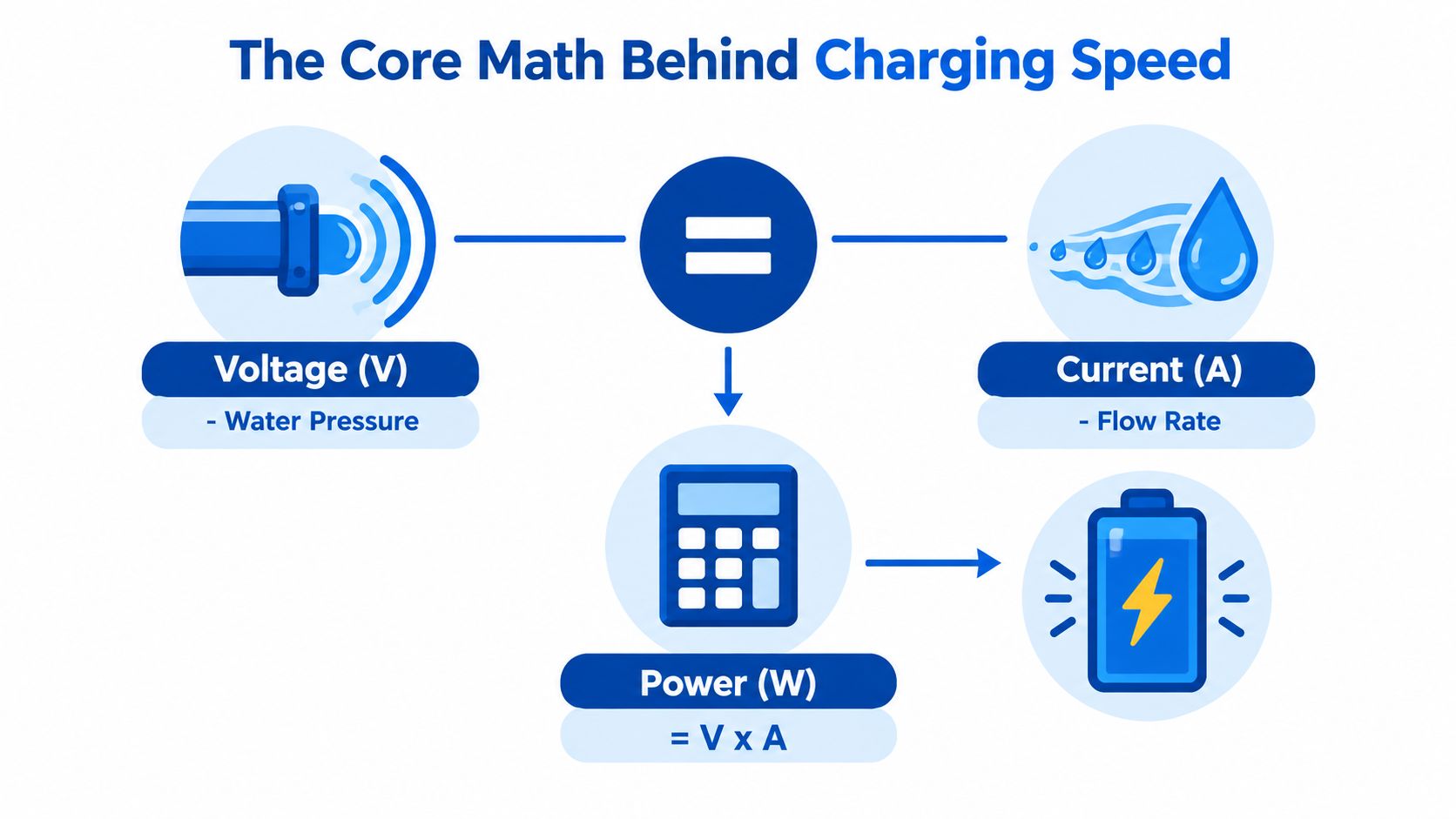
A charger delivering 20V at 5A produces 100W, as shown in this fast-charger power explanation. The same wattage can come from different voltage and current combinations, but the device, cable, and charging protocol determine which combination is allowed.
Why voltage matters
Higher current sends more electrical flow through the cable. Resistance then creates losses and heat, particularly in a thin or poorly made cable. Fast-charging systems often raise voltage in controlled steps rather than relying only on higher current.
USB Power Delivery coordinates the exchange. The charger advertises compatible output options, while the device requests one it can accept. The charger then adjusts its output instead of forcing its maximum rating into the phone.
That explains why a 100W adapter won't automatically charge every device at 100W. A phone may request a lower profile, a tablet may accept more, and a laptop may use another combination. The adapter's maximum is a ceiling, not a promise.
Reading the label without getting lost
A label may show several output combinations instead of one universal figure. For example, a 30W USB-C Power Delivery adapter can list 5V/3A, 9V/3A, 15V/3A, and 20V/1.5A, according to this USB Power Delivery technical reference.
Check three specifications before matching equipment:
- Device input support, such as USB PD or PPS.
- Charger output profiles, including voltage and current combinations.
- Cable rating, particularly for higher-power USB-C charging.
USB PD 3.1 added fixed voltage levels of 28V, 36V, and 48V, supporting up to 140W, 180W, and 240W respectively when suitable cables and devices are used. The equation remains unchanged. Higher voltage gives the system more room to deliver power when all three parts support the required standard.
How USB PD and PPS Negotiate Speed
USB Power Delivery has evolved by raising the available power ceiling and improving how devices request it. That history helps explain why a modern USB-C charger can serve a phone, tablet, and notebook, while an older adapter may struggle with the same collection of devices.
| Standard | Max Power and Key Feature |
|---|---|
| USB PD 1.0 | 100W, using 20V and five power profiles |
| USB PD 2.0 | 100W, aligned with USB-C |
| USB PD 3.0 | Added Programmable Power Supply, or PPS |
| USB PD 3.1 | Expanded maximum power to 240W with higher-voltage profiles |
USB PD 1.0 arrived in 2012 with a 100W ceiling. USB PD 2.0 followed in 2014, retaining that maximum while aligning the system with USB-C. In 2017, USB PD 3.0 added PPS. Then, in 2021, USB PD 3.1 expanded the maximum to 240W with 28V, 36V, and 48V profiles, as documented in this USB Power Delivery history.
Fixed profiles versus fine control
Traditional USB PD profiles offer defined voltage and current combinations. That works well, but the device may need to regulate the incoming power internally to reach the battery's preferred level.
PPS gives the charger and device finer control. USB PD 3.0 introduced voltage adjustments in 20mV steps and current adjustments in 50mA steps, while PPS remained limited to 5A and 100W, according to this PPS overview for USB Power Delivery.
Rather than completing one handshake and staying there, the device can continue requesting changes as charging conditions shift. One technical description says the exchange repeats at roughly 10-second intervals during charging, as explained in this PPS negotiation reference.
That ongoing adjustment helps the charging circuit work closer to the battery's needs. The result can be better efficiency and lower heat than a fixed-profile approach, a benefit described in this fast-charging standards explainer.
What this means for buying
If you're charging only a basic phone, USB PD may be sufficient. If your phone specifically supports PPS, a PPS-equipped adapter can provide more precise control. If you want one charger for a laptop and several smaller devices, USB PD 3.1 gives you a broader power range, but the cable and devices still need to support it.
For a vehicle setup, compare the adapter's supported profile with your phone rather than choosing by port appearance. This quick phone charger guide for cars is a natural place to compare that use case.
Why GaN Technology Makes Compact Power Possible
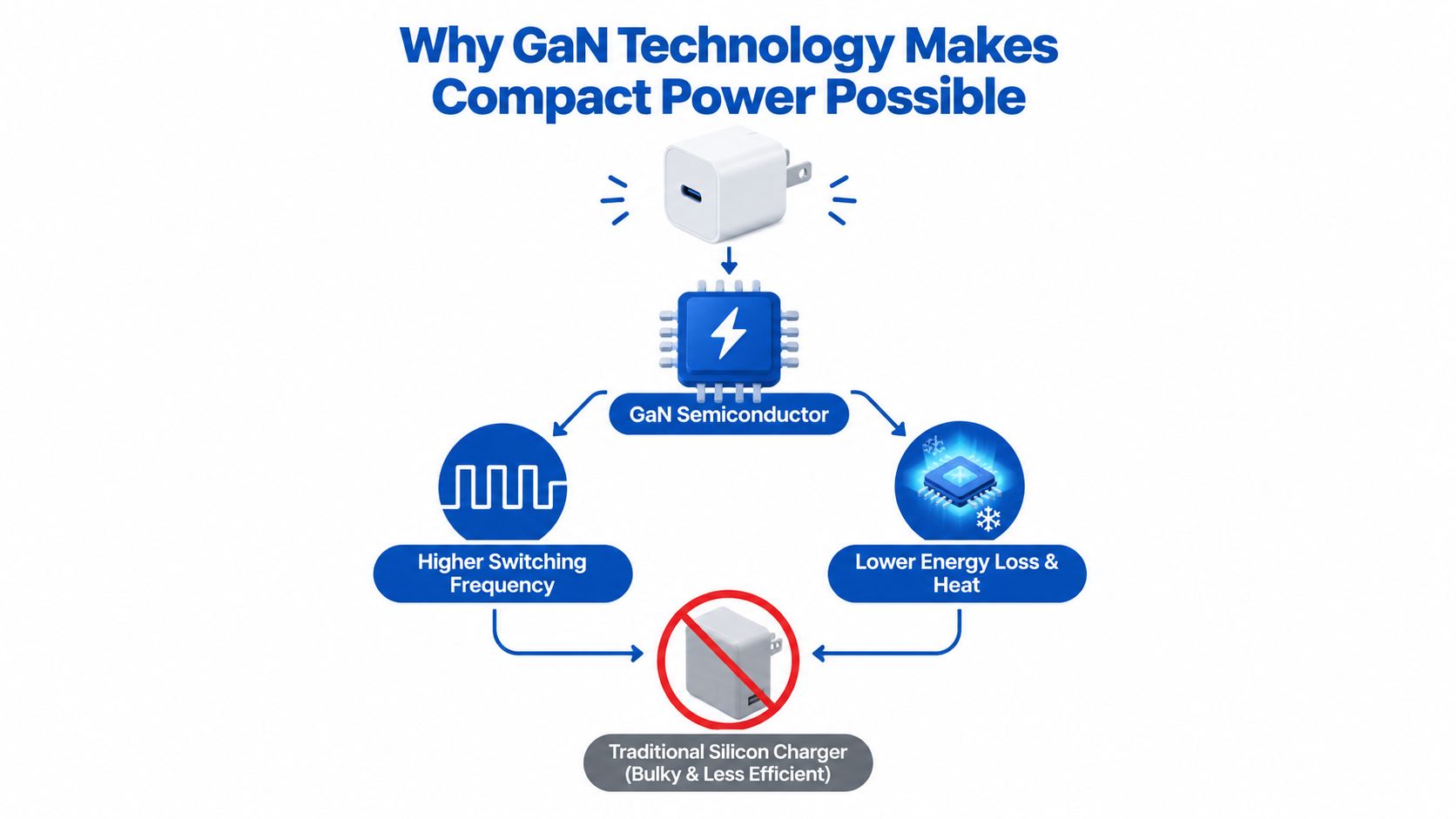
A charger can have an impressive rating and still become uncomfortable to hold under sustained load. Heat wastes energy, stresses components, and can encourage the device to reduce its charging demand. Gallium nitride, or GaN, helps address that problem at the switching stage.
The semiconductor difference
GaN switches at higher frequencies and with lower losses than silicon, according to this USB and wireless charger technology overview. That lets designers use smaller magnetic components and create higher power density.
The benefit isn't just a smaller travel brick. A more efficient design can devote more of its input energy to useful output instead of converting as much of it into waste heat.
This is why compact 65W to 140W GaN chargers can provide laptop-class power in a travel-sized form factor while remaining thermally manageable. The rating alone doesn't create that result. The semiconductor design helps the charger sustain it.
Why cooler hardware can charge faster
The charger and the battery have different thermal limits, but they influence the same experience. Battery fast-charging protection can account for charging power, current, temperature, voltage, and anode-potential limits, so rising heat can cause the device to reduce power.
A silicon and GaN adapter with the same advertised output may therefore feel different in daily use. The better comparison isn't just the maximum wattage. Look at whether the charger can maintain its requested profile under load, how many ports share the output, and whether its thermal design suits your use.
A compact desktop charger can be useful for a desk where several devices share one outlet. A smaller single-port model may make more sense for a phone bag. The right choice depends on whether you need sustained laptop output, simultaneous charging, or simple portability.
What to check: GaN improves the charger's efficiency and size, but it can't override a phone's input limit or replace a cable that isn't rated for the requested power.
For a closer look at the category, compare the GaN charger selection with your device list and preferred charging location.
Cables and Connectors The Hidden Speed Limit
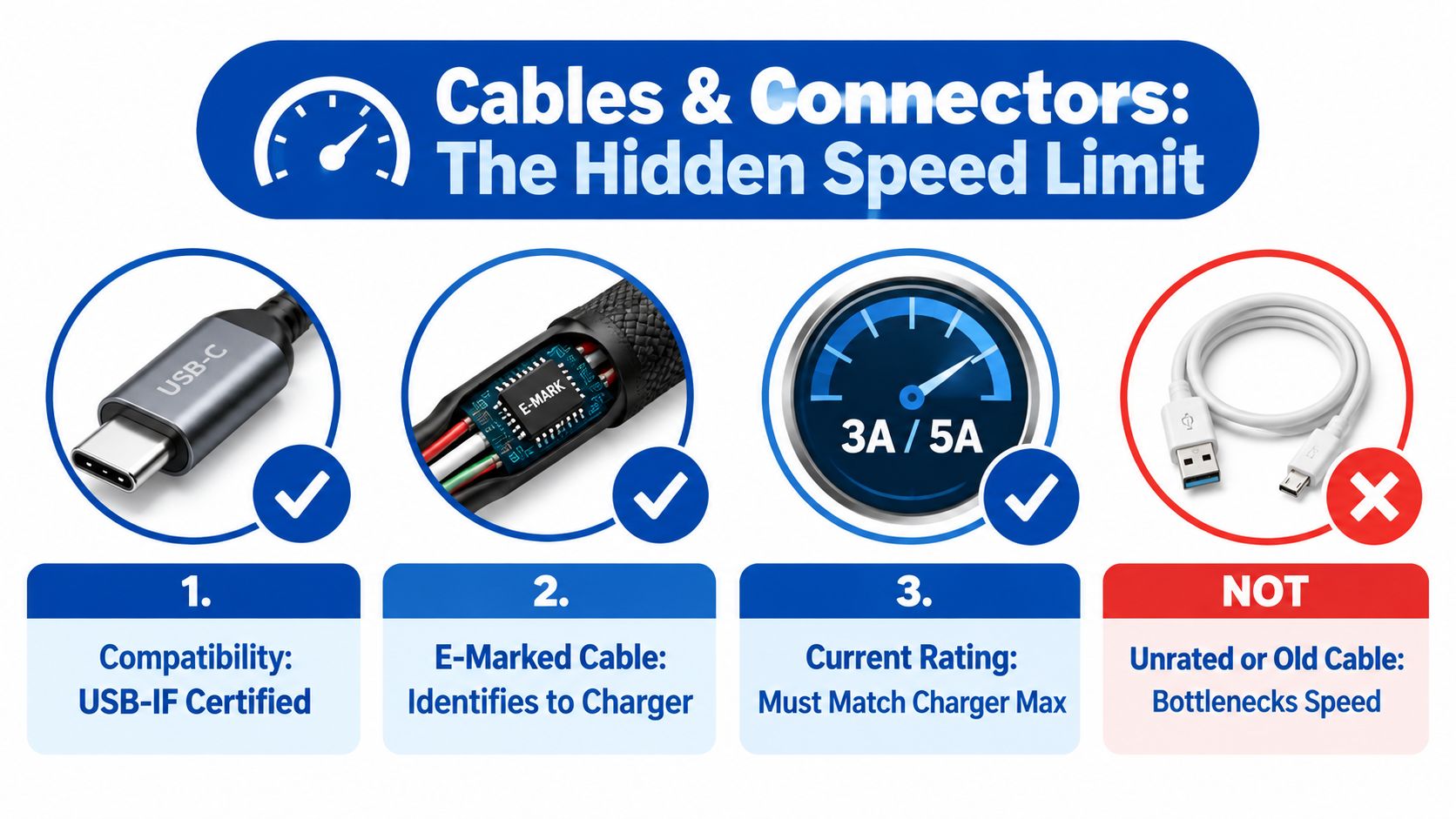
The cable is the quietest part of the charging setup, which is why it often gets ignored. A charger can offer high power, but the connection still depends on a cable that can identify itself correctly and carry the negotiated current.
A 100W charger may charge slowly when the phone doesn't support its protocol, the cable lacks the required rating, or the device requests a lower profile. The adapter isn't broken. The system has found the highest power level that all three components can safely share.
What an e-marker does
An e-marked USB-C cable contains an electronic identification chip. It tells the charger what the cable is designed to handle, which becomes especially important for higher-power USB-C connections.
For higher-power use, don't treat a cable as a passive piece of wire. Its current rating, construction, connector quality, and identification all affect whether the charger and device can select the intended profile.
Most fast-charging standards increase voltage rather than just pushing more amperage, as explained in this consumer guide to identifying a fast charger. That still doesn't make the cable irrelevant. The cable must support the voltage and current combination the device requests.
A practical cable check
Before blaming the power brick, inspect the complete path:
- Connector type: Confirm that the cable matches the ports on both ends.
- Power rating: Match the cable's stated capability to the charger and device.
- E-marker: Look for identification designed for higher-power USB-C operation.
- Condition: Replace cables with fraying, loose connectors, corrosion, or heat discoloration.
- Certification information: Prefer clear USB-IF compliance information when available.
For USB PD 3.1 Extended Power Range, or EPR, higher-power cables are part of the system requirement. A 140W to 240W setup isn't created by the adapter alone. The device and cable must also support the relevant high-power mode.
A cable can also introduce voltage drop. If resistance becomes significant, the device may receive less usable power or fall back to a safer profile. That's why a short, properly rated cable can outperform a longer, poorly specified one even when both look identical from the outside.
See DigiDevice's USB-C cable guide for fast charging before pairing a new adapter with a laptop, tablet, or phone.
Charging Curves Heat and Real World Timelines
The number on the charger describes potential output at a particular operating point. Your device follows a charging curve, so the actual rate changes as the battery fills.
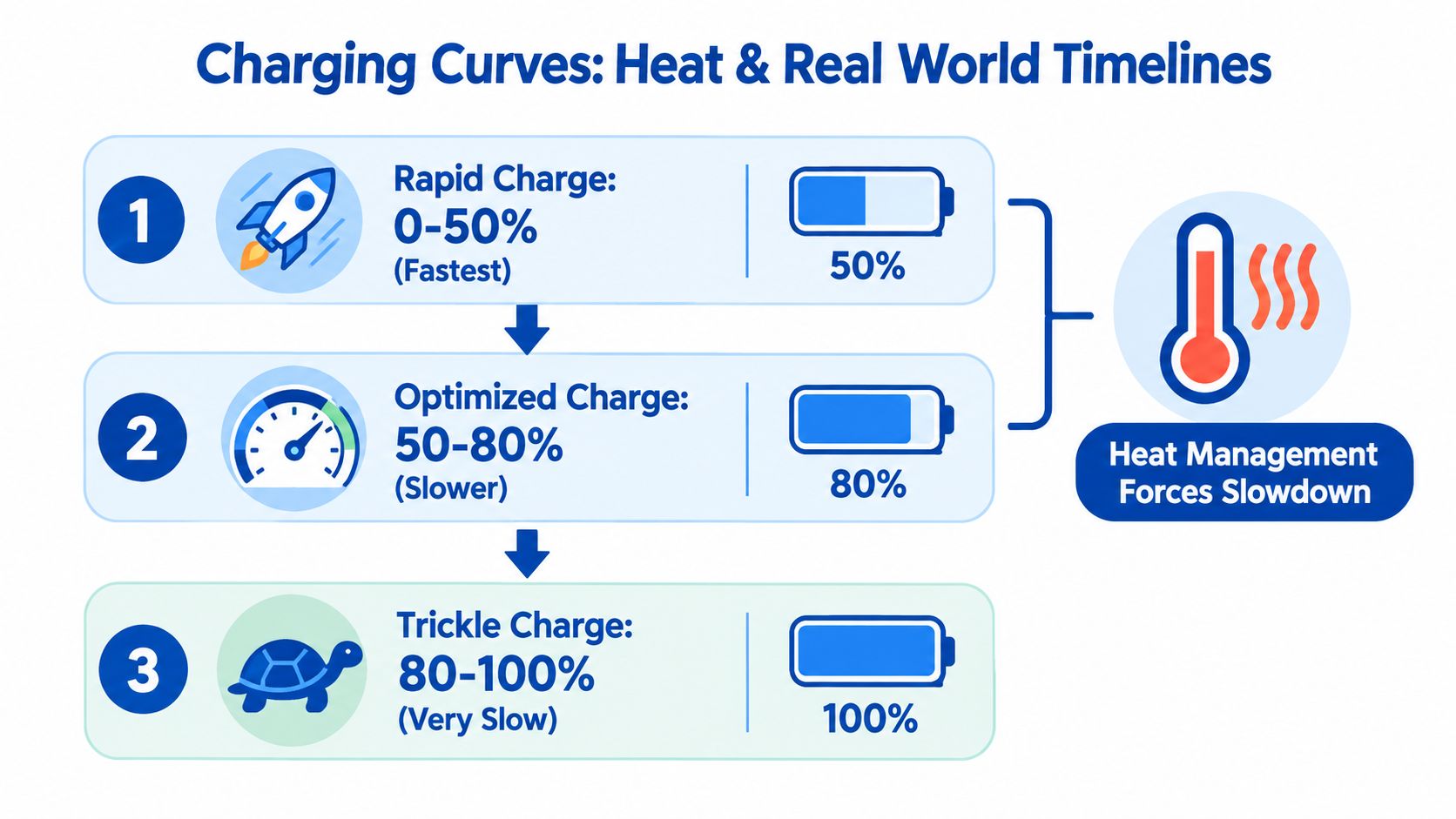
Early charging is usually the most aggressive phase. The device can accept more power while the battery voltage and temperature remain within its preferred range. As the battery approaches a higher state of charge, the device deliberately reduces input to limit stress and heat.
Three phases explain the disappointment
Think of charging as three broad stages:
- Rapid phase: The battery accepts its strongest supported input while conditions are favorable.
- Optimized phase: The device reduces power as battery voltage and temperature rise.
- Final phase: The last portion takes longer because protection systems prioritize controlled completion over maximum speed.
This is why a charger can feel impressively quick at the beginning but much slower near full. The slowdown isn't necessarily a fault. Battery protection limits can include power, current, temperature, voltage, and anode potential, so the device has several reasons to taper output.
Phones, tablets, and laptops also manage this differently. A phone may be limited by its battery and internal charging circuit. A tablet may accept a broader USB PD profile. A laptop can request more power, but only when its adapter, cable, and USB-C input support the required level.
Watch the embedded explanation here before diagnosing a slow final charge:
How to keep the fast phase useful
You can't eliminate the charging curve, but you can avoid making the device slow down earlier than necessary.
- Reduce heat: Keep the phone out of direct sun and avoid covering it with insulating material while charging.
- Use the right mode: Confirm that the adapter supports the device's required USB PD or PPS profile.
- Avoid heavy loads: Gaming, navigation, video recording, and hotspot use can consume part of the incoming power while the battery charges.
- Check the connector: A loose or contaminated port can interrupt the negotiation or increase resistance.
- Set a realistic target: If you need to leave soon, a partial top-up during the faster phase may be more useful than waiting for the final percentage.
Battery behavior also depends on the cell design and protection electronics. For readers working with removable cells or portable projects, this 18650 lithium battery guide provides relevant background on battery choice and handling.
Choosing the Right Fast Charging Setup for Your Devices
A charger can promise high wattage and still charge your phone slowly. The result depends on a three-way match between the charger, cable, and device. Start with the device's supported charging protocol and maximum input, then choose hardware that can supply what it requests.
Use this matching sequence
- Identify the device limit. A 100W adapter cannot make a phone accept more power than its charging hardware allows.
- Check protocol support. Look for USB PD, PPS, or the manufacturer's named standard.
- Review charger profiles. Confirm that the adapter offers the voltage and current combinations the device can request.
- Match the cable. Higher-power USB-C charging requires an appropriately rated, e-marked cable.
- Check shared output. A multi-port charger may divide its available power when several devices are connected.
- Allow for heat. A charger under a desk, inside luggage, or beside a warm laptop may reduce output to control temperature.
A GaN charger suits a compact setup with high power. A PD 3.1 desktop station fits a desk serving a laptop, phone, tablet, and accessories. Neither guarantees maximum speed. The device must support the protocol, and the cable must carry the negotiated power.
For example, DigiDevice lists a 6-port GaN desktop station with PD 3.1 support up to 140W per USB-C port. Check its listed voltage profiles to confirm that your laptop's 28V EPR requirement and your phone's PPS requirement are both covered before buying. Its maximum output is a capability, not a promise that every connected device will charge at that rate.
Use this final check: charger power, device protocol, cable capability, and thermal conditions must agree. If one part has a lower limit, the system normally selects a slower, safer mode.
DigiDevice offers chargers, adapters, and USB-C cables for mobile and laptop setups. Compare each product's specifications with your device's USB PD or PPS requirements, then visit DigiDevice to check available options and the current price.