

Best GaN Chargers for Faster, Cooler Power in 2026
You're staring at a bedside drawer full of mismatched charging bricks, while your laptop crawls toward a usable battery level and your phone warms up on an old USB-A adapter. The best GaN chargers fix that mess, but not because the box displays a bigger wattage number. The true test is sustained efficiency, thermal control, and intelligent power sharing when several devices are connected.
Direct answer: choose a compact single-port GaN charger for a phone or tablet, a dual-port model for a laptop-and-phone travel kit, and a higher-output desktop station for a household or desk crowded with devices. For premium models, the useful question is whether the charger holds its output under continuous load, not whether it briefly reaches its advertised peak.
Why Your Old Charger Is the Slowest Thing in Your Bag
The drawer starts innocently. There's a phone brick from an older handset, a tablet adapter, a laptop charger with a cable permanently attached, and a power-bank charger that still uses USB-A. None is useless, but together they create the exact problem a modern charging setup should eliminate: too many bricks, too many cables, and no clear idea which one should power what.
A 60W laptop brick can block the outlet beside it. Three separate chargers can turn a short trip into a cable-management exercise. An old USB-A port may still charge a phone, but it often makes a quick top-up feel painfully slow beside a modern USB-C Power Delivery connection.
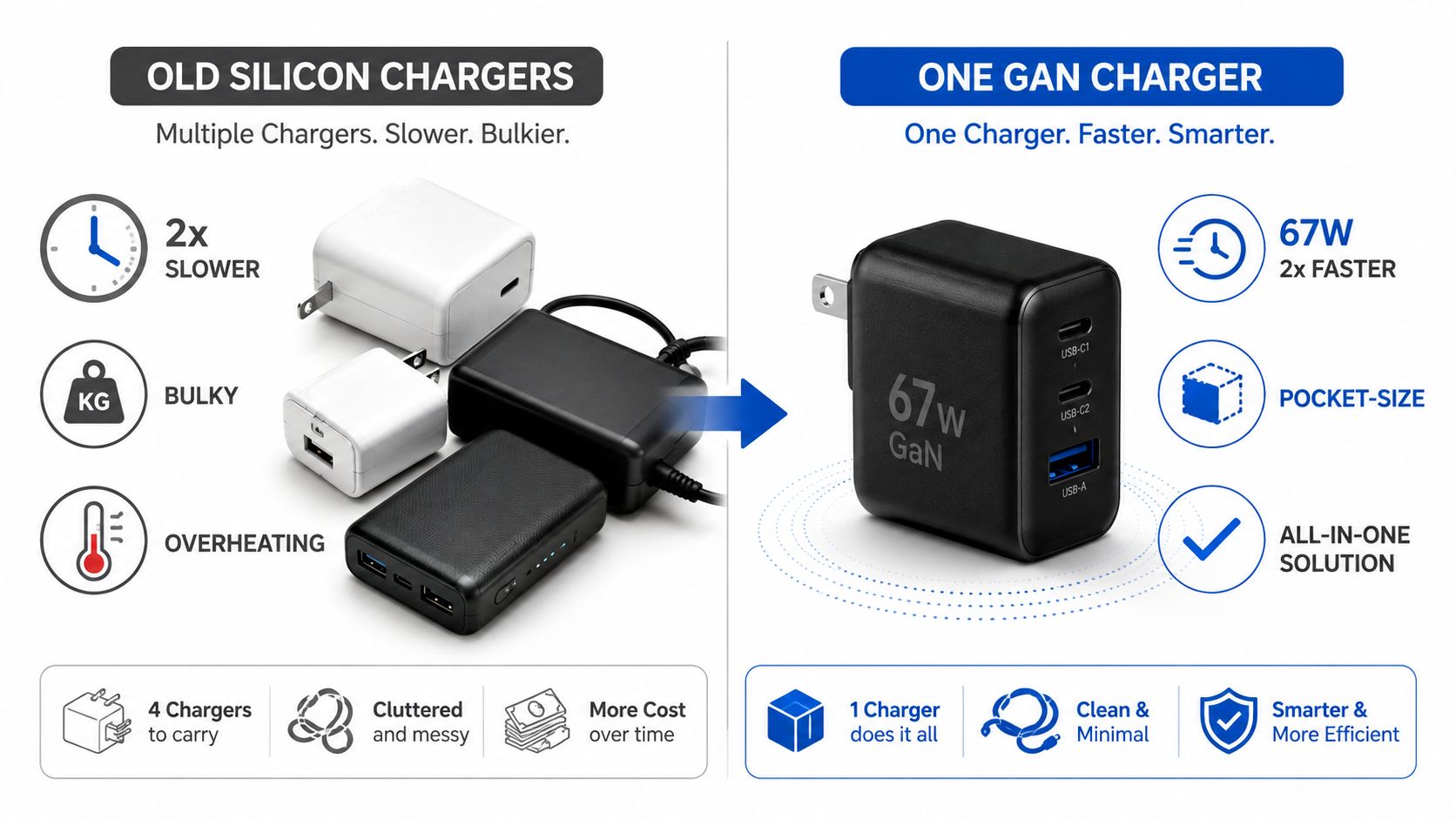
The upgrade is about fewer decisions
A GaN charger uses a more compact power-conversion design, so one unit can replace several older silicon adapters without taking over the wall socket. The practical benefit isn't just a smaller rectangle. You can leave a laptop and phone connected at the same time, carry one charging station instead of a pouch of bricks, and keep a bedside setup less cluttered.
For a light mobile setup, a compact USB-C fast charger for Android phones is a sensible starting point. A laptop user needs more headroom, while a family or shared desk needs enough total capacity to avoid one device stealing power from another.
Practical rule: don't buy the highest wattage printed on the front. Buy the charger whose port layout matches what you actually plug in together.
The behavioral change matters more than the spec-sheet drama. One well-designed charger means fewer outlet hunts, fewer cable swaps, and less uncertainty about whether a laptop is charging or merely holding its battery level. By the time you finish this guide, you'll know whether your routine calls for a travel brick, a laptop replacement, or a desktop-class multi-port station.
What GaN Actually Means for a Charger
GaN means gallium nitride, a semiconductor material used in the switching stage of a charger instead of relying only on traditional silicon components. In plain terms, the switching circuitry can operate efficiently at higher frequencies, allowing the transformer and related magnetic components to become smaller.
That engineering change produces two user-visible results. The charger can waste less input energy as heat, and the manufacturer can fit more power into a smaller body. You don't need to understand switching waveforms to notice the difference. You notice it when a laptop charger occupies less bag space, leaves nearby outlets accessible, and doesn't feel uncomfortably hot during a long session.
What changes at the wall
Traditional silicon chargers still work, but their thermal limits often force a larger enclosure and more room around internal parts. GaN designs can place components more densely, which helps explain why a compact 100W GaN charger can challenge the size of a much larger laptop brick.
That doesn't mean every charger using the GaN label is automatically excellent. The material improves the potential design envelope, but the finished product still depends on the power circuitry, cooling path, firmware, insulation, and protection systems. A poorly engineered GaN charger can still run hot or distribute power badly.
Independent market and technical coverage reports that GaN chargers typically convert about 92% to 95% of input power, compared with 80% to 87% for silicon designs, and that 65W GaN units can operate 10°C to 15°C cooler under full load. Those figures are summarized in technical coverage of GaN efficiency and thermal behavior, but they shouldn't be treated as a guarantee for every model.
GaN is now the baseline
GaN is no longer a reason to pay attention by itself. It's a useful foundation for a compact charger, not proof that the charger has a good port map or safe thermal design. Read DigiDevice's future tech gadgets coverage for the broader context, then judge a charger by what happens when you connect the devices you use every day.
The best designs pair GaN switching with clear USB-C Power Delivery profiles, sensible port spacing, reliable protection, and a published power-distribution table. The semiconductor makes compact power possible. The rest of the charger determines whether that power is pleasant to live with.
The Spec Sheet Decoded for Real Buyers
A charger's largest number often describes the entire unit, not the port your laptop uses. A 100W charger may deliver that full allocation to one laptop, then divide its available power after you connect a phone or tablet. The useful question is not “How many watts?” It is “How does this charger behave with my regular device combination?”
That sharing is normal. The problem is a product page that advertises the highest possible output while hiding the power available once a second cable is connected. Read the distribution table before comparing headline wattage.
Read these lines in order
USB-C PD 3.1 matters for high-power laptop charging. It identifies newer USB-C Power Delivery profiles, including the 140W and 240W classes used by demanding laptops and desktop charging stations.
PPS suits compatible Samsung phones and other devices that adjust voltage dynamically. It can also give compatible Chromebooks and mobile devices more precise charging than a fixed profile.
QC 5 matters when an older Android device expects Qualcomm Quick Charge behavior. For a laptop-first setup, USB-C PD usually matters more, but QC 5 can preserve compatibility across a mixed device collection.
USB-A still works well for older cables, earbuds, controllers, and accessories. Treat it as an accessory port, not an equal replacement for USB-C. Check its assigned output, since multi-port chargers often reserve their strongest profiles for USB-C.
| Spec Term | What It Means in Practice | Should You Care? |
|---|---|---|
| Total wattage | The combined power budget available to connected devices | Yes, especially with several devices |
| Per-port output | The maximum a particular port can provide | Absolutely |
| USB-C PD 3.1 | Higher-power USB-C charging profiles | Yes for demanding laptops |
| PPS | Adjustable charging behavior for compatible devices | Yes for supported Samsung phones and similar devices |
| QC 5 | Quick Charge support for compatible legacy Android devices | Only if your devices need it |
| USB-A | Older connector standard with broad accessory compatibility | Useful, but don't expect it to replace USB-C performance |
| Power-distribution table | Shows how output changes as ports become active | Essential for multi-port buying |
Ignore the peak-only sales pitch
Peak output is a starting point, not a buying decision. Find the distribution chart and check what happens when two laptops share the charger. A nominal 100W arrangement might divide into 60W plus 30W, leaving part of the budget unused or changing how quickly each device charges.
Match the charger to what you regularly plug in together. A solo laptop user needs a strong primary USB-C port. Someone charging a laptop and phone at the same time needs predictable sharing, not merely a larger number on the box. Use this guide to fast phone charging for Android alongside your device specifications, then choose the port behavior that fits your routine.
Efficiency, Heat, and Sustained Output Compared
A charger earns its place on your desk during the hour after the marketing peak. A short burst at maximum output tells you little about how the unit behaves while a laptop, tablet, and phone keep drawing power through a long work session.
The most useful test asks three questions. How much energy reaches the device compared with what the charger pulls from the wall? How hot does the enclosure become under continuous load? Does the charger maintain its output, or does thermal protection force it to throttle?
The stress-test evidence
One controlled 30-minute full-load stress test reported conversion efficiency results of 96.2%, 94.8%, and 92.5% across three top-tier GaN units. The best performer kept energy loss below 3W and temperature rise below 8°C above ambient, according to the independent GaN thermal-efficiency test.
Those results make the buying lesson clear. Two chargers can carry the same wattage label and still behave differently once the load stays high. One may hold its thermal envelope with modest heat, while another approaches its limits and reduces output.
| Charger | Wall-to-Tip Efficiency @ 100W | Surface Temp After 60 Min | Sustained Output | Time to Charge 16" Laptop to 80% |
|---|---|---|---|---|
| Budget 100W GaN brick | Not provided in verified testing | Not provided | Must be verified by testing | Not provided |
| Premium 100W GaN brick | Results among tested units ranged from 92.5% to 96.2% | Best tested rise stayed under 8°C above ambient during the reported stress test | Strong performers maintained efficient full-load behavior during the test | Not provided |
| Silicon reference unit | Not provided in the verified test | Not provided | Not provided | Not provided |
The table deliberately leaves unsupported fields blank. There isn't reliable data here for a 60-minute temperature result or a laptop charge time, so any article claiming precise values would be pretending.
Why sustained behavior wins
A laptop's charging speed can change as its battery fills and its internal temperature rises. A charger that remains cool and stable has a better chance of delivering useful power throughout the session than one that reaches its thermal ceiling early.
For a desk setup with multiple devices, consider the 240W Digital GaN Charger with PD3.1 and 140W USB-C output. Its relevance is the desktop-class format and multi-port design, not a promise that every connected device receives the headline output simultaneously.
The charger that stays composed at full load is more useful than the charger that wins a box-front wattage contest.
Matching Charger Type to Real Use Cases
A charger should fit your charging pattern before it fits your wishlist. Port count, physical layout, and dynamic allocation decide whether the device feels effortless or becomes another piece of desk clutter.
The frequent traveler
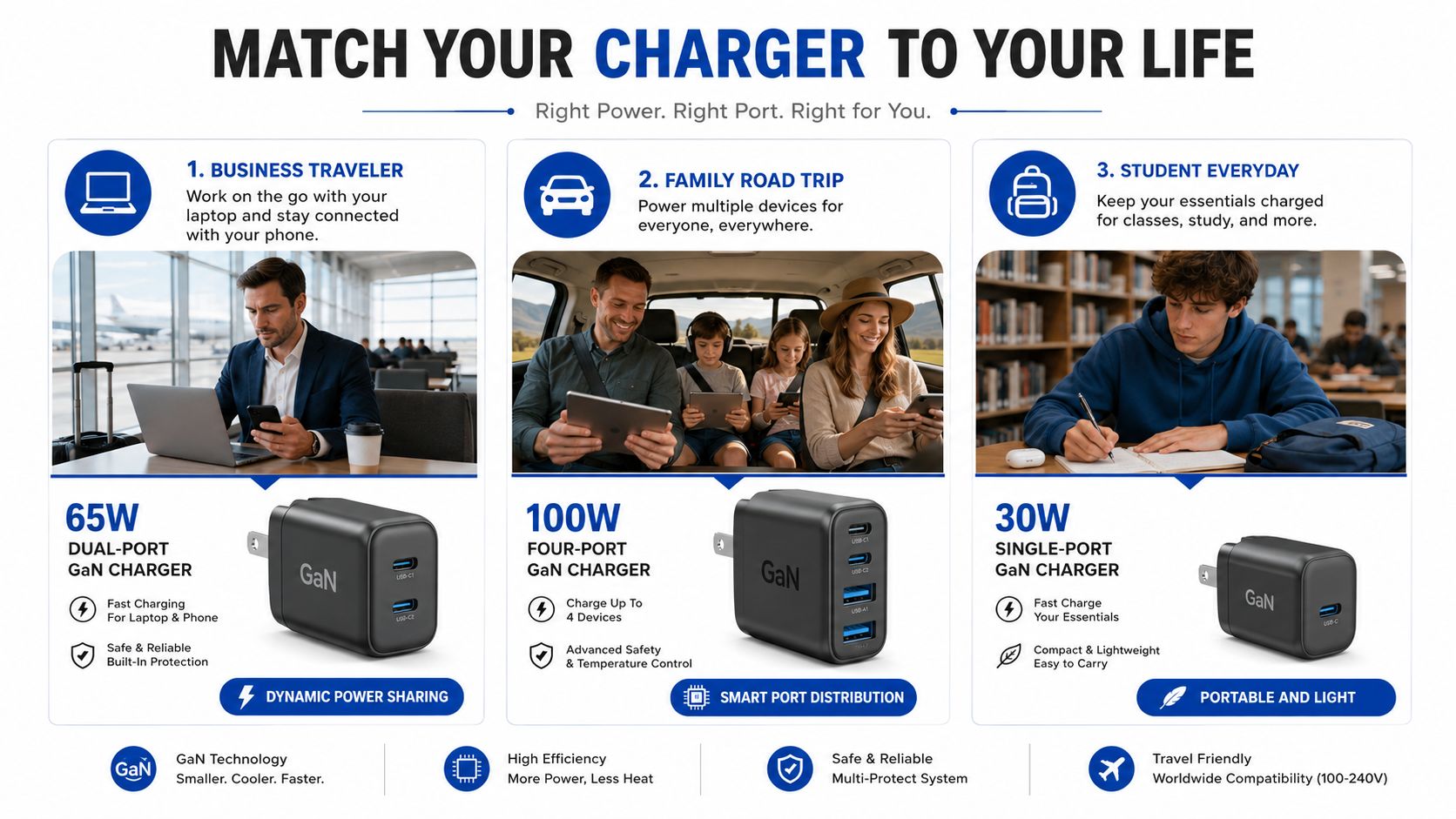
For a traveler carrying a laptop and phone, a compact dual-USB-C GaN charger is the strongest default. A 65W class unit handles a light laptop setup and a phone without forcing you to pack separate bricks, while foldable prongs make the shape easier to stow.
If your laptop demands more, choose a 100W class travel charger with interchangeable regional plugs. That arrangement suits hotel desks because it reduces the number of adapters and keeps the power source close to the devices instead of scattering them across the room.
The shared household
Families and multi-device users need a desktop station, not merely a powerful wall plug. A 100W to 150W class unit with three USB-C ports and one USB-A port can serve laptops, phones, tablets, earbuds, and older accessories, provided its power-distribution table matches the expected load.
Independent testing of multi-port designs treats them as dynamic power-sharing systems, not fixed-output blocks. A review of a 200W, six-port desktop GaN station highlighted four USB-C ports and two USB-A ports, showing why desktop models suit mixed-device users who need simultaneous charging. The multi-port GaN charger comparison also emphasizes that total wattage is a shared budget.
The dorm or small-room setup
A student with a phone, earbuds, and tablet doesn't need a desktop power station. A compact 45W class charger with a useful USB-C port can handle a small kit without adding a power strip to an already crowded outlet.
For broader desk organization, DigiDevice's multi-device charging station guide is a natural companion. The decision is simple: one or two devices favor portability, while a permanent collection of devices favors more ports and a clearly documented allocation scheme.
Here's a visual reference for how these patterns differ:
Choose by routine:
- Travel kit: dual USB-C, compact body, foldable prongs.
- Laptop desk: higher single-port output, PD 3.1 if required.
- Family station: several USB-C ports, clear dynamic sharing.
- Student setup: compact output with enough capacity for a tablet and accessories.
Safety and Certification Checklist Before You Buy
Safety verification shouldn't take long. Start by checking whether the listing clearly identifies the charger's compliance marks, protection features, manufacturer, and actual port behavior. If the seller hides those details behind vague language, skip the listing.
Check the marks that matter
UL or ETL are relevant safety marks for North American products. CE indicates conformity with applicable European requirements. FCC relates to electromagnetic-interference compliance for products sold in the United States. USB-IF recognition is useful when you want confidence in USB Power Delivery interoperability.
A mark printed on a product image isn't enough by itself. Look for a consistent manufacturer name, model number, and documentation that identifies what was tested. Missing or suspicious certification information is a hard reason to walk away, regardless of the discount.

Inspect the engineering clues
A credible listing should identify over-temperature protection and over-current protection. Those systems help the charger react when a load exceeds safe conditions, but they don't replace sensible thermal design or a reputable test mark.
Be cautious with a claimed 100W output in an implausibly light enclosure, exposed or poorly insulated prongs, and vague country-of-origin information. Weight alone doesn't prove a charger is unsafe, but an extreme mismatch between the claim and the physical design deserves scrutiny.
Use this quick pre-click audit:
- Confirm the model number: Make sure the same model appears on the charger, listing, and documentation.
- Read the port chart: Verify the output for one, two, and several connected devices.
- Check protections: Look for over-temperature, over-current, over-voltage, and short-circuit protection.
- Inspect certification details: Don't rely on a decorative logo with no identifiable product information.
- Use the right cable: A capable charger still needs a cable rated for the power profile you expect.
For cable and mains-accessory planning, DigiDevice's Longwell power cord information can help you avoid treating the wall connection as an afterthought.
GaN can improve efficiency and compactness, but it doesn't guarantee overnight safety or long life by itself. Certification, thermal design, and load management matter more than the GaN label alone.
Picks by Persona and Where to Buy
A charger should match the way your devices share power, not the largest wattage printed on its box. I'd choose a modest model that keeps one laptop and one phone charging reliably over a huge station that rarely reaches its useful load. Sustained output, heat during long sessions, and predictable port allocation matter more than a peak figure you see for a few minutes.
The minimalist traveler
Primary pick: choose a dual-port charger in the 65W to 100W class, with two USB-C ports, foldable prongs, and a published distribution table. This format suits travelers carrying a laptop, phone, earbuds, and perhaps a tablet. The distribution table matters because plugging in the phone should not leave the laptop receiving only maintenance-level power.
Budget alternative: use a compact single-port charger if you normally charge one device at a time. It takes less space and has fewer sharing rules, though you will need another outlet when the phone and laptop need power together.
Premium upgrade: select a 100W travel charger with interchangeable regional plugs when hotel rooms, airport lounges, and international outlets are part of your regular week. The extra flexibility earns its space in a travel kit.
Prioritize USB-C PD for the laptop and PPS for compatible phones. Leave enough capacity for the second device, then check how the charger behaves after several hours rather than judging it by its initial charging speed.
The hybrid laptop worker
Primary pick: choose a desktop replacement in the 100W to 140W class, preferably with USB-C PD 3.1 when your laptop requires higher-power charging. It can sit beside a monitor or hub and keep the laptop, phone, and accessories connected, eliminating the nightly cable shuffle.
Budget alternative: a 100W multi-port charger with two USB-C ports works well if its listing explains exactly how output changes with both ports active. A clear allocation table is more useful than a higher headline wattage with hidden restrictions.
Premium upgrade: use a desktop station with several USB-C ports and enough total capacity for the workstation. Its advantage is sustained thermal headroom and steady allocation across a long workday. A station that runs hot or repeatedly cuts laptop output under load is a poor upgrade, even if its maximum rating looks impressive.
A desktop GaN charging station for laptops and phones fits this category when several devices need one fixed charging point. Check the product page for its exact port arrangement and output table before purchasing.
The multi-device household
Primary pick: choose a four-port, 100W to 150W class charger with intelligent dynamic sharing. It should provide several USB-C ports for newer devices and at least one USB-A port for older accessories. The right model reallocates power as devices fill, without making the laptop repeatedly start and stop charging.
Budget alternative: a lower-output station suits a household focused on phones, earbuds, and tablets. It will not handle several power-hungry laptops at once, but it can reduce outlet clutter and stay within a more manageable thermal range.
Premium upgrade: choose a 200W, six-port desktop station for a mixed collection of laptops, phones, tablets, earbuds, and accessories. A reviewed example uses four USB-C and two USB-A ports with 200W total output, showing why a desktop layout works well for simultaneous charging. That capacity remains shared, so read the allocation rules instead of assuming every port receives maximum power. Pay attention to whether the station holds its output overnight with several smaller devices connected.
| Persona | Primary Pick | Wattage | Ports | Key Protocol | Price Band |
|---|---|---|---|---|---|
| Minimalist traveler | Compact dual-port GaN charger | 65W to 100W class | Two USB-C | USB-C PD, PPS where supported | Not provided |
| Hybrid laptop worker | Desktop replacement charger | 100W to 140W class | Two or more USB-C | USB-C PD 3.1 when required | Not provided |
| Multi-device household | Desktop multi-port station | 100W to 200W class | Four to six mixed ports | USB-C PD with documented sharing | Not provided |
Price bands are omitted because verified information does not provide reliable current prices. Buy through the manufacturer, an authorized retailer, or a reputable certified refurbisher. Before checkout, inspect the listing for visible certification marks, the actual port count, the model number, and a complete power-distribution table.
For shopping context, DigiDevice offers chargers, adapters, cables, and specialized electronics for mobile and PC setups. Match the product page to your device mix, verify its output allocation, and choose the charger that stays cool and useful under your normal load instead of the one carrying the loudest wattage claim.
Frequently asked questions
Do GaN chargers run cooler?
They can, but the result depends on the complete thermal design, enclosure, airflow, and load pattern. GaN helps the conversion stage waste less energy as heat, while poor ventilation or aggressive sustained loading can still make a charger uncomfortable to use. Check long-duration behavior and keep vents clear.
Is a multi-port GaN charger slower?
Not automatically. Its behavior depends on how total wattage is shared when several devices connect. A charger with a clear distribution table is easier to predict, while a model that hides allocation rules may reduce laptop output unexpectedly.
What should I check before buying a GaN charger?
Check the model number, certification information, USB-C PD profiles, protection features, port count, and power-distribution table. Then match the charger's sustained behavior and port layout to the devices you charge together. A household station needs stable sharing, while a travel charger needs compactness without sacrificing the laptop's charging priority.