

Best Earbuds for Gaming in 2026
The newest Bluetooth version doesn't automatically make a pair the best earbuds for gaming. Choose the connection your platform supports, then judge delay, microphone quality, and comfort in that mode. A technically impressive pair is still the wrong purchase if its transmitter won't work with your console.
Updated for March 2026.
Why Most Gaming Earbuds Advice Gets It Wrong
A Bluetooth badge tells you less than a connection diagram. Before comparing drivers, codecs, or noise cancellation, trace the audio path from your gaming device to your ears.
That sounds basic, but it's where generic rankings become misleading. An earbud can offer advanced wireless audio and still require a transmitter that your console doesn't support, an occupied USB port, or a phone feature you can't access.
The core reframe: Buy the connection between your device and your earbuds, not the longest feature list.
Gaming isn't a single platform
The audience is too broad for a universal recommendation. Newzoo figures reported for 2024 put worldwide games revenue at approximately $182.7 billion, with about 3.42 billion players; mobile contributed roughly $100.3 billion, consoles $43.5 billion, and PC $39.0 billion, according to this breakdown of the global games market.
Those platforms create different buying problems. A phone player may want pocketable earbuds that also handle calls, while a desk player may care more about dependable team chat and uninterrupted audio.
- Mobile priorities: Convenient pairing, a portable case, usable microphones, and a gaming mode that works on the intended phone.
- PC priorities: Predictable timing, clear input-device selection, and a connection that remains stable during play.
- Console priorities: Explicit transmitter support, working chat, and a practical place to connect the receiver.
- Cross-platform priorities: Clear instructions for switching devices without sacrificing the features you bought.
The distinction isn't whether wireless earbuds are good or bad. It's whether their useful features survive the move from the product page to your actual setup.
The following visual separates the specifications worth checking from the shortcuts that can mislead.
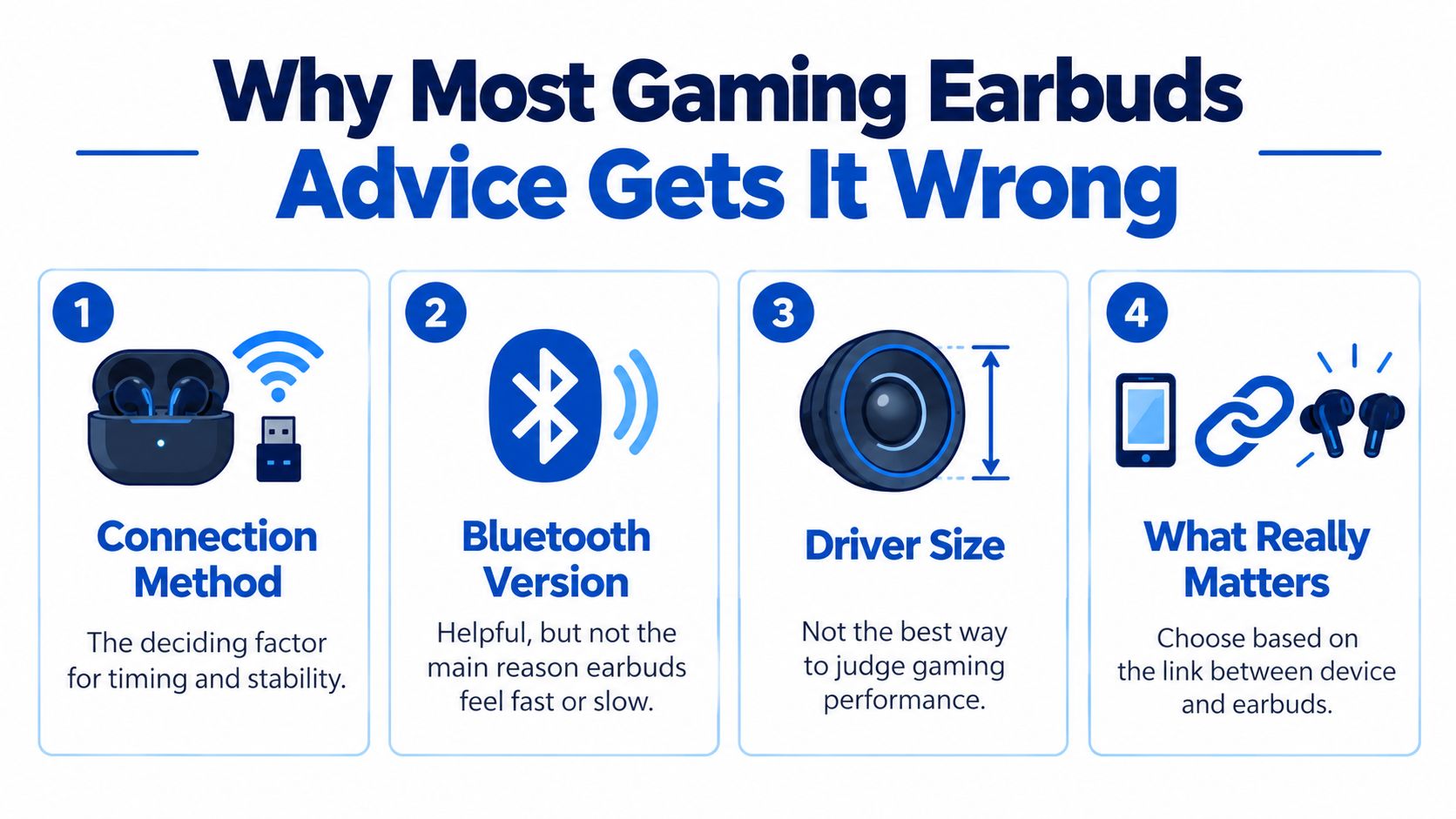
Stop treating driver size as a verdict
A driver specification doesn't establish whether you can distinguish a reload from an explosion, hear a teammate clearly, or tolerate the fit through a match. Those are separate questions that deserve separate checks.
My buying rule is simple: reject incompatible options before comparing sound. Then evaluate the remaining pairs using the same connection mode, game, and microphone conditions.
That approach may leave a less glamorous product on your shortlist. It also prevents an expensive pair of everyday earbuds from becoming a frustrating gaming accessory.
The Specs That Actually Change In-Game Audio
A late gunshot is a timing problem, not something a richer codec can necessarily fix. Treat latency, voice capture, and fit as independent requirements rather than assuming a premium audio specification covers everything.
Connection Modes and Typical Gaming Delay
| Connection Mode | Typical Delay | Best For | Main Trade-off |
|---|---|---|---|
| Standard SBC Bluetooth | 259.8 ms average in the cited true-wireless testing | Convenience when timing is secondary | Noticeable separation between action and sound |
| LE Audio using LC3 | Roughly 20–30 ms codec latency, not total system delay | Compatible devices with verified implementation | Every part of the audio chain matters |
| Proprietary USB transmitter | Check independent end-to-end measurements | Timing-sensitive wireless play | Platform and receiver compatibility |
| Wired USB-C or analog | No universal figure established here | Ranked and rhythm play when wireless delay is uncertain | Cable routing and connector requirements |
The Bluetooth measurements and LC3 distinction come from the RTINGS investigation of headphone latency. Its standard Bluetooth result shouldn't be read as a measurement of every gaming mode, and LC3 codec latency shouldn't be presented as guaranteed end-to-end performance.
LDAC and high bitrate don't mean low delay. Sound quality and timing are different variables, so a music-focused codec badge isn't a substitute for testing the intended gaming connection.
Microphones need a gaming workload
A quiet-room voice sample doesn't reveal how an earbud handles mechanical keys or simultaneous game audio. Look for recordings that include typing, speech, and realistic background noise.
One published gaming-earbud testing example describes keyboard-noise rejection at 72 dB SPL, approximately 4.2 hours of playback with ANC and game audio active, and a proprietary 2.4 GHz connection measuring approximately 32 ms. It also reports roughly ±14 ms variation with an LDAC configuration, illustrating why consistency deserves attention alongside average delay.
These are results from a particular example, not promises for the category.
- Voice clarity: Listen for missing consonants and clipped words, not merely reduced background noise.
- Fit and isolation: Check whether the seal stays comfortable when you speak or move your jaw.
- Wired versus wireless: Decide whether cable freedom matters enough to justify charging and receiver management.
- Platform-specific modes: Confirm that a useful Android setting also exists on the platform where you play.
For a broader buying checklist, compare low-latency wireless audio options for competitive FPS before treating any advertised gaming mode as sufficient.
Three Earbud Archetypes and Who Each One Suits
The useful shortlist isn't a ladder from cheap to expensive. It's a choice between predictable wired operation, dedicated wireless gaming, and everyday portability.
The comparison below helps separate those priorities. Its audiophile-style category describes a sound-first preference, not proof of competitive performance.
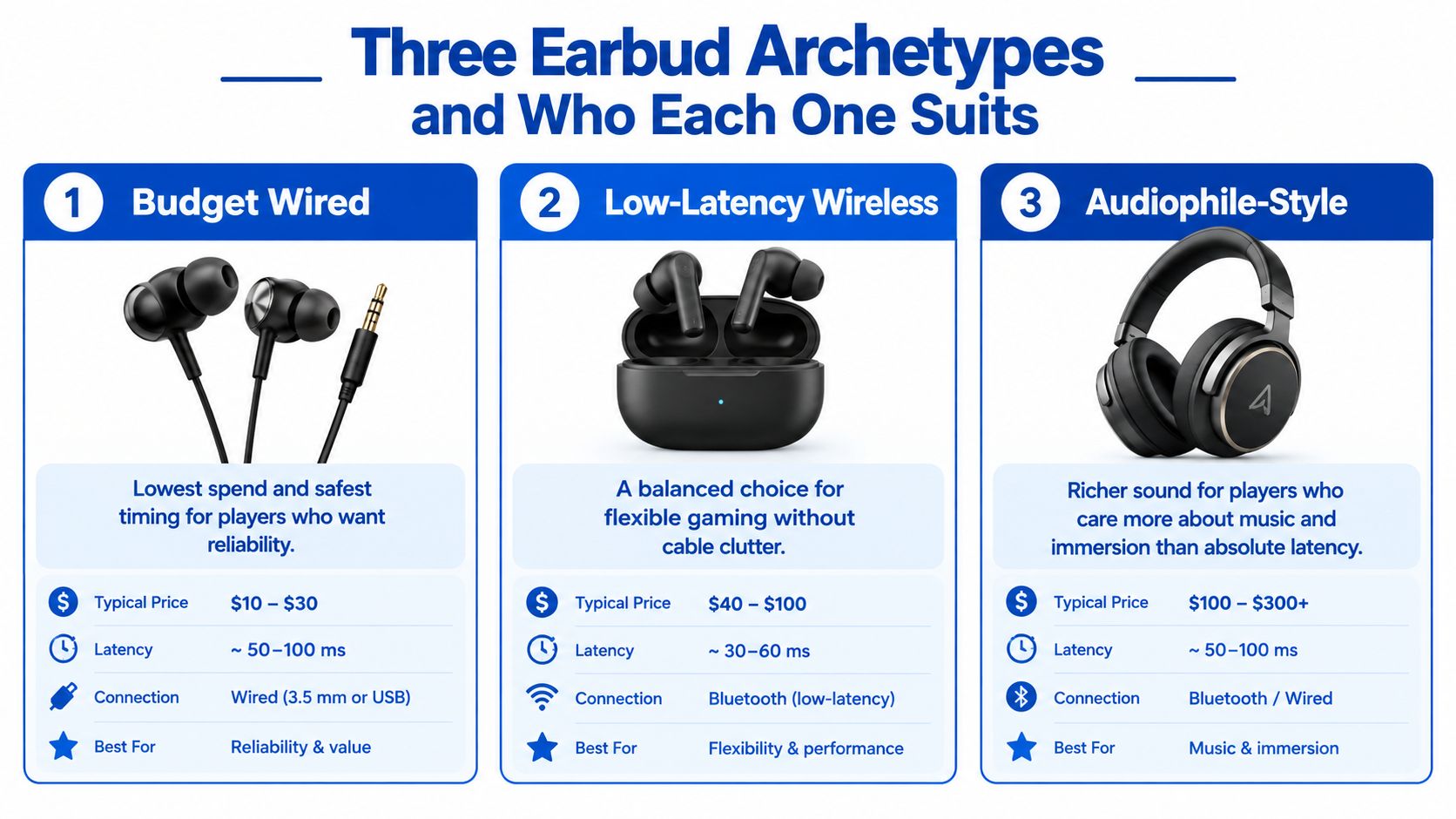
Budget wired earbuds
Choose this direction when you want to spend on the listening experience rather than wireless conveniences. It suits a stationary setup, a player who dislikes charging, or someone who wants a straightforward fallback.
The compromises are physical. You need a manageable cable route and the correct audio connection, and you shouldn't assume an inline microphone will work through every adapter.
A sensible wired purchase leaves room in the budget for fit and connection quality. A comfortable pair with the right connector is more useful than a technically ambitious pair attached through an unsuitable adapter.
Dedicated low-latency wireless earbuds
This archetype suits players who want cable freedom at a regular gaming station. The included transmitter is part of the purchase, not an optional accessory to evaluate later.
Check its shape as well as its compatibility. A receiver that blocks a neighboring port or clashes with a handheld case can become annoying even when the audio works.
The failure point is buying for a desk and expecting equal convenience everywhere else. A protruding phone receiver may be a poor fit for travel, charging, or handheld grip.
A particularly costly mismatch is buying Bluetooth-only earbuds for a console without confirming an accepted audio path.
Hybrid true wireless earbuds
Hybrid models suit players who alternate between everyday phone use and gaming. The strongest fit is a product whose documented modes match both activities, rather than one whose gaming claim depends entirely on an app setting.
Don't assume “hybrid” means simultaneous audio mixing. Switching sources, maintaining multiple connections, and hearing both sources together are different capabilities.
If immersion matters more than competitive timing, explore the spatial-audio headphone buying guide alongside your earbud shortlist. Consider it a comparison of priorities, not a reason to pay for processing you won't use.
For another perspective on the category, watch the accompanying video.
Console, PC, and Mobile Compatibility Explained
Will these earbuds work on this exact device, using this exact connection? Get that answered before ordering, including whether the microphone works through the same path.
Standard Bluetooth is limited or unsupported on some consoles, Xbox uses a nonstandard wireless approach, and LE-only products can exclude older devices. The platform-compatibility discussion in this gaming-earbud guide highlights why a broad cross-platform label isn't enough.
Check each device separately
| Platform | What to verify before buying |
|---|---|
| PS5 | Explicit support for the included USB transmitter, game audio, and voice chat |
| Xbox | Exact Xbox compatibility for that product version and its intended connection |
| Nintendo Switch | Handheld and docked operation, receiver clearance, and microphone support |
| Steam Deck | The intended USB or wireless mode, including use through your dock |
| Windows | Playback and recording-device support, available ports, and required software |
| Android | Phone-specific codec support, gaming-mode availability, and USB accessory requirements |
| iPhone | Connector compatibility and features available without an Android-only control app |
| Meta Quest | Explicit support for the headset model, receiver fit, and microphone routing |
For PS5, distinguish compatibility with the console from compatibility with a television or phone nearby. Those aren't interchangeable audio paths.
For Xbox, don't assume the PS5 version of a transmitter will work. Look for explicit confirmation for the exact variant being sold.
On Nintendo Switch, check the configuration you use. A setup that fits comfortably while docked may be awkward when handheld.
Steam Deck and Windows buyers should check the entire desk arrangement. Include the dock, hub, adapter, and microphone input in that check rather than stopping at an operating-system logo.
For Android, iPhone, and Meta Quest, ask whether the transmitter leaves the device usable while charging and holding it normally. Physical fit can be as decisive as software support.
Use this checklist before committing to a wireless pair.
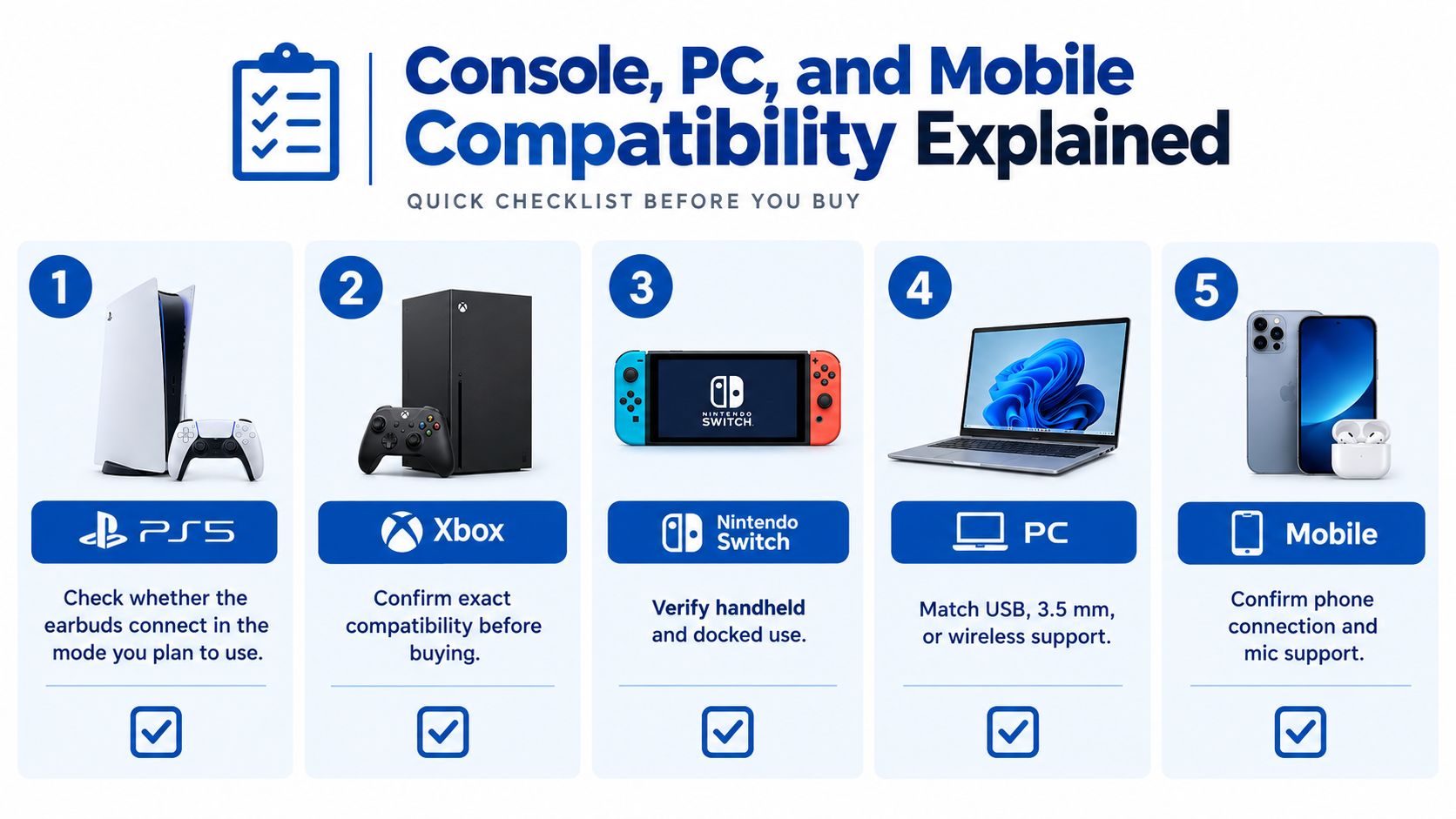
Check the accessory chain
- USB-C and USB-A: Confirm whether the required adapter is included and supports the intended audio accessory.
- Controller connections: Verify the earbud plug, microphone wiring, and controller support together.
- Simultaneous connections: Ask whether mobile audio mixes with console audio or merely interrupts it.
- LE Audio: Confirm support on both ends rather than relying on a Bluetooth version number.
Once compatibility is established, follow the true wireless earbud pairing guide to establish a clean baseline connection before introducing additional devices.
How to Choose Based on Platform, Budget, and Play Style
Start with the platform where a bad purchase would hurt most. If ranked PC matches matter more than occasional phone gaming, don't let phone convenience dictate the whole decision.
Your budget should cover a working setup, not just the earbuds. Include any necessary adapter, replacement tips, or separate microphone before comparing the final cost.
Follow the decision path
- Name your primary platform. Record its exact model and the connection you intend to use.
- Eliminate unsupported options. Treat unclear compatibility as an unanswered question, not an implied yes.
- Set a complete budget. Compare the total purchase, including accessories you actually need.
- Decide how important chat is. If communication is essential, favor a serviceable microphone arrangement over an impressive codec list.
- Check session practicality. Consider fit, charging opportunities, and whether you need awareness of the room.
- Choose a direction. Stop comparing unrelated categories once your requirements point clearly toward one.
For ranked or rhythm games without independently measured wireless performance, my recommendation is wired USB-C or analog. For mixed phone and PC use, favor a documented Bluetooth-plus-transmitter arrangement rather than expecting ordinary phone audio to cover every situation.
The setup pictured below illustrates why the controller, phone, cable, and earbud connection belong in the same buying decision.
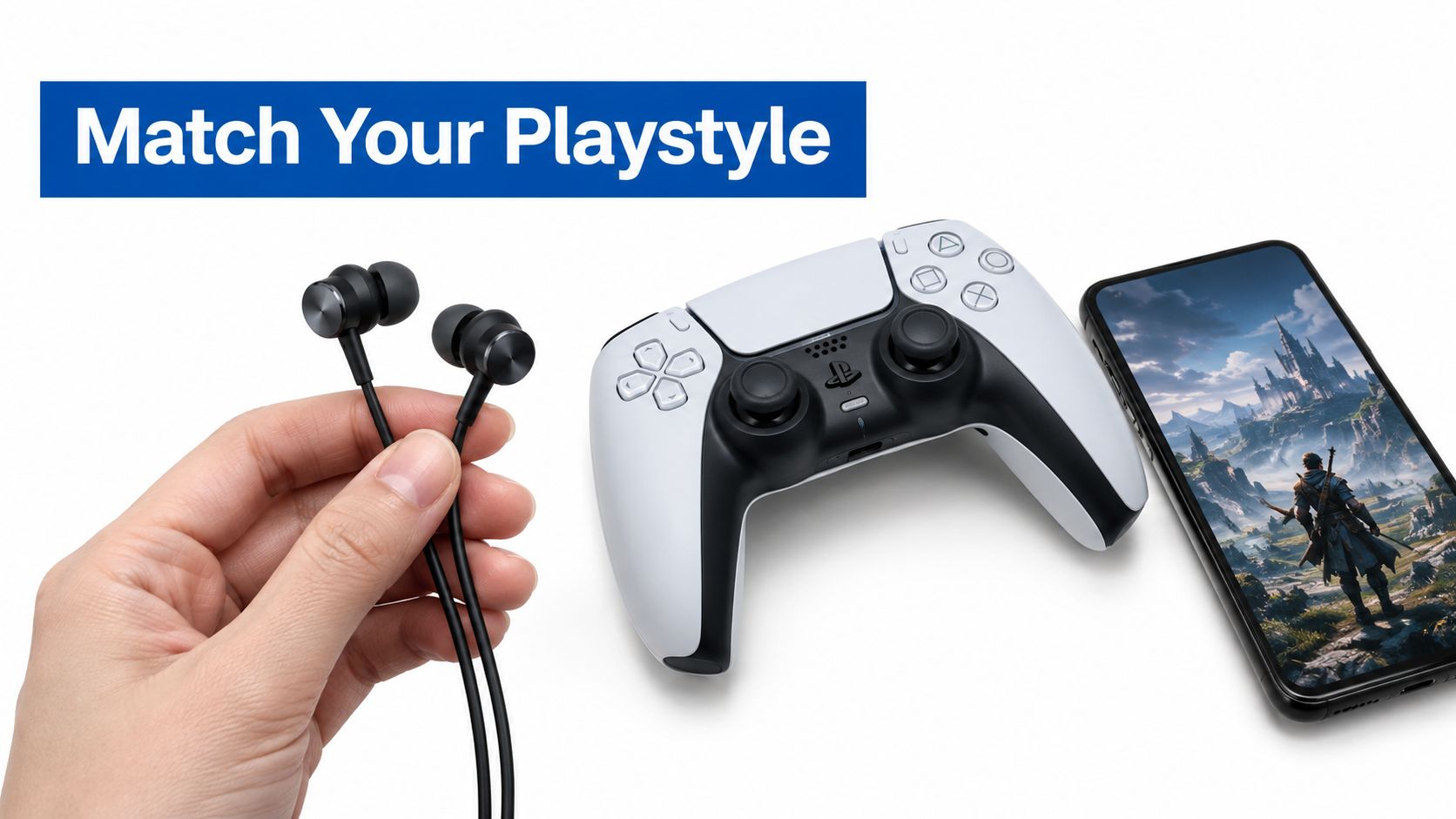
Spend on the limitation you actually have
If your current earbuds sound acceptable but teammates can't understand you, prioritize voice capture. If they hurt, a more advanced codec won't solve the purchase.
Likewise, don't buy maximum isolation automatically. A shared home, handheld session, or need to hear alarms may make accessible transparency controls more valuable.
Budget rule: Pay to remove a demonstrated problem, not to collect specifications that don't change your play.
Product pages should answer practical questions before checkout. Ask for the included transmitter, exact platform support, microphone behavior, and return conditions when fit or compatibility remains uncertain.
The best earbuds for gaming aren't necessarily the pair with the most features. They're the pair that meets your primary requirement without creating a new problem elsewhere in your setup.
Setup and EQ Tips for Cleaner In-Game Audio
Establish a clean baseline before changing EQ. Use a familiar game sequence, keep the listening level moderate, and change a single setting at a time so you can identify what helps.
Run a repeatable setup check
- Position the receiver sensibly. Try a front-facing port or suitable extension rather than leaving the transmitter buried behind the computer. Compare stability before deciding the new position helped.
- Confirm the active connection. Check the selected output and input devices instead of assuming pairing chose the gaming path.
- Verify codec support. If you're relying on LE Audio or LC3, confirm that both endpoints support it and that it's active.
- Remove redundant processing. Compare the game's own audio mode with extra system or vendor effects disabled. Keep whichever configuration gives clearer, more consistent cues.
- Test voice chat. Record speech while typing, then listen for clipped words, keyboard intrusion, and changing levels.
- Set a volume limit. Make comfortable listening part of the saved setup, not something you remember after a long session.
EQ for separation rather than spectacle
Start by reducing exaggerated sub-bass if explosions obscure useful detail. Then make restrained midrange or upper-midrange adjustments if footsteps and reloads remain difficult to distinguish.
Don't turn a suggestion into a universal preset. Games, earbud tuning, ear tips, and your hearing differ, so an aggressive boost can make dialogue harsh without improving placement.
- Use a repeatable scene: Compare the same footsteps, reload, and spoken line.
- Keep loudness comparable: A louder setting can seem clearer even when the balance isn't better.
- Protect voice intelligibility: Reject an EQ change that makes teammates harder to understand.
- Check sidetone: If supported, adjust it until speaking feels natural without becoming distracting.
For the tonal side of setup, use the headphone frequency-response guide to understand what your adjustments are changing.
Finish by returning to ordinary play. A useful preset should make the game easier to follow without requiring constant volume changes or attention to the audio controls.
Troubleshooting Common Gaming Earbud Problems
Diagnose the symptom before replacing the hardware. Return to the simplest working connection, then add the feature associated with the failure.
Match the symptom to a practical fix
| Symptom | Likely cause to investigate | First change to try |
|---|---|---|
| Audio lags only on a particular platform | A different connection mode is active | Select the documented gaming path |
| Transmitter isn't detected | Port, hub, or adapter conflict | Connect directly through a supported port |
| Teammates hear constant typing | Input gain or noise rejection isn't suitable | Reduce microphone gain and record a new sample |
| Battery falls short of expectations | Your gaming workload differs from advertised playback conditions | Compare runtime with ANC disabled |
| Audio drops during phone and console use | Concurrent connection behavior | Disconnect the secondary source and retest |
| Ear discomfort develops | Tip pressure or an unsuitable fit | Stop playing and reassess tip size and insertion |
These are starting points, not guaranteed diagnoses. If the issue persists, save the exact connection and settings used so support can investigate something reproducible.
Comfort and hearing safety belong in the setup
Don't compensate for poor isolation by repeatedly increasing volume. The British Safety Council's discussion of Make Listening Safe connects gaming listening practices with preventable hearing loss and tinnitus risk.
Consider moderate isolation, accessible transparency, and listening breaks rather than treating maximum ANC as the automatic winner. If controls are awkward, review practical earbud volume-control options before your next extended session.
Does newer Bluetooth guarantee less gaming delay?
No. Check the active connection and platform implementation, not just the version printed on the box.
Can the same earbuds work on every console?
Don't assume so. Verify the exact console, transmitter version, and microphone path before buying.
How can I check microphone quality before a match?
Record yourself speaking while typing with game audio running. Listen for missing words and intrusive noise, then confirm teammates hear the same improvement.
DigiDevice offers true wireless earbuds alongside chargers, adapters, and cables for building a practical gaming setup. Visit DigiDevice, compare the listed connections against your platform checklist, and check price and availability on the product page before purchasing.