

Best Spatial Audio Headphones in 2026
You've settled in for a film, put on your headphones, and the first action scene arrives. With ordinary stereo, the score spreads between your left and right ears. With a well-implemented spatial mode, dialogue can feel anchored ahead of you while effects move through a wider, more convincing scene.
The problem is that spatial audio isn't one uniform feature. Movie immersion, music rendering, and competitive gaming place different demands on headphones, and ecosystem compatibility can matter more than a long specification sheet. This guide compares the strongest options by use case, explains the latency and battery compromises, and shows what to configure before deciding that spatial audio “doesn't work.”
Updated for August 2026.
| Model | Best For | Key Strength | Battery Life | Price Tier |
|---|---|---|---|---|
| Sony WH-1000XM6 | Cross-platform listening | ANC, LDAC, and 360 Reality Audio | Manufacturer-dependent by mode | Premium |
| Bose QuietComfort Ultra | Movies and immersive listening | CustomTune, Immersion Mode, and head tracking | Up to 24 hours | Premium |
| Apple AirPods Pro | Apple users | Seamless Apple device integration | Model and mode dependent | Premium |
Why Spatial Audio Changes Everything
A standard pair of headphones can make a film enjoyable, but it often presents the entire soundtrack as a wide line between your ears. That's enough for music and dialogue, yet it can flatten a busy scene. Engines, footsteps, room tone, and speech compete within the same left-right picture.
Spatial audio changes the presentation by creating a virtual sound field around the listener. A helicopter can appear to pass overhead, dialogue can seem to come from the screen rather than inside your head, and background effects can occupy distinct positions around the scene. The result depends heavily on the content mix, the source device, and the headphones doing the rendering.
The category has moved well beyond its early premium-novelty phase. A 2025 market report valued the global spatial audio headphone market at $2.8 billion in 2024 and projected it to reach $9.6 billion by 2033, with a 14.2% compound annual growth rate (MarketIntelo's spatial audio headphone market report). That projection points to growing hardware demand for 3D audio, virtual surround, and head tracking, not only wider software availability.
Practical rule: Don't choose the most expensive spatial headphone by default. Choose the model whose rendering method matches the device and content you use most.
For example, the Bose QuietComfort Ultra makes a strong case for film watchers who value silence and a more room-like presentation. Its approach is different from the convenience of AirPods Pro inside Apple's ecosystem, while Sony's WH-1000XM6 is a better fit for listeners moving between phones, computers, and streaming platforms. The Bose QuietComfort Ultra review is useful if noise isolation and immersive listening sit near the top of your priorities.
How Spatial Audio and Head Tracking Work
Before comparing models, separate two features that manufacturers often present together.
Spatial audio uses digital processing to place sound elements within a virtual three-dimensional field. Instead of treating everything as fixed left and right channels, the renderer can position effects, voices, or instruments around the listener. Headphones reproduce those cues through carefully timed changes in the signal reaching each ear.
Head tracking adds movement awareness. Sensors detect changes in your head position, then the headphones or source device adjust the virtual sound field. The purpose is to make the audio feel anchored in the room or on the screen instead of moving with your head.
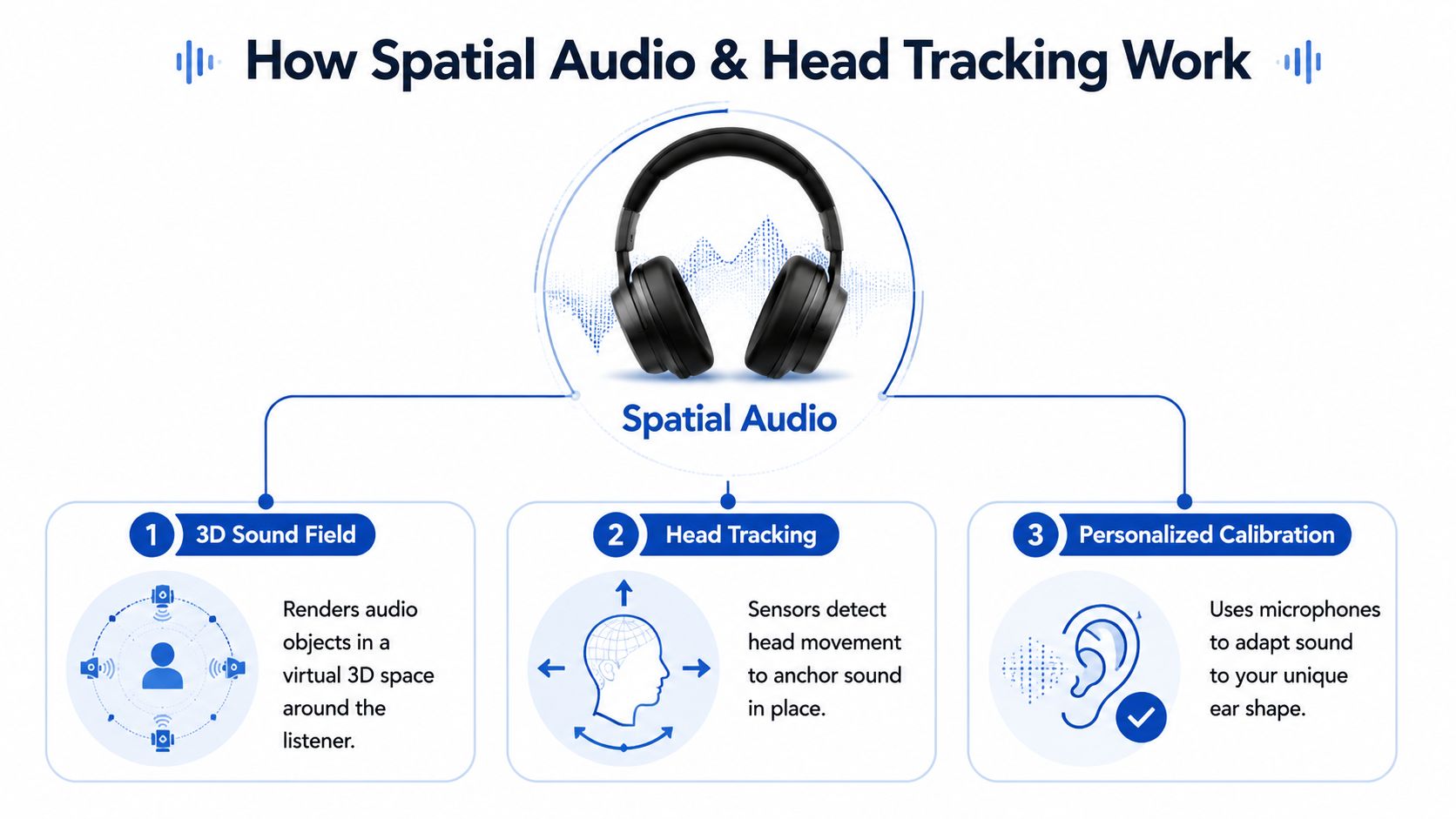
Apple's iPhone documentation makes the distinction especially clear. Control Center offers Off, Fixed, and Head Tracked modes. Fixed enables spatial rendering without movement tracking, while Head Tracked enables spatial audio and tracking so the sound follows head movement (Apple's Spatial Audio controls).
In practical use, Fixed mode can be preferable for music or casual listening because the sound remains stable while you move. Head Tracked mode is more useful for films, supported games, and other content where you want the screen or virtual environment to remain the apparent reference point.
Sony describes the same core behavior for 360 Reality Audio. Its head-tracking system adjusts the sound field to compensate for head movement and keeps the original sound position in three-dimensional space. Sony also describes alignment between the sound field and the smartphone display, which helps explain why a properly calibrated system can make a screen feel like the source of dialogue and effects.
The modern consumer path began with object-based formats becoming scalable. Dolby Atmos launched in 2012, shifting immersive audio away from fixed channels toward object-based rendering. Apple then announced Spatial Audio in 2020, brought it to movies and television through iOS 14 in September 2020, and expanded it to Apple Music on June 7, 2021, through iOS and iPadOS 14.6 (the documented evolution of spatial audio). That history explains why a headphone's operating-system support can matter as much as its drivers.
For readers interested in how sound may pair with visual computing, the future of augmented reality offers useful context. AR and VR depend on tight alignment between what you see and where sound appears.
Key Specs That Matter
When comparing wireless headphones for films and competitive gaming, the platform and latency figures deserve attention before driver size or codec labels. Apple's smoothest implementation is designed around supported Apple headphones and devices. Sony's 360 Reality Audio requires compatible hardware and content, while PC users may depend on Dolby Atmos for Headphones or DTS Headphone:X. Ecosystem support can determine which spatial modes work at all.
Codec support matters most for music and general wireless listening. Sony's WH-1000XM6 supports LDAC, which can carry more audio data than common SBC or AAC implementations when both the source and connection support it. That does not guarantee better sound on every track, but compatible equipment gets more headroom than with a basic Bluetooth connection.
Latency is the gaming filter
For competitive gaming, latency takes priority over an impressive soundstage. Typical Bluetooth connections can feel delayed, while newer low-latency implementations reduce the gap and may reach very low delay with a compatible dongle and headset. Those figures depend on the complete source, headset, and connection path, so the Snapdragon Sound explanation from Pocket-lint is useful context when checking compatibility.
A gaming mode on the headset does not guarantee a fast result. The console, computer, dongle, and game path must support the same low-latency technology. Otherwise, positional audio may still arrive late enough to affect competitive play.
A wired connection avoids wireless transmission delay and removes battery dependence. It sacrifices convenience, but for a fixed PC setup it can remain the more dependable option.
Battery and isolation shape immersion
Active noise cancellation does not create spatial positioning. It reduces outside sound that can mask quiet environmental details, which helps during films and travel. The Bose QuietComfort Ultra's CustomTune processing is designed for this more personalized, isolated presentation.
Spatial processing also uses power. A buyer's guide reports 18 hours of battery life with spatial processing enabled (the cited 2026 buyer's guide). Treat advertised endurance as mode-dependent. ANC, head tracking, volume, and codec choice can all change the result.
Driver size alone says little about imaging. Tuning, ear-pad seal, fit, DSP calibration, and the mix itself influence whether an effect feels above, behind, or wider. The headphone frequency response guide helps interpret frequency graphs without treating them as a complete verdict.
Top Spatial Audio Headphone Picks Compared
Different listening priorities produce different winners. The Sony WH-1000XM6 is the most flexible option for people who move between Android and other platforms. Active noise cancellation, LDAC, native 360 Reality Audio processing, and foldable over-ear construction cover everyday listening without requiring Apple hardware.
The Bose QuietComfort Ultra targets films, travel, and quiet rooms. CustomTune and Immersion Mode use head tracking to keep the presentation anchored as you move. Bluetooth 5.3 and 12 microphones support its processing and call features. Battery life reaches up to 24 hours, although active modes can reduce actual endurance.
Apple AirPods Pro suit iPhone, iPad, and Mac owners who value automatic switching and tight device integration. Their advantage is the Apple workflow, not broad compatibility with every phone, computer, or game console.
| Model | Best For | Key Strength | Battery Life | Price Tier |
|---|---|---|---|---|
| Sony WH-1000XM6 | Mixed devices and Android | LDAC, 360 Reality Audio, ANC | Depends on active features | Premium |
| Bose QuietComfort Ultra | Films and quiet environments | Immersion Mode and CustomTune | Up to 24 hours | Premium |
| Apple AirPods Pro | Apple ecosystem users | Automatic integration and head tracking | Depends on model and mode | Premium |
What matters in practice: A wide soundstage does not guarantee stable placement. Head tracking, compatible content, and a secure fit determine whether spatial audio feels anchored or simply processed.
For spoken-word production, immersive headphones are not the right monitoring reference. ClearAudio's guide to studio headphones for ClearAudio is more relevant when accurate monitoring matters more than cinematic width.
Competitive players should inspect the complete connection path before buying. A headset's gaming mode cannot remove delay if the console, computer, dongle, or game does not support the same low-latency system. This low-latency wireless headset guide focuses on the timing trade-offs that matter more than maximum spaciousness.
Choose by primary use, then check ecosystem support. A film-focused headset may deliver better immersion, while a gaming model with a compatible dongle can place cues sooner. Spatial audio behaves differently across movies, music, and competitive games, so raw specifications alone are a poor buying shortcut.
Choosing the Right Headphones by Use Case
The best spatial audio headphones for a film watcher aren't automatically the best choice for a tournament player. Start with the activity that occupies most of your listening time, then treat other features as secondary.
Movies and television
Choose strong head tracking, effective ANC, and a stable over-ear fit. The Bose QuietComfort Ultra's Immersion Mode suits viewers who want sound to remain anchored as they shift in their chair. Noise isolation matters here because a quiet room makes subtle positioning easier to notice.
Competitive gaming
Gaming reverses the priority order. Low latency comes before maximum spaciousness. Standard Bluetooth can introduce too much delay for competitive play, while a compatible wireless dongle can make spatial cues more usable. Head tracking may add immersion, but it won't compensate for a connection that puts audio behind the action.
A headset should also remain comfortable during long sessions. Weight distribution, clamp pressure, ear-pad heat, microphone behavior, and the ability to use a wired fallback can matter more than a branded surround mode.
Music
Music listeners should verify that the streaming service and individual release support a spatial mix. Sony's 360 Reality Audio can create a more object-based presentation, but a conventional stereo track won't gain the same placement because the headphones carry a spatial label.
Codec support and tuning deserve more attention than exaggerated driver claims. The Sony WH-1000XM6 is a sensible choice for listeners who want LDAC and broad device flexibility, while Apple users may prefer AirPods Pro for simple access to supported Apple Music content.
AR, VR, and mixed use
AR and VR users need reliable tracking, low weight, and a fit that stays stable during movement. A headphone that sounds impressive for a stationary film may become tiring or shift position during an extended immersive session.
Decision shortcut: Pick Bose for film-first immersion, a low-latency dongle headset for competitive gaming, AirPods Pro for Apple convenience, and Sony for the broadest mixed-device balance.
For a split workload across films, music, and everyday devices, Sony's WH-1000XM6 is the least restrictive option. It won't turn every stereo source into a perfectly positioned 3D mix, but its combination of processing, ANC, codec support, and platform breadth makes it easier to live with.
The following video provides a useful visual reference for how immersive headphone listening is commonly presented. Treat demonstrations as an illustration, not a substitute for testing your own source device and content.
Setting Up and Troubleshooting Spatial Audio
A premium headset can sound ordinary if the source, app, or content format is incompatible. Start with the playback chain, not the equalizer. Movies, music, and games can use different spatial formats, so a setting that works for one use case may not work for another.
Start with the source
Confirm that your phone, tablet, computer, console, and streaming app support the same spatial format. On iPhone, open Control Center with compatible headphones connected, then choose Off, Fixed, or Head Tracked. Fixed is the better starting point if head movement feels distracting or the soundtrack shifts unnaturally.
Sony owners should finish 360 Reality Audio setup in the Sony | Headphones Connect app. Its personalized ear or listening measurements can change how accurately instruments and effects appear around you, so complete calibration before judging the headphones.
Fix the common failures
- Audio cuts out: Move closer to the source, reduce wireless interference, or test a wired connection. A weak Bluetooth link can interrupt playback before the headphones are at fault.
- Head tracking feels slow: Recalibrate in the manufacturer's app, reseat the headset, and confirm that the source app supports dynamic tracking. Tracking is useful for films, but often adds little during music or fast competitive play.
- The sound feels flat: Check that the film, album, or game contains a supported spatial mix. Processing cannot recreate every object position from ordinary stereo content.
- Battery falls quickly: Spatial rendering and head tracking add processing demand. Change Head Tracked to Fixed when anchored movement is unnecessary, and disable other power-intensive features when practical.
- The codec sounds basic: Review the phone's Bluetooth or audio settings. Some devices select a lower-quality codec even when both products support a better option.
Troubleshooting order: Check content, platform, connection, and calibration before blaming the headphone's drivers.
If smartphone playback is your main source, this guide to getting studio-quality audio on a smartphone explains the wider signal path and settings that affect everyday listening.
For gaming, test the complete chain. A low-latency headset can still perform poorly if its dongle is incompatible, the console routes audio elsewhere, or the game's spatial processing conflicts with the headset mode. Use the configuration that keeps delay low before adding head tracking or extra processing.
Frequently Asked Questions
Will spatial audio work with any phone or device?
Compatibility depends on the headphones, operating system, app, and audio format working together. Apple devices provide the most direct Spatial Audio workflow with compatible AirPods and select Beats headphones. Android support varies by device and application, while Sony headphones with 360 Reality Audio offer a strong option for compatible Android listening.
PC users may access Dolby Atmos for Headphones or DTS Headphone:X through supported software and games. The headphones do not always need to match the platform brand, but a supported renderer must exist somewhere in the playback chain. Check the app and operating system before judging the headset. Movies, music, and games can expose different compatibility limits.
Does spatial audio improve gaming performance?
It can improve directional awareness when the game and rendering system support it, but spatial effects do not automatically improve competitive performance. Latency remains the deciding factor. Standard Bluetooth connections can feel noticeably delayed, while newer implementations and compatible dongles target much lower delay, as explained in this Snapdragon Sound latency context from Pocket-lint.
Competitive players should verify the complete connection first. Confirm that the console or PC recognizes the dongle, the game uses the intended output, and the headset is running its low-latency mode. Then test whether spatial rendering helps with footsteps, reloads, or environmental cues. Head tracking is optional for many games and can consume power without improving awareness.
Why does my battery drain faster with spatial audio enabled?
Spatial rendering and head tracking require extra processing. Rather than accepting the shortest runtime as unavoidable, change Head Tracked to Fixed when you do not need the soundstage anchored to your movement. Reduce ANC in a quiet room, disable unused processing features, and use a wired connection for stationary listening. These changes usually matter more than small differences in advertised battery figures.
The best choice still depends on your primary activity. Choose Bose for immersive films, Sony for cross-platform flexibility, AirPods Pro for Apple integration, and a low-latency dongle-based headset for serious competitive gaming.
DigiDevice curates headphones, immersive tech, AR smart glasses, and practical accessories for listeners who care about compatibility and real-world performance. Visit DigiDevice to compare current audio options and build a spatial listening setup for your devices, games, and daily routine.