

Projector vs TV for Gaming Which Fits Your Setup?
Updated for March 2026. If you're choosing between projector vs TV for gaming, don't start with category loyalty. Start with your games, your room, and the exact mode you'll play in. A gaming TV usually wins on predictable latency and bright room use, while a gaming projector wins on scale and flexible placement, and the right answer changes once you measure both properly.
Choosing the Right Gaming Display
You're in a bright apartment with one usable wall, a couch that has to serve guests, work calls, and game nights, and a console that gets packed away between sessions. A big TV would dominate the room all day. A compact projector could disappear into a drawer, then throw a huge image at night, but only if the light, throw distance, and latency cooperate.
That's the decision. It isn't projector vs TV for gaming as a branding contest. It's whether you value predictable responsiveness and plug and play ease more than image scale, portability, and storage flexibility.
In our testing conversations with small space gamers, the same mistake keeps appearing. People compare a headline refresh rate or a peak brightness number, then discover the display behaves differently at their actual console output, in their actual room, with image processing turned on. What we noticed is that satisfaction tracks setup fit more than spec sheet wins.
The Four Questions That Decide It
Use these filters before you look at any product page.
- What do you play most: Competitive shooters and fighting games punish delay. Adventure, racing, and local co op reward scale.
- When do you play: Daylight sessions favor a self emissive panel. Dark evening sessions let a projector show its strength.
- Where will it live: A fixed wall and media console suit a TV. A multipurpose room may suit hardware you can move or store.
- How often will you set it up: Daily use rewards zero friction. Occasional movie scale game nights can tolerate alignment and cable work.
Practical rule: Judge a display at the resolution, refresh rate, and picture mode you'll actually use, not at the best number in its marketing.
That principle carries through latency, brightness, HDR, and cost. A technically excellent display that you avoid using because setup is annoying isn't a good gaming display for you. Convenience isn't separate from performance. It's part of whether performance shows up in your routine.
Keep your console or PC output in the frame too. If your source, cable, port, and game don't all support the same mode, the display can't invent it for you.
Projector and TV Gaming Overview
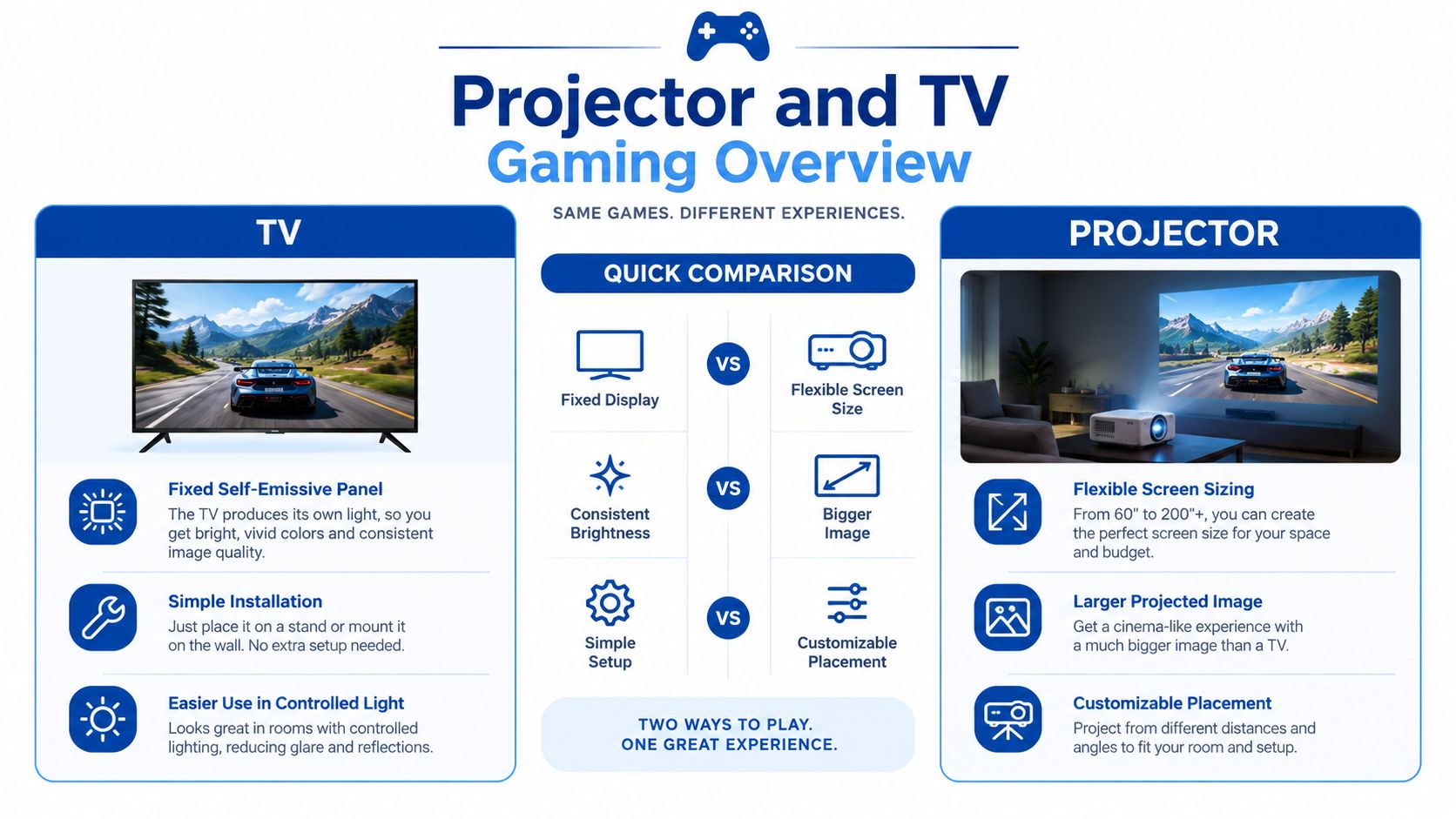
A TV is a fixed, self emissive panel. You buy a diagonal size, place it once, and that panel produces its own light every session with little variation. A projector is a light engine plus a surface. The hardware can be small, but the final image depends on wall or screen choice, distance, alignment, and room light.
That structural difference explains most of the trade offs. TVs tend to be simpler for daily console use and more consistent in bright rooms. Projectors can scale far beyond a practical panel size from compact hardware, which is why apartment gamers keep considering them even when a TV looks safer on paper.
The performance gap isn't automatic anymore. Gaming focused TVs and projectors can both reach 60 to 120 Hz, but their measured performance depends on the exact resolution, refresh rate, and image processing mode, according to RTINGS projector input lag testing. Category alone doesn't tell you how a specific model will feel.
Use the map below before you chase individual specs. It shows tendencies, not verdicts.
| Decision Factor | TV Tendency | Projector Tendency | What To Verify |
|---|---|---|---|
| Input lag | More predictable in Game mode | Varies more by mode and processing | Measured lag at your target mode |
| Refresh rate | Broader high refresh support in gaming models | Strong on specialist models, uneven elsewhere | Supported resolution and Hz together |
| Image scale | Limited by panel you buy | Very large image from small hardware | Throw distance and seating distance |
| Brightness and HDR | Stronger highlights, easier in daylight | Depends on lumens, screen size, and light control | Room light and screen surface |
| Setup | Fixed, low daily friction | Flexible, more placement decisions | Alignment, cabling, and storage |
Size Is Not the Same as Quality
A larger image changes immersion, split screen readability, and how far you can sit comfortably. It doesn't guarantee better blacks, brighter HDR highlights, or lower lag. Shoppers often merge those ideas because a huge image feels premium in a demo.
Separate them. Scale is one purchase. Responsiveness is another. Brightness in your room is a third. A smart buy in projector vs TV for gaming checks all three independently, then decides which compromise you can live with every day, not just on the first impressive night.
Compare Input Lag and Refresh Rate
Display latency is the time between your controller command and the image changing. For fast games, it's the most important measurable difference between these display types, because it affects aim, timing windows, and whether controls feel connected or floaty.
Refresh rate sets a timing floor. At 60 Hz, one refresh lasts 16.67 milliseconds, while at 120 Hz it lasts 8.33 milliseconds, as explained in RTINGS TV input lag methodology. A higher refresh rate can show new frames sooner, but only if your console or PC renders them and the display accepts that exact combination.
The comparison map below frames why headline claims mislead buyers who don't pair resolution with refresh rate.
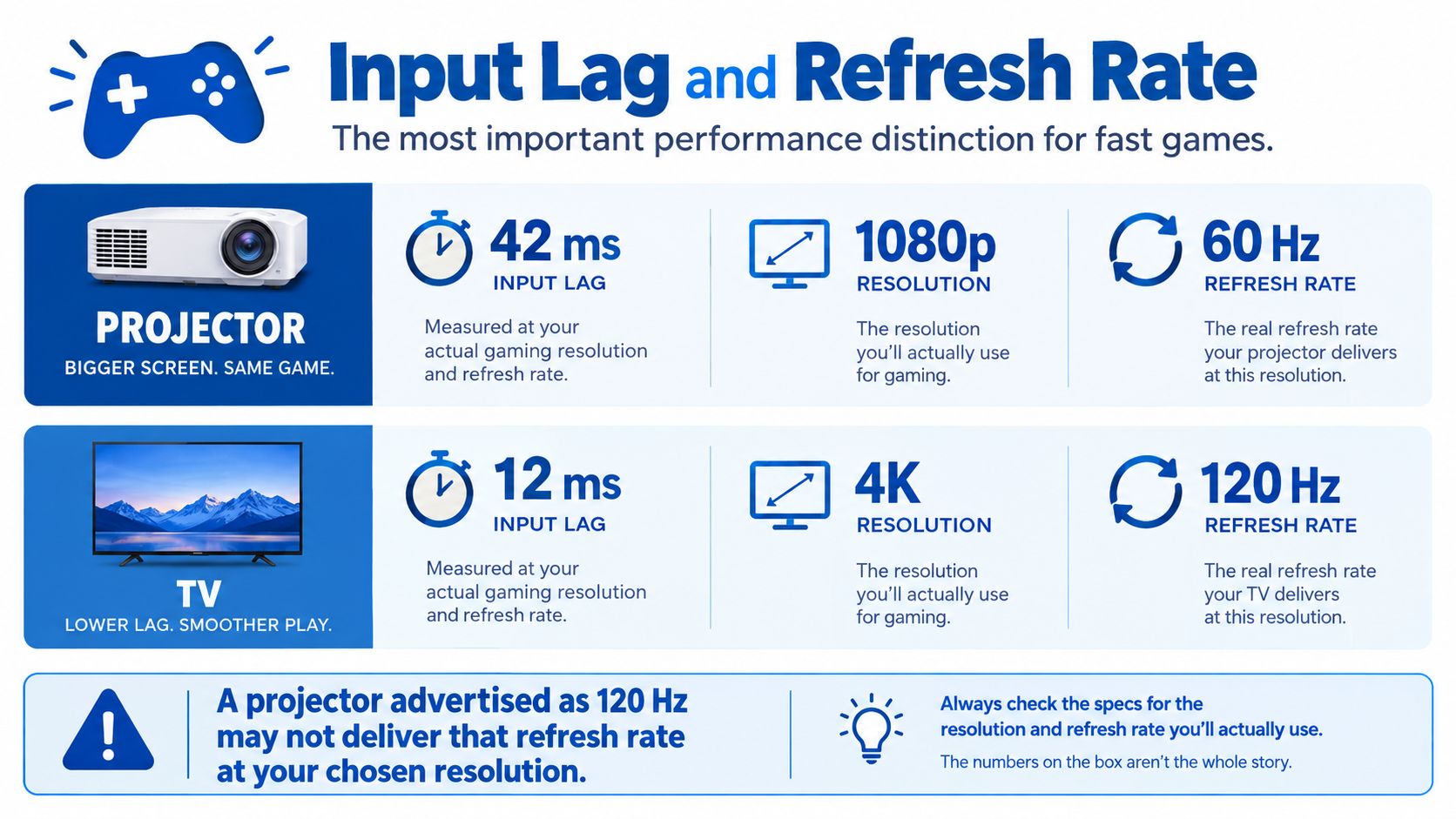
Independent testing reports many gaming projectors at approximately 16 to 17 ms at 4K/60 Hz, around 8 ms at 1080p/120 Hz, and roughly 4 ms at 1080p/240 Hz, while one tested model reached 4.7 ms at 1080p/120 Hz but 21.5 ms at 4K/60 Hz, according to The Smart Home Hookup gaming projector testing. That single model proves the point. It's fast or mediocre depending on the mode you choose.
Gaming TVs often look more predictable here because high refresh gaming features are now common in that category. Projectors vary more. A specialist gaming projector at 1080p and high refresh can feel highly responsive. A generic home cinema or portable model can feel sluggish even if its box emphasizes 4K support.
Match Latency to Genre, Not Ego
- Esports shooters and fighting games: Prioritize a verified low result at your target mode and treat every processing feature as suspect until tested.
- Racing and action adventure games: A small latency difference may matter less than scale, field of view, and motion clarity.
- Local multiplayer and party games: Shared visibility often outweighs a modest delay, especially when everyone is on one couch.
If you want the underlying measurement logic before you shop, read our guide to what input lag means for gaming displays. It'll help you separate refresh rate, frame rate, and processing delay instead of treating them as one number.
Processing is where good hardware gets sabotaged. Scaling, tone mapping, pixel shift sequencing, and keystone correction can affect latency, and Game or Fast modes generally bypass extra processing, as noted in RTINGS supported resolutions testing for projectors. Keystone is especially risky because a tilted, corrected image may look tidy while feeling slower.
Watch the embedded breakdown with that in mind, then test your own setup in Game mode with a direct HDMI connection.
Don't accept a low lag claim until you know the resolution, refresh rate, picture mode, and correction settings behind it. That's where projector vs TV for gaming is won or lost for competitive players.
Compare Brightness HDR and Screen Size
Brightness specs don't translate cleanly across categories. A TV rating describes light from a fixed panel area. A projector lumen rating describes total light that then gets spread across whatever image size you choose. Make the image bigger and that same light covers more area, so perceived brightness drops.
A reported 3,000 ANSI lumen projector spread across a 100 inch image produces about 350 nits, which is weaker than many OLED televisions, and manufacturer guidance suggests more than 1,500 lumens as a practical threshold for stronger HDR results, according to BenQ guidance on gaming projector brightness and refresh rate. Bigger isn't free. You're trading intensity for scale.
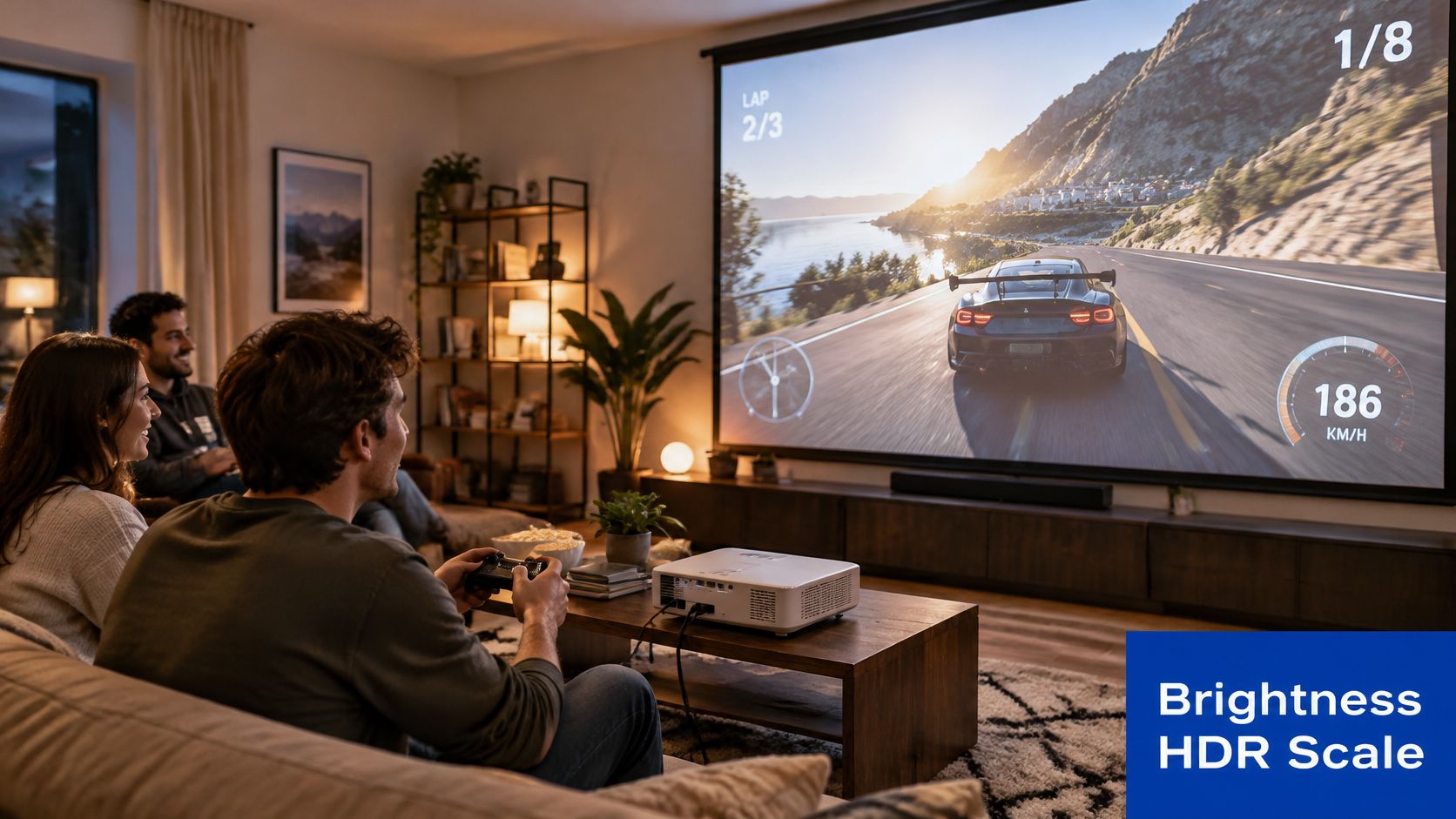
The photo scenario below is where projectors earn their appeal, a shared racing session where scale and social viewing matter as much as highlight punch.
Your Room Is Part of the Display
In a dark room, a projector can look cinematic, with a large image that pulls you into open world games. In daylight, blacks can turn grayish, shadow detail can wash out, and HDR highlights lose the contrast that makes them convincing. A TV fights ambient light more easily because its panel brightness is concentrated in a smaller, fixed area.
Screen surface matters too. A matte white wall is convenient but reflects room light back at you. An ambient light rejecting screen can improve perceived contrast in imperfect rooms, though it adds cost and placement constraints. Before you assume a projector will look washed out or brilliant, read our comparison of lumen brightness for daytime projector use and model your actual lighting.
HDR support only helps when the display has enough brightness for highlights and the room lets you see dark detail at the same time.
TV shoppers face a different version of the same problem. Panel class, processing, and gaming features vary inside one lineup, so it helps to compare close siblings rather than assume a series name guarantees performance. If you're narrowing TV options, this breakdown of which TCL P80 suits you is a useful example of checking tier differences before you buy.
For HDR heavy single player games played in mixed light, a premium TV may be better value even if a projector is cheaper per inch. For dark room, big image gaming where atmosphere beats specular highlights, the projector case gets much stronger. In projector vs TV for gaming, brightness isn't a spec contest. It's a room simulation you should run.
Compare Cost Space and Everyday Setup
Sticker price is the least complete way to compare these displays. A TV purchase is mostly panel, stand or mount, and a place to put it. A projector purchase can expand into a screen surface, mount or tripod, longer HDMI runs, light control, speakers, and the time you spend aligning the image in the spot you use.
That doesn't make projectors bad value. It makes total setup cost the honest comparison. Price the whole working system, not the box that creates the image.
What Each Setup Asks From Your Space
- TV placement: You need wall or furniture space for the exact panel size, every day, whether you're gaming or not.
- Projector placement: You need throw distance, a clear projection path, a suitable surface, and seating that doesn't block the beam.
- TV daily friction: Power on, pick up controller, play. That's a real advantage for short sessions.
- Projector daily friction: Alignment, focus, light control, and cable routing can be minor if installed permanently, or annoying if rebuilt nightly.
Apartment renters often read this trade off differently from homeowners. A compact projector that stores in a cabinet can be more practical than committing a wall to a large panel, especially if you can't mount hardware or you move often. Our projector screen sizing guide for small rooms will help you check whether your seating distance and wall can support the image size you're imagining.
Shared living rooms push the other way. If family members use the display in daylight, bump furniture, or expect instant access, the fixed TV usually creates fewer arguments. Nobody has to dim the room, realign a corner, or explain why keystone is off for gaming.
Portability also isn't just weight. A portable setup still needs power, a stable surface, throw distance, light control, and a reliable connection to your console or PC. Carry weight is easy to market. Repeatable placement is what determines whether you'll use it outside your main room.
Maintenance belongs in the same ledger. Panels are largely set and forget once installed. Projectors ask you to protect the lens path, manage dust and airflow around the unit, and keep the projection surface consistent. Those tasks aren't hard, but they're recurring.
The cheapest display is the one you'll still enjoy using after the novelty fades. If setup friction cuts your play time, its effective cost per hour rises fast.
Match Projectors and TVs to Gaming Setups
Genre and room together predict satisfaction better than category averages. A display that's wrong for ranked shooters can be perfect for split screen racing, and a panel that's ideal at a desk can feel cramped for four people on a couch.
Scale explains the pull. Modern gaming projectors can produce screens exceeding 100 inches, with some examples supporting images up to 180 inches, and a 100 inch diagonal image has roughly 1.85 times the width and about 3.4 times the screen area of a 55 inch 16:9 display, according to BenQ gaming projector vs TV guidance. In split screen play, that extra area isn't cosmetic. Each player's view becomes easier to read.
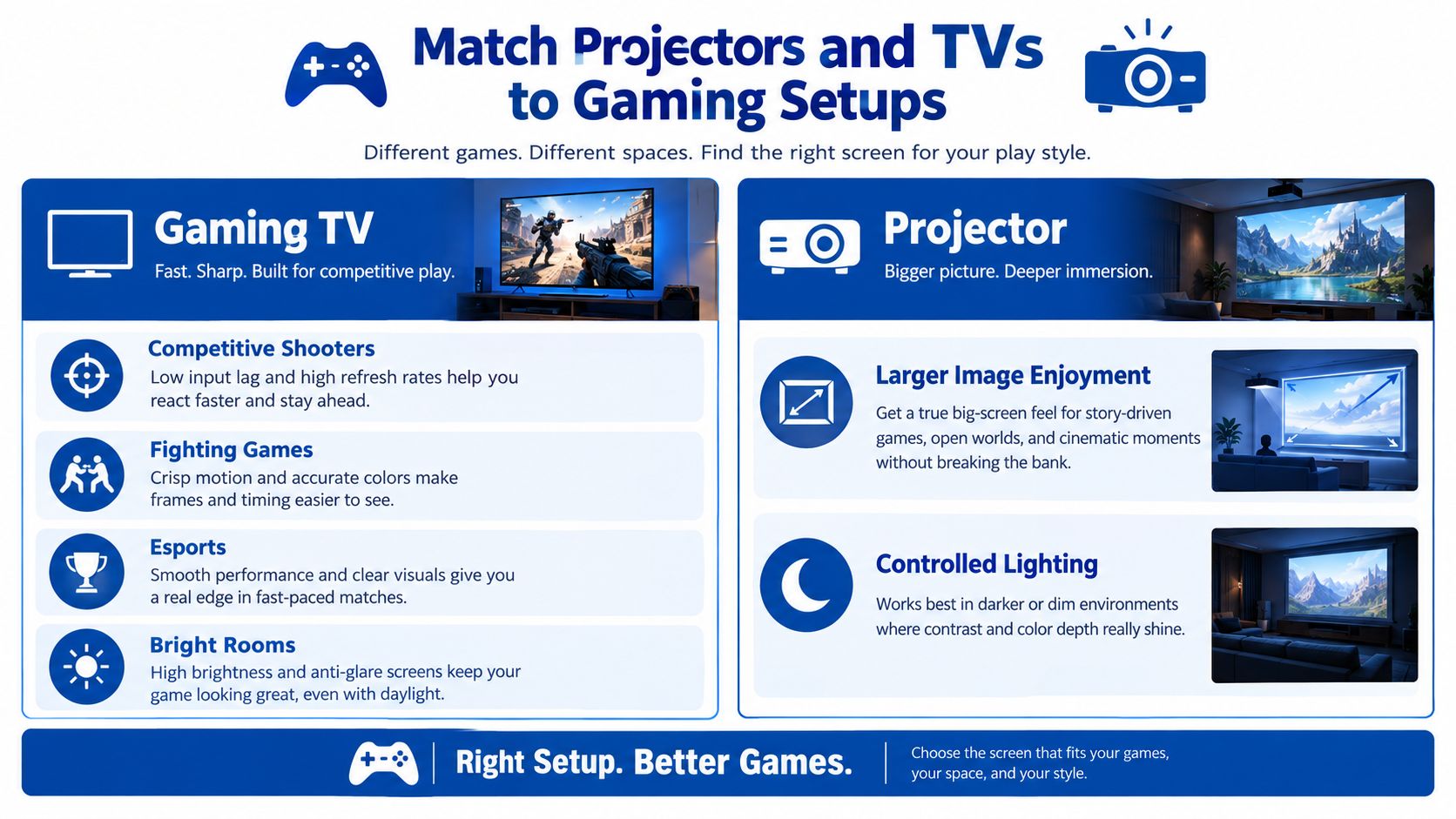
The use case map below turns those trade offs into setup choices you can recognize from your own routine.
Five Setups, Five Different Answers
Competitive console or PC play. Choose the display with the best verified result at your target mode, broad high refresh support, and the fewest setup penalties. That's often a gaming TV, though a specialist projector can qualify if its measured mode matches how you'll play.
Cinematic single player sessions. A projector makes a strong case in a dark room, where scale builds presence in exploration, horror, and story driven games. You'll accept weaker HDR highlights in exchange for immersion, and for many players that's a fair trade.
Apartment gaming. Storage and wall flexibility may outrank absolute brightness. A compact projector you can set up for evening sessions and remove afterward fits multipurpose rooms that a fixed large panel would dominate.
Desk adjacent hybrid setups. If you split time between close seating and couch play, ergonomics matter as much as display type. Our gaming desk setup ideas for ergonomic play can help you plan seating distance and cable routes before you commit to a screen position.
Portable and social gaming. Don't buy on portability claims alone. Portable models vary widely, and independent testing found many around 20 to 30 ms at 1080p/60 Hz with some reaching 72.7 ms or 110.3 ms, levels that can undermine competitive play, according to The Smart Home Hookup portable projector comparison. For casual co op that may be fine. For reaction sensitive multiplayer, it isn't.
The pattern is consistent. TVs protect performance and convenience. Projectors buy scale and flexibility, but you have to verify that your genre tolerates the specific model's measured behavior.
Make the Final Gaming Display Choice
Choose a TV when predictable latency, bright room usability, and simple daily operation sit at the top of your list. That's the safer default for competitive shooters, fighting games, esports practice, and households that game in daylight without wanting a setup ritual.
Choose a projector when very large image scale, flexible placement, apartment friendly storage, or cinematic immersion matters more, and your room can support it. That means controlled light for best results, a workable throw distance, and a model whose measured gaming mode matches your console or PC output.
Connectivity is the final trap. HDMI 2.1 is associated with 4K at 120 Hz and features such as VRR and ALLM, but buyers should verify that the specific display and port support the exact resolution, refresh rate, and features required by their source device, according to HDMI Forum HDMI 2.1 specification materials. A label on the box isn't proof that every feature works on the port you'll use.
Run This Checklist Before You Buy
- Name your target mode: Write down resolution and refresh rate together, for example the exact console output you'll use most.
- Verify measured latency: Find results for that mode in Game mode, with processing and keystone settings disclosed.
- Audit your room: Check daylight, seating distance, wall or screen surface, and whether you can darken the space.
- Confirm the full chain: Source device, game support, HDMI cable, display port, VRR, and ALLM must align end to end.
- Price the working setup: Include screen, mount, cables, audio, and light control, not just the display.
If budget is steering you toward projection, compare complete setups in our roundup of the best projectors under 500 for value focused buyers and apply the same latency checks there. DigiDevice stocks compact projectors and gaming accessories, which makes it one place to compare small space options against the checklist above rather than buying on diagonal size alone.
The non obvious conclusion in projector vs TV for gaming is that the best display is the one whose compromises land on things you don't care about. Competitive players shouldn't trade milliseconds for inches they'll barely notice during a match. Cinematic and couch co op players shouldn't surrender a huge shared image to win a latency margin their games won't reward.
Decide which compromise you'd still defend after a month of normal use. That's your answer, and it's more reliable than any universal winner.
Ready to build a setup that fits your room instead of fighting it? Browse compact gaming projectors, displays, and accessories at DigiDevice, compare the modes and connections that match your console or PC, and check current prices on the product pages before you buy.