

Active Optical Cable: The Complete Guide for 2026
You've run a long HDMI, USB-C, or network cable through a wall, connected everything, and the result is a flickering display or a link that falls back to a slower mode. The expensive cable isn't necessarily defective. With an active optical cable, the question is whether its embedded electronics match the protocol, direction, display mode, and power profile of the equipment at both ends.
An active optical cable, or AOC, converts electrical signals into optical signals inside the connector housings, carries the data through fiber, and converts it back at the destination. That design can solve distance, electromagnetic interference, and signal-integrity problems, but it can also provide fewer practical features than a shorter passive cable when compatibility is narrower. Updated for March 2026.
What an Active Optical Cable Actually Is
A small AV rack can expose copper cable limits quickly. A passive HDMI run may work perfectly on a bench, then lose a stable picture after installation near power supplies, motors, or building equipment. The screen may flicker, drop HDR, or show a failed handshake instead of a clean image.
An active optical cable changes how the signal travels. The source sends an electrical signal into the connector, electronics modulate that signal into light, optical fiber carries it across the run, and a second connector converts the light back into an electrical signal for the display or network device.
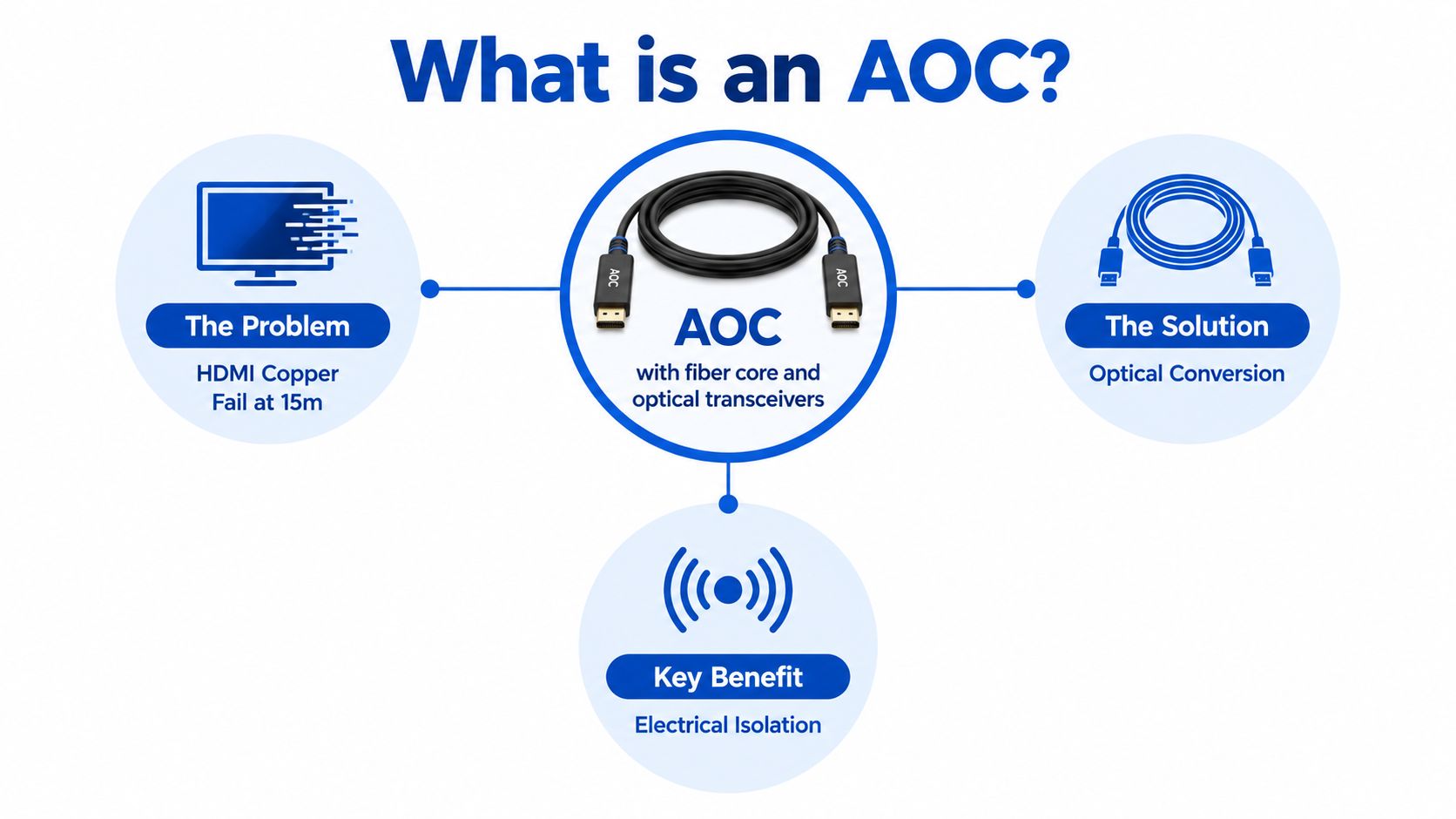
The three parts inside the assembly
An AOC isn't just a length of bare fiber. It combines:
- Optical fiber: Carries the high-speed data as light rather than electricity.
- Copper conductors: Supply power to the electronics and may carry auxiliary functions, depending on the interface.
- Transceivers and control electronics: Convert, condition, and manage the signal at each end.
That last category determines compatibility. The fiber itself doesn't understand HDMI, DisplayPort, USB, Ethernet, Thunderbolt, or any other protocol. The electronics do.
A documented USB Type-C AOC illustrates the progression clearly. USB 2.0 was established in 2000 with a maximum rate of 480 Mb/s and a maximum cable length of 5 meters. USB 3.0 followed in 2008 at 5 Gb/s and up to 3 meters. Thunderbolt 2 arrived in 2013 at up to 20 Gb/s and 2 meters, while Thunderbolt 3 reached 40 Gb/s in 2015 through USB Type-C connectors, as documented by Sumitomo Electric's USB Type-C AOC documentation.
The same documentation describes a USB Type-C AOC compliant with DisplayPort 1.4, using two unidirectional lanes at 8.1 Gb/s each, alongside USB 3.1 Gen 1 with 5 Gb/s bidirectional transmission. That combination explains why an AOC can preserve a familiar connector while using a completely different signal path.
For a practical explanation of ordinary USB-C cable requirements, see this USB-C cable guide for data transfer. The important distinction is simple: a passive cable mainly transports an electrical signal, while an AOC actively processes the signal inside the cable.
Visual cue: Insert image of a long HDMI AOC connecting a rack-mounted source to a ceiling-mounted projector in a commercial room.
AOC vs DAC and Passive Copper Compared
An AOC, a direct attach copper cable, and a passive copper cable can all connect compatible equipment, but they solve different problems. Choosing between them requires more than comparing the bandwidth printed on the package.
A DAC keeps the signal electrical from end to end. It usually makes sense inside a rack or between closely positioned devices, where the run is short and the equipment benefits from a simple, low-cost assembly. Passive copper follows the same basic principle without the active components found in a DAC.
An AOC adds optical conversion. That reduces the effect of electrical attenuation, crosstalk, and electromagnetic interference over a longer run, but it also introduces powered electronics and a stricter compatibility requirement.
AOC vs DAC vs Passive Copper at a Glance
| Criterion | Active Optical AOC | Direct Attach Copper DAC | Passive Copper |
|---|---|---|---|
| Distance | Suited to longer high-bandwidth links than passive copper | Best suited to short rack connections | Best suited to short, stationary runs |
| EMI resistance | Strong, because the main data path uses light | Limited by the electrical path | Limited by the electrical path |
| Cable weight and airflow | Often lighter than equivalent long copper assemblies | Can become bulky in dense racks | Usually simple, but thickness varies |
| Power | Requires power for embedded conversion electronics | May draw power through the connected equipment | No signal-conversion electronics |
| Cost | Higher because it integrates transceivers and fiber | Often economical for short links | Usually the simplest and least expensive option |
| Latency | Adds active signal processing, though the practical result depends on the design | Very low for short links | Very low, with no active conversion |
| Serviceability | Integrated assembly, not a field-terminated fiber lead | Integrated copper assembly | Easy to replace, but limited by reach and signal integrity |
Copper still wins when the cable is short, stationary, and operating in a controlled environment. DACs are particularly attractive when port density, budget, and low latency matter inside a rack. Some short-reach InfiniBand and high-speed data-center applications also require a specific DAC or another approved cable type, so a faster-looking AOC isn't automatically an acceptable replacement.
AOC market estimates reflect its growing role beyond consumer displays. One estimate placed the global market at USD 3.97 billion in 2023 and projected USD 9.07 billion by 2030, with a 12.6% compound annual growth rate from 2024 through 2030. The same estimate identified QSFP as the leading form factor in 2023 at 25.45% of global revenue, according to Fortune Business Insights' active optical cable market assessment. These figures are estimates, and market definitions vary.
For a desk setup where the requirement is more ports rather than a long optical run, a USB-C docking station with 4K HDMI and USB connectivity may be a more appropriate solution than an AOC.
Practical rule: Choose passive copper for a short, quiet run. Choose DAC for a short, dense rack link. Choose an AOC when distance, interference, cable bulk, or signal integrity has become the limiting factor.
How an 800G Data Center AOC Works
An 800G AOC demonstrates why headline throughput doesn't tell the whole story. The cable isn't carrying one enormous undivided stream through one optical core. An 800G QSFP-DD AOC uses eight parallel 100G-class PAM4 channels, with each electrical lane operating at 106.25 GBd.
At the switch or server, the host electrical lanes enter the QSFP-DD assembly. Signal-conditioning electronics prepare the lanes for optical transmission, then laser sources drive parallel optical paths through OM4 multimode fiber. At the far end, photodiodes and receiving electronics convert the light back into electrical lanes for the destination device.
The documented example states an aggregate throughput of 800 Gb/s and alignment with IEEE 802.3ck, QSFP-DD hardware, and CMIS specifications, as described in FS.com's 800G QSFP-DD AOC documentation.
Why lane design matters
PAM4 carries more signaling information per symbol than a simpler two-level electrical signal, but it also places greater demands on the transmitter, receiver, equalization, and error-handling systems. The AOC has to preserve lane alignment while managing electrical losses before conversion and optical losses after conversion.
That makes the AOC an integrated transceiver-and-cable assembly rather than a fiber lead that a technician can terminate in the field. The host protocol, connector form factor, lane encoding, fiber type, and specified reach all need to match.
Two AOCs with the same nominal speed can behave differently because their DSP generation, laser characteristics, firmware, thermal design, and host interoperability differ. Buyers should therefore verify the complete link specification instead of treating 800G as a guarantee of universal operation.
Visual cue: Insert image of an 800G QSFP-DD AOC installed between a data-center switch and a server, with the lane architecture labelled.
HDMI, DisplayPort, and USB Video Runs
A ceiling-mounted projector, a gaming monitor, and a conference-room touchscreen can all use an AOC, but the correct cable depends on the protocol carried inside the connector.
A documented HDMI 2.0 AOC supports an 18 Gb/s link, divided into 6 Gb/s per lane, and can carry 4K UHD at 60 Hz over distances up to 100 meters, according to Amphenol Socapex's HDMI AOC datasheet. The assembly uses optical fiber for the high-speed signal and copper conductors to power the embedded electronics.
That power path matters. Source compatibility, display compatibility, cable orientation, and available port power can affect whether the connection starts reliably. An HDMI AOC may be marketed as plug and play, but it still has a source end and a display end.
Video AOC scenarios by protocol and run length
| Scenario | Protocol | Typical Length | AOC Needed? |
|---|---|---|---|
| Ceiling-mounted projector | HDMI 2.0 | Long room or ceiling run | Often useful when passive copper becomes unreliable |
| Competitive gaming display | DisplayPort 1.4 | Longer desk or wall run | Useful when high refresh and signal integrity exceed passive-cable comfort |
| Wall-mounted touchscreen | USB-C with video and data | Long room or furniture run | Depends on DP Alt Mode, USB data support, power, and directionality |
DisplayPort AOCs can be useful for a gaming system where the GPU and display sit far apart, but the cable must support the source's DisplayPort generation and the monitor's required display mode. A cable with the right connector can still fail to provide the expected resolution, refresh behavior, USB data, or adaptive-display features.
USB-C video runs are more complicated because the connector may carry DisplayPort Alt Mode, USB data, charging, or a combination of tunneled protocols. A USB-C AOC that works with a Thunderbolt dock may not work with a monitor expecting ordinary USB-C DisplayPort Alt Mode.
For readers troubleshooting a laptop-to-display connection, this HDMI cable-to-laptop guide offers a useful starting point. For business buyers evaluating the broader cost of a display fleet, TCO for UK SMB monitors adds procurement context beyond the cable itself.
A matching connector only proves that the plug fits. It doesn't prove that the cable supports the required protocol, direction, power, or display mode.
The USB4 and Thunderbolt Compatibility Trap
USB-C is a connector shape, not a performance guarantee. Two ports can look identical while supporting different combinations of USB data, DisplayPort Alt Mode, PCIe tunneling, Thunderbolt compatibility, and USB Power Delivery.
The same warning applies to labels such as USB4 and Thunderbolt. A USB4 active cable may preserve backward compatibility with earlier supported modes, but its embedded electronics can limit forward compatibility with protocols that appeared later. A Thunderbolt cable also isn't automatically interchangeable with every USB4 cable, even when both use USB-C connectors.
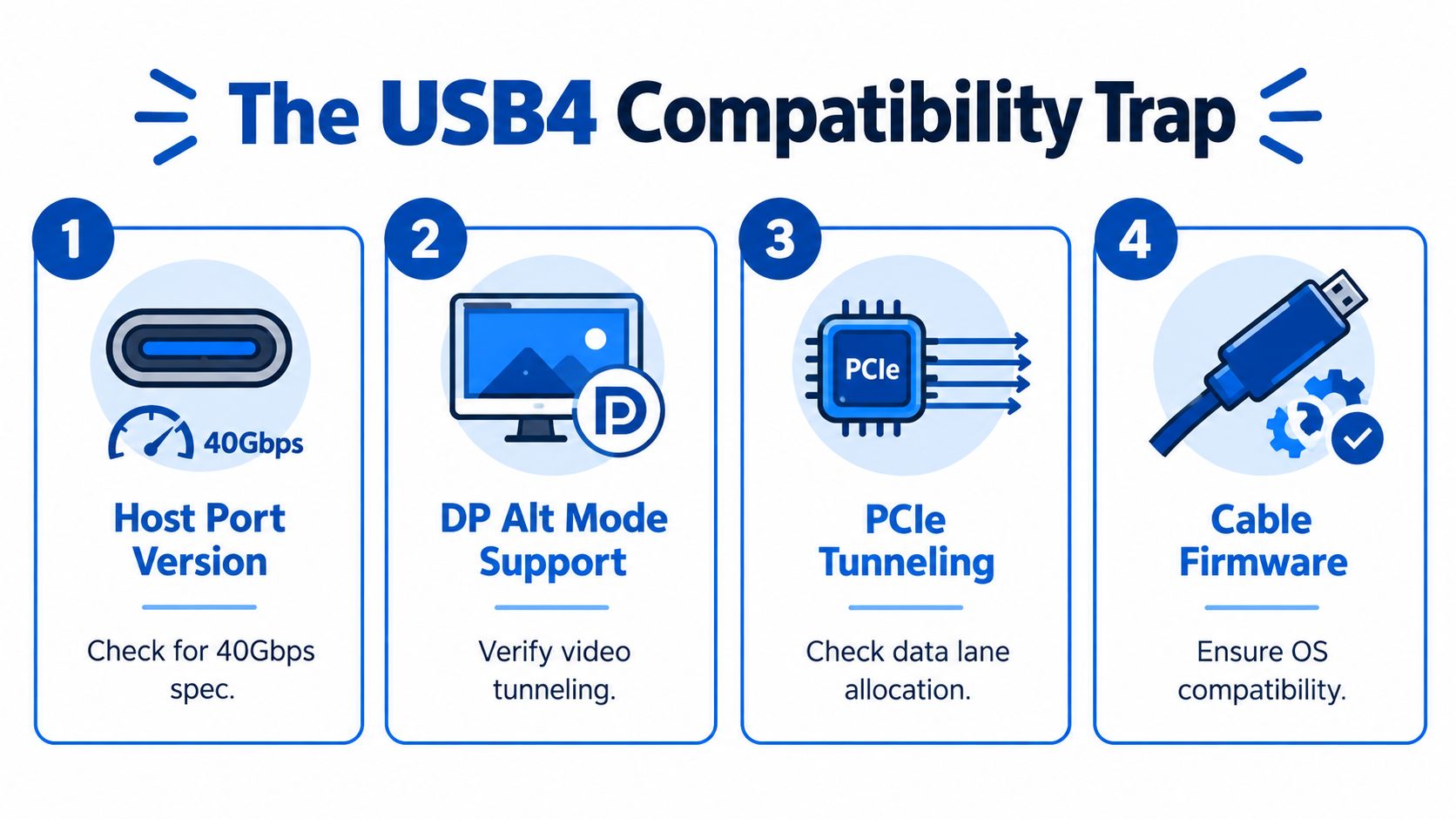
The compatibility matrix
Before buying an AOC, check these attributes together:
- Host port version: Confirm the actual USB4 or Thunderbolt generation supported by the laptop, dock, GPU, or workstation.
- Display mode: Verify whether the host supports native DisplayPort Alt Mode or requires DisplayPort tunneled through Thunderbolt.
- PCIe tunneling: Check whether the cable and host support the PCIe traffic required by an external drive, graphics device, or dock.
- Directionality: Look for source, host, display, TX, and RX markings. Some active cables won't work when reversed.
- Power Delivery: USB-C Power Delivery controls charging. Higher ratings such as 100 W or 240 W require an appropriately rated, electronically marked cable.
- Cable electronics: Ask which modes the embedded chipset supports, rather than relying on the USB-C shape.
Consider a docking-station user who connects a 3-meter USB4 40 Gbps AOC to a Thunderbolt 3 laptop. The plug fits, but the connection may fall back to USB 3.2 instead of delivering the expected USB4 behavior. The problem isn't necessarily the laptop, dock, or cable alone. The three devices may not share the same negotiated mode.
A docking station explainer from F1Group helps clarify why docks combine multiple protocols and power functions in one connection. For a high-power USB-C setup, review the stated capability of this 240 W magnetic USB-C adapter rather than assuming that every USB-C accessory supports the same charging profile.
The USB4 reference material is useful for understanding why the label covers a family of capabilities rather than one universal operating mode. A buyer should also request certification information, eMarker data, supported display modes, cable direction, and the exact charging rating before purchase.
Installation Reliability and Lifecycle Realities
Treat an AOC as a small electronic device inside a flexible jacket. The fiber needs protection from sharp bends, crushing, pulling, and repeated abuse, while the connector housings need enough airflow and careful handling to keep their transceivers reliable.
A common multimode-fiber installation guideline uses a minimum bend radius of roughly 6 to 10 times the cable's outside diameter, but the product datasheet takes priority. A tight turn behind a display may not break the cable immediately. It can create an intermittent fault that appears only after movement, temperature change, or repeated reconnects.
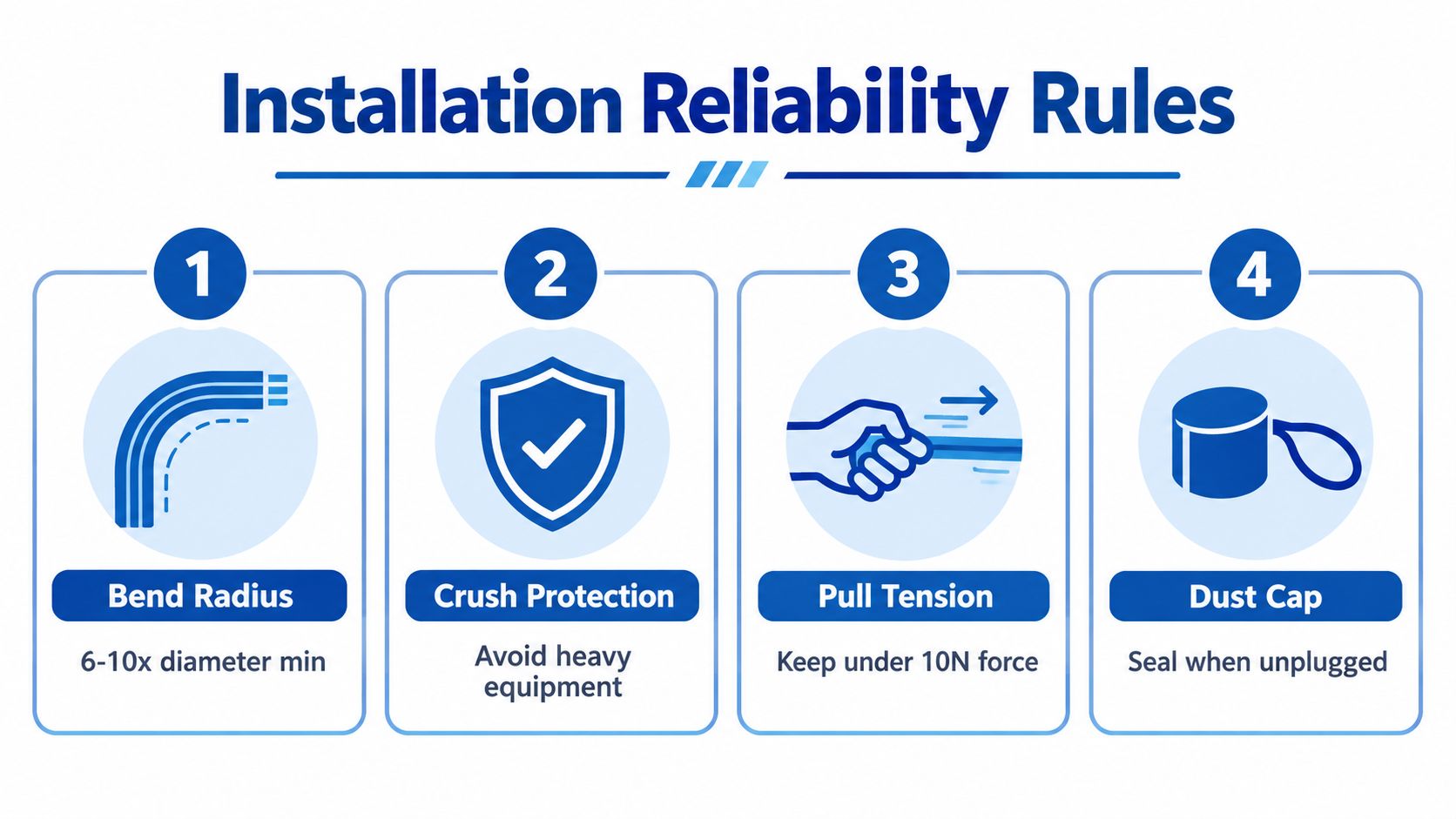
Four habits that prevent avoidable failures
- Route by the jacket, not the connector. Don't pull on the optical head or use the transceiver housing as a handle. Use the cable's designated pull feature if the manufacturer provides one.
- Protect the cable from crushing. A chair wheel, rack rail, equipment case, or temporary trade-show flooring can apply force that the fiber and internal electronics weren't designed to tolerate.
- Keep heat in mind. A VCSEL-based AOC can experience a substantial reduction in mean time between failures as temperature rises above 45°C, with vendor guidance reporting a decline of nearly 25% for every 10°C increase, as discussed in Link-PP's AOC and DAC technical guide. This is vendor-produced guidance, not an independent laboratory benchmark, but it highlights why dense cable bundles and restricted airflow deserve attention.
- Label both ends. Mark source and destination before the cable disappears into a wall, rack, desk, or ceiling. Directional HDMI and optical data-center assemblies can fail when the ends were swapped.
Dust caps should remain installed whenever connectors are unplugged. Keep connector faces clean, avoid unnecessary hot-plugging, and don't force a latch that isn't aligned. If a link becomes marginal, test the cable in a known-good configuration before replacing expensive host equipment.
Lifecycle planning also matters. An AOC's failure modes include optical-source degradation, contamination, electrostatic damage, heat stress, and mechanical damage. A spare policy is sensible for critical displays, conference rooms, and data-center links because the integrated construction usually means replacing the complete assembly rather than repairing a fiber section in the field.
Buying Guide, FAQ, and When an AOC Is Worth It
A defensible AOC purchase starts with the equipment, not the cable shelf. Record the source, destination, protocol, display mode, charging requirement, direction, installation path, and required length before comparing brands.
AOC Buyer's Checklist: Specs to Verify Before Purchase
| Criterion | What to Verify | Red Flag |
|---|---|---|
| Connector type | HDMI, DisplayPort, USB-C, QSFP, or QSFP-DD | The plug fits, but the product doesn't list the required protocol |
| Protocol generation | Exact USB, Thunderbolt, HDMI, DisplayPort, or Ethernet mode | The listing uses only “8K,” “USB4,” or “high speed” without detail |
| Directionality | Source and display markings, TX and RX labels | No clear orientation information |
| Video support | Resolution, refresh behavior, HDR, HDCP, and audio features | Video compatibility is described only by connector shape |
| USB data | Supported data mode and lane allocation | The cable claims video but says nothing about USB data |
| Power Delivery | USB-C PD rating and electronic marker information | Charging wattage is implied rather than specified |
| Length and routing | Certified reach, bend guidance, and installation environment | The cable must be sharply bent or tightly bundled |
| Certification and warranty | Relevant compliance information and replacement terms | No manufacturer documentation or support path |
People Also Ask
Will an AOC work with any port that has the same connector?
No. Connector shape is only the mechanical starting point. The AOC's electronics must support the host protocol, negotiated speed, display mode, direction, and power arrangement. A USB-C AOC may support Thunderbolt display tunneling but not ordinary USB-C DisplayPort Alt Mode, or it may carry video while offering limited USB data.
Is an HDMI AOC reliable for long 4K video runs?
It can be, when the cable is certified for the required HDMI generation, distance, HDR and HDCP behavior, audio features, and direction. The documented HDMI 2.0 example supports 18 Gb/s, 4K UHD at 60 Hz, and distances up to 100 meters, but that doesn't make every HDMI AOC interchangeable. Confirm the source, display, cable orientation, port power, and stated reach together.
How long does an AOC last in a field installation?
There isn't one universal service life. Lifespan depends on heat, bend stress, connector cleanliness, hot-plugging, electrical discharge, and whether the cable operates within its rated conditions. An AOC installed with gentle routing and protected connectors can remain useful for years, while a crushed or overheated assembly can fail much sooner.
An AOC rarely justifies its premium for a short run in a controlled environment. It becomes more compelling when the run is beyond the comfortable range of passive copper, when electromagnetic interference threatens the link, when cable weight affects installation, or when a long high-bandwidth connection must remain stable.
For a simpler short USB-C-to-display connection, compare the requirements with this USB-C to HDMI 4K adapter. The right choice may be a passive cable, a DAC, a dock, or an AOC. Bandwidth is only the first filter. Protocol and power compatibility decide whether the finished installation works.
DigiDevice offers practical cables, adapters, docking accessories, and mobile and PC connectivity tools for setups where protocol matching matters. Visit DigiDevice to compare the right connection hardware for your display, workstation, gaming system, or home-office run before you buy.