

Cell Phone Booster for Rural Areas: Complete Setup Guide
You're sitting at a rural kitchen table, watching a work call freeze while your phone alternates between one bar and no service. Outside, a text may send near the driveway, but inside, the walls, roof, terrain, and distance from the nearest tower turn that weak connection into dropped calls and unusable data.
Direct answer: a cell phone booster for rural areas can improve indoor coverage when there's an existing outdoor cellular signal to capture. It can't create service where the outdoor signal is absent, so measuring your property before buying matters more than choosing the biggest-looking specification sheet.
Updated for March 2026, this guide focuses on the part most shoppers skip, the pre-purchase site survey. I'll show you how to measure signal, choose an antenna and gain level, install the system, and recognize when a booster isn't the right tool.
Why Rural Cell Coverage Remains a Problem
A rural home can have two very different connectivity conditions within a few steps. The phone may connect beside the mailbox, lose service at the front door, and show no usable data in a metal-roofed office. That pattern isn't unusual. Tower distance, hills, forests, tree cover, and construction materials all affect the signal that reaches the property.
Nationwide coverage figures can also hide the practical problem. The FCC reported that, excluding Alaska, 11% of U.S. road miles had no 4G LTE coverage, 16% of all square miles had no LTE coverage or only subsidized LTE, and 1.4 million Americans had no LTE access at all. Those figures are documented in the FCC signal booster overview.
Carriers can cover most residents while leaving large geographic pockets with weak service. A single distant tower may serve farms, cabins, and roads separated by uneven terrain, while a roof, insulated wall, or steel outbuilding blocks the last part of the connection.
That's where a booster fits. It captures an available outside signal, strengthens it, and rebroadcasts it indoors. It doesn't replace a tower, repair a carrier outage, or generate cellular service from nothing.
Field rule: If your phone can connect outdoors, even inconsistently, test that signal carefully before you rule out a booster.
For people also planning an off-grid property, cellular coverage is only one part of the setup. A practical resource on off-grid RV power solutions can help you think through power availability for routers, phones, and other connected equipment.
Before comparing models, read this practical explanation of whether cellular boosters work. It helps separate a genuine weak-signal problem from a location with no usable signal at all.
How a Cell Phone Booster Actually Works
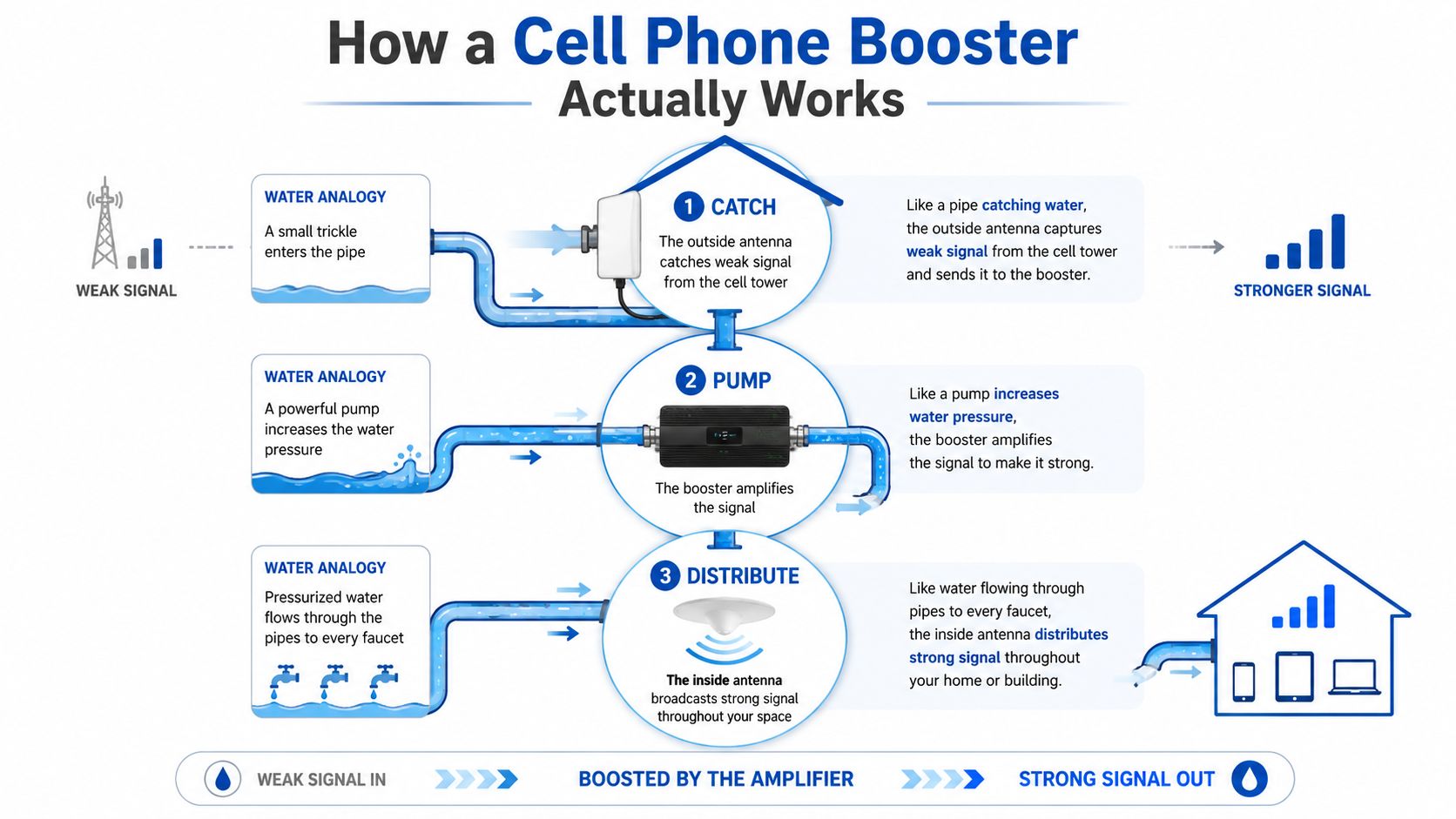
A rural booster is a three-part system, operating like a water line serving a house.
The outside antenna is the intake pipe. Mounted on a roof, mast, or exterior pole, it collects the usable signal arriving from a carrier tower. A directional antenna focuses on one tower or direction, while an omnidirectional antenna listens around the property.
The amplifier unit acts like a pump. It receives the outside signal through coaxial cable and increases its strength by a measured amount, expressed in decibels. Typical properly installed rural systems are commonly associated with 20–30 dB of gain, as described in this rural booster performance guide.
The inside antenna is the distribution pipe. It rebroadcasts the amplified signal into the room, cabin, home office, or building where phones need service.
The signal must travel in both directions
Downlink is the signal traveling from the tower to your phone. It carries incoming voice, messages, and data.
Uplink travels from your phone back to the tower. A system that improves only what you receive won't reliably fix calls or uploads if the phone's return signal can't reach the tower. A properly designed booster handles both paths, subject to its supported bands and operating limits.
The most expensive mistake is treating the amplifier as a signal generator. If there's no detectable cellular signal outside, the pump has nothing to move. That's why an outdoor measurement should come before a product order.
If your home also has weak indoor Wi-Fi, don't confuse the two systems. A cellular booster works with carrier radio signals, while a Wi-Fi extender repeats your internet network. For that separate problem, this guide to setting up a Wi-Fi extender at home is the more relevant resource.
FCC Approval and Carrier Registration Requirements
The FCC created a formal consumer signal booster framework through a Report and Order released on February 20, 2013. The policy recognized boosters as a practical way to extend voice and broadband coverage in rural, underserved, and hard-to-serve areas without building new towers everywhere, while also requiring safeguards against harmful interference.
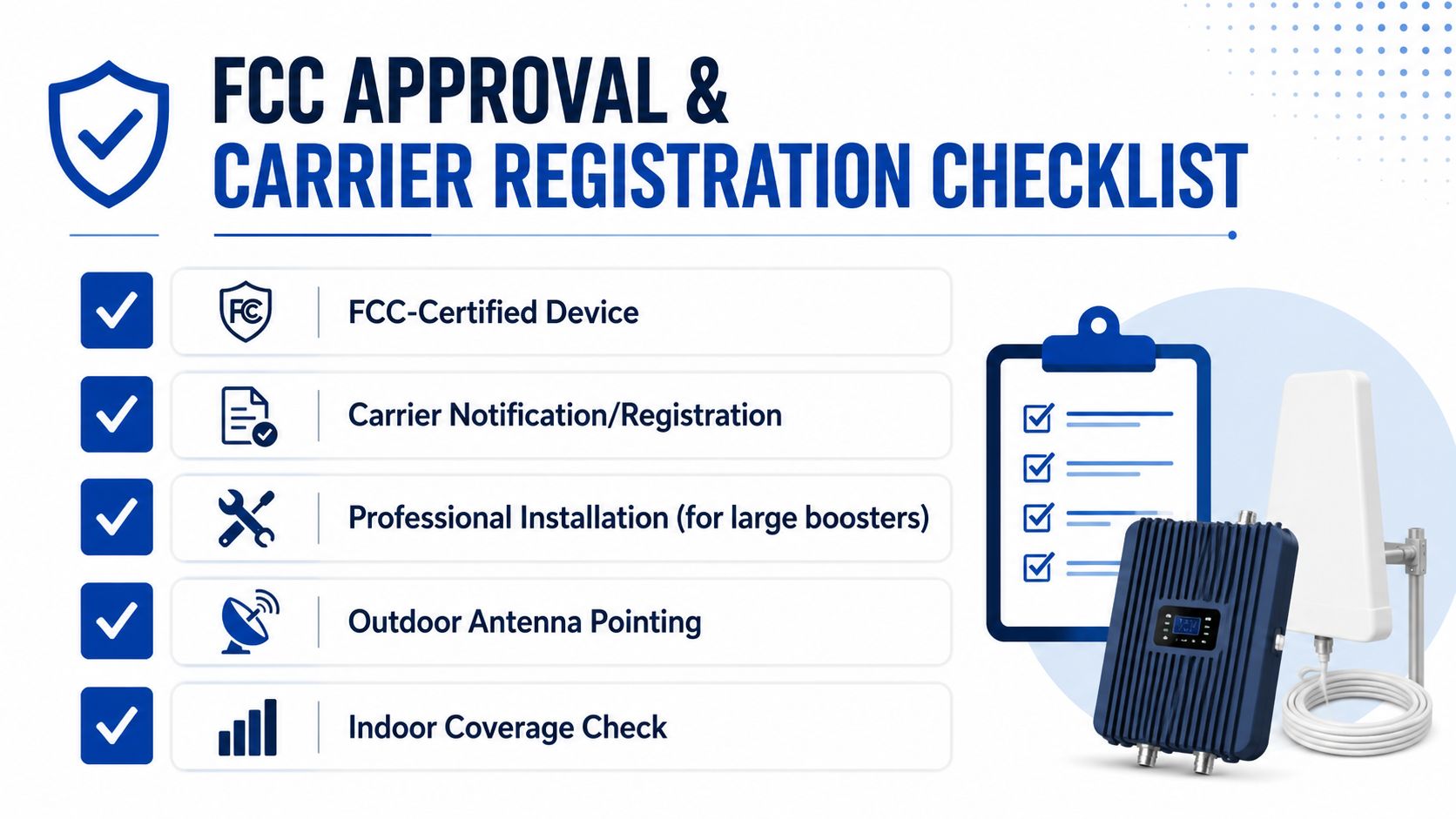
That framework matters at the installation stage. A consumer unit sold and marketed in the United States after March 1, 2014 must meet the newer FCC requirements if it's FCC-certified. Before operating one, you must complete two steps:
- Obtain approval from your wireless provider.
- Register the specific booster with that provider.
The FCC explains those obligations in its consumer signal booster requirements. Don't treat registration as optional paperwork. It connects the equipment to the carrier's network-protection process.
Consumer and industrial units aren't interchangeable
The FCC distinguishes between Consumer and Industrial signal boosters. Original consumer rules cover specific spectrum categories, including Cellular 800 MHz, PCS, AWS-1, and 700 MHz bands, as outlined in the FCC rules for signal boosters.
Industrial and Part 90 equipment follows a different compliance path. For example, Class B Part 90 boosters must be registered directly with the FCC before use, have a radiated-power cap of 5 watts ERP per retransmitted channel, and existing Class B installations were required to be registered by November 1, 2014, according to the FCC Part 90 booster requirements.
For a home, cabin, or ordinary farm office, start with a clearly identified consumer unit and verify carrier compatibility. If you're dealing with a large commercial building or a specialized radio system, ask an installer to confirm which category applies.
A metal structure deserves particular attention. This FCC-approved booster guide for metal buildings is useful when the outside signal is present but the building envelope blocks it.
Measuring Your Outdoor Signal Before You Buy
The site survey is the step that prevents most bad purchases. Bars are too coarse for serious rural planning, so use your phone's field-test screen or a signal-measurement app that reports dBm.
The dBm scale is negative. A reading closer to zero is stronger than a more negative reading. The practical categories below provide a useful starting point for comparing locations:
- Excellent, -69 dBm and above: Strong outdoor signal with favorable conditions.
- Good, -79 to -70 dBm: Usually a workable source signal.
- Fair, -99 to -80 dBm: A booster may be valuable, especially with careful antenna placement.
- Poor, -100 dBm and below: Results become more dependent on antenna height, direction, terrain, cable loss, and the exact reading.
- Very weak, around -115 dBm: A purchase becomes risky unless testing finds a stronger point elsewhere on the property.
Run the survey in several locations
Stand outside at the side of the house, near the roofline, beside a pole or mast location, and at the highest safe point you can access. Record the dBm reading at each location instead of relying on the bar icon.
Test more than one carrier if the property uses multiple networks. A booster may support several carriers, but each carrier can arrive from a different tower or use different bands.
Practical rule: The best antenna location is the point with the strongest stable reading, not automatically the highest point or the side closest to the road.
You can use a free tower-mapping service to identify likely tower directions, then verify the direction with real readings. Hills, tree cover, and seasonal foliage can change the result, so don't assume the nearest tower on a map is the strongest source.
Move the phone slowly around the property and allow the reading to settle. Note whether the signal holds steady or jumps sharply. A stable weak signal is often easier to work with than a stronger reading that disappears whenever the phone changes orientation.
For antenna options and placement considerations, see this guide to external antennas for mobile phones.
The supplied video can also help you understand the measurement process before climbing onto a roof or mast:
Write down the carrier, band if your app displays it, location, time, and dBm reading. That record gives you a much better basis for choosing equipment than a product page that only promises more bars.
Choosing the Right Gain and Coverage Area
A booster's gain matters only after a site survey confirms that the outside signal is usable. Gain is measured in decibels, or dB, and describes how much the unit can strengthen the received signal. It does not predict the indoor result by itself.
A unit rated at 70 dB maximum gain offers more amplification headroom than one rated at 50 dB, provided the outdoor signal is strong enough and the antennas have adequate isolation. If the donor antenna receives little or no usable signal, extra gain cannot create service. FCC rules still govern consumer equipment, so a higher gain rating does not remove registration requirements or make an uncertified amplifier acceptable.
Rural home products are often rated for roughly 3,000 to 5,000 square feet. Some models claim up to 7,000 square feet and up to 70 dB maximum gain, according to this rural coverage and gain comparison. Treat those figures as capacity under favorable conditions. Walls, floor plan, cable loss, antenna separation, and the measured outdoor signal can reduce the usable area substantially.
Match the antenna to the property
Use a directional antenna when your survey shows one tower direction with the strongest stable reading. It concentrates reception toward that source and can reduce interference from other directions.
An omnidirectional antenna suits properties where usable service arrives from several directions, the tower direction remains uncertain, or the installation changes position, such as in a vehicle. Its broader reception pattern gives up some focus, so it may deliver less gain toward a single distant tower.
The table below is a planning aid, not a coverage promise. Outdoor dBm is the deciding input, while antenna height, cable condition, walls, and isolation affect the final result.
| Outdoor Signal (dBm) | 50 dB Gain Coverage | 65 dB Gain Coverage | 70 dB Gain Coverage |
|---|---|---|---|
| -69 dBm and above | Strong source, often suitable for targeted rooms | Strong source, suitable for broader indoor coverage | Strong source, with substantial headroom |
| -79 to -70 dBm | Targeted rooms may perform well | Broader home coverage may be practical | Broad coverage may be practical with good isolation |
| -99 to -80 dBm | Coverage can be limited by source strength | Better choice for weak rural properties | More headroom for difficult layouts |
| -100 dBm and below | Results are highly site-dependent | Directional antenna and careful placement become important | Still requires a usable source signal and a disciplined install |
For carrier compatibility and model comparisons, review multi-carrier cellular amplifiers for rural areas. Measure the outdoor signal first, then choose gain and coverage area.
Installing Your Booster for Maximum Performance
A good rural installation is mostly about antenna geometry, cable discipline, and weather protection. The amplifier itself is only one part of the system.
Start outside
- Choose the mounting point. A roof mount, pole, or mast can place the donor antenna above obstructions. Mount it securely enough to handle local wind and weather.
- Aim a directional antenna. Point it toward the tower direction that produced the strongest stable dBm reading. Make small adjustments and recheck the reading rather than trusting a map alone.
- Keep the coaxial run practical. Excess cable adds loss. Avoid sharp bends, crushing, and damaged jackets. Tighten connectors firmly, but don't strip their threads.
- Protect the penetration. If the cable enters through a wall or roof, use suitable weatherproofing around the opening. Water entering beside coax can damage the building and the equipment.
Place the amplifier and indoor antenna
Install the amplifier indoors in a dry, ventilated location near a power source and within a sensible cable distance of both antennas. Don't bury it in insulation, wedge it against a heat source, or leave it where condensation can reach the connections.
The inside antenna should face the rooms where people use their phones. A panel antenna can direct coverage across a space, while a ceiling-mounted antenna can distribute it more broadly.
Preserve antenna isolation
The outside and inside antennas must be separated so the indoor broadcast doesn't feed back into the donor antenna. That feedback is called oscillation, and the amplifier may reduce its gain or shut down to protect the network.
The exact separation depends on antenna type, building materials, antenna direction, and system design. Use vertical and horizontal distance, solid walls, and careful antenna orientation to improve isolation. If the amplifier reports oscillation, don't keep increasing power. Move an antenna, change its direction, or add physical separation.
Installation insight: A modest amplifier installed with a strong donor signal and clean isolation can outperform a more powerful unit installed with a damaged cable and antennas facing each other.
After mounting, power the system on with the indoor antenna connected as directed by the manufacturer. Walk through the target rooms with the same phone and carrier used during the survey. Check calls, texts, and data separately because improved bars don't automatically mean every application behaves the same way.
Troubleshooting Common Booster Problems
A blinking light doesn't automatically mean the booster has failed. Most rural installation problems come from the signal path, antenna relationship, or carrier setup.
The amplifier shows an oscillation warning
Insufficient separation is the first suspect. Turn the system off, move the indoor antenna farther from the outdoor antenna, and change the antenna direction if possible. Metal roofing, walls, and terrain can help isolation, but they don't replace deliberate placement.
The booster works for one carrier
Check whether the donor antenna is aimed at a direction that favors one carrier. Then verify that the amplifier supports the relevant carrier bands. Multi-carrier capability doesn't mean every model handles every band in every market.
Gain seems lower than expected
Inspect both ends of every coax connection. Look for crushed cable, sharp bends, moisture, loose connectors, and unnecessary cable length. A weak outdoor reading can also limit the amplifier, even when the equipment is operating normally.
The display or app reports an error
Use the manufacturer's indicator-light or app documentation for the exact code. Common categories include oscillation, overload, unsupported band activity, or an antenna connection issue. Don't guess by repeatedly rebooting without changing the installation.
If you switch wireless providers, review the registration status and register the specific booster with the new provider as required. For outdoor installations and exposed equipment, this outdoor cell phone signal booster guide provides a useful troubleshooting reference.
Alternatives When a Booster Is Not the Answer
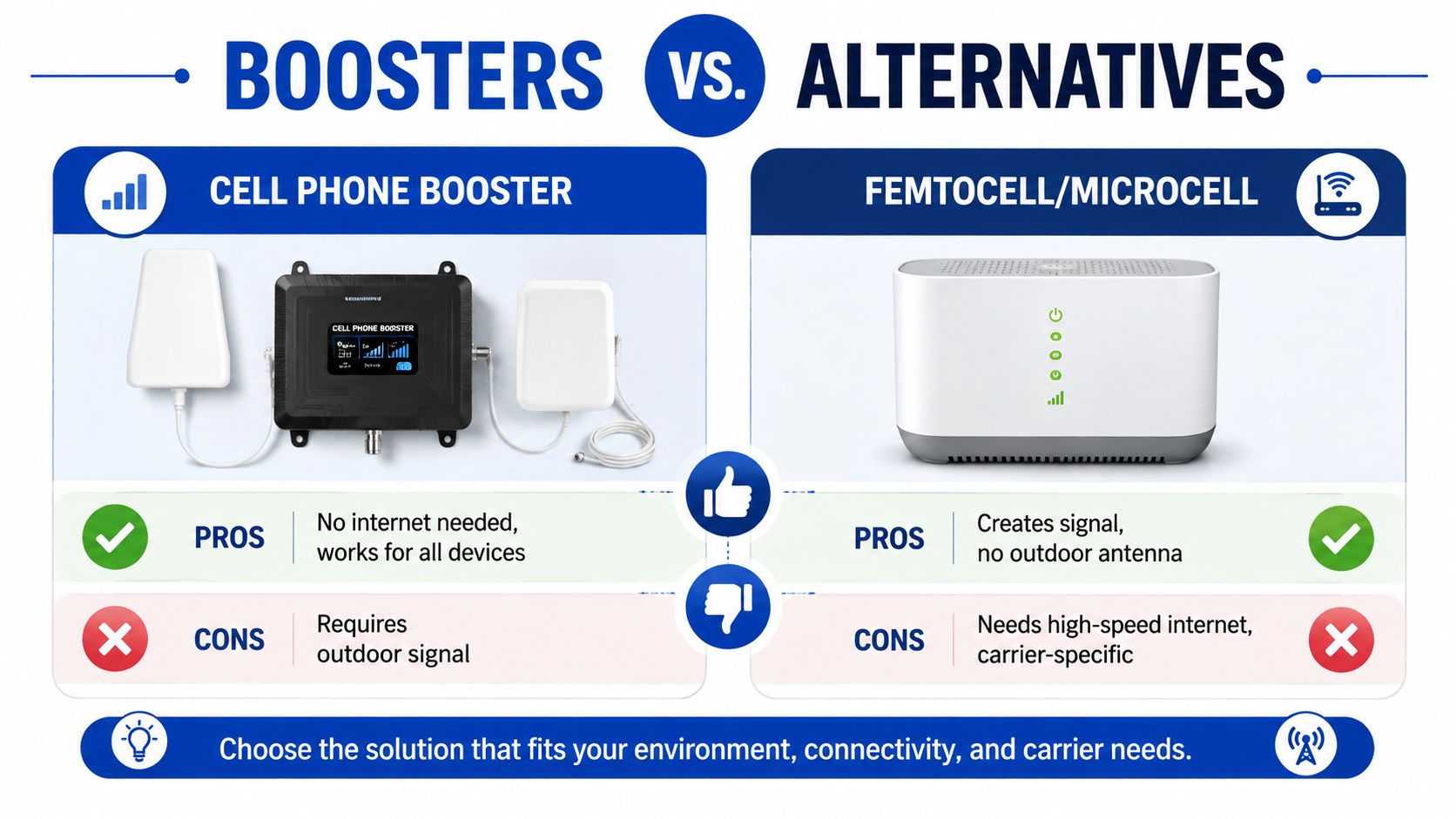
A booster needs an outdoor cellular signal. If your survey finds no usable signal anywhere around the property, increasing gain won't solve the underlying problem.
A femtocell or microcell can create a local cellular connection through an internet service, but it depends on compatible carrier support and a dependable broadband connection. It's useful when internet service is available but the tower signal isn't.
An external antenna for a hotspot or cellular router can be a better fit when the main goal is home internet rather than voice service. The antenna moves the receiving element outdoors or to a better location, while the router distributes the connection indoors.
Wi-Fi calling may solve voice and messaging needs without a cellular booster if the phone, carrier, and internet connection support it. It won't help when the internet connection is also unreliable, and it doesn't improve cellular service for every device.
A satellite-based service is the edge-case option for properties with no terrestrial cellular path and no dependable fixed connection. It involves different equipment, installation, power, and service considerations, but it addresses the condition a booster can't.
Use your outdoor dBm survey as the decision filter:
- Usable signal outdoors: Consider a booster, with the antenna chosen around the strongest measured direction.
- Signal only at one exterior point: Improve antenna height or use a directional antenna before buying a larger amplifier.
- No detectable signal: Consider internet-based cellular equipment, Wi-Fi calling, a cellular router strategy, or satellite connectivity.
- Strong outdoor signal but poor indoor service: Focus on building materials, antenna placement, cable routing, and indoor coverage design.
DigiDevice offers cellular equipment alongside mobile accessories and related electronics, including an INVCALL booster listed for large home or office use with support for specified U.S. carrier bands. Visit DigiDevice to compare the available booster and connectivity options, then check your outdoor dBm readings before choosing a system.
People Also Ask
Will a cell phone booster work if I have no signal outside
No. A booster amplifies an existing cellular signal. If testing finds no usable signal anywhere outdoors, consider Wi-Fi calling, internet-based cellular equipment, or satellite connectivity instead.
Should I use a directional or omnidirectional antenna in a rural area
Use a directional antenna when one tower direction gives you the strongest stable reading. Choose an omnidirectional antenna when service arrives from multiple directions or the installation needs broader reception.
Do I need carrier approval before using a consumer booster
Yes. The FCC requires consumer booster users to obtain wireless-provider approval and register the specific booster with that provider before use.