

Best AR Glasses for Gaming Tested for 2026 Play
You're halfway through a fast match, the desk is cramped, and the handheld's built-in display feels too small for comfortable aiming. AR glasses can turn that same setup into a private, large virtual screen, but the right choice depends less on a flashy panel specification than on how the glasses connect, where they get power, and how much latency your device chain adds.
Direct answer: the XREAL Air 2 Pro is the balanced baseline for portable and PC gaming, the XREAL One Pro is the stronger low-latency and wider-FOV choice, the VITURE Beast suits bright rooms, and the ROG XREAL R1 is the high-refresh option for players who specifically want 240Hz. Before buying, confirm USB-C DisplayPort Alt Mode support, adapter requirements, controller routing, and the power plan for your handheld or laptop.
Why AR Glasses Are Winning for Gaming Right Now
A handheld console works brilliantly until the game asks for small interface text, distant targets, or sustained concentration. On a couch, in bed, or during travel, AR glasses solve the physical-screen problem by placing a large private display in front of your eyes without requiring a television or permanent monitor.
They're particularly useful for a single-screen gaming setup. A compatible Steam Deck or handheld PC can send video directly over USB-C, while a computer can use the glasses as a portable monitor. That makes them a better fit for screen size, privacy, and portability than for replacing a full desktop workspace.
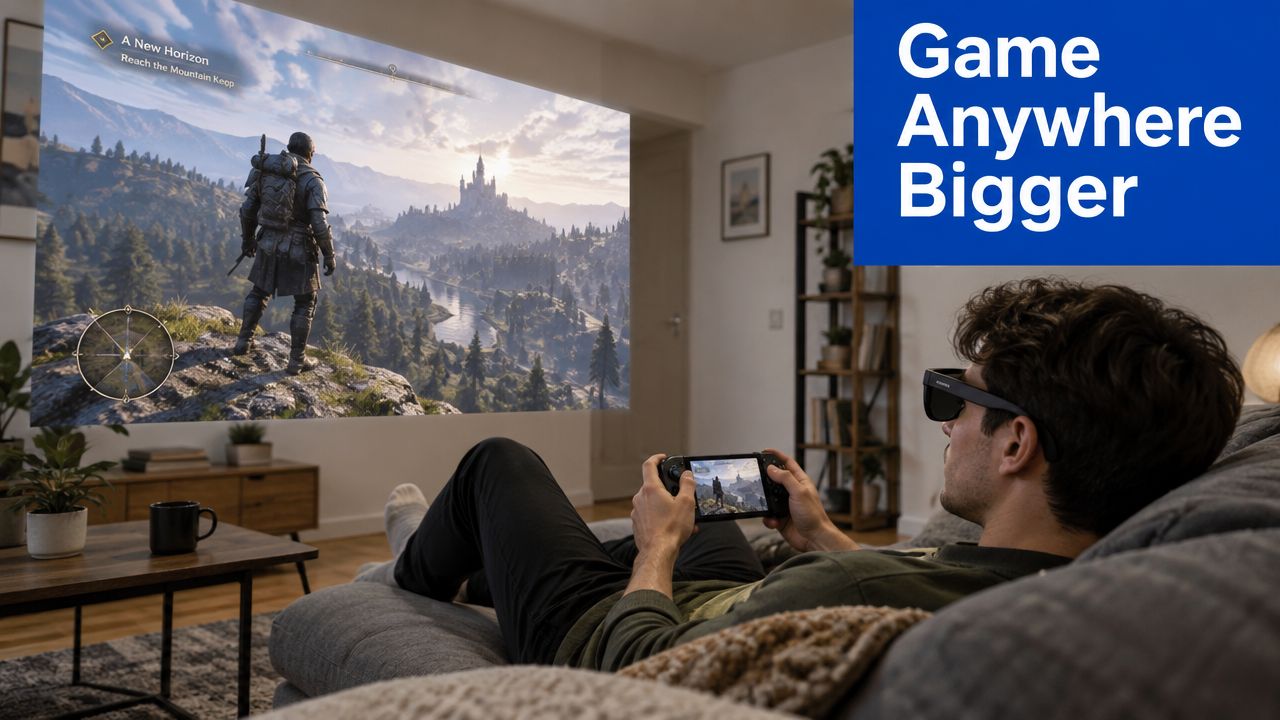
AR glasses also differ from VR headsets in a practical way. Gaming-focused wired glasses generally act like external displays, so you still hold a controller, keyboard, or mouse and see the game feed rather than entering a fully enclosed virtual environment. Some models add spatial features such as 3DoF tracking, but the core experience remains monitor replacement, not room-scale VR.
Why 2026 changes the comparison
CES 2026 produced a clear gaming milestone when ASUS and XREAL presented the ROG XREAL R1 as an AR glasses family advertising a 240Hz refresh rate, paired with 1080p micro-OLED panels. Industry coverage described the glasses as a gaming-monitor replacement concept and reported planned global shipment in the first half of 2026. CES 2026 coverage of the ROG XREAL R1 gives the wider context.
That threshold matters because refresh rate directly affects motion cadence. 240Hz roughly doubles the frame cadence of 120Hz glasses, giving shoppers a concrete benchmark when comparing fast shooters, racing games, and other motion-heavy genres.
The category is also becoming more crowded. One 2026 industry compilation estimated the global AR gaming market at $18.43 billion in 2025, compared with $14.32 billion in 2024, and projected $51.63 billion by 2029, with a 29.4% compound annual growth rate over that period. The same compilation estimated connected smart glasses at 5.5 million units in 2025, up from 2.7 million in 2024, and total XR shipments at about 14.5 million devices globally in 2025. XR market statistics and shipment context explain why support, accessories, and model variety are expanding.
For broader background on where display glasses are heading, this future of augmented reality overview pairs well with 3D and AR asset generation, especially if you want to understand how spatial content is created rather than only consumed. For shopping, browse the AR glasses collection and start with the device you already own.
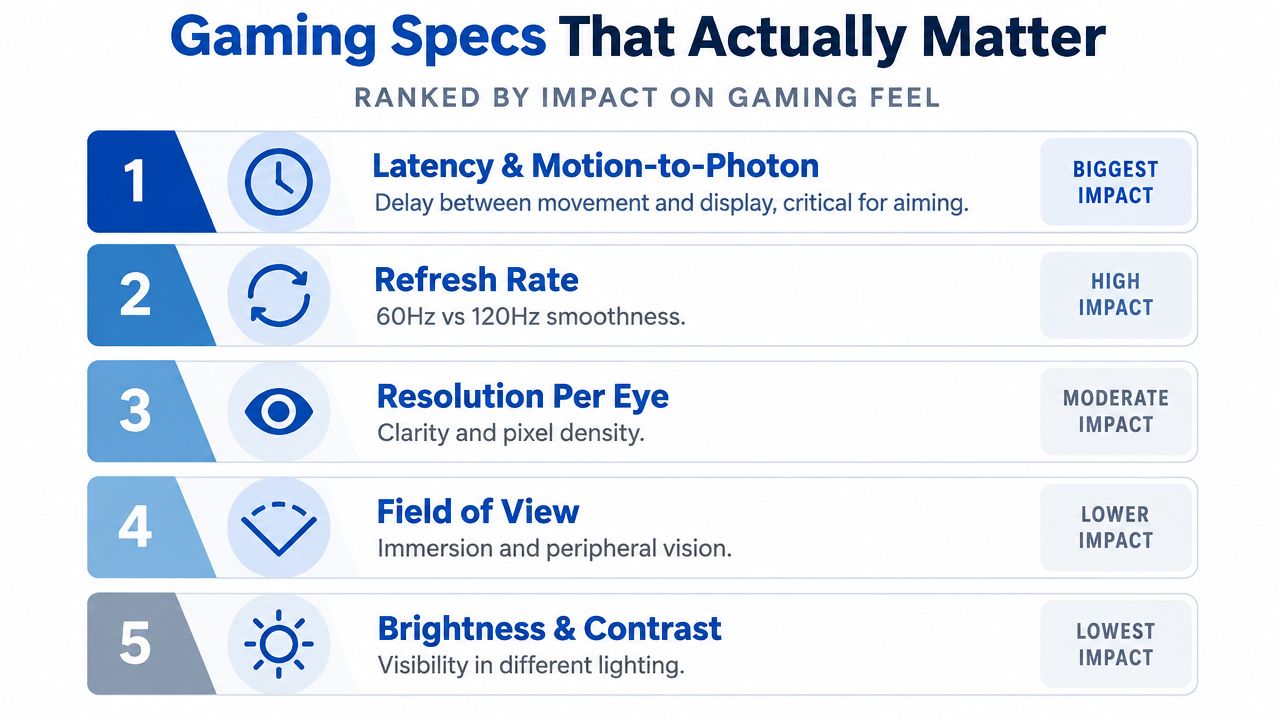
Gaming Specs That Actually Matter Explained
Gaming glasses don't need every feature found in a mixed-reality headset. They do need a display pipeline that responds quickly, stays clear during motion, and remains visible in the room where you play.
Latency and motion response
Latency is the delay between an input or head movement and the image update. Wired AR glasses typically target very low latency, with neutral gaming guidance describing figures under 20ms as typical for wired designs. General AR gaming guidance also recommends 1080p at 144Hz or higher as a practical value target for high-frame-rate FPS and competitive games.
The XREAL One Pro pushes the specification further with 3ms motion-to-photon latency, native 3DoF tracking, and its self-developed X1 spatial computing chip. That doesn't automatically make every game faster, because the console, cable, adapter, and game frame rate still matter, but it gives head movement a tighter display response.
The practical rule: panel speed matters, but the complete chain matters more. A fast display can't erase latency introduced by an incompatible adapter or an overloaded source device.
Refresh rate
Refresh rate describes how often the display can update each second. 120Hz is already a strong target for smooth handheld and PC gaming, while the ROG XREAL R1 makes 240Hz the headline feature for players chasing the highest motion cadence.
A higher refresh rate is most useful when the source device and game can produce enough frames to take advantage of it. It has less impact in slower, story-led games than in competitive shooters, racing titles, and rapid camera movement.
Resolution per eye
Resolution per eye determines how much detail each display panel can show. The XREAL Air 2 Pro uses 1920×1080 per eye, a sensible baseline for game text, HUD elements, and general sharpness.
Resolution isn't the same as perceived immersion. A highly detailed image can still feel like a floating monitor if the field of view is narrow, while a wider view can make the same game feel more enveloping.
Field of view
Field of view, or FOV, describes how much of the scene you see through the glasses. Wider FOV generally makes the virtual screen feel larger and gives games more visual presence, although it can spread a fixed resolution across more of your view.
The XREAL Air 2 Pro sits at about 46° FOV, while the XREAL One Pro reaches 57°. The VITURE Beast is listed at 58°, so these models separate into a narrower monitor-replacement feel and a wider, more immersive presentation.
Brightness and contrast
Brightness is measured in nits and affects visibility in rooms with ambient light. The Air 2 Pro reaches about 500 nits peak brightness, while the VITURE Beast is listed at 1250 nits HDR, making it the more obvious candidate for daytime or bright-room sessions.
Brightness doesn't replace good fit or contrast. If the image sits poorly over your eyes, a high nit rating won't fix distraction or eye strain. For technical design context, this waveguide versus birdbath optics guide helps explain why different AR glasses can produce very different visual experiences.
This video gives a visual companion to the display and gaming concepts discussed above.
Top Gaming AR Glasses Compared Head to Head
The strongest model depends on whether you value balanced portability, low-latency tracking, bright-room visibility, or maximum refresh rate. The table below keeps the comparison focused on the specifications that change the feel of play.
Gaming AR Glasses Spec Comparison
| Model | Resolution per Eye | Refresh Rate | FOV | Brightness | Latency Highlight |
|---|---|---|---|---|---|
| XREAL Air 2 Pro | 1920×1080 | Up to 120Hz | About 46° | About 500 nits peak | Reviews describe essentially no perceptible gaming latency |
| XREAL One Pro | 1920×1080 | 120Hz | 57° | Not specified in the verified data | 3ms motion-to-photon, native 3DoF |
| VITURE Beast | 1200p | 120Hz | 58° | 1250 nits HDR | Brightness-first gaming design |
| ROG XREAL R1 | 1920×1080 | 120Hz normally, 240Hz with frame-rate boost mode | Not specified in the verified data | 700 nits peak | 0.01ms panel response time, 240Hz mode |
The field of view explainer is useful if you're unsure whether a wider image will matter more to you than concentrated sharpness.
XREAL Air 2 Pro for balanced portable play
The Air 2 Pro is the sensible baseline for gamers who want a portable monitor replacement without paying primarily for spatial computing features. Its 1920×1080 resolution per eye, 120Hz refresh, approximately 46° FOV, and roughly 500 nits peak brightness create a sharp, large-feeling image for handheld and PC gaming.
Reviews emphasize its gaming responsiveness, describing no perceptible latency during play. The compromise is immersion. A 46° view feels more like a large floating screen than a wraparound game world, so it suits portable RPGs, platformers, and general PC use better than players seeking the widest visual presence.
XREAL One Pro for low-latency immersion
The One Pro is the technical choice for desk-based gaming and players who notice head movement response. Its 3ms motion-to-photon latency, native 3DoF tracking, 120Hz Sony micro-OLED display, and 57° FOV form a more aggressive performance package than the older narrow-view baseline.
The wider field of view improves perceived scale, while the X1 chip handles spatial display behavior. It still isn't a replacement for a full VR headset, and the source device must deliver a suitable signal, but it makes a strong case for competitive play where camera movement and screen presence both matter.
VITURE Beast for bright rooms
The VITURE Beast takes a different route. Its listed 1200p per eye, 120Hz refresh, 1250 nits HDR, and 58° FOV prioritize visibility and a wide presentation.
That makes it the better fit for travel, daytime use, and rooms where curtains can't fully block ambient light. It isn't automatically the winner for every competitive setup because brightness and resolution don't tell you the complete latency story. Choose it when you regularly fight reflections or washed-out screens.
ROG XREAL R1 for the 240Hz ceiling
The ROG XREAL R1 is the halo pick for refresh-rate enthusiasts. ASUS and XREAL specify a 171-inch virtual Micro-OLED display, 120Hz normal operation, and 240Hz through frame-rate boost mode, while the panel response time is listed at 0.01ms. ROG XREAL R1 product specifications provide the gaming-focused thresholds.
Independent coverage lists 0.55-inch Sony micro-OLED panels, 1920×1080 resolution, and 700 nits peak brightness. ROG XREAL R1 display coverage provides those panel details.
The R1's value is clearest when your games and source hardware can use high refresh. If your priority is broad compatibility, bright-room visibility, or wider FOV, another model may fit better.
Platform Compatibility and Input That Decides Your Pick
The most expensive mistake is buying glasses that your gaming device can't feed directly. Start with the output port, not the panel.
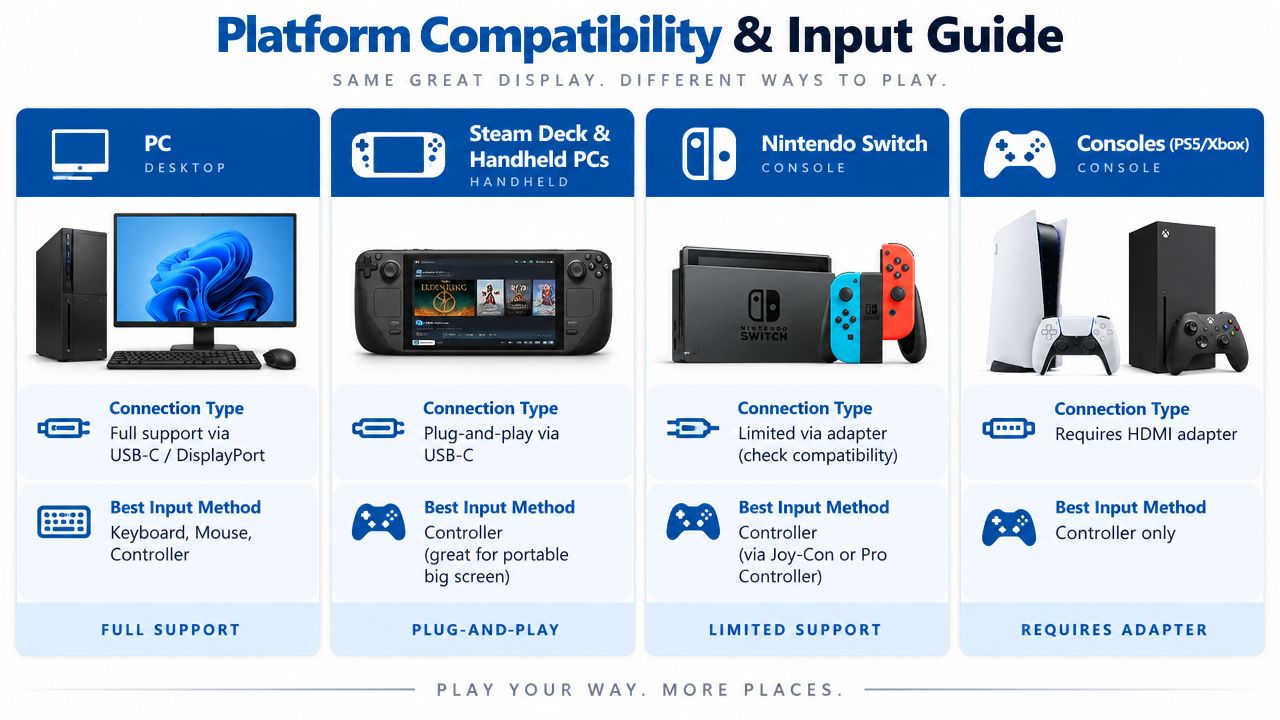
A USB-C port must support DisplayPort Alt Mode for direct video transmission. USB-C alone isn't enough. If your laptop, handheld, or phone lacks that video capability, you'll need an HDMI-to-USB-C adapter, and that adds cost, bulk, and a possible source of latency.
PC and gaming laptops
A gaming laptop with USB-C DisplayPort Alt Mode is the cleanest computer setup. One cable can carry video to the glasses, while the laptop remains responsible for game rendering and input.
Desktop PCs vary more. Many use HDMI or standard DisplayPort outputs rather than USB-C video, so the glasses may require an adapter. That adapter also needs a reliable power path, particularly when the source port carries video but not the power required by the glasses.
Steam Deck and handheld PCs
Steam Deck and compatible handheld PCs are natural partners for display glasses because they're designed around portable play and external screens. Confirm the exact USB-C port specification on your model before checkout, because similarly shaped ports don't always offer the same video features.
The controller remains in your hands. The glasses display the game, while buttons, sticks, keyboard, mouse, or a connected gamepad continue to control it. For a single large screen, advanced spatial tracking matters less than stable display output and comfortable viewing.
The Steam Deck AR gaming guide is a useful next read if handheld play is your main use.
Nintendo Switch and consoles
Nintendo Switch, PlayStation, and Xbox setups commonly use HDMI output rather than direct USB-C DisplayPort video. That means the glasses need an HDMI-to-USB-C adapter, and the adapter can introduce another component that needs power and careful cable routing.
Input remains conventional. You use the console's Joy-Cons or gamepad, not hand tracking. Check whether your chosen adapter supports the console's output chain before assuming the glasses are plug and play.
| Check before buying | Why it decides the result |
|---|---|
| USB-C DisplayPort Alt Mode | Enables direct connection |
| HDMI output only | Requires an HDMI-to-USB-C adapter |
| Adapter power input | Prevents a dead or unstable display chain |
| Controller access | Keeps game input independent from the glasses |
| 3DoF support | Helps anchor or stabilize a virtual screen, but isn't required for basic monitor replacement |
For cables, adapters, and connection accessories, review DigiDevice's USB-C adapters and cable selection alongside your glasses choice.
Comfort Audio Battery and Thermal Realities for Long Sessions
A display can look perfect on a specification sheet and still become annoying during a long gaming session. Weight distribution, nose-pad pressure, lens alignment, and cable position decide whether you keep wearing the glasses after the novelty fades.
Prescription users should check insert support before buying. Players without prescription needs should still adjust the nose pads and temple fit so the image stays centered without constant repositioning.
Audio choices
Built-in speakers keep the setup compact, but open-ear audio can be less private than earbuds in a quiet room. Earbuds give you stronger isolation and a more familiar sound profile, while the glasses' integrated speakers eliminate another cable and reduce pressure around the ears.
For multiplayer, also check microphone behavior on the host device. The glasses handle display and sometimes audio output, but voice chat still depends on the connected console, handheld, phone, or PC.
Power is part of the ecosystem
Many AR glasses don't include an internal battery. They draw power from the connected device or need a separate dock or accessory for longer sessions. Independent coverage says glasses can increase battery drain by around 15% to 20% on systems such as Steam Deck or laptops, while external accessories may extend use to roughly 6 to 12 hours, depending on the setup. AR glasses battery and power guidance provides that context.
Ask the better battery question: which glasses fit your device's charging and video arrangement with the least hassle?
A handheld gamer should plan for simultaneous charging if the device supports it, or carry an appropriate power accessory. A laptop user has more flexibility near a wall outlet, but cable placement still affects comfort and heat around the computer's USB-C ports.
For supporting gear, compare DigiDevice charging accessories and portable audio options before committing to a long-session setup.
Recommended Picks by Gamer Type and Budget
There isn't one universal winner. The best AR glasses for gaming are the pair that matches your genre, room, source device, and tolerance for adapters.
Competitive FPS and racing
Choose the XREAL One Pro if head movement response and a wider view are your priorities. Its 3ms motion-to-photon latency, native 3DoF, 120Hz display, and 57° FOV create the most convincing low-latency and immersion combination in this comparison.
The ROG XREAL R1 is the more extreme alternative if your setup can exploit 240Hz. Its normal 120Hz mode and frame-rate boost mode make it a specialist choice rather than an automatic recommendation for every handheld.
Immersive single-player gaming
The XREAL One Pro again has the strongest case when you want a larger-feeling screen without moving to a full VR headset. Its 57° FOV is materially wider than the Air 2 Pro's approximately 46° view.
For slower games, the difference between models may matter less than fit, image alignment, and whether the glasses connect directly to your device.
Bright-room and travel play
Pick the VITURE Beast when ambient light is the recurring problem. Its listed 1250 nits HDR and 58° FOV target visibility and scale, which are useful on daytime trips or in rooms where you can't control the lighting.
The trade-off is that its advantage is situational. If you mostly play in a dark room, low-latency behavior and comfort may deserve more weight than maximum brightness.
Best value baseline
The XREAL Air 2 Pro remains the straightforward starting point for most portable and PC gamers. It combines 1920×1080 per eye, up to 120Hz, approximately 46° FOV, and about 500 nits peak brightness, while reviews describe its gaming latency as imperceptible.
Its floating-monitor presentation isn't as immersive as wider models, but that can be a benefit for players who want a stable, practical display rather than a more enveloping view. Review Rokid Max AR 3D Smart Glasses for phone, Switch, PS5, Xbox, and PC as an alternative if your platform mix includes several HDMI-based consoles.
Halo performance
The ROG XREAL R1 is for shoppers who specifically want a 240Hz headline specification and a gaming-first design. ASUS lists a 0.01ms panel response time, while the R1 uses a 171-inch virtual Micro-OLED display and enables 240Hz through frame-rate boost mode.
Before choosing it, verify that your source device, game settings, and adapter chain can support the intended mode. A premium display is wasted if the connection forces a lower refresh rate.
Setup Tips Accessories and Buying Checklist Before You Buy
Use this sequence before starting a game:
- Confirm the source output. Check whether your PC, handheld, or phone supports USB-C DisplayPort Alt Mode.
- Map HDMI devices. For Switch, PlayStation, Xbox, or a desktop without USB-C video, identify the required HDMI-to-USB-C adapter and its power input.
- Match the display to the genre. Competitive games favor low latency and high refresh, while slower games can prioritize FOV, comfort, or brightness.
- Plan power before the first session. Decide whether the host device can charge while sending video, or whether you'll use a dock or external power accessory.
- Test fit and audio. Adjust nose pads, confirm prescription insert support if needed, and choose built-in speakers or earbuds based on your environment.
A GaN charger can simplify a portable setup by providing compact power for compatible accessories and devices. Use this GaN charger guide when building a travel kit.
Before checkout, verify these points:
- Device chain: direct USB-C or adapter-based HDMI?
- Refresh target: 120Hz is sufficient for many setups, while 240Hz is the R1's specialist feature.
- Latency priority: look for a clearly stated motion-to-photon figure when competitive play matters.
- Visual preference: narrower FOV for a concentrated screen, wider FOV for stronger immersion.
- Room brightness: consider the VITURE Beast for demanding bright-room conditions.
- Session power: account for host-device drain and external charging.
Updated for March 2026. Insert image of the selected AR glasses connected to a Steam Deck on a travel table. Insert image of the selected AR glasses connected to a console through an HDMI-to-USB-C adapter.
DigiDevice offers AR glasses, adapters, cables, chargers, headphones, and other accessories that can help complete a gaming display chain. Check the DigiDevice selection, confirm compatibility with your exact source device, and build the power and audio setup before you buy.