

What Is Thermal Imaging Camera: A Practical Guide for 2026
A thermal imaging camera detects infrared radiation emitted by objects and translates it into a visual temperature map, letting you see heat patterns invisible to the naked eye. Thermal imaging cameras typically detect long-wave infrared radiation in the 8–14 μm band, turning differences in heat into a readable image.
You're in a dark basement with your phone flashlight switched off. The ordinary camera shows almost nothing, but a thermal camera can reveal a warmer pipe, a cooler draft, or an electrical connection that's heating abnormally. That's the practical answer to what is thermal imaging camera: it's a sensing instrument that measures infrared energy and displays relative or calibrated temperature information, rather than visible color and light.
The technology began as a specialist inspection tool. The first commercial thermal imaging camera was sold in 1965 for high-voltage power line inspections, a milestone that established the technology's connection with preventive maintenance and safety (historical background on thermal imaging cameras). Today, the category spans phone attachments, handheld inspection tools, security systems, and high-temperature industrial equipment.
The market reflects that wider role. One 2026 industry report estimated the thermal imaging market at USD 14.9 billion in 2025, projected USD 41.3 billion by 2035, and forecast USD 16.4 billion in 2026, with a projected 10.8% CAGR across 2026–2035 (thermal imaging market outlook). Those figures are projections, not a guarantee for any individual product, but they show why thermal cameras now appear in more everyday workflows.
Seeing Heat in the Dark
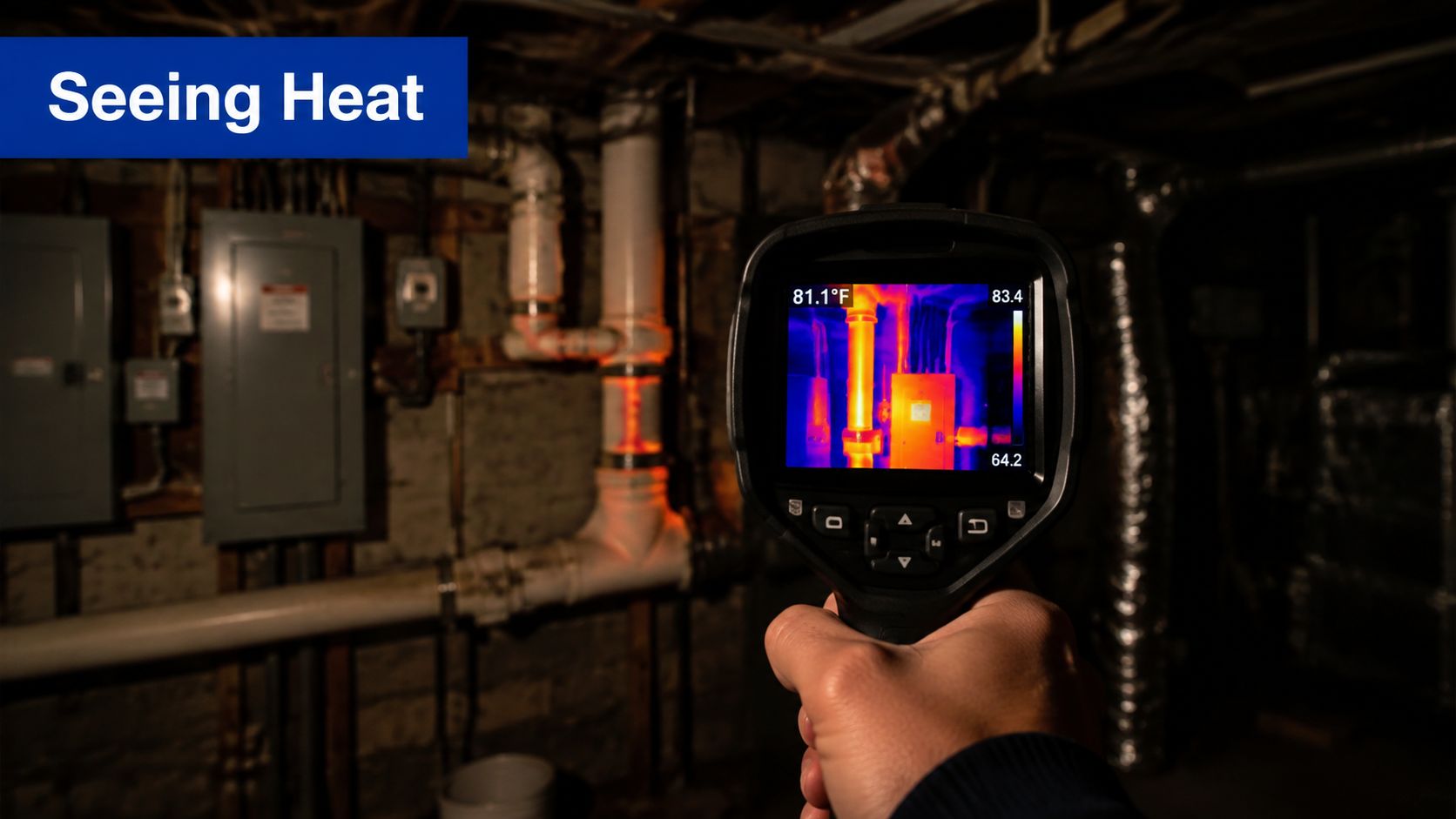
In a pitch-black basement, a normal camera leaves a warm pipe or overheating wire nearly invisible. A thermal camera produces a different kind of evidence. It detects infrared energy associated with surface temperature and converts the pattern into an image, so an abnormal connection can stand out without visible light.
The camera reads radiation from surfaces within its field of view. It does not see through walls like an X-ray. A drywall patch may appear warmer above a pipe or cooler where a draft reaches the surface, but the measured signal belongs to the wall's exterior. The hidden cause is inferred from that surface pattern, then checked with other tools when needed.
What appears on the screen
Red, orange, yellow, blue, and purple usually represent a display palette, not the object's actual color. The camera maps temperature values or differences to colors, much like a relief map uses shades to show elevation. The palette helps your eyes find contrast quickly, while the underlying sensor response and measurement settings determine what that contrast means.
A warm electrical terminal can appear bright beside cooler components. A person may form a distinct warm outline outdoors at night, and a cold air leak can appear as a cool streak along a door frame. These patterns are useful clues, not automatic diagnoses.
Practical rule: Use colors as an alert system. For a dependable reading, check the displayed temperature, emissivity setting, surface condition, and distance.
Thermal imaging supports diagnostics, safety checks, building inspection, electrical maintenance, security, and outdoor observation. It differs from digital infrared night vision. A product such as the Rexing NVS1 digital infrared night vision scope is designed to preserve visible scene detail in low light, whereas thermal imaging emphasizes heat contrast.
That distinction should guide the purchase. Choose night vision when labels, connectors, or ordinary visual details matter. Choose thermal imaging when the target is an unusual heat pattern in darkness, smoke, or a crowded electrical cabinet. Phone attachments can make that inspection portable, while rugged industrial units are built for harsher handling and more controlled measurements.
How Infrared Sensors Turn Heat Into Images
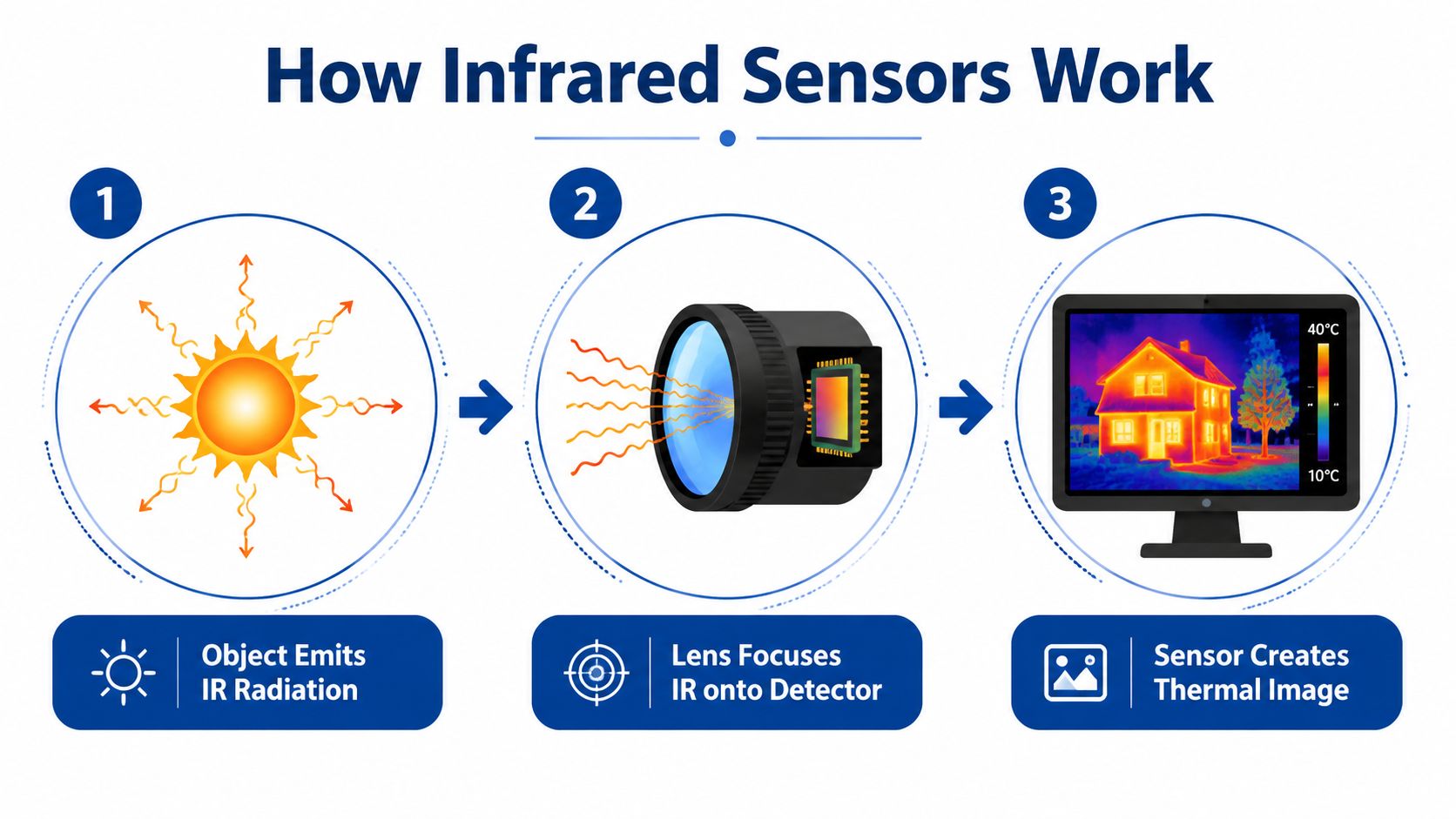
A thermal camera starts with infrared energy rather than visible light. Surfaces emit this radiation, and the optical system focuses it onto a detector array. Commercial thermography commonly uses the long-wave infrared range of 8–14 μm, according to this long-wave infrared thermometric camera guide.
The conversion follows a defined chain:
- The object emits infrared radiation. A warmer surface generally produces a stronger signal than a cooler one, although material properties and surrounding conditions affect the reading.
- The lens focuses the energy. Thermal lenses use materials that transmit the relevant wavelengths. Ordinary glass is not automatically suitable.
- The detector responds. Many thermal cameras use an uncooled microbolometer, a detector type documented in this thermal camera detector datasheet.
- The electronics interpret the response. Each detector element reacts to incoming infrared energy. The camera converts that response into a pixel value, building the thermal image one measurement at a time.
- The software presents the result. It may apply a color palette, grayscale, center-point temperature, or a box marking the hottest and coolest areas.
The microbolometer analogy
Each detector element works like a miniature infrared receiver. It does not capture visible raindrops or ordinary light. Instead, incoming infrared energy changes the element's electrical behavior, and the camera translates that change into a pixel value. Stronger or weaker responses create the contrast you see across the image.
An uncooled microbolometer operates under ordinary conditions, which helps phone-compatible and handheld cameras remain compact. Cooled detectors can provide advantages in demanding specialist applications, but they require more complex systems. As a result, a small attachment and a rugged industrial unit may use the same broad imaging principle while differing in speed, sensitivity, measurement confidence, and operating range.
The detector's pixel count controls thermal detail, not the visible-light megapixel rating of the paired phone. Published specifications show this distinction with an uncooled microbolometer offering 384×288 thermal resolution (thermal detector and resolution specifications). Lens coverage also affects what reaches those pixels. This field of view guide explains how much of a scene the camera captures.
Key Specs That Matter
A thermal camera's specification sheet becomes easier to read when each number answers a practical question. Four categories shape the buying decision: thermal resolution, NETD, spectral band, and frame rate. Together, they indicate how much detail you can separate, how small a temperature difference you can detect, which infrared wavelengths the sensor uses, and how smoothly it displays movement.
Resolution and NETD
Thermal resolution is the detector's pixel grid. A 384×288 sensor samples a scene more densely than a smaller detector, which helps when you need to examine a narrow wire, a small circuit component, or a distant target. The visible-light camera in a paired phone does not add thermal pixels, so its megapixel rating cannot substitute for detector resolution.
Resolution and measurement confidence are separate checks. A high-resolution camera can still give uncertain readings when the target is reflective, occupies too little of the frame, or is viewed from an unsuitable angle. For inspection work, pixel count tells you how finely the scene is sampled. Emissivity, distance, focus, and calibration affect whether the resulting temperature reading is trustworthy.
NETD, or noise equivalent temperature difference, describes the smallest temperature difference the camera can distinguish from sensor noise. Lower NETD is better. Recent reporting on premium devices describes models moving toward 20 mK or better, alongside 640×480, 640×512, and megapixel-class thermal sensors (recent thermal device specification trends). Higher sensitivity can reveal subtle gradients that a basic camera may merge into one broad color.
Spectral band and frame rate
The spectral band identifies the infrared wavelengths the camera detects. Long-wave infrared in the 8–14 μm range is common for general thermography. The band influences which measurement conditions the camera can handle, so match it to the materials and temperatures you plan to inspect.
Frame rate matters when a subject moves or when you pan across equipment. A smoother live view makes it easier to follow a changing hotspot, while latency can make a phone attachment feel less responsive. Frame rate alone does not make temperature measurements more accurate.
Use this buying filter:
- Fine detail: Prioritize detector resolution for small components.
- Subtle faults: Prioritize lower NETD when minor temperature differences matter.
- Measurement context: Check spectral range, calibration information, emissivity settings, and focus.
- Moving scenes: Consider frame behavior and latency, not only still-image quality.
Wildlife work places more emphasis on scene coverage and movement. A camera for wildlife photography provides useful context for the broader optical decision. A maintenance technician should begin with the fault's size, distance, and temperature contrast, then select the detector and measurement features that fit that task.
Thermal Cameras Versus Night Vision
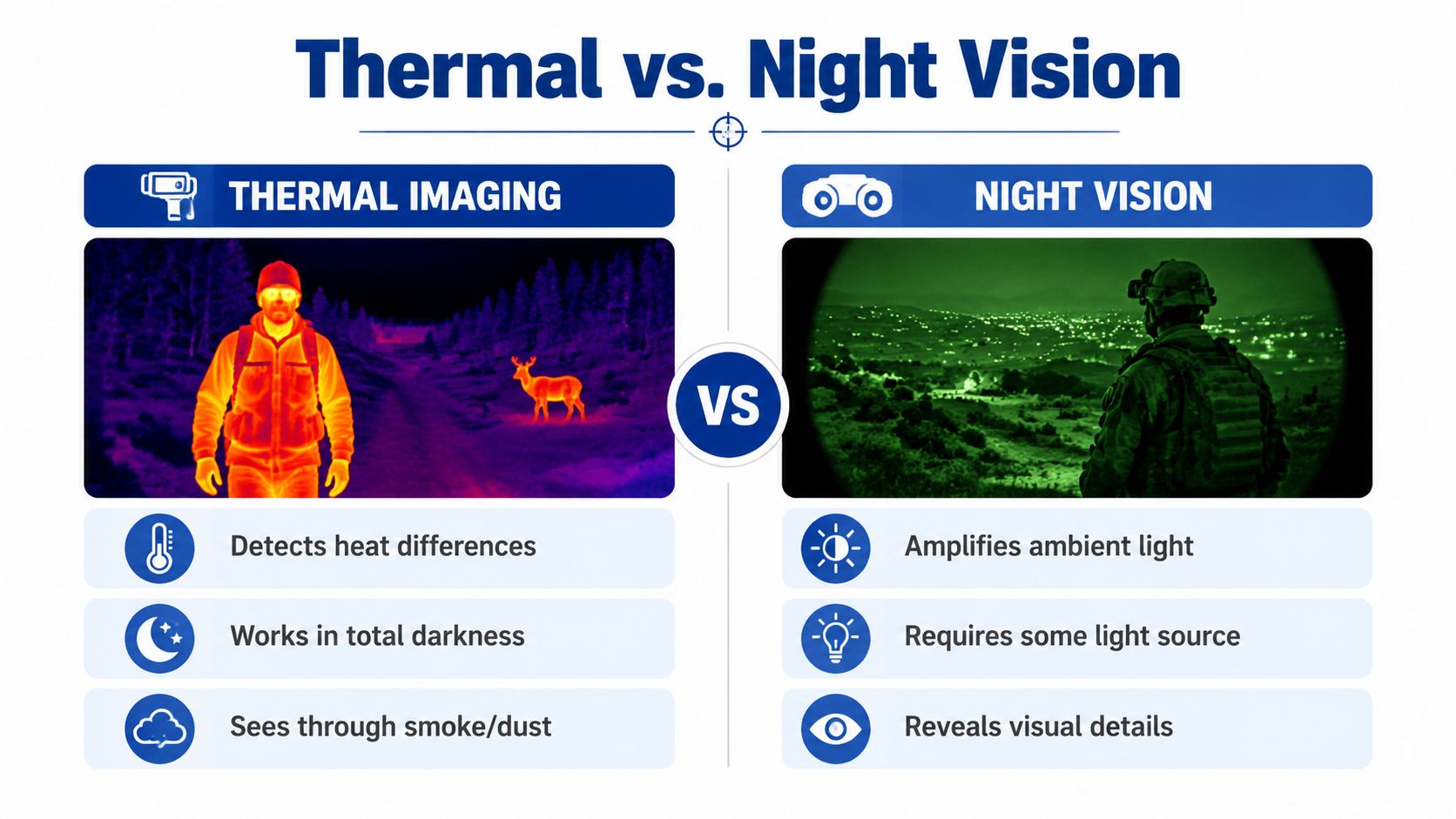
You are checking a dark site and need to know whether a distant shape is a person, an animal, or equipment. The right tool depends on the question. Night vision amplifies available light, while thermal imaging measures differences in infrared energy emitted by objects. Night vision usually preserves a scene's familiar visual appearance. Thermal imaging turns temperature contrast into a distinct pattern.
| Criterion | Thermal imaging | Night vision |
|---|---|---|
| Light requirement | Can operate without visible illumination | Needs some ambient light or an infrared illuminator |
| Main information | Heat differences | Visual scene detail |
| Total darkness | Strong fit | Depends on the device and illumination |
| Smoke or light obstruction | Can reveal heat contrast through some conditions | Visibility can deteriorate |
| Identification | May show shape and heat pattern without fine detail | Usually better for ordinary visual detail |
| Best fit | Detection, inspection, and heat-related faults | Observation and visual confirmation |
The two technologies answer different parts of the same investigation. A thermal camera can locate a person or animal through its heat signature, yet clothing texture, markings, and written labels may disappear. Night vision can reveal those visual clues, while offering no direct indication that one circuit terminal is hotter than nearby terminals.
Choose by the question you need answered
For “Where is the target?”, thermal is often the stronger first tool. For “What exactly is that target?”, night vision may provide the better follow-up view. A useful field setup can combine them, using thermal to detect a heat pattern and visible imaging to confirm identity or condition.
That distinction matters in low-light operations. Pilots learning to work after dark need to understand how each viewing method behaves, and this drone pilot night training in Australia provides relevant operational context. In electrical maintenance, a night-vision image may look normal while a thermal scan exposes an abnormal hotspot.
Thermal imaging also works in daylight because it does not depend on darkness. Night vision suits general visual observation, while thermal is designed to reveal temperature contrast that ordinary sight cannot show.
Real Use Cases That Justify the Purchase
A thermal camera earns its place when it answers a question your eyes or a standard camera cannot answer reliably. The right model depends on the decision ahead, whether you are screening a wall, comparing electrical components, or checking equipment at a high temperature.
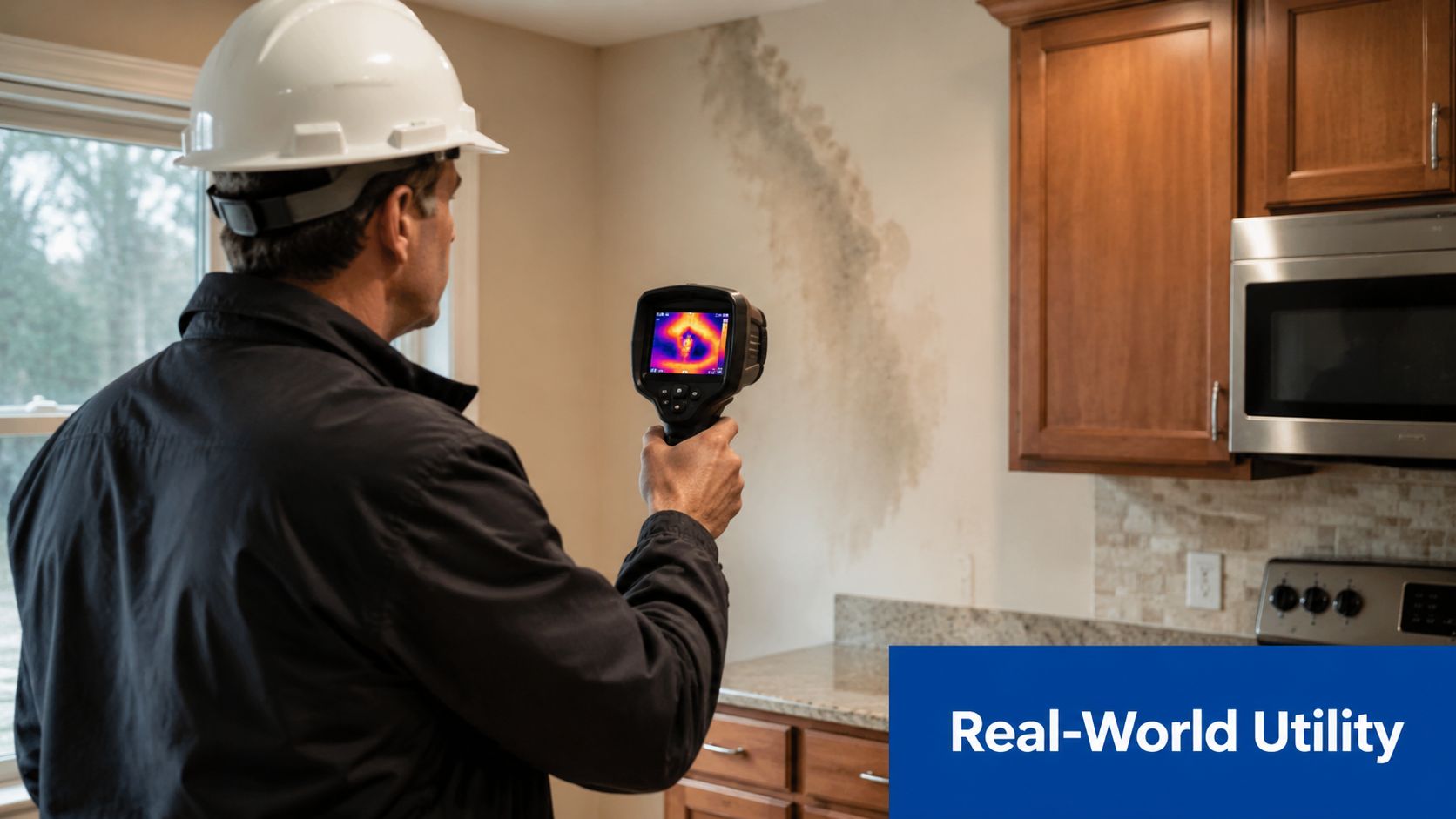
A home inspector may scan around windows, ceilings, and plumbing routes for unusual surface temperature patterns. A cooler patch can suggest airflow or moisture-related conditions, but the image does not prove the cause. Visual inspection and, where appropriate, a moisture meter are still needed.
Group the use cases by the decision
- Find an abnormal heat source: Electrical technicians can compare breakers, terminals, cables, and boards under similar load conditions. A localized hotspot may justify shutting down equipment and investigating the connection.
- Trace a temperature pathway: HVAC workers can follow warm and cool surfaces around ducts, radiators, vents, and insulation. The shape of the pattern often provides more useful evidence than one isolated pixel.
- Locate a hidden change: Building inspectors can use surface patterns to identify areas requiring closer examination behind walls or around openings. For an active plumbing problem, this guide on how to find a hidden water leak fast explains the professional response a camera scan cannot replace.
- Detect people, animals, or equipment: Security teams and outdoor users can use heat contrast to locate a warm target in darkness or visually cluttered surroundings.
- Check high-temperature equipment: Camera families include models specified for object-temperature ranges around −40°C to 350°C, −20°C to 650°C, and up to 2,000°C in higher-range units (published thermal camera temperature ranges). Select a calibrated range suited to the equipment. A thermal camera is not automatically safe or accurate for every target.
The practical workflow is straightforward: scan, identify an unusual pattern, verify the conditions, and decide what action the evidence supports. For plumbing inspections, this thermal imaging camera guide for water leaks helps clarify what surface-temperature evidence can and cannot show.
A thermal image is a screening tool, not a diagnosis. Reflections, airflow, sunlight, surface finish, and distance can all change the infrared energy reaching the detector, which can alter the apparent temperature pattern.
Smartphone Thermal Cameras and Mobile Attachments
A smartphone thermal attachment makes sense when portability matters more than rugged independence. It can turn the phone you already carry into a compact inspection system, but the attachment still contains the thermal detector. The phone's visible-light camera doesn't become a thermal sensor by itself.
Start with compatibility
- Identify the phone connector. Check whether your Android phone uses USB-C, whether an iPhone requires a compatible adapter, or whether the camera connects wirelessly.
- Confirm operating-system support. A thermal attachment depends on its companion app. Look for current support, permissions, firmware updates, and measurement features before buying.
- Choose the physical format. A direct plug-in dongle is compact. A cable-mounted unit can be easier to position. A wireless model offers flexibility but adds another battery and connection step.
- Review the app tools. Useful functions include spot readings, temperature boxes, palettes, image capture, video, notes, and report export.
- Test the workflow. Hold the phone and attachment together, move around the target, and check whether the view remains stable. A loose connector or awkward case can matter more than a headline specification.
Match the attachment to the job
For occasional checks around a home, a small clip-on model can be convenient. For repeated electrical, HVAC, or building inspections, prioritize measurement controls, detector performance, calibration information, and physical durability.
Don't confuse a phone-connected inspection camera with a thermal camera. An Inskam inspection camera for Android and iOS is designed for visual access inside pipes and tight spaces, while thermal imaging is designed to map infrared energy across surfaces. They solve different visibility problems, and some workflows benefit from carrying both.
How to Choose and Start Using Your Camera
Choose the camera around the decision you need to make, not the most impressive specification on the product page.
| Your task | Selection priority | Why it matters |
|---|---|---|
| Occasional home checks | Compact design and simple app | You'll actually carry and use it |
| Electrical inspection | Resolution, NETD, measurement controls | Small temperature differences can matter |
| HVAC and building work | Field of view and stable measurements | You need to interpret broad surface patterns |
| High-temperature equipment | Correct calibrated temperature range | The camera must match the target conditions |
| Outdoor observation | Target detection, ergonomics, and motion handling | A usable live view matters in changing scenes |
Before scanning, let the camera reach a stable operating condition according to its instructions. Keep the lens clear, frame the target steadily, and compare similar materials under similar conditions. Reflective metal can mislead a measurement, so don't treat a shiny surface reading as automatically authoritative.
A practical troubleshooting pass
- Blurry thermal image: Check focus, lens cleanliness, distance, and whether the target is too small for the detector.
- Unstable temperature reading: Recheck emissivity, reflections, airflow, and the measurement spot's position.
- Unexpected colors: Change the palette or scale limits. The palette is a display choice, not a direct statement of material color.
- App connection drops: Reseat the attachment, remove a case that blocks the connector, check permissions, and update the app or firmware.
- Unsafe inspection conditions: Don't approach live electrical equipment beyond your training or required protective procedures. Thermal imaging can reveal a problem, but it doesn't make hazardous equipment safe.
For a first purchase, a smartphone attachment is a sensible entry point if you need portability and occasional diagnostics. A dedicated rugged unit is the better direction when you work in demanding environments, need a broader temperature range, or depend on repeatable measurements and physical controls.
DigiDevice offers a curated selection of electronics and specialized tools, including thermal imaging cameras compatible with Android and iOS. Visit DigiDevice to compare available thermal camera options and check the current price before choosing the format that fits your inspection workflow.