

How Do E Ink Displays Work: A Practical Tech Guide
An E Ink display uses tiny charged pigment particles floating in fluid inside microcapsules, and an electric field physically moves them to form an image that stays put without power. That's the whole trick, and it's why a Kindle page, a smartwatch face, or an E Ink phone case feels closer to printed paper than to a glowing phone screen.
Most people believe the screen looking “soft” or “easy on the eyes” is the magic. The story is more mechanical than that, and once you understand the physics, the tradeoffs make sense fast.
The Core Physics Behind Every E Ink Display
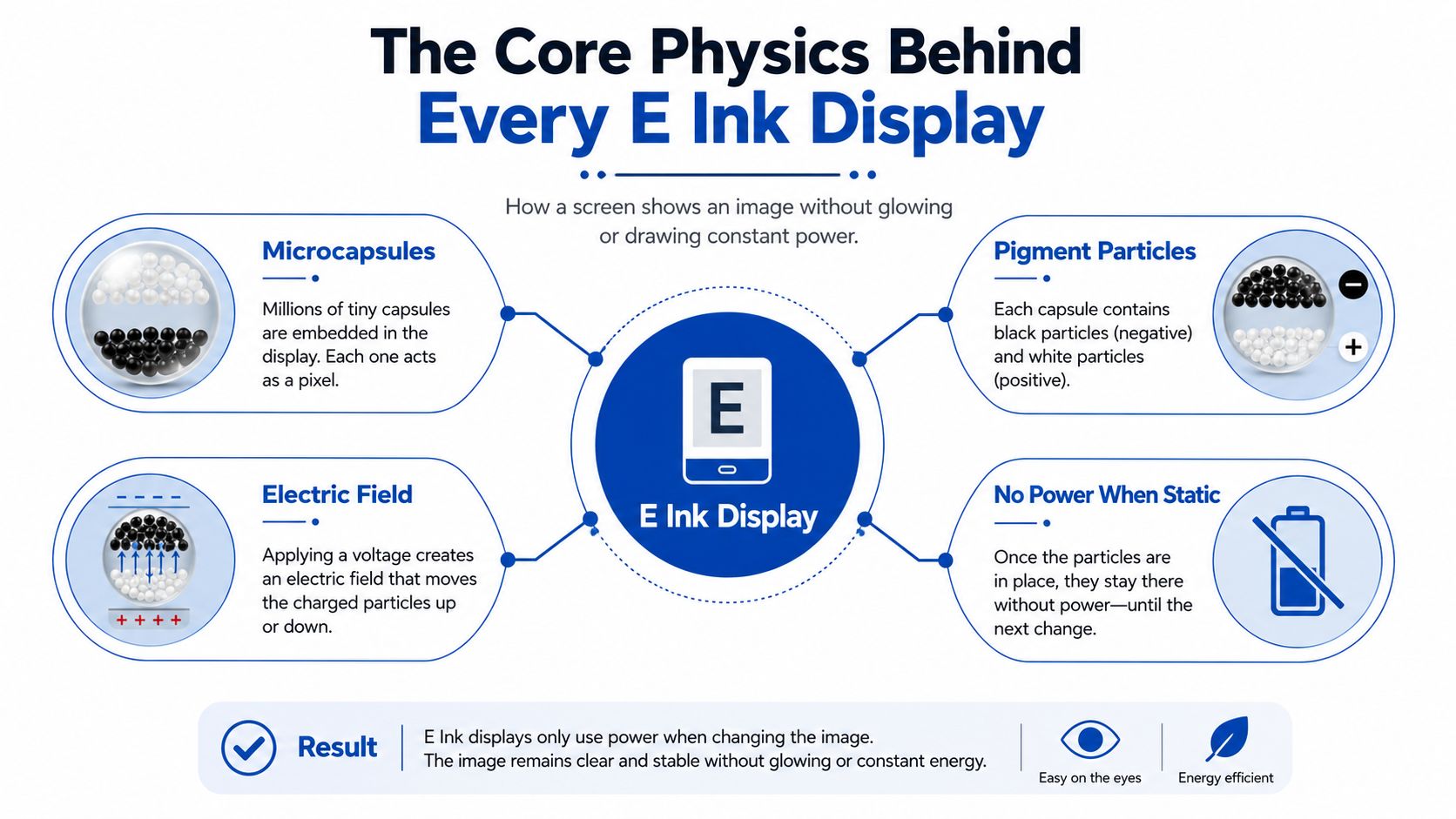
Why can a screen show a page without glowing all the time? The answer starts with electrophoresis, the same basic idea behind moving charged particles through a fluid under an electric field. In E Ink, the “ink” isn't ink at all, it's charged pigment particles suspended in clear fluid inside millions of tiny capsules, and the display pushes those particles up or down to make each pixel look light or dark. AEA explains the core mechanism clearly.
A good mental model is a wall made of millions of tiny transparent balloons. Each balloon holds black and white particles, and the screen tells each one which color should sit on top. A Kindle, an E Ink watch, or an NFC E Ink phone case all rely on that same movement, even if the casing and controller board look completely different on the outside.
Why the image stays after power is removed
The key word is bistable. Once the particles are arranged into text or an image, the display can keep that pattern visible without continuous power, which is why E Ink uses energy mainly when the content changes. JICLCD describes that bistable behavior directly, and Gouforit explains the update-only power pattern.
That's also why E Ink feels so different from LCD or OLED. Those panels have to emit light or keep a backlight running, while E Ink is more like paper with electronically movable pigment. The image doesn't vanish when the field disappears, because the particles are already sitting where they need to be.
Practical rule: if a screen only changes during page turns, menu updates, or clock refreshes, you're seeing the real strength of E Ink, not a compromised version of a phone display.
The downside comes from the same physics. The particles must physically migrate before a new image appears, so the refresh is slower than on backlit displays. TW Display describes this mechanical distinction, and that's why E Ink is great for reading, labels, and low-motion interfaces, but not for video.
Anatomy of an E Ink Panel and What Each Layer Does
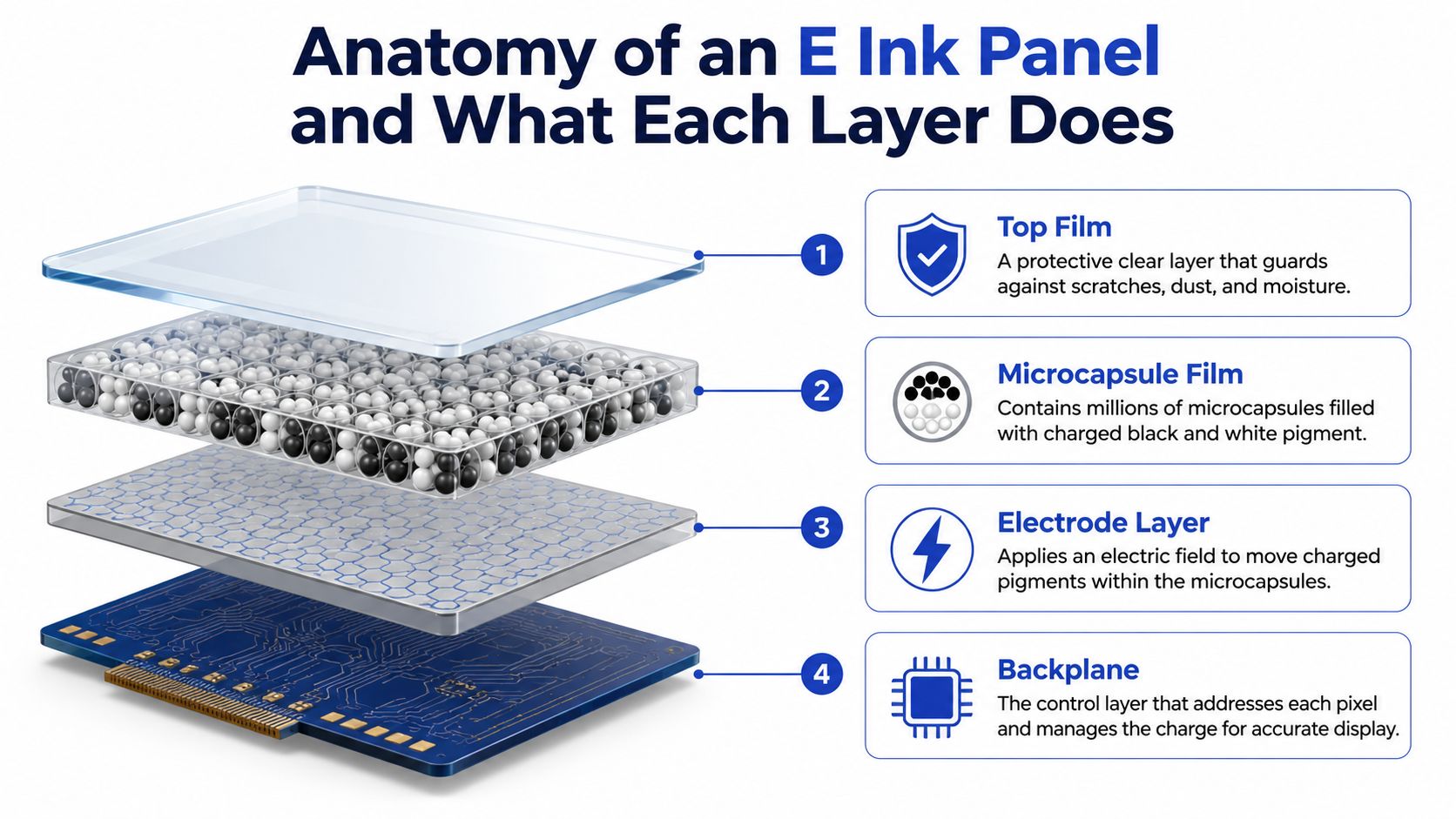
The screen you hold isn't just “one layer of paper-like material.” It's a stack of parts that each do a different job, and the image only looks clean when all of them cooperate. The top film protects the panel, the capsule layer holds the pigment, the electrode system creates the electric field, and the backplane decides which pixel gets what charge.
A denser pixel layout makes text look sharper, because each tiny capsule can be addressed more precisely. That's one reason e-readers can feel crisp even when they're much slower than a tablet. The visual quality is less about glow and more about how carefully the controller places each particle.
The layers that turn charge into readable text
At the top sits the protective film, which takes the abuse of daily handling. Under that is the microcapsule film, the working surface where charged particles float in fluid. Below that, the electrode layer applies the field that moves the particles, and the TFT backplane tells individual pixels what to do.
The controller matters just as much. One polarity pulls light pigment upward for a white pixel, the opposite polarity brings dark pigment forward for a black pixel, and the timing has to be precise across millions of individually addressed capsules. This per-pixel addressing is described in practical engineering terms here.
A panel with a good stack and a tuned controller looks clean. A panel with weaker driving waveforms can leave traces of the previous page, which readers usually call ghosting. That's not a mysterious software bug, it's the visible result of particles that weren't fully driven to their new positions.
What the reader actually notices
Plastic-backed flexible panels can bend, but they often trade away some contrast or rigidity. Older devices with slower controllers can also show more visual leftovers between refreshes. In day-to-day use, that means the panel's engineering choices show up as how clean a page flip feels, how sharp text looks, and how often the display needs a full refresh to stay tidy.
The simplest way to think about it is this, E Ink is not one thing. It's a stack of choices, and every layer affects the user experience you see on screen.
How E Ink Compares to LCD and OLED in Real Use
The quickest way to understand E Ink is to put it beside the screens many people already own. LCD and OLED are built to shine, while E Ink is built to stay visible with very little power once the page is set. That difference changes how each one behaves outdoors, at night, on a desk, and during long reading sessions.
An LCD can look bright and lively indoors, especially with a strong backlight. OLED gives deep blacks and vivid contrast, but even a static clock face still sits on an emissive panel that's designed to produce light. E Ink is the odd one out because it doesn't need to keep glowing just to hold a paragraph on the screen.
| Metric | E Ink | LCD (IPS) | OLED |
|---|---|---|---|
| Idle power use | Very low for static pages | Higher because of backlight | Higher because pixels emit light |
| Sunlight readability | Strong in bright ambient light | Can wash out outdoors | Can wash out outdoors |
| Refresh speed | Slower, by design | Fast | Fast |
| Ghosting risk | Can appear between updates | Usually low | Usually low |
| Long-reading comfort | Often preferred for paper-like viewing | Depends on backlight and settings | Depends on brightness and content |
The practical pattern is simple. If you want motion, video, or fast-touch interaction, LCD and OLED win. If you want a display that behaves like a page and barely sips power while it sits there, E Ink makes more sense.
Where each display type wins
E Ink's reflective design relies on ambient light rather than a backlight, which is why it remains readable in bright conditions. That's also why it's such a strong fit for reading hardware and signage. The New York Times archive piece on the rise of e-paper notes the importance of that reflective design and the first Kindle in 2007.
LCD still wins when the interface changes constantly and needs speed. OLED still wins when the product needs rich color, deep blacks, and smooth animation. E Ink wins when a screen should look calm, stay visible, and avoid constant battery drain.
If you're comparing devices for eye comfort, our guide to choosing a monitor that reduces eye strain is a useful companion read, especially if you split time between e-paper, laptops, and phones.
E Ink is not a better display for everything. It's a better display for a specific kind of work, reading, labeling, and low-motion information delivery.
Main E Ink Variants and Where Each One Shows Up
Not all E Ink panels feel the same in use. The panel chemistry, waveform tuning, and color architecture change how fast the image updates and how crisp the text looks. That's why two devices can both say “E Ink” on the spec sheet and still feel very different in your hands.
The main families you'll run into
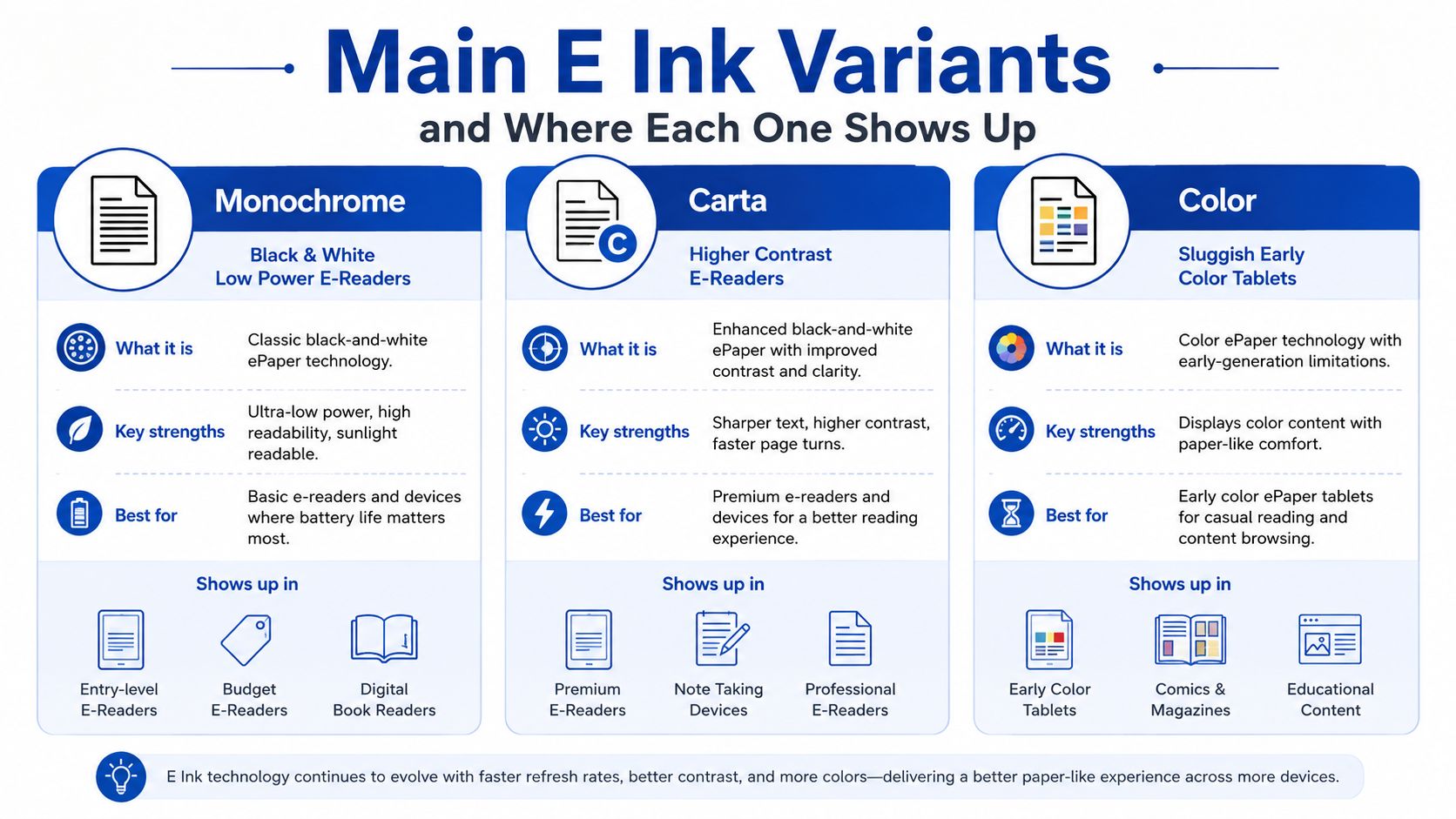
Monochrome E Ink is the classic black-and-white look, and it's still the cleanest choice for reading. Carta pushes that same idea toward better contrast and sharper text, which is why many modern e-readers favor it. Color E Ink adds more layers of complexity, and that usually means slower refresh and less punch than a simple monochrome panel.
Some devices use segment displays, which are not full-page tablet screens at all. They're better for labels, simple watches, and compact status readouts. Flexible panels are a separate design choice, too, since a plastic substrate can bend in ways rigid glass can't.
What changes in the experience
A monochrome Kindle-style panel feels fast enough for book pages because the display only needs to pick between light and dark states. Carta improves the reading experience by making those states cleaner and easier to read. Color panels can do more visually, but they usually give up some speed and clarity to get there.
The same core idea scales into different products. A smartwatch face benefits from always-on visibility. A phone case benefits from a decorative image that doesn't drain the battery after it's set. A shelf label benefits from changing only when the price or stock changes.
For a concrete example of how that product category looks in practice, see this NFC E Ink phone case for Samsung S24 Ultra and S23 Ultra, which shows how flexible E Ink can move beyond reading devices and into personal accessories.
Real-World Devices That Showcase E Ink's Strengths
E Ink makes the most sense when the screen's job is to sit still, stay readable, and avoid wasting power. That's why it keeps showing up in places where a flashy display would be a bad fit. The hardware chooses E Ink when the user needs calm information, not motion.
Dedicated e-readers are still the clearest example. A Kindle or Kobo can hold a book page in view with the reflective, paper-like look that made the category famous in the late 2000s, and that same logic carries into modern reading hardware. E Ink smartwatches take the same advantage, because an always-on face is useful only if it doesn't burn through the battery.
Where the tradeoff matters most
Electronic shelf labels use E Ink because prices and product details don't need constant animation. Digital signage uses it when sunlight legibility matters more than video playback. A phone case with an E Ink back panel uses the same physics for style and personalization, which is a very different use case from reading, but it still depends on bistability and low power once the image is set.
The limitations show up just as clearly. Large panels are still fragile compared with commodity LCDs, and color remains less vivid than what many expect from a phone or tablet. That's not a failure of the concept, it's the price of using physical pigment movement instead of light emission.
Useful way to think about it: if the screen only has to change when the information changes, E Ink usually deserves a look.
This also helps explain why E Ink appears in wearables, note-taking gadgets, labels, and specialty accessories rather than in mainstream video-first tablets. For another adjacent category, our AI-powered wearable recorders for second-brain note-taking piece connects the same “always-ready, low-distraction” design philosophy to a different class of device.
Hands-On Care and Troubleshooting for E Ink Devices
E Ink still needs basic care, even if the screen looks like paper. The panel can keep an image without power, but the front surface, frontlight, and controller are all still real hardware. Treat it like electronics first and a display second.
Habits that keep the panel healthy
A full refresh every so often helps clear residual charge. That matters because the particles are physically moving, and small leftovers from prior pages can build into ghosting if the panel is left on similar content for too long. Keeping static images up for long stretches can make the leftover look more noticeable, especially on simpler panels.
Use a soft dry cloth for cleaning, and don't assume the matte finish is tougher than glass just because it feels different. Harsh cleaners can damage the surface treatment. If you're wiping down a Kindle, an E Ink watch face, or a phone accessory, go gently and avoid anything abrasive.
The screen may look like paper, but the front layer is still a finished electronic surface.
For readers who like deeper device repair checklists, browse our troubleshooting guides from We Fix PC Laptop, because a lot of the same habits that help tablets and laptops also apply to E Ink gear.
What usually signals a real problem
A flickering frontlight can point to a lighting issue rather than a panel failure. A battery that drains overnight may mean the device is waking too often or not sleeping properly. Stuck pixels and persistent visual artifacts are more concerning, especially if a full refresh doesn't improve them.
If a device looks dull or uneven, start with the simple things first. Restart it, refresh the page, and check whether a frontlight setting or battery issue is making the screen seem worse than it is. A panel replacement is the last step, not the first guess.
For cleaning supplies that fit this kind of maintenance routine, our screen cleaner kit for phones, tablets, monitors, and glass is a practical option to keep nearby.
Where E Ink Is Heading for Early Adopters
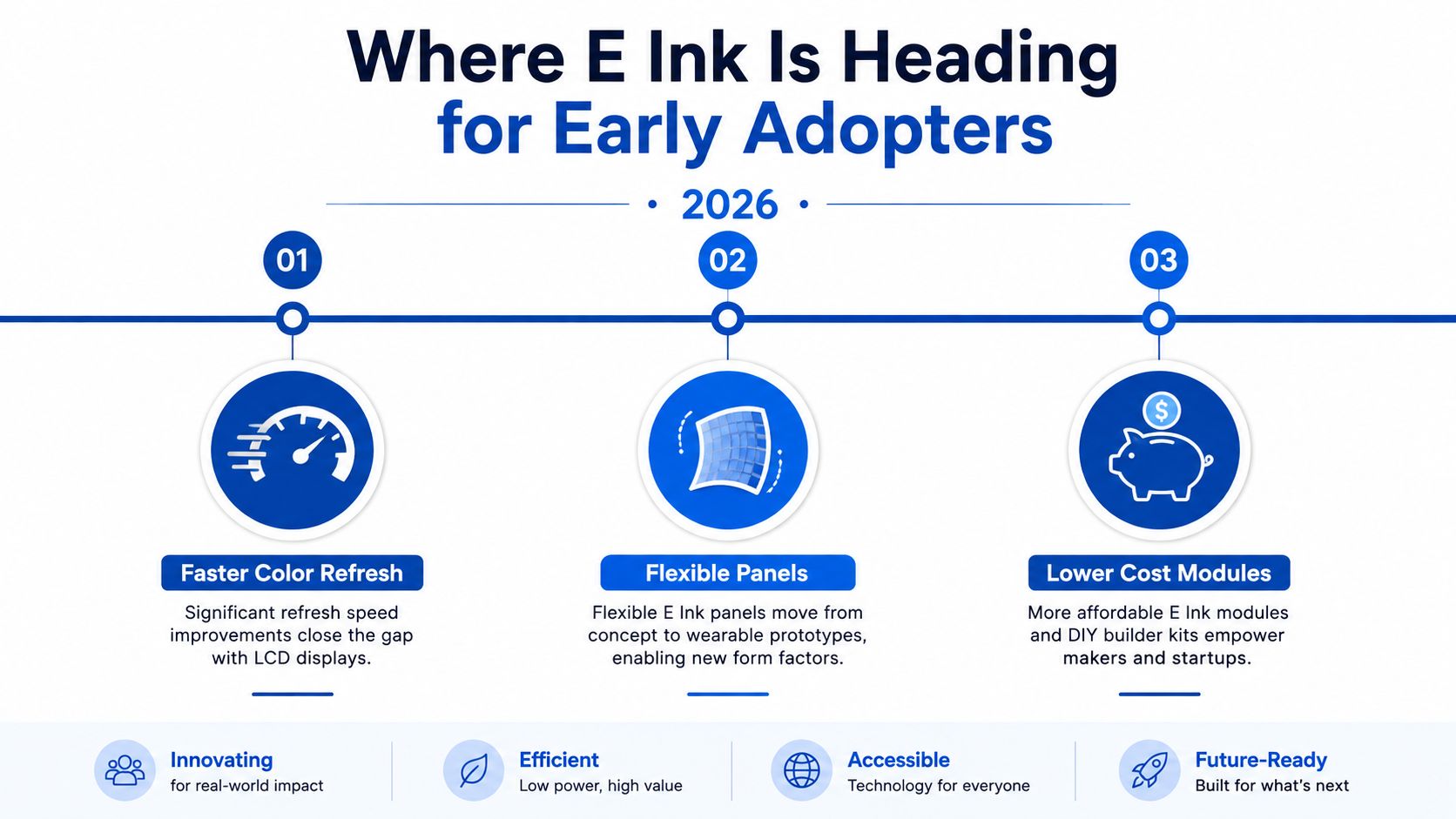
E Ink's next step isn't “turn it into OLED.” That's the wrong target. The interesting progress is in making the same low-power, bistable display model better at color, more flexible in form factor, and more useful in devices that wake only when information changes.
Color is the most obvious frontier. IEEE Spectrum notes that full-color e-paper works by sequencing voltages on the electrodes so particles can move into different color states, which shows how the same core physics scales into more advanced display modes. That matters because the bottleneck isn't just color itself, it's how quickly the controller can place those states cleanly.
What early adopters should expect
Flexible substrates are another meaningful shift. Curved wearables and accessory-style panels are easier to imagine when the display can physically bend, not just survive in a rigid frame. Low-energy IoT devices fit too, especially when a screen only has to update when data changes.
The limits that still matter
Full-motion video on color E Ink is still unrealistic for most buyers. Large panels also remain a tougher engineering and cost problem than commodity LCDs. Outdoor-only color is still difficult because the screen has to balance readability, pigment behavior, and acceptable refresh speed at the same time.
That's why the best buyers in 2026 should focus on use case, not hype. If the screen needs to wake rarely, stay readable in sun, and hold the same image for long stretches, E Ink remains a smart choice. If the product needs animation and rich media, it still isn't the right tool.
For a broader view of how display hardware choices are evolving, our future of wearable displays guide is a helpful next stop, especially if you're comparing calm, readable interfaces with more immersive visual systems.
Common Questions About How E Ink Displays Work
Is E Ink easier on the eyes than LCD or OLED? Many readers find it more comfortable for long reading because it reflects ambient light instead of shining like a backlit panel. The experience feels closer to paper, especially in bright spaces, but comfort still depends on font choice, lighting, and whether the device uses a frontlight.
Why do E Ink screens refresh slowly? Because the image is created by physically moving pigment particles through fluid, not by flipping a liquid crystal state or changing emitted light. That mechanical movement takes time, and the controller has to drive the electrodes carefully to avoid ghosting and uneven page updates.
Does E Ink work in total darkness? Not by itself. Reflective E Ink needs ambient light to be readable, so a frontlight is what makes it usable in dark rooms or at night. Without that light source, it behaves much like a printed page in a dark room, which means you won't see the text clearly.
If you want to compare real E Ink devices, accessories, and other practical tech that fits the same low-power, real-world-use mindset, take a look at DigiDevice. You'll find hardware that matches the way people use displays, reading, commuting, labeling, and personalizing, without forcing a one-size-fits-all screen choice.