

Gaming Desk U Shaped
You're looking at a U-shaped gaming desk because a straight desk has already lost the battle. Monitors, a tower, speakers, a microphone, controllers, and work equipment are competing for the same narrow strip of surface. The U-shaped format can fix that, but only if your room leaves enough space to move, sit, stand, and get out without colliding with the rear panel.
A gaming desk U shaped setup works best when you choose the room footprint first, then plan chair clearance, ergonomics, cable routing, and gear zones. Surface area matters, but a desk that blocks the door or traps your chair will feel worse than a smaller, well-planned workstation.
What a U-Shaped Gaming Desk Actually Is
A U-shaped gaming desk is a three-sided workstation that wraps around you in a broad 180-degree arc. A straight desk gives you one work surface. An L-shaped desk gives you two connected surfaces. A U-shaped desk adds a third return, creating a front zone and two side zones within easy reach.
That extra surface changes the setup equation. Your main monitor and keyboard can stay centered, while the returns hold a stream deck, audio interface, console, speakers, charging equipment, paperwork, or a secondary computer. The dead space behind a crowded monitor arrangement becomes usable workspace instead of a dumping ground.
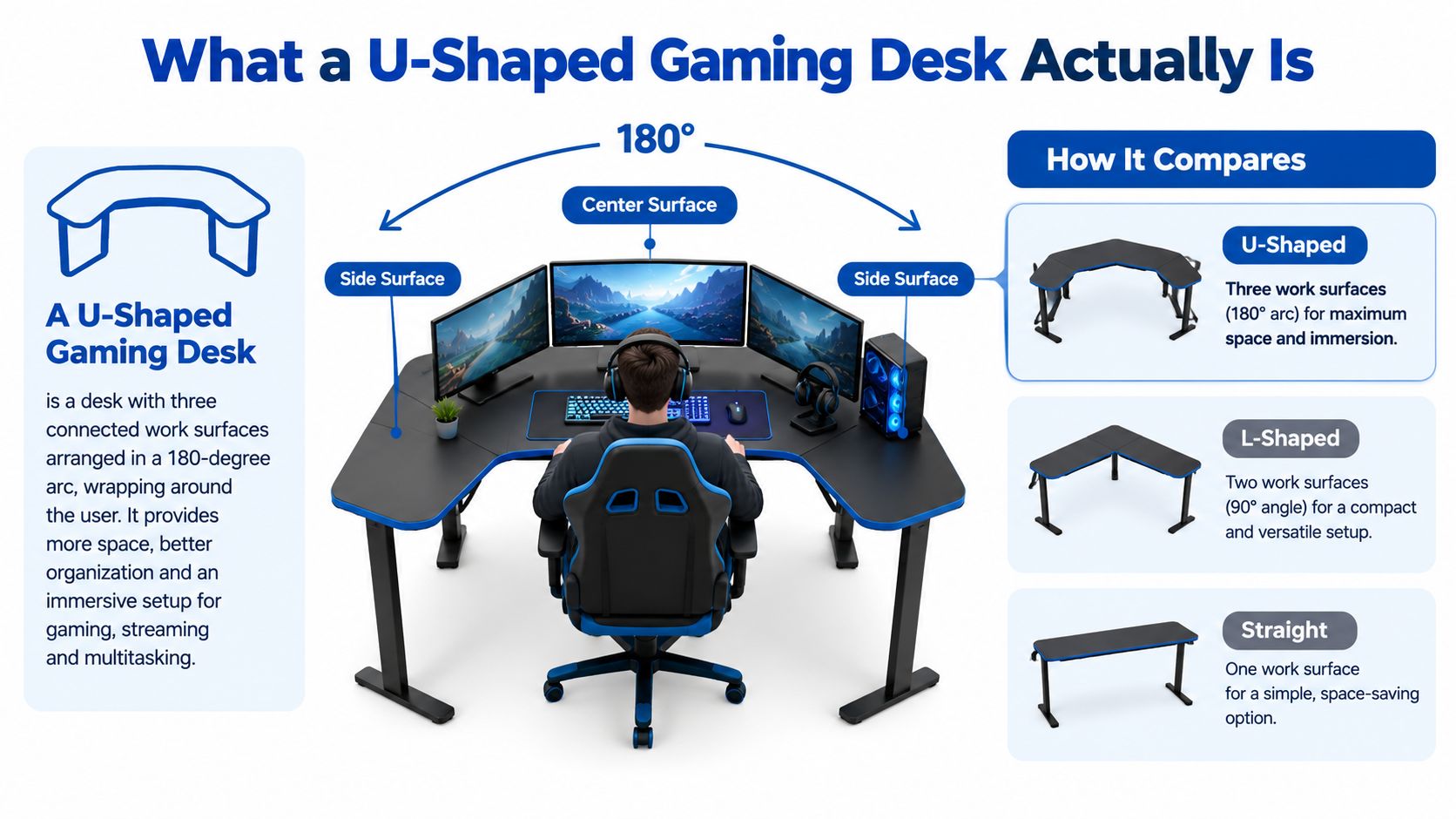
Most models arrive as modular kits. Shared corner legs, a center spine, or connecting brackets support the three surfaces, so the quality of those joints matters as much as the desktop finish. A shallow return can look generous in a product photo but leave your keyboard, mouse, and microphone fighting for space.
Start with depth, not the headline width
Standard gaming desk depth often begins around 23 to 24 inches for compact rigs, reaches 27 to 30 inches for longer sessions, and exceeds 30 inches for gear-heavy builds, according to this gaming desk dimension guide. The reason is simple. A return needs enough depth to hold equipment without pushing it into your lap or forcing your elbows outward.
Before comparing steel thickness or RGB features, mark the desk footprint on the floor. Check the door swing, window access, outlet position, and the route your chair takes when you roll backward. The strongest frame in the world won't rescue a layout that turns every exit into an obstacle course.
For more ideas on positioning screens, storage, and peripherals, use these gaming desk setup ideas as a planning reference. Treat the U shape as a workflow system, not just a larger tabletop.
Room Size and Footprint Requirements
The first question is whether your room can support the desk and a clean chair escape path. A U-shaped setup needs usable wall runs on three sides, room for the seat, and enough clearance to roll back, turn, and stand without catching the rear edge or trapping your knees. Plan on at least 8 by 8 feet for a comfortable workstation. 10 by 10 feet gives the layout more breathing room for a larger setup.
Measure the actual footprint, not the room's advertised dimensions. Check the wall behind the main monitor and both return walls, then subtract space taken by baseboards, radiators, windows, door trim, and shelving. A desk that fits on paper can still block a door or leave one return unusable.
Leave room for the chair to move
The chair path decides whether a wraparound desk works every day. You should be able to roll backward, turn, reach for a cable, stand up, and leave for a break without moving the desk or squeezing between the returns. If the chair only moves forward, the U shape becomes a daily annoyance.
Use floor tape before ordering. Mark the front edge, both returns, and the rear bridge. Place the chair inside the outline and test your normal movements. Include the route to the door, access to outlets, and any position needed to clean or retrieve items behind the desk.
| Room Tier | Min Floor Size | Desk Wall Run | Return Depth | Chair Escape |
|---|---|---|---|---|
| Small bedroom | 3 × 3 m | Measure the usable wall sections first | Compact depth only | Keep a clear route behind the seat |
| Dedicated room | 4 × 4 m | Three substantial wall runs | Medium to deep | Comfortable roll-back and exit space |
| Large game room | 5 × 5 m plus | Full command-center layout | Deep gear-friendly returns | Multiple exit and movement routes |
A U-shaped desk uses more floor area than an L-shaped equivalent. The extra surface matters only if you can still move freely around the station. In a smaller room, compare the measured footprint with these ergonomic gaming desks for small rooms before committing to three connected panels.
Layout Zones for Monitors and Gear
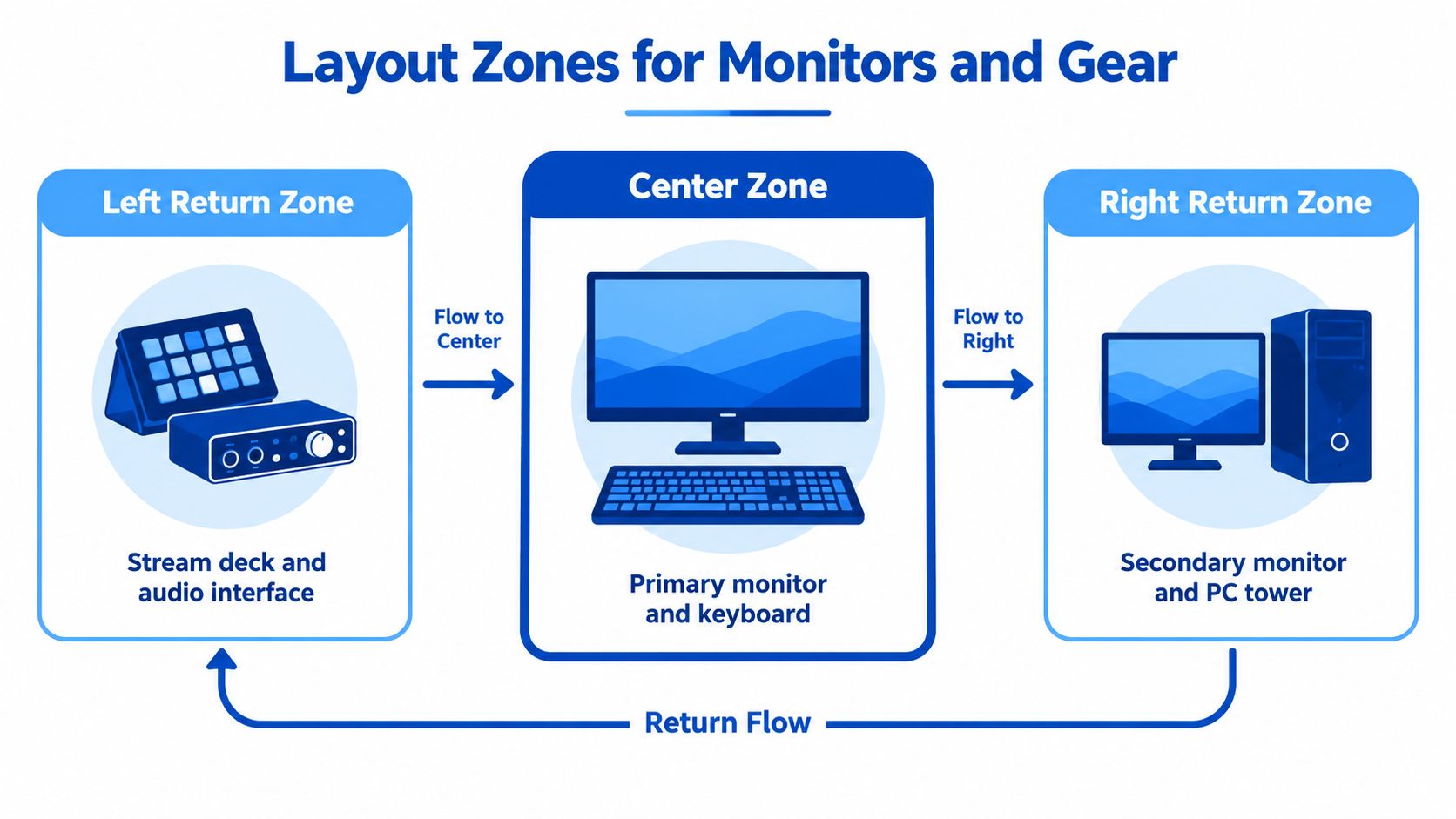
A good U-shaped desk has a job for every panel. Without clear assignments, the returns become controller graveyards, spare-cable shelves, and places where paperwork disappears.
Put the primary monitor and keyboard on the center wall. The left return can support a stream deck, audio interface, mixer, or console. The right return works well for a secondary monitor, PC tower, reference material, or charging station.
Build each panel in layers
Think of every surface as three depth bands:
- Front zone: Reserve roughly 25 to 30 cm for the keyboard, mouse, wrist position, and immediate controls.
- Mid zone: Use roughly 40 to 50 cm for monitor-arm clamps, speakers, microphones, and frequently adjusted equipment.
- Rear zone: Leave roughly 15 to 25 cm for cable drops, lighting, and access behind the hardware.
Those measurements come from the practical layout plan in the brief, not a universal body-fit rule. Your chair position and monitor arms still determine the final placement.
Daily-use equipment should sit inside your natural shoulder and forearm arc. Gear used occasionally can sit farther out, but don't put the audio interface or stream controls at the far end of a return if you adjust them constantly.
A cardboard mock-up is worth the effort. Cut panels to the intended depth, place boxes where the monitors and peripherals will go, and sit in the chair for a real session. You'll spot awkward reaches before the desk arrives.
For screen selection and viewing comfort, compare the best monitors for eye strain. The best screen layout still fails if the side panels force you to twist your neck repeatedly.
Ergonomics Across Three Workstations
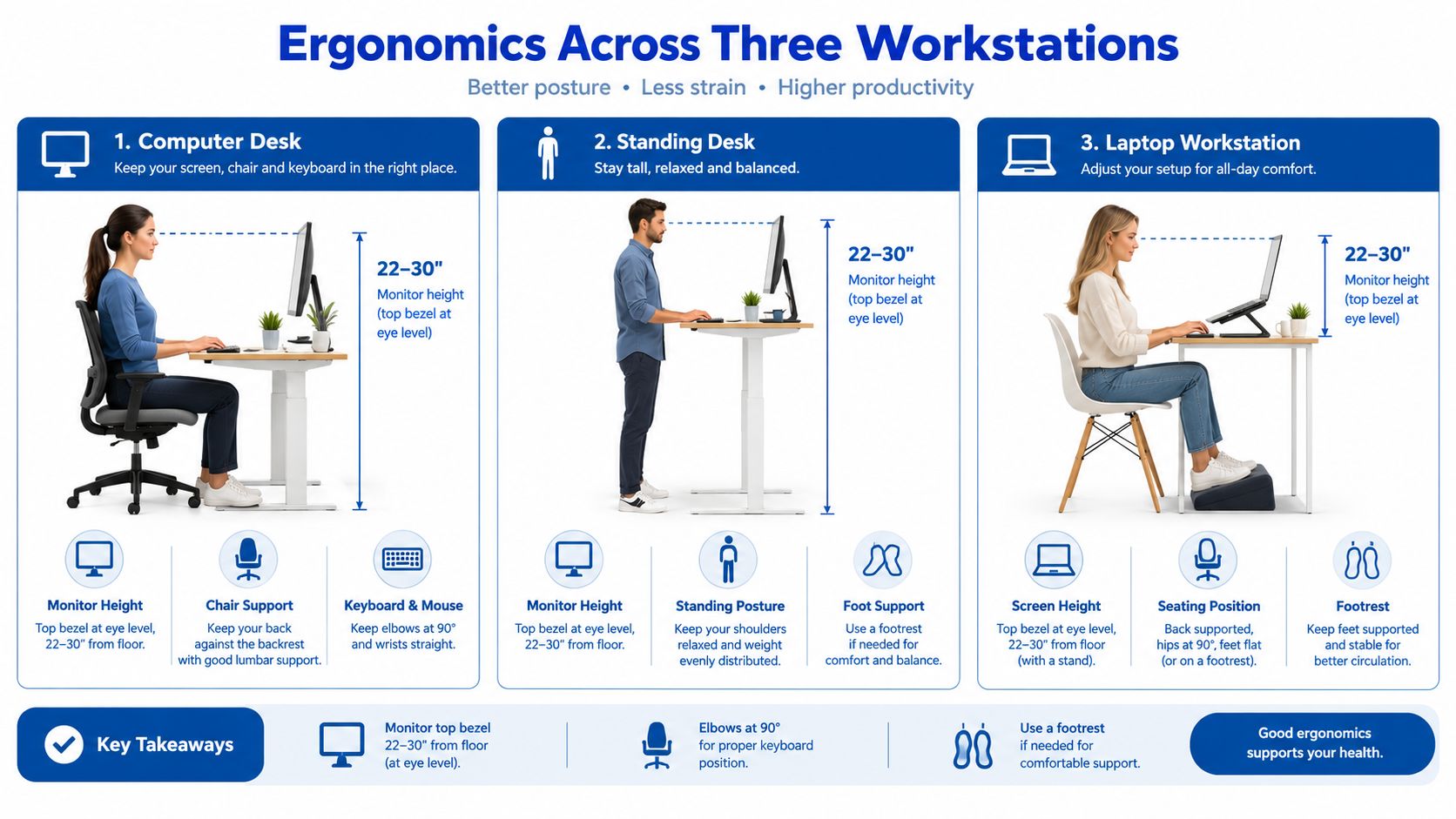
A U-shaped desk can leave you twisting toward a return for hours. Set the chair's escape path first, then tune each workstation so your keyboard, mouse, monitor, and controls sit within a comfortable reach.
Center the primary screen on the front panel, with its top bezel at or slightly below seated eye level. Leave 6 to 12 inches of clearance behind the monitor for airflow and cable access, plus 2 to 3 inches of side clearance where possible, as outlined in this gaming desk ergonomics reference.
Treat the returns as active work zones
Keep your elbows close to your body, forearms parallel to the floor, and wrists straight. If turning toward a return makes your elbow flare outward, move the mousepad or shrink that active zone. Do not accept a bad angle just because the desktop has room.
A sit-stand frame helps only if it raises the entire connected desk. Check that the mechanism supports the full wraparound structure and its equipment load. The listed adjustment range and load rating matter, but they do not correct a screen placed too high or a chair positioned where it cannot roll out safely.
Posture sensors and adjustable components can serve as reminders, but they belong low on your buying checklist. A sensor cannot fix a shallow return, an awkward monitor angle, or a chair blocked by the desk.
For wrist alignment and mouse control, use this ergonomic mouse pad and wrist support guide. The pad should let your hand stay level without forcing your forearm against the desk edge. For broader workstation placement ideas, 2026 desk layout ideas from Gorins Furniture provides context that also applies to gaming setups.
Test the chair path before buying. Roll into the center, turn toward both returns, and pull back without striking a panel or cable bundle.
Cable Management for a Wraparound Desk
Three panels create three cable runs that converge around one chair. If you mount monitors and accessories first, you'll probably end up removing half the setup to route power properly.
Start with one main power point. Mount a power strip vertically along a rear leg or inside an under-desk tray. Route each panel's cables backward along the underside, then bring them into that central power area.
Separate power from data
Keep power cables and data cables in separate channels where possible. Use adhesive raceways under each panel, then clip them at regular intervals so the cable weight doesn't pull the channel loose. A woven sleeve works well across the rear bridge, where cables travel from one return to the other.
Add a grommet near each panel corner. Monitor arms, microphone booms, USB hubs, and charging leads can then drop directly into the tray instead of crossing the desktop.
| Zone | Run Type | Hardware | Notes |
|---|---|---|---|
| Center panel | Monitor and keyboard power/data | Rear tray, grommet, separate channels | Keep the primary cable drop close to the screen mount |
| Left return | Stream controls and audio | Raceways, USB hub, magnetic holder | Leave access for interface adjustments |
| Right return | Tower, secondary screen, chargers | Sleeve, grommet, cable labels | Avoid routing the tower cable across the chair path |
A magnetic holder on each return keeps headset and charging cables off the floor. Label both ends of every run. That small step saves time when a monitor, interface, or console moves later.
The Woodstock Furniture & Mattress Outlet cable guide is a useful companion if you want more ideas for trays, clips, and under-desk routing. For a gaming-specific approach, use these PC gaming cable management ideas for clean setups.
Materials, Load Ratings, and Durability
Most U-shaped gaming desks combine an engineered-wood or MDF top with a steel or aluminum frame. That combination can work well, but the joints and unsupported spans matter more than a glossy finish or aggressive RGB description.
The rear bridge and inside corners carry the stress. Check whether the bridge uses mechanical brackets and substantial supports, rather than relying on a few screws driven into the desktop edge. Corner flex becomes especially noticeable when you clamp a monitor arm to one return and lean on the opposite side.
Read load ratings with context
Independent marketplace listings show common U-shaped or standing desk examples including a 60 × 30 inch desktop with a 250-pound lifting capacity, a U-shaped model advertised at 600 pounds, and another surface rated at 200 pounds per surface, as summarized in this U-shaped desk listing comparison. These figures show that the category targets monitor-heavy and accessory-heavy setups, but the rating alone doesn't prove stability.
Load capacity should cover the complete setup: monitors, arms, tower, speakers, microphone, lighting, and anything stored on the returns. Dynamic sit-stand ratings deserve extra scrutiny because the frame must move the load smoothly, not merely hold it while stationary.
Look for a top with enough thickness to resist sag across the returns. Thin particleboard with a decorative laminate may look acceptable on delivery day but can disappoint under cantilevered monitor mounts. Steel usually offers better rigidity than lightweight aluminum, while aluminum can make sense when low weight matters more than aggressive leaning or heavy clamps.
Practical rule: Inspect the corner brackets, rear bridge, leveling feet, and underside support before you get distracted by the finish.
A level floor helps, but adjustable feet can compensate for minor irregularities. Assembly quality matters too. A strong frame assembled loosely will wobble, so tighten every joint evenly and recheck the fasteners after the desk settles.
Matching the Desk to Your Workflow
The right U-shaped configuration depends on what you do at the desk, not how impressive the product photo looks. A competitive gamer, a streamer, and a remote worker may all want three surfaces, but they don't need the same depth, monitor placement, or return assignment.
Small bedrooms
A compact bedroom should prioritize the escape path over maximum surface area. Use shorter sides, moderate depth, one central monitor arm, and minimal corner bulk. Keep the returns for lightweight equipment such as a controller dock, headphones, or a small laptop rather than placing a tower and heavy lighting on both sides.
Don't fill every inch just because it's available. Empty space around the chair improves movement and makes the station easier to clean.
Dedicated game rooms
A larger room can support a true command center. Put the primary gaming display on the front panel, use one return for streaming controls and audio, and reserve the other for a secondary display, tower, or console area.
A multi-monitor setup benefits from monitor arms because the arms free the desktop for keyboards, mixers, and charging equipment. Make sure the clamps land on supported sections, not unsupported corners or thin decorative edges.
Hybrid work and streaming
Hybrid setups need visual separation. Keep the work monitor and camera-facing surface clean, then angle the streaming return away from the main video-call sightline. Store the microphone boom, RGB lighting, controllers, and capture equipment there so they remain accessible without making the work background look chaotic.
| Room Profile | Min Room Size | Side Length | Recommended Depth | Monitor Setup | Key Add-ons |
|---|---|---|---|---|---|
| Compact bedroom | 3 × 3 m | Short, room-tested sides | Compact to moderate | Single central display | One monitor arm, slim PC mount |
| Dedicated game room | 4 × 4 m | Medium to long sides | Moderate to deep | Multi-monitor front | Dual arms, tower mount, shelf risers |
| Large command room | 5 × 5 m plus | Long modular sides | Deep gear zones | Gaming and reference displays | Audio shelf, lighting mounts, cable tray |
| Hybrid work and stream | Measure around camera sightlines | Main side plus functional returns | Moderate work depth, deeper stream return | Center work display, angled secondary setup | Microphone arm, capture gear shelf, clean background storage |
For audio, a product such as the Baseus GH02 Gaming Wireless Headphone with Mic Over-Ear Headphones can stay on a return-panel hook instead of consuming center-panel space. For console power, the Play Time Game Charger For XBOX is another example of equipment that belongs in a dedicated charging zone rather than beside the main keyboard.
Choosing and Buying Your U-Shaped Desk
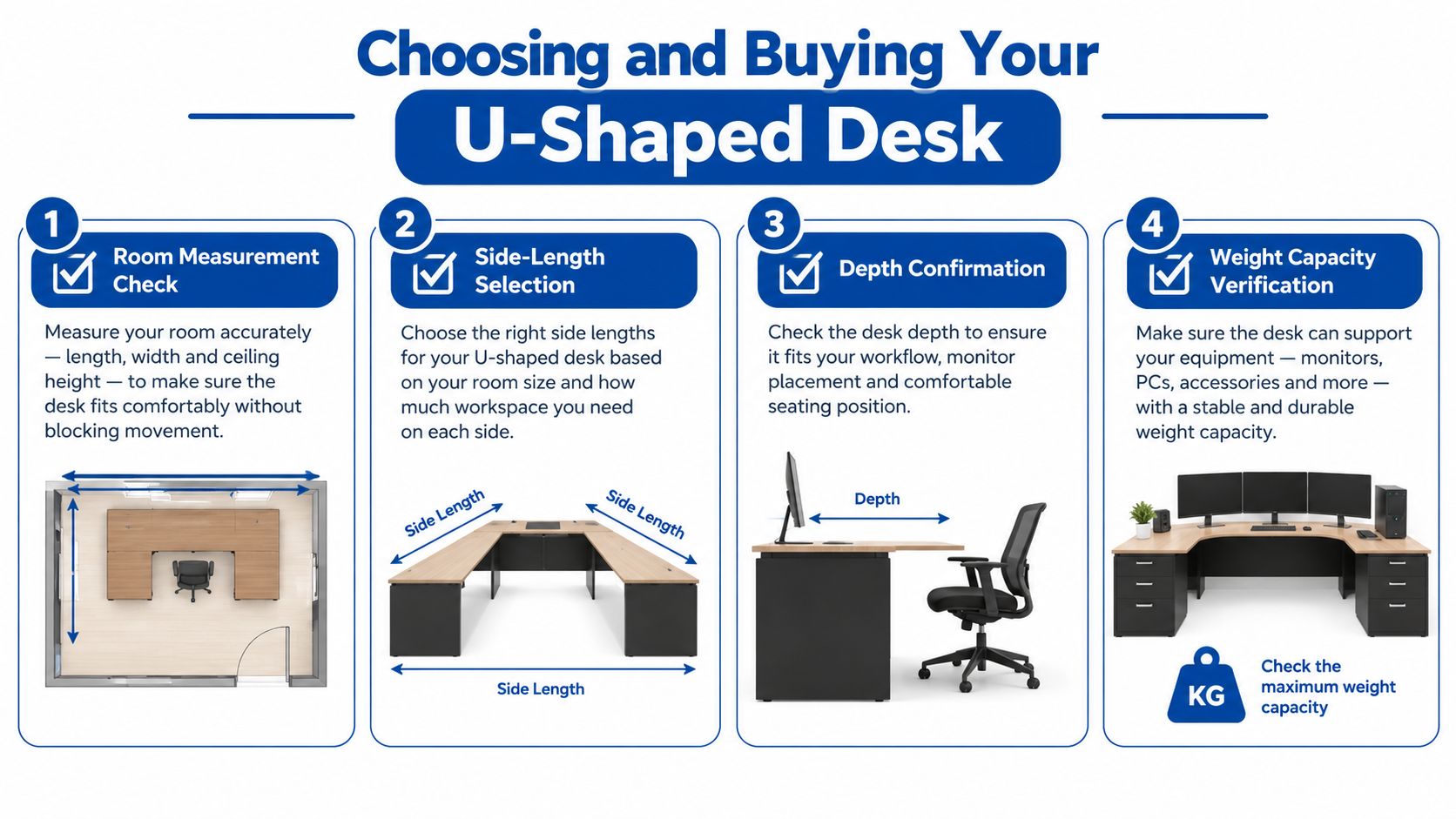
Use a buying checklist, not a spec-sheet binge. The desk should pass four tests: it fits the room, supports the workflow, protects your posture, and survives the equipment load.
Verify the room before the product
Measure the three wall runs, door swing, outlet positions, and chair movement. Then confirm the actual desktop depth, not just the advertised total width. A U-shaped desk that technically fits but removes your exit route is the wrong desk.
Check the return panels next. A return that's too narrow for a mousepad, keyboard, or audio device is decorative surface area, not useful workspace.
Audit the construction
Ask these questions before buying:
- Load capacity: Does the rating cover monitors, mounts, tower, speakers, microphone, and accessories together?
- Frame support: Are the corners and rear bridge mechanically reinforced?
- Cable access: Are there grommets, trays, raceways, or only a vague promise of cable management?
- Material thickness: Does the top feel substantial enough for clamped arms and daily leaning?
- Configuration: Can the modules reverse or adapt if your room changes?
- Assembly: Can you build it safely with the available space and help?
- Warranty: Does the warranty provide meaningful coverage rather than a short exclusion-heavy period?
Watch for thin particleboard cores, undersized returns, missing grommets, exposed cable paths, and corner joints held together by minimal hardware. These aren't cosmetic annoyances. They determine whether the desk remains stable after the setup becomes heavy.
If you're comparing wood alternatives for another room, find a high quality oak L shaped to see how material and joinery can change the feel of a workstation.
A U-shaped gaming desk is a strong choice for a real command center, but it isn't automatically better. Measure the room, preserve the chair escape path, assign every zone a purpose, and choose depth and structure over flashy specifications. Then compare current U-shaped gaming desk listings at DigiDevice for dimensions, availability, and the equipment that will complete your station.
DigiDevice offers gaming desks alongside headphones, chargers, PC accessories, and other practical setup equipment, so you can build the workstation around the desk instead of treating it as an isolated purchase. Visit DigiDevice to compare the current selection and check price, dimensions, and availability before you order.