

Cell Signal Booster for Apartment: A Practical 2026 Guide
You're standing by the kitchen window because that's the only place your phone stops dropping the call. The second you walk toward the bedroom, the bars fall apart, the audio gets choppy, and you start wondering if the apartment is cursed or if your carrier just hates your building.
It's usually neither. In a cell signal booster for apartment setup, the problem is almost always the mix of building materials, tower direction, and bad placement, plus a lease that gives you zero room for sloppy installs. Treat the apartment like a regulated, signal-starved environment first, then decide whether a booster is even the right fix.
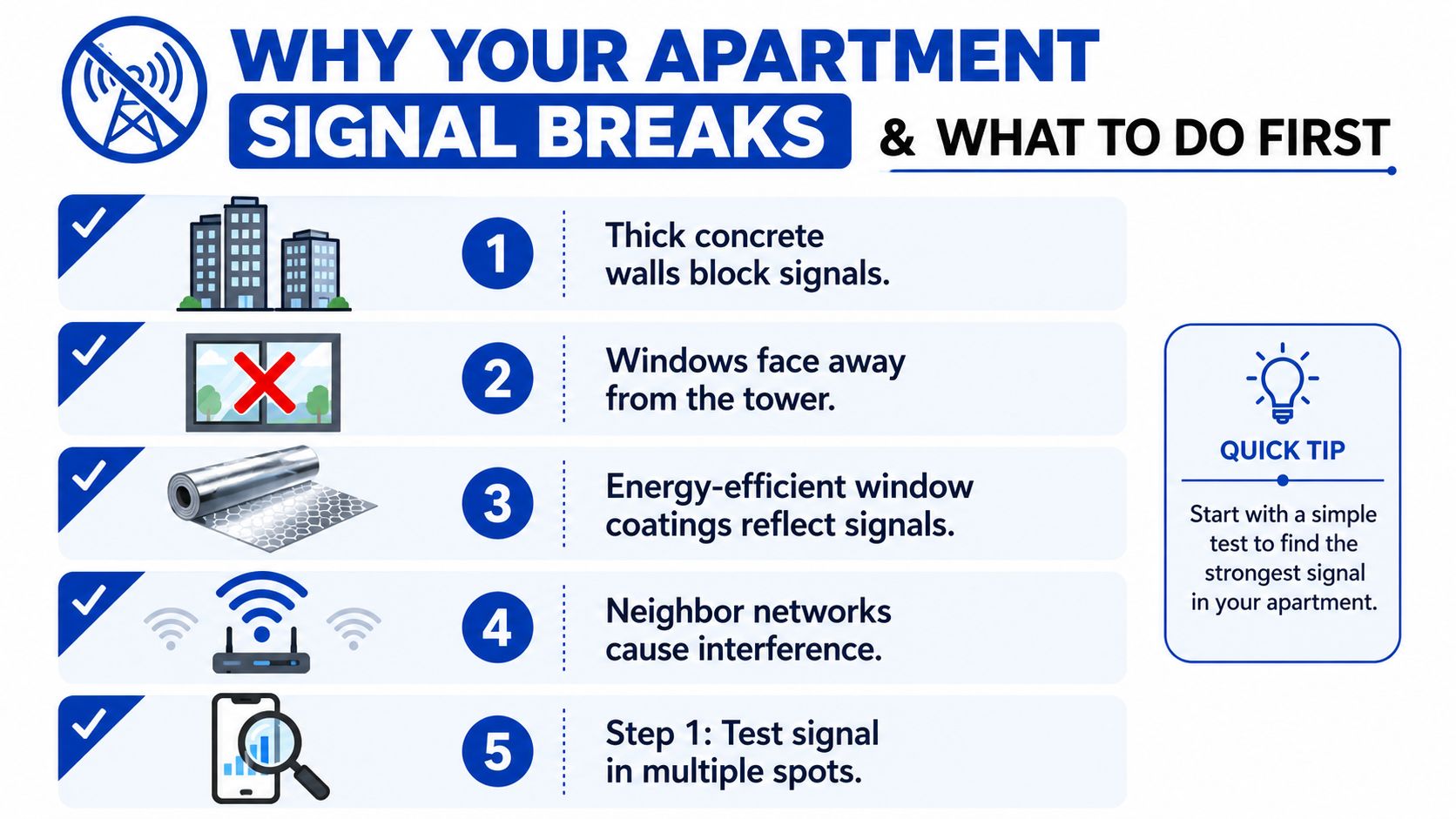
Why Your Apartment Signal Breaks and What to Do First
Apartment signal loss follows a pattern, and once you learn to read it, the fix gets a lot less mysterious. A lot of people blame the carrier first, but in most units the building is doing the damage before the signal ever reaches your phone.
Start with the room map, not the shopping cart
Walk the apartment with your phone and note where calls break, where data stalls, and where you get usable service. The point is to separate a true dead zone from a bad spot in the unit, because boosters only help when there's already some usable signal to capture, which the FCC also makes clear in its consumer guidance on boosters (FCC consumer signal booster guidance).
If you can, check the same spots near a window and then deeper inside the unit. Technical research on building penetration found mean ground-floor signal loss of about 15 dB, with a 3.5 dB standard deviation, which is a clean way of saying the building itself can chew through a meaningful chunk of signal before it ever gets to your couch (building penetration research).
Practical rule: if the window spot is usable and the interior isn't, you're dealing with penetration loss, not a broken phone.
Confirm what kind of problem you actually have
A bad signal can hit voice, data, or both. If calls fail but browsing limps along, that points you toward a different install strategy than a unit where both collapse the moment you move away from the glass.
Also, check carrier and band before you buy anything. App-based signal maps now push people to measure room by room first, which is exactly the right habit in apartments, because a booster can't create coverage out of thin air if the donor side is basically empty (Signal Atlas listing).
Don't buy before you test the donor side
The cleanest apartment fix starts with the strongest window, not the fanciest box. In weaker units, the outdoor reference signal matters more than many want to admit, because that's the signal the booster has to work with. One apartment-oriented kit is rated for about 500 sq ft when the outdoor signal is around −95 dBm RSRP, but that drops to about 60 sq ft when the signal weakens to around −115 dBm RSRP (coverage versus signal strength example).
That's why I'd rather see you test first and buy second. A weak apartment isn't random, it's usually geometry, materials, and tower alignment. Treat the apartment as a lease-bound, regulated, signal-starved environment, then make the buying decision.
How a Cell Signal Booster Actually Works
A booster is not magic, and it's not Wi-Fi in a box. It's a signal relay system with three parts, and the install only works when those parts are placed with some discipline.
The three-part chain
The outside, or donor, antenna catches the usable cell signal. The amplifier increases it. The inside antenna rebroadcasts it across your unit. The FCC's consumer booster page is explicit that these devices are for improving coverage where a usable signal already exists, not inventing service from nothing (FCC consumer signal booster guidance).
The donor antenna acts as the pipe bringing the signal in, the amplifier functions as the pump boosting its strength, and the inside antenna serves as the showerhead distributing it where needed.
Good apartment installs are won at the window. If the donor antenna is pointed at a bad spot, the amplifier just repeats a weak or dirty signal.
Why uplink matters as much as downlink
A booster is bidirectional. Your phone talks back to the tower through the same system, so the upload path matters, not just the bars on your screen. That's why some apartments show decent-looking signal but still have failed calls or stalled data.
Gain is the boost level, usually discussed in dB, and attenuation is the signal loss through walls, glass, and other building materials. In plain English, attenuation is the tax the apartment charges your signal before the booster ever sees it.
Passive versus active setups
A passive setup is just an antenna arrangement, no real amplification. It can help in a few edge cases, but it isn't the same as an active booster. If you're living in a dense building, I'd rather have a properly approved active unit with automatic gain control than a half-measure that looks clever on paper.
For a deeper primer on the mechanics, see DigiDevice's guide to what a mobile signal booster is and how it works.
Booster Types That Make Sense in an Apartment
Not every booster belongs in a rental, and many of the giant kits sold online are too much machine for a 600-square-foot unit. The goal is to match the gear to the problem, not to buy the biggest spec sheet.
What fits a small apartment
| Booster Type | Typical Coverage | Apartment Fit | Lease Risk |
|---|---|---|---|
| Passive window antenna | Limited, location-dependent | Best as a diagnostic or edge-case fix | Low if fully interior |
| Compact active booster | Moderate, room-focused | Solid for studios and small one-bedrooms | Low to medium |
| Multi-antenna in-home kit | Broader indoor spread | Good for thick walls or awkward layouts | Medium if you need more cabling |
| Large whole-home kit | Very broad | Overkill for most apartments | Higher because of install complexity |
In a small unit, I'd rather see a compact multi-carrier kit than some oversized commercial-looking box that only makes sense in a house. If your living room and bedroom are separated by one stubborn concrete wall, a multi-antenna kit can make sense. If you've got a window with a usable signal and a clean layout, smaller is usually smarter.
Carrier support matters before anything else
A 4G-only booster won't help you chase every 5G situation, and a multi-carrier model is usually the safer bet in apartments because renters don't control which tower or band their phone leans on. That's also why the external antenna article on DigiDevice's site is worth a look if you're comparing form factors like a window mount versus something more permanent: external antennas for mobile phones.
My take: if you've got two bars near a window, go multi-carrier and mid-gain. If you've got zero bars everywhere, stop romanticizing boosters and look at alternatives first.
FCC Approval and Carrier Compatibility Without the Fine Print
A legal apartment booster has to follow FCC rules, or you end up with a gadget that can cause interference and still fail to solve your reception problem. In a rental, that means checking approval, matching carrier bands, and getting the right sign-off before you turn it on.
What the FCC cares about
FCC consumer booster rules took effect on March 1, 2014, after being established on February 20, 2013. Under those rules, consumers must get wireless-provider approval and register the specific booster before use, and boosters sold in the U.S. after March 1, 2014 must meet the updated requirements (FCC consumer signal booster guidance).
The FCC also says boosters cannot extend a network past its normal range. The technical limits in the published rules include a 5 watts ERP ceiling for authorized frequencies, a 9 dB maximum noise figure, and spurious emissions below −13 dBm in any 100 kHz measurement bandwidth (FCC technical rule document).
What to look for on the box
A real unit should show an FCC ID and match the bands your carrier uses. Grey-market repeaters from overseas are where people get into trouble, because they may look powerful but fail the interference rules that protect the network.
FCC Part 90 guidance also says Class B signal boosters are fixed-location devices, and new Class B installations must be registered before operation, with mobile operation prohibited since November 1, 2014 (FCC Part 90 signal booster rules).
Match the carrier bands before you buy
| Carrier | Primary 4G LTE Bands | Primary 5G NR Bands | Notes |
|---|---|---|---|
| Verizon | Bands 2, 4, 5, 13, 66 | n5, n77 | Make sure the booster supports Verizon's LTE bands your phone uses in the building |
| AT&T | Bands 2, 4, 5, 12, 14, 29, 30, 66 | n5, n77 | Verify low-band and mid-band support, not just the packaging label |
| T-Mobile | Bands 2, 4, 5, 12, 66 | n41, n71, n77 | Check that the booster covers T-Mobile's LTE and mid-band 5G bands |
| Regional or MVNO users | Depends on host network | Depends on host network | Match the underlying carrier's band list, not just the MVNO brand |
The practical move is simple. Buy an FCC-approved unit, confirm the carrier bands, and do not trust a random “5G booster” label to cover the band your phone uses in your apartment. DigiDevice's FCC-approved cell phone signal booster overview is a useful reference point before you spend money.
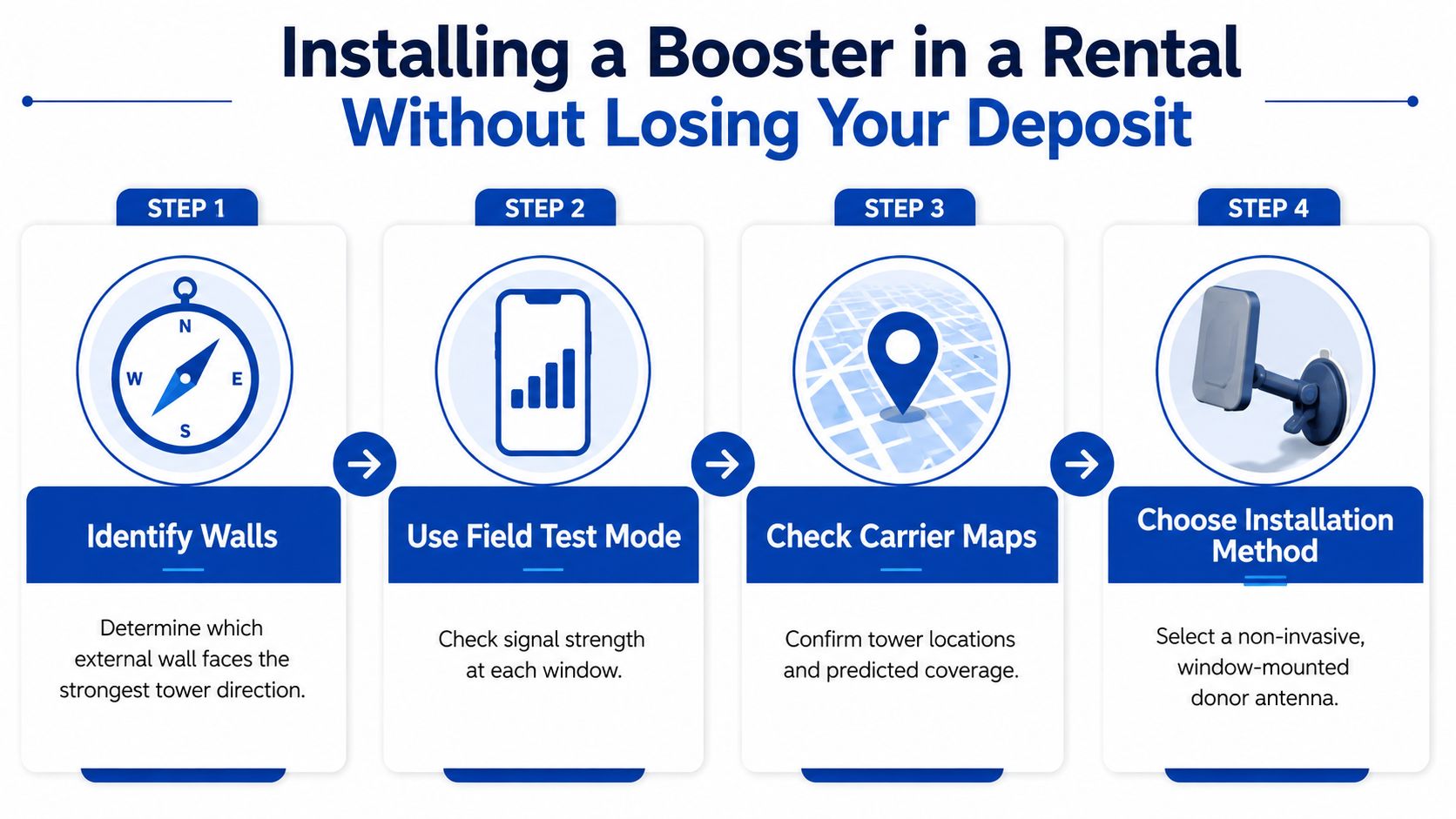
Installing a Booster in a Rental Without Losing Your Deposit
Rentals punish bad installs. You want signal, not patch marks, nail holes, or an annoyed landlord asking why there's coax running across the living room.
Pick the donor window like you mean it
Start with the window or exterior wall that gives your phone the strongest reading. Don't assume the highest window is the best one, because tower direction and nearby reflective surfaces can beat altitude pretty quickly. The best spot is the one your phone likes, not the one that looks intuitive.
Use field-test mode or carrier coverage maps to triangulate the strongest side of the unit. If your landlord tracks utilities closely, Axis Meter Solutions has a useful page on submetering for rental buildings, which is relevant because you're dealing with a building where small changes and shared infrastructure matter.
Keep the antennas far enough apart
A small apartment can trigger oscillation if the inside and outside antennas see each other too easily. My rule in a 600 to 1,000 square foot layout is simple, keep the antennas separated as much as the unit allows, and use both vertical and horizontal spacing instead of trying to cram everything into the same corner.
If the booster keeps shutting down, it's often not “broken.” The antennas are too close, or the donor side is feeding on reflected signal.
Use no-drill cable routing
These are the rental-friendly tricks that save your deposit:
- Adhesive cable clips for baseboards and trim, so you're not drilling anchor holes.
- Tension-mounted curtain-rod hardware when the donor antenna needs a stable interior window position.
- Over-door hooks for routing cables between rooms without touching the wall finish.
- Flat-window-entry coax when you need the cable to pass through a closed window without a permanent opening.
Know what leases usually care about
Most leases are fine with interior antennas sitting on furniture or a shelf. They're usually not fine with exterior mounting, roof penetrations, or anything that touches common areas without permission. Put your plan in writing, photograph the unit before you start, and keep the install reversible.
If you want the simplest path, choose a kit that supports a clean no-drill install and doesn't force you into a permanent mount. DigiDevice's home-signal guide is a helpful companion if you're comparing non-permanent layouts: boost cell signal at home.
Alternatives Worth Considering Before You Buy
Sometimes the right move is to skip a booster. If your apartment already has solid internet, or your carrier offers a small-cell option, that can be the cleaner fix. The apartment comes first here, because it is lease-bound, signal-starved, and full of rules about what you can touch.
Compare the options
| Option | Upfront Cost | Monthly Cost | Lease Risk | Works Without Internet | Voice + Data |
|---|---|---|---|---|---|
| Cell signal booster | Higher | None | Low to medium | Yes | Yes |
| Wi-Fi Calling | Low | None | Very low | No | Voice, and some messaging paths |
| Carrier femtocell or microcell | Varies | Usually none | Very low | No | Often voice-focused |
| Mesh Wi-Fi with Ethernet backhaul | Higher | None | Very low | No | Helps Wi-Fi Calling, not cellular |
Wi-Fi Calling is the easy win if your internet is stable. It fails when the router or connection fails, so I do not treat it as a full substitute for a real booster in a building with bad RF conditions.
Carrier femtocells and microcells are less common than they used to be, but they still show up in some markets. Carrier-provided gateways and small-cell-style setups usually work better for data-heavy households than for people who need dependable cellular voice through thick walls.
When the alternatives beat a booster
If the problem is really poor Wi-Fi, fix Wi-Fi first. A solid mesh setup with Ethernet backhaul can make Wi-Fi Calling feel like the right workaround. If your carrier offers a home gateway tied to your plan, that can also be a no-drill answer for data.
Use a booster when you need the phone network itself to improve inside the apartment. Use the alternatives when the core issue is internet connectivity, not cellular propagation.
DigiDevice's broader home-signal guide is useful if you are deciding whether to skip hardware entirely: boost cell signal at home. And if your building has a front desk or controlled access that affects who can touch shared infrastructure, PadPulse's guide to secure door entry for landlords is a good reminder that building systems and tenant access rules often move together.
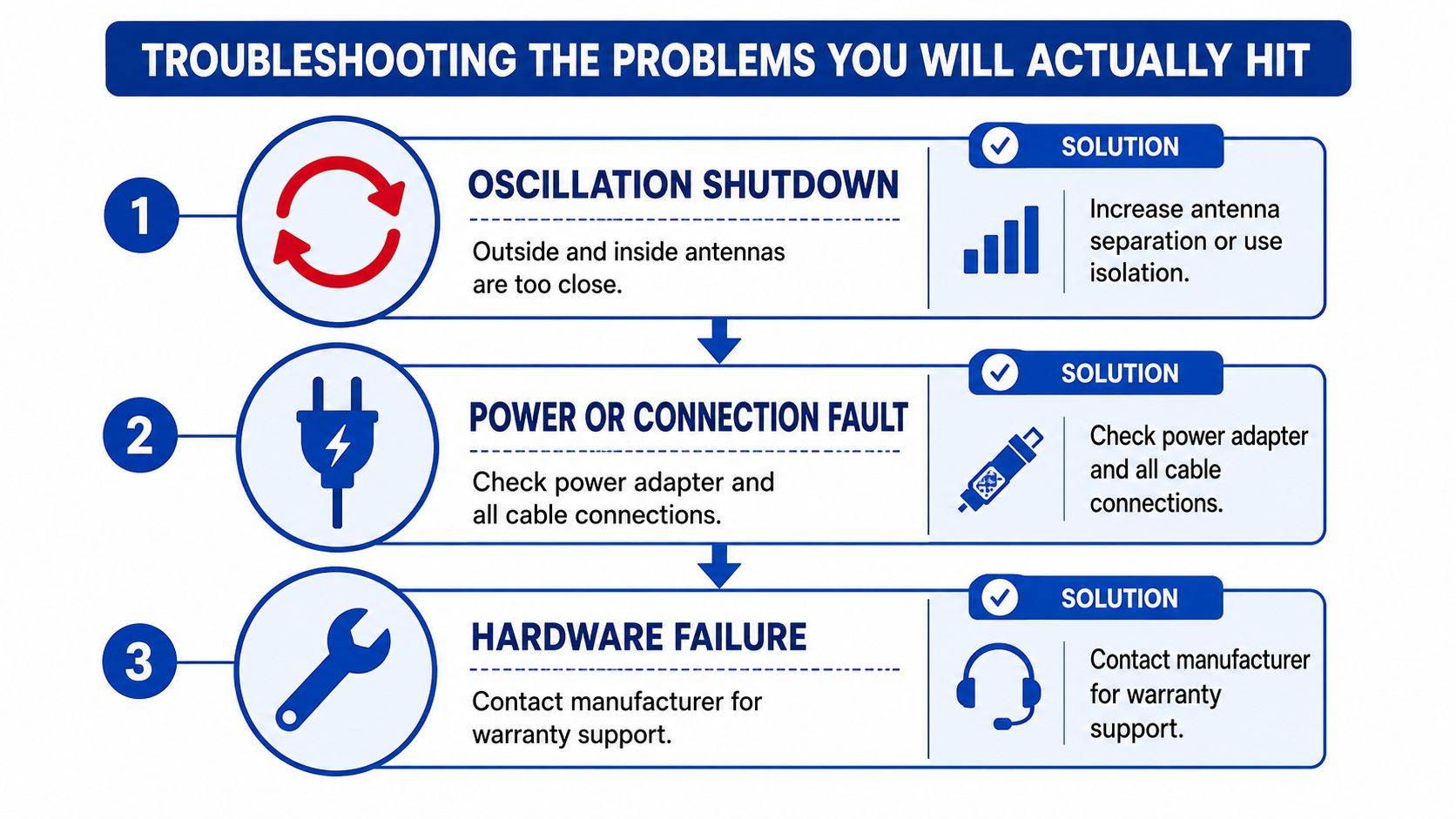
Troubleshooting the Problems You Will Actually Hit
Most “my booster doesn't work” complaints in apartments are placement problems, not dead hardware. The hard part is figuring out which problem you've got first, because fixing the wrong one wastes your afternoon.
Start with oscillation before anything else
If the booster keeps shutting off or the signal seems to vanish after a short burst, the inside and outside antennas are probably seeing each other. That's classic oscillation, and it's common in small apartments where the donor antenna lives too close to the living room antenna.
Check the signal quality, not just the bars
If the bars look full but data stalls, that often points to a bad donor signal, a high noise figure issue, or overshoot from improper placement. Foil-backed insulation and metalized windows can also reduce the quality of what the donor antenna captures, which is why the best window sometimes changes after the first test.
If the signal fell after a neighbor added a metal awning, a new reflective surface may have changed the donor side. Apartments are annoyingly dynamic that way.
Match the band before you blame the unit
A lot of people buy a booster that doesn't support the band their phone is using. That's especially easy to mess up with 5G, because low-band and mid-band support are not the same thing, and a unit built for one won't fix the other.
When I'm diagnosing a weak install, I check dBm before and after in the same room. If the numbers improve by the window but not in the bedroom, that's a placement issue. If nothing changes anywhere, then I look at registration, cable connections, and whether the unit was approved for use.
DigiDevice's explainer on whether boosters work is a solid place to sanity-check the basics before you assume you bought junk: do cellular boosters work.
Apartment Booster Checklist and a Clear Next Step
A clean apartment decision fits on one screen. If you can screenshot this and follow it on install day, you'll avoid most of the dumb mistakes renters make with boosters.
Use this checklist before you buy
- Test the window spot: Compare signal at the best window, the desk, and the bed.
- Identify the carrier and band: Use field-test mode or diagnostics so you know what the phone is really using.
- Measure donor strength: If the outside signal is weak, your indoor result will be weak too.
- Read the lease: Look for exterior modification clauses, common-area restrictions, and drilling rules.
- Confirm FCC approval: Check for the FCC ID and carrier compatibility before power-on.
- Verify antenna separation: Plan the install so the antennas won't trigger oscillation.
Buy only when the apartment actually qualifies
I'd buy an FCC-certified multi-carrier booster only when at least two of these are true, you have usable signal at one window, your apartment has a problem room rather than a total dead zone, and your lease allows a reversible interior install. If those boxes aren't checked, lean on Wi-Fi Calling or a carrier small-cell style option instead.
If you pass the checklist, go to a product page that clearly shows the supported bands, FCC status, and return policy before you spend a dollar. In a 600-square-foot rental, support and return terms matter more than a giant peak-gain number.
DigiDevice carries practical connectivity gear and apartment-friendly signal solutions, so if your tests say a booster is justified, start by comparing the supported bands, FCC approval, and install style on DigiDevice. If your apartment is still a bad donor-signal environment after testing, that site also helps you sort hardware from hype before you buy the wrong fix.