

Best Mobile Signal Booster for 2026: Complete Buyer's Guide
You're halfway through a Zoom call when the 5G bars disappear. The other person hears every third word, your hotspot slows to a crawl, and the call drops just as you start explaining the important part. A best mobile signal booster can solve that kind of indoor coverage problem, but only when there's usable signal outside and the system is installed correctly.
Updated for March 2026, this guide focuses on the details that decide whether a booster works, including antenna type, separation, gain, carrier compatibility, building materials, and FCC requirements. It also follows a practical buying rhythm, with informational guidance first, scenario-based recommendations next, and troubleshooting for readers who need an answer quickly.
Why Your Signal Drops at Home and What a Booster Can Fix
Remote professionals usually discover a dead zone through repetition. A call works beside the kitchen window, fails at the desk, and becomes unreliable whenever rain, distance from the tower, or the building's materials add more obstruction. In a rural home, that weak indoor signal can turn an ordinary meeting into a series of apologies and reconnects.
The cost isn't only annoyance. Dropped calls can interrupt client conversations, missed texts can delay work, and slow cellular data can make a phone hotspot unsuitable for a home office. Wi-Fi calling may help if your internet connection is dependable, but it doesn't solve poor cellular reception for every device, room, or situation.
What a booster can and can't do
An FCC-compliant consumer booster uses an outside antenna to capture an existing cellular signal. The amplifier strengthens that signal, and an indoor antenna rebroadcasts it where people use their phones. The system can also support the phone's connection back toward the carrier network, provided the equipment and installation remain compliant.
The limitation is more important than the sales pitch. A booster can't create signal from nothing. If your phone gets no usable signal outside, there's nothing for the antenna to capture. In that situation, test Wi-Fi calling, ask the carrier about available network equipment, or compare coverage from another carrier before buying hardware.
For a practical overview of indoor reception problems and possible fixes, see this guide to boosting cell signal at home.
Buying rule: Test the signal outdoors before comparing amplifier specifications. A stronger source signal and a sensible antenna installation often matter more than a larger number on the box.
Summary box: This guide will help you decide whether a booster suits your location, how much gain your deployment requires, which antenna fits your building, what FCC obligations apply, and when Wi-Fi calling or a carrier change makes more sense. You can also review the FCC-approved booster range before comparing systems.
How a Mobile Signal Booster Actually Works
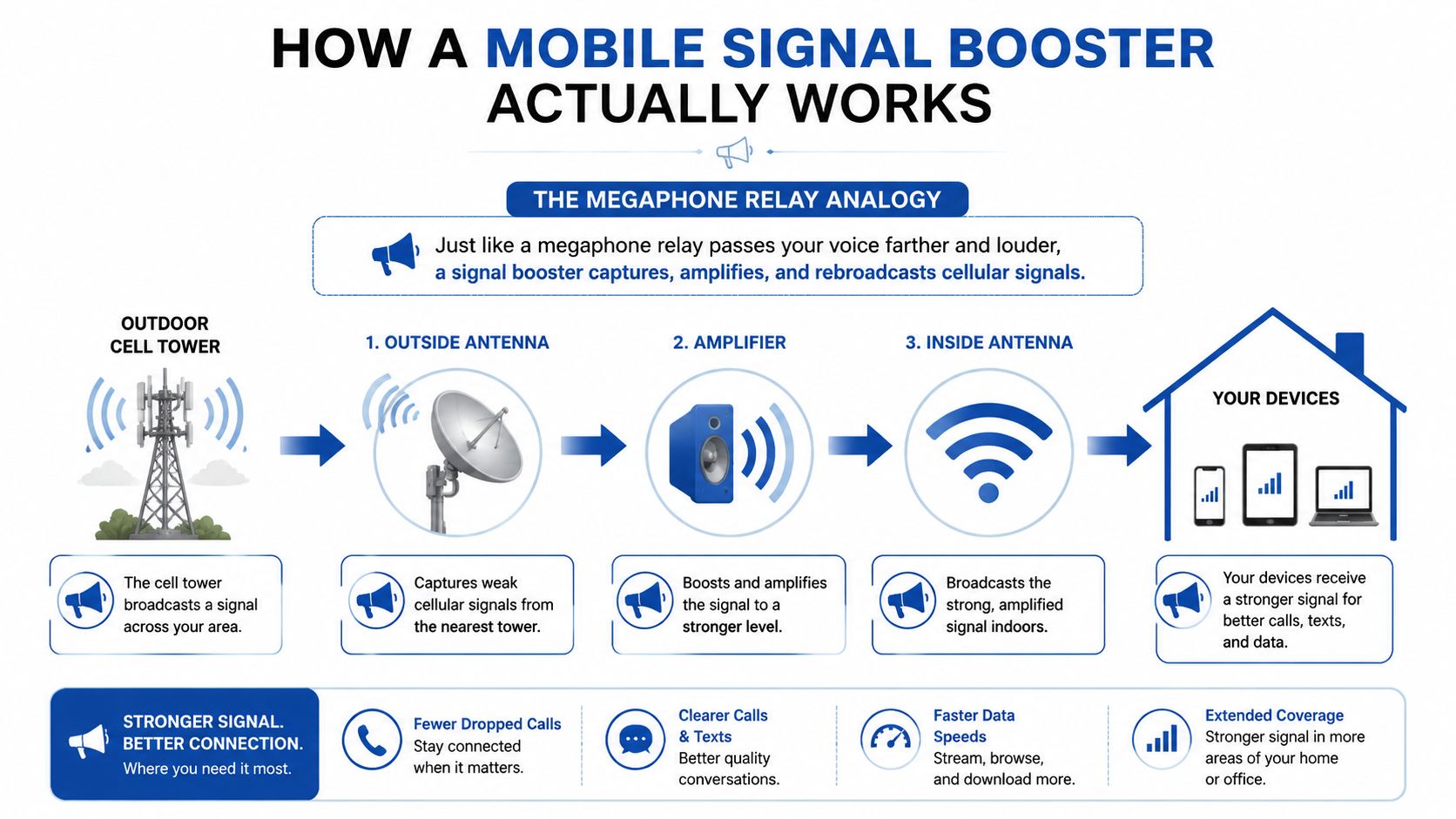
Think of the system as a megaphone relay. The outside antenna listens to the carrier signal, the amplifier processes and strengthens it, and the inside antenna speaks to your phone. If any part of that relay is poorly placed, the amplifier can't compensate indefinitely.
The three parts that matter
- Outside antenna: This captures the available signal from a nearby cell site. An omni antenna listens across directions, while a directional antenna focuses on a selected direction and can be more useful when the source signal is weak or the tower is distant.
- Amplifier: The amplifier increases signal strength while using automatic gain control to limit instability. It must balance useful gain against oscillation, which occurs when the outside and inside antennas feed back into each other.
- Inside antenna: This rebroadcasts the improved signal into the target room, vehicle, office, or building area. Placement matters because walls, roofing, shelving, and metal surfaces can limit how far that rebroadcast signal travels.
Reading gain without falling for the largest number
Gain is measured in dB, and it describes how much the system can strengthen a signal. It isn't a guarantee of coverage or speed. The outdoor signal quality, antenna direction, cable losses, antenna separation, supported bands, and building construction all affect the result.
U.S. FCC rules require consumer boosters to operate only in weak-signal areas, not extend normal network coverage, and cap retransmitted channel power at 5 watts ERP. The technical framework also relies on automatic control to reduce oscillation and harmful uplink noise, as described in 47 CFR § 90.219.
A useful spec sheet should therefore show supported carrier bands, consumer certification, antenna options, automatic gain control, and installation requirements. The gain figure matters, but it isn't the whole system.
For a plain-language explanation of the signal path, see what a mobile signal booster does.
FCC Rules and Carrier Compatibility Explained
The modern consumer booster category took shape when the FCC issued new rules on February 20, 2013, designed to reduce interference and make boosters safer and more available, especially in rural and underserved areas. Those rules took effect on March 1, 2014, and the FCC says devices sold and marketed in the United States after that date must meet the new requirements. The FCC signal booster guidance provides the historical and regulatory context.
The order separates boosters into Consumer and Industrial categories. A residential user shouldn't assume that an industrial amplifier is interchangeable with a consumer product. The class affects technical requirements, operating conditions, and registration procedures.
Carrier support isn't the same as guessing
The FCC says many major wireless providers allow compliant boosters. Its consumer guidance identifies Verizon, AT&T, Sprint, and T-Mobile as carriers with approved boosters that carry the required label, so additional approval isn't needed for those labeled devices. That doesn't mean every booster supports every band or every regional deployment, so the product documentation still deserves careful attention.
Look for language identifying the unit as a certified consumer booster, along with the required labeling. An unlabeled amplifier sold as a generic signal enhancer is a poor bet, even if its advertised gain looks impressive. The FCC-approved cell phone signal booster guide is a useful place to compare compliant options.
The user still has responsibilities
Under 47 CFR § 20.21, a consumer user must obtain the serving carrier's consent before operation, register the booster with that carrier, and use it only on supported subscriber-service bands. The rule also sets limits for uplink noise, uplink power, and downlink power, including an uplink noise limit of −103 dBm/MHz, a maximum uplink power of 1 watt composite conducted power and EIRP per band, and a composite downlink limit of 0.05 watt, or 17 dBm, conducted and EIRP per band. Read the full requirements in 47 CFR § 20.21.
These limits protect the carrier network from an improperly configured system. Compliance is part of buying the best mobile signal booster, not paperwork to consider after installation.
Sizing a Booster for Your Space and Signal
Coverage decisions start outside the building. A small office with usable reception near a window has a different requirement from a metal workshop where the outside antenna must pull in a weak, distant signal and feed several enclosed work areas.
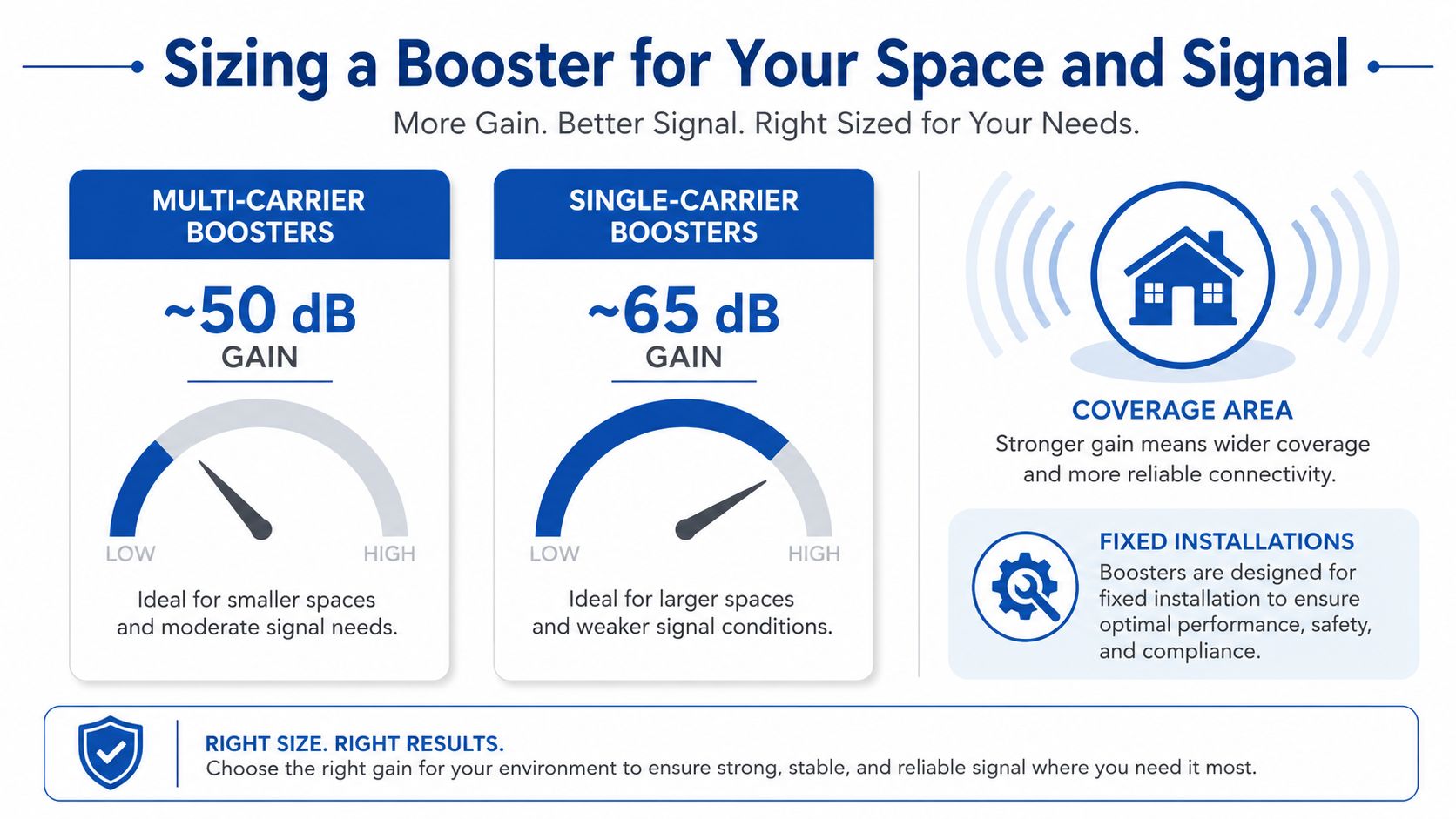
Independent booster guides commonly place multi-carrier systems at about 50 dB gain, single-carrier systems around 65 dB, and some fixed stationary applications as high as 100 dB, depending on the system and deployment. These benchmarks are summarized in the mobile signal booster gain guide.
Match the system to the real conditions
Use a simple assessment rather than choosing the biggest amplifier:
- Test outdoors: Walk around the roofline, yard, or vehicle exterior and identify where calls or data work most reliably. That location determines whether an omni or directional antenna makes sense.
- Map the target area: Decide whether you need one room, a home office, a whole house, an RV cabin, or a larger workspace. Indoor antennas work best when placed where people use their phones.
- Account for construction: Metal siding, metal roofing, concrete, insulation, and dense interior shelving can reduce the indoor signal. A building that looks modest on a floor plan may need a more deliberate antenna layout.
- Check carrier needs: A multi-carrier booster is practical when household members use different networks. A single-carrier unit may offer higher gain when everyone uses the same supported carrier.
The best mobile signal booster isn't automatically the one with the highest gain. It's the system that can maintain stable gain with the available outside signal, antenna separation, cable run, and carrier bands.
The performance ceiling comes from the complete installation. A high-gain amplifier paired with a poorly positioned outside antenna or insufficient separation can reduce performance through feedback. A more moderate system installed with a clean signal path can produce a more dependable result.
Installation and Antenna Placement That Decides Success
Installation is where many promising booster purchases fail. The amplifier can be correctly certified and still perform poorly if the outside antenna is placed in a shadowed location, aimed away from the serving tower, or mounted too close to the inside antenna.
A practical installation sequence
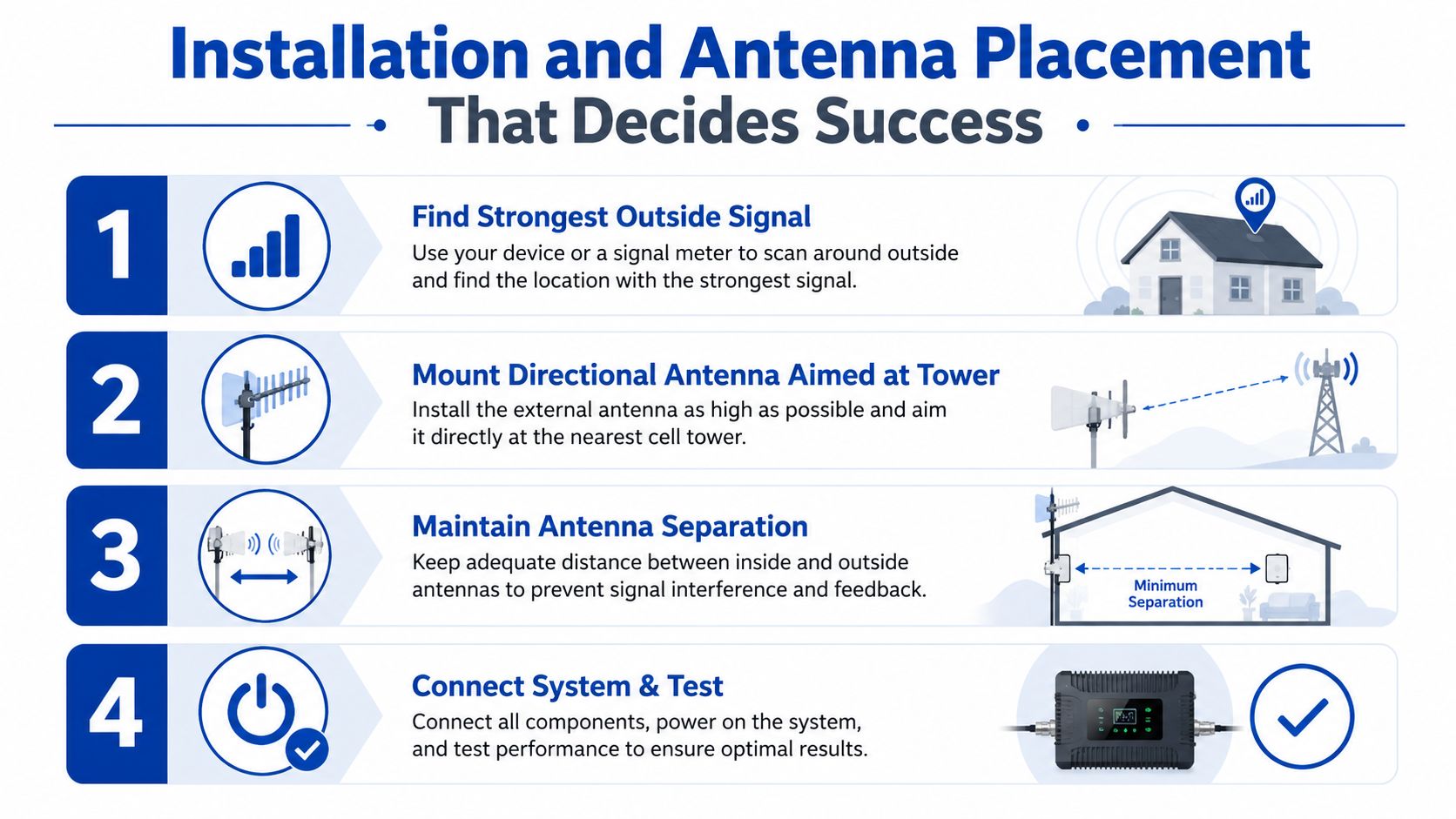
- Find the strongest outside signal point. Test several locations rather than assuming the roof peak is best. A clear side of the building may outperform a higher but obstructed position.
- Aim a directional antenna toward the serving tower. A Yagi antenna is often a sensible choice for semi-rural sites. An LPDA antenna can suit rural metal buildings where the tower is farther away and the signal path needs more directional focus.
- Create sufficient antenna separation. Keep the outdoor and indoor antennas physically separated according to the manufacturer's installation guidance. Too little separation can cause oscillation, prompting the booster to reduce gain or shut down a band.
- Put the inside antenna where users sit. Covering the amplifier cabinet isn't the objective. Place the indoor antenna near the desk, living area, vehicle seating zone, or work floor that needs service.
Metal buildings deserve special attention because metal can severely block cellular reception. The outside antenna, mounting point, cable quality, and entry route often matter more than buying a larger amplifier. The guidance on external antennas for mobile phones covers the antenna side of that decision.
A short installation demonstration can help clarify the physical layout before you start routing cable.
Troubleshoot before replacing the booster
- Blinking or shutdown indicators: Increase antenna separation, inspect connectors, and check whether the antennas face each other through a thin wall or roof.
- Weak improvement: Re-test the outdoor mounting point and adjust the directional antenna toward the actual serving tower.
- Good signal in one area only: Reposition the inside antenna or consider whether the building requires more than one indoor antenna.
For mounting hardware, cable, and antenna options, browse the signal booster installation accessories that fit the deployment.
Choosing the Right Booster for Your Scenario
The right system depends on the location's weakest link. A rural home may have a clear outdoor signal but long distances to the tower. A metal building may have usable reception outside and almost none indoors. An RV needs a compact vehicle-oriented setup, while a small office may prioritize several users and mixed carriers.
| Scenario | Coverage Need | Antenna Strategy | Booster Class |
|---|---|---|---|
| Rural home | Rooms across a home with weak but usable outdoor reception | Directional antenna when the tower is distant, with indoor antenna placed near work and living areas | Multi-carrier consumer system for mixed networks, or single-carrier system when one network dominates |
| Metal building | Interior rooms blocked by metal walls or roofing | Mount the outdoor antenna clear of the structure, use Yagi for semi-rural placement or LPDA for more distant rural towers | Consumer system selected for the usable outdoor signal and indoor layout |
| RV | A vehicle cabin or travel living area | Vehicle-compatible outside antenna with an interior rebroadcast antenna, installed with careful separation | Mobile or vehicle-oriented consumer booster |
| Small office | Desk areas and meeting spaces, often with multiple devices | Omni antenna where outside signal is broadly available, directional antenna where tower direction matters | Multi-carrier consumer booster when staff use different networks |
In metal buildings, what we notice first is not the amplifier's headline gain. It's the outside antenna location. If the antenna sits beside a metal wall or under a metal roof, the system starts with a poor source signal and the amplifier has little room to help.
For a larger home or office layout, review the INVCALL booster for large houses and offices, which is listed for U.S. carrier coverage and a multi-antenna indoor arrangement. For a metal structure, compare the FCC-approved booster for metal buildings with the antenna and cable requirements before ordering.
Installer's perspective: Choose the booster class after checking the outside signal and building envelope. Don't choose it from floor area alone.
A fixed installation can justify more specialized equipment than an RV or small office, but higher gain doesn't remove the need for separation and automatic control. Updated for March 2026, this remains the clearest buying distinction: match the whole signal path, not just the amplifier label.
Boosters Versus Alternatives and Common Failures
A booster isn't the only way to improve calling. Wi-Fi calling can be the simplest answer when indoor cellular reception is weak but home internet is stable. A carrier femtocell or small-cell device may provide a localized cellular connection through the internet, if the carrier offers and supports one. Switching carriers can be more effective when the current network has no usable outdoor signal at the property.
| Option | Where it works well | Main limitation |
|---|---|---|
| Wi-Fi calling | Reliable broadband and compatible phones | Depends on internet quality and device settings |
| Carrier femtocell | Carrier-supported home or office deployment | Requires carrier availability and compatible service |
| Switching carriers | Locations where another network reaches the property | Doesn't improve the current carrier's coverage |
| Mobile booster | Usable outside signal with poor indoor distribution | Needs correct antenna placement and compliance |
The most common booster failures are predictable:
- Oscillation shutdown: The symptom is a warning light, reduced gain, or a band switching off. The cause is insufficient antenna separation. Move the antennas farther apart and check for reflective metal surfaces.
- Weak or unstable improvement: The outside antenna is aimed at the wrong tower or mounted at a poor signal point. Re-test around the building and adjust the direction.
- No improvement at all: There's no usable outside signal for the antenna to capture. A booster isn't the right purchase until you find a workable source signal or consider Wi-Fi calling, a carrier device, or another network.
The guide to whether cellular boosters work is useful before spending money on an installation that the location can't support.
Frequently Asked Questions
Can a booster fix zero outside signal?
No. A booster amplifies an existing signal, so it can't generate cellular service where the outside antenna receives nothing. Test Wi-Fi calling, ask the carrier about a femtocell or small-cell option, or check another carrier's coverage.
Will it work if I switch carriers?
A multi-carrier consumer booster can continue supporting compatible networks, while a single-carrier model is limited to its supported carrier bands. Check the label and band documentation before changing service.
Are boosters legal in an RV or across state lines?
They can be used when the equipment and installation meet FCC consumer requirements, including carrier consent and registration under 47 CFR § 20.21. Follow the carrier and manufacturer instructions when moving the system between locations.
When you're ready to compare compliant options, visit the FCC-approved booster range and choose the system that matches your outside signal, building type, carrier needs, and installation plan.
DigiDevice offers signal boosters and related installation products for shoppers solving difficult indoor and mobile coverage problems. Visit DigiDevice to compare the available equipment, check compatibility details, and choose a booster setup before your next dropped call.