

Best AR Smart Glasses for 2026 Buyers
You're on a crowded train, trying to finish a presentation before the next stop, or on a flight wishing your laptop screen were larger without opening a laptop. The first decision in choosing the best AR smart glasses isn't which brand has the brightest display. It's whether you want display glasses for a private virtual screen or camera and AI glasses that behave like ordinary eyewear with hands-free assistance.
Direct answer: Choose XREAL One Pro for latency-sensitive gaming and laptop work, VITURE Beast for immersion and bright environments, and Ray-Ban Meta Gen 3 for everyday camera, calls, audio, and AI. For commuting and social wear, camera-first glasses make more sense. For remote work, flights, and gaming, display glasses are the practical choice.
Updated for March 2026
| Buyer priority | Best fit | Why |
|---|---|---|
| Private screen for work or travel | XREAL One Pro | Strong latency and mature software |
| Bright, immersive display | VITURE Beast | Wider field of view and higher brightness |
| Everyday AI and camera use | Ray-Ban Meta Gen 3 | Familiar frame design and hands-free features |
| Text-focused minimalist AR | Even Realities G2 | Better suited to notifications and navigation |
| Open, experimental AI | Brilliant Labs Frame | Appeals to technically minded users |
Why 2026 Is the Breakout Year for Smart Glasses
At 7:42, a commuter pulls up a large virtual screen, edits the last slide of a deck, and closes the glasses before the train reaches the next stop. That scenario belongs to display glasses, not camera-first eyewear. A different commuter might wear Ray-Ban Meta glasses all morning, ask an assistant a question, record a quick clip, and never see a digital screen at all.
That split matters because the category is expanding while its products are moving in different directions. IDC recorded about 2.25 million global smart glasses shipments in Q1 2026, up 167% year over year (IDC's AR and VR market data). IDC also projects approximately 13.6 million units for full-year 2026 and 27.3 million by 2030, implying an 18.9% CAGR over that period (IDC's smart glasses market analysis).
Those figures describe a market that's scaling, but they don't mean every product has reached the same level of maturity. Display glasses still behave like personal monitors, usually relying on a phone, laptop, handheld console, or adapter. Camera and AI glasses are closer to connected eyewear, with microphones, speakers, cameras, and a phone-backed assistant.
What buyers notice first
The useful change isn't a vague promise of “the future.” It's more practical:
- Display quality: Brightness and field of view now determine whether a virtual screen remains useful outside a dark room.
- Wearability: Camera-first frames can look like conventional sunglasses, while display models still advertise their electronics through thicker temples.
- Market choice: More brands are competing across media, gaming, productivity, navigation, and AI assistance.
IDC puts the average smart-glasses selling price at about $376 in 2026, with a projection of roughly $229 by 2030 as the category matures (IDC's pricing and shipment forecast). That doesn't make every model affordable, but it does give buyers more room to choose by use case instead of settling for whatever looks most futuristic.
For a broader look at where optics, processors, and everyday eyewear are heading, DigiDevice's future of augmented reality guide is a useful companion read.
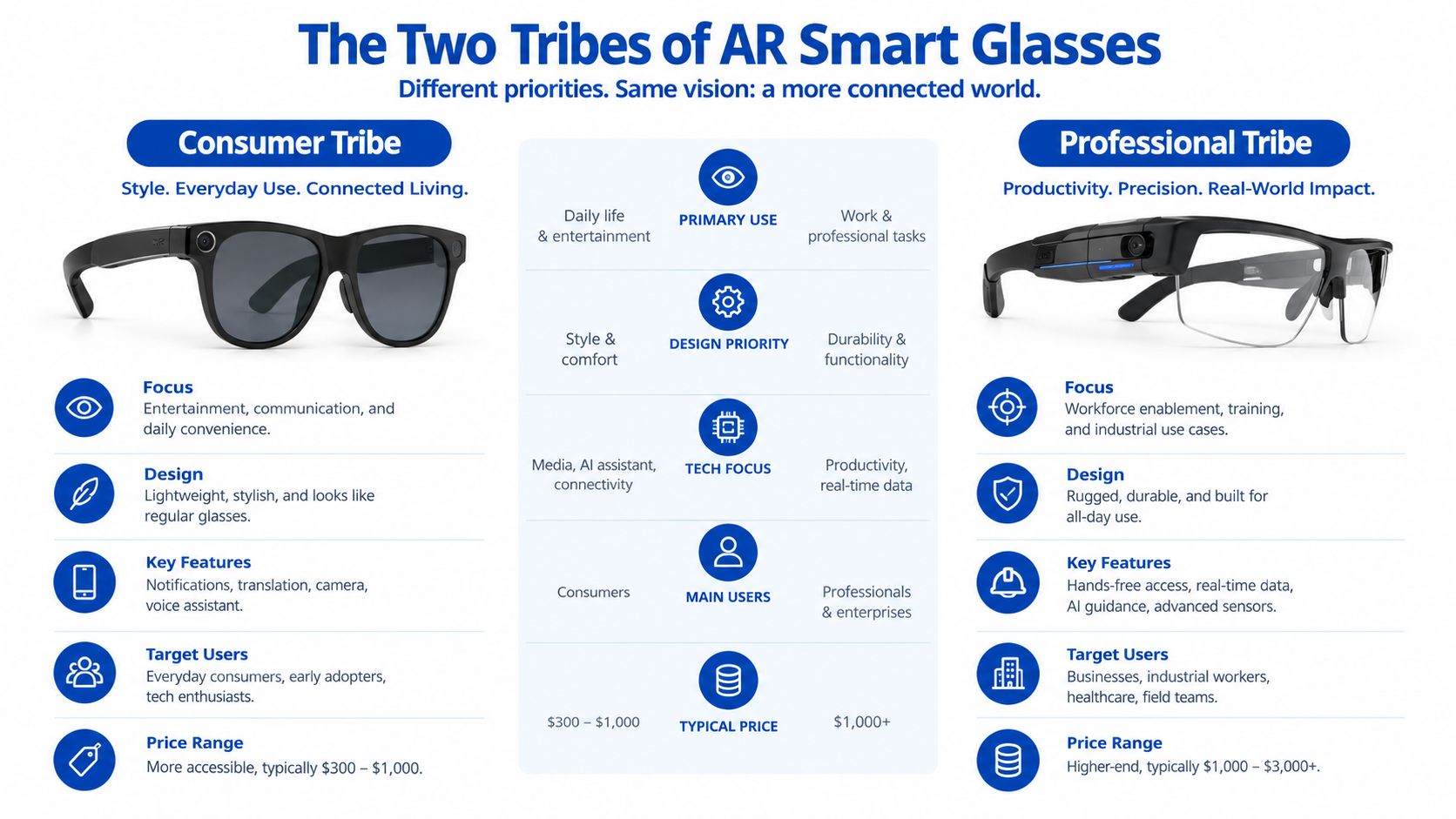
The Two Tribes of AR Smart Glasses Right Now
Smart glasses divide into two clear groups before you even compare models.
Display glasses connect to another device and project a private screen in front of your eyes. They're the right tool for watching films on a flight, playing a handheld game on a much larger virtual screen, or adding workspace to a laptop. XREAL One Pro and VITURE Beast belong here. Their value depends on field of view, brightness, latency, comfort, and source-device compatibility.
Camera and AI glasses don't give you a virtual monitor. They use onboard cameras, microphones, open-ear speakers, and an assistant to handle calls, capture photos, answer questions, and describe what you're seeing. Ray-Ban Meta Gen 3 represents this approach, while Even Realities G1 sits closer to the minimalist, information-first end of the category.
The practical shopping split
| Decision axis | Display glasses | Camera and AI glasses |
|---|---|---|
| Primary input | Phone, laptop, console, or handheld | Voice, frame controls, and camera context |
| Power source | Connected source device or accessory | Internal battery and charging case |
| Social signature | Looks like technology eyewear | Often resembles ordinary sunglasses |
| Ideal environment | Flights, desks, gaming, private media | Commuting, walking, calls, quick capture |
| Main limitation | Cable, adapter, and source compatibility | No large visual workspace |
The market is already favoring the camera-first side. In 2025, AI-enabled smart glasses shipments reached 8.7 million units, up 322% from the prior year, and Meta accounted for 85.2% of global shipments, or roughly 7.4 million units (TelecomPaper's shipment report). That concentration tells you something important. Buyers are comfortable with familiar frames that add a camera and assistant, even when those frames don't provide AR visuals.
The display market has a different trajectory. IDC expects display glasses from vendors such as XREAL, VITURE, and RayNeo to grow from 3 million units in 2026 to 12.2 million by 2030 (Forbes' smart-glasses roundup). The category is splitting fast, so don't buy camera glasses expecting a monitor, or display glasses expecting a discreet everyday assistant.
For a useful technical explanation of the optical choices behind these products, DigiDevice's waveguide versus birdbath optics comparison gives the right background.
Display Glasses Head-to-Head XREAL One Pro vs VITURE Beast
The XREAL One Pro and VITURE Beast are competing for buyers who want a large private screen, but they don't emphasize the same experience. XREAL One Pro prioritizes latency and software maturity. VITURE Beast prioritizes immersion, brightness, and daylight usability.
One independent 2026 comparison lists the XREAL One Pro at 57° field of view, 700 nits, and a 171-inch virtual screen. The same comparison lists VITURE Beast at 58° field of view, 1,250 nits, and 1200p resolution, with the Beast winning for immersion and daylight use while the One Pro is stronger on latency and software maturity (the 2026 AR smart-glasses comparison).
| Spec | XREAL One Pro | VITURE Beast |
|---|---|---|
| Field of view | 57° | 58° |
| Brightness | 700 nits | 1,250 nits |
| Virtual screen | 171 inches | Not specified in the cited comparison |
| Resolution | Not specified in the cited comparison | 1200p |
| Main advantage | Latency and software maturity | Immersion and daylight usability |
| Best setting | Laptop work and gaming | Bright rooms, travel, and media |
Winner by buying criterion
Field of view: VITURE Beast wins narrowly at 58° versus 57°. That difference won't transform the experience by itself, but it supports the Beast's more immersive presentation.
Brightness: VITURE Beast wins clearly at 1,250 nits versus 700 nits. If you use glasses near a bright window, on a patio, or during daylight travel, this is the specification I'd prioritize.
Latency: XREAL One Pro wins. The independent comparison specifically favors it for latency, which matters more for fast games than a slightly wider viewing window.
Software maturity: XREAL One Pro wins according to the same comparison. A stable control layer and reliable screen positioning can matter more than a headline resolution when you use the glasses every day.
Comfort: Neither model should be chosen from a specification sheet alone. Fit depends on your nose bridge, prescription needs, cable position, and how long you tolerate temple pressure.
Price: Don't use price as the only tie-breaker unless the retailer's current listing confirms it. Availability, regional bundles, lens accessories, and included adapters can change the actual purchase cost.
Practical rule: Choose the XREAL One Pro when the glasses replace or extend a laptop and gaming display. Choose the VITURE Beast when brightness and immersion matter more than the cleanest latency profile.
The practical verdict is straightforward. For a Switch, handheld PC, or laptop workflow, I'd take the XREAL One Pro. For bright travel environments and cinematic viewing, I'd take the VITURE Beast. DigiDevice's XREAL versus VITURE travel comparison is the natural next read before you choose a travel setup.
Camera and AI Glasses Led by Ray-Ban Meta Gen 3
Ray-Ban Meta Gen 3 belongs in a different aisle from XREAL and VITURE. It isn't a portable monitor. It's a familiar-looking frame designed to capture photos, handle calls, play audio, and access an AI assistant without requiring you to hold a phone.
IDC highlights the 2026 Ray-Ban Meta Gen 3 at $449, with a 12MP camera, 3K video, nine hours of battery life, and microphones that reduce background noise by 90% compared with the prior generation (IDC's Meta Connect 2026 coverage). IDC also identifies a $349 Ray-Ban Meta Audio model with no camera, an AI assistant, music, calls, and 12 hours of battery life in the same coverage.
What the camera-first design gets right
The best part of this format is that it doesn't demand a special posture. You can ask a question while walking, take a first-person photo while carrying luggage, or answer a call without raising a phone to your face. Open-ear audio keeps you aware of announcements and nearby conversation, although it won't create the private visual workspace that display glasses provide.
The Ray-Ban frame language also helps. Wayfarer, Headliner, and Skyler silhouettes feel more socially ordinary than the thicker bands on many display models. That changes where you'll wear them. A pair that looks like normal eyewear is more likely to leave the house than a device that feels like a miniature headset.
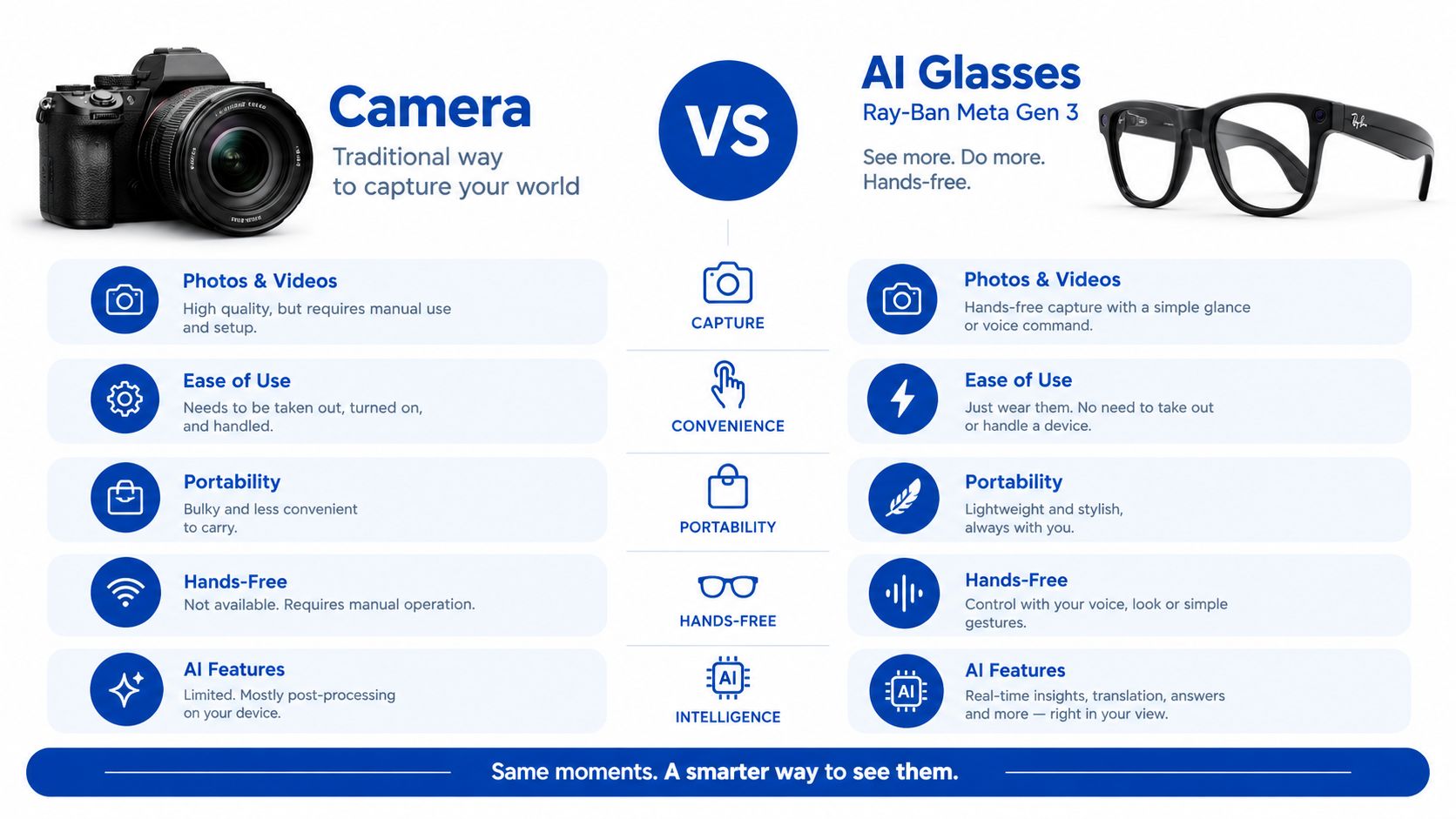
Camera and AI glasses are the better choice for the buyer who wants less screen time, not more screen area. They're also the reason smart glasses have gained broad early adoption. If you want a visual overlay, subtitles, or a private monitor, the Ray-Ban Meta Gen 3 is the wrong purchase no matter how polished the frame looks.
For a more detailed look at assistant features and competing products, see DigiDevice's 2026 AI assistant smart-glasses reviews.
Matching Glasses to Real Life Commute, Remote Work, Travel
The right pair depends on what your hands are doing when you need the glasses.
The commuter
A commuter wearing earbuds on a train usually needs awareness, notifications, calls, and occasional camera access. Ray-Ban Meta Gen 3 wins this scenario because it resembles ordinary eyewear and doesn't force you to manage a cable or a virtual screen.
You can use the camera for a quick photo of a damaged ticket, ask an assistant a hands-free question, or take a call while keeping your phone in a pocket. The limitation is equally clear: there's no visual overlay, so directions and answers arrive through audio rather than a lens display.
Verdict: Choose camera and AI glasses for commuting.
The remote worker
A remote worker in a café may want a larger private workspace without carrying multiple monitors. XREAL One Pro is my pick when low latency and mature software matter most. VITURE Beast is the better alternative when the workspace has strong daylight or when media quality matters more than latency.
Your laptop must support the required USB-C video output, commonly through DisplayPort Alt Mode, and your phone or handheld may need a compatible adapter. Accessories such as Beam Pro or Pro Dock can change the setup, so confirm the complete signal path before ordering. For the wider remote-work setup, this guide to remote-work apps from SwiftNet Wifi is useful because virtual monitors don't solve poor connectivity or an unsuitable collaboration workflow.
Verdict: Choose display glasses for remote work.
The frequent flyer
Frequent flyers care about privacy, carry-on space, comfort, and whether the glasses remain useful when a phone connection is limited. Display glasses are excellent for private films or a large laptop view, but the cable and adapter kit can become another item to lose in a seat pocket.
Even G2 and Brilliant Labs Frame are lighter, more socially discreet alternatives for text-oriented or experimental use, but they don't replace a wide media display. Camera-first glasses are easier to wear through an airport, though airplane mode behavior and offline capabilities should be checked before travel.
| Lifestyle | Glass type | Top pick | Key feature | Why it wins |
|---|---|---|---|---|
| Train commute | Camera and AI | Ray-Ban Meta Gen 3 | Hands-free camera and audio | Looks ordinary and keeps your hands free |
| Café remote work | Display | XREAL One Pro | Private virtual workspace | Strong latency and software maturity |
| Bright flight or hotel room | Display | VITURE Beast | Higher brightness and wider FOV | Better daylight and media performance |
For Mac and Windows users, DigiDevice's virtual-monitor AR-glasses guide is worth checking before you buy. Compatibility is the difference between a useful workstation and an expensive pair of screens that your laptop can't drive.
Decision Matrix Which Pair Actually Fits You
A useful matrix starts with the job, not the logo. Display glasses should be judged by field of view, brightness, latency, and source compatibility. Camera and AI glasses should be judged by capture quality, assistant usefulness, microphones, audio, and how naturally you'll wear them.
I'd put 60% of the decision weight on comfort and battery for someone seeking all-day eyewear. That pushes Ray-Ban Meta Gen 3 and Even G2 ahead because a lighter, more wearable product is more likely to stay on your face. I'd put 60% on screen specifications for a gamer or laptop worker. That shifts the result toward XREAL One Pro or VITURE Beast.
The scores below are editorial guidance, not laboratory measurements. They reflect each product's role in the category and the verified differences described earlier.
| Model | Display quality | Comfort | Battery life | Price/value | Best for |
|---|---|---|---|---|---|
| XREAL One Pro | Excellent for latency-focused display use | Good, but visibly technical | Dependent on connected setup | Strong for screen replacement | Laptop work and gaming |
| VITURE Beast | Excellent for brightness and immersion | Good, with accessory needs | Dependent on connected setup | Strong for bright environments | Travel media and gaming |
| Ray-Ban Meta Gen 3 | No display | Strong everyday wearability | Strong for camera-first use | Strong for AI and capture | Commuting and calls |
| Even G2 | Narrow, text-focused display | Strong minimalist design | Best checked against current listing | Good for notifications | Navigation and concise information |
| Brilliant Labs Frame | Experimental overlay approach | Lightweight-oriented design | Best checked against current listing | Niche value for developers | Open and experimental AI |
Three questions that settle the choice
- Are you escaping a laptop screen or escaping your phone? If you want more screen, buy display glasses. If you want fewer moments holding a phone, buy camera and AI glasses.
- Will you use the glasses in daylight? Prioritize the brightness guidance from expert roundups, which generally points to roughly 50° or more of field of view and 1,000+ nits for usable outdoor AR (2026 everyday-wear AR glasses guidance).
- Are you wearing them for minutes or hours? A brilliant screen doesn't compensate for a poor fit during a long flight or work session.
My opinion is simple. Don't let a wide field of view convince you to buy display glasses if you want discreet AI. Don't let a familiar Ray-Ban frame convince you that it can create a virtual monitor.
Our Pick and Where to Buy
There isn't one universal winner, and anyone ranking these products without naming the use case is skipping the important part.
Best for the frequent flyer
Choose XREAL One Pro if your priority is the largest practical private screen and smooth interaction with a laptop or handheld. Its strength is the display experience, particularly latency and software maturity. You'll need to tolerate a more technical frame, a cable, and the adapter requirements of your source device.
Best for the everyday wearer
Choose Ray-Ban Meta Gen 3 if you want a pair that can leave the house with you. It fits the camera and AI category, so you get hands-free capture, calls, audio, and assistant access rather than a floating screen. The trade-off is obvious, but it's a trade-off many commuters will prefer.
Best for the gamer and streamer
Choose VITURE Beast when bright, immersive viewing matters most. Its 58° field of view and 1,250-nit brightness give it the strongest daylight and immersion case in the cited comparison (2026 AR smart-glasses comparison). If fast response and software polish outweigh brightness, XREAL One Pro remains the better gaming decision.
DigiDevice carries a curated mix of AR glasses and related phone and PC accessories, so it's a sensible place to compare a glasses purchase with the adapters, cables, prescription inserts, or travel case your setup may require. For the product most relevant to this category, you can review the Rokid Max AR 3D Smart Glasses listing, which is described for phones, Switch, PS5, Xbox, and PC use.
Before ordering, compare the current listing, regional stock, return terms, and included accessories. Then check current AR glasses availability at DigiDevice and choose the bundle that matches your actual source devices, not the setup shown in a promotional video.
AR Smart Glasses Buyer Questions Answered
Will they work with iPhone, Android, Steam Deck, PlayStation 5, iPad Pro, or Vision Pro?
Compatibility starts with the output connection, not the operating-system logo. Display glasses generally need a device that can send video over USB-C, often through DisplayPort Alt Mode, or an appropriate adapter. Phones, handheld consoles, and laptops vary widely, so verify video output support before assuming a charging port can drive a display.
Steam Deck and compatible USB-C devices are natural display-glasses candidates. PlayStation 5 setups usually require a dock, adapter, or intermediary device because the console's direct output path differs from a USB-C handheld. An iPad Pro with USB-C may work when its model and adapter support the required video signal.
Camera and AI glasses follow a different compatibility pattern. They typically pair with a phone for setup, calls, cloud services, and assistant features. A Vision Pro installation doesn't automatically make another pair of glasses compatible with it, so treat those as separate ecosystems.
Should you buy prescription inserts?
Use the manufacturer's official prescription insert when the model relies on a precise optical position, especially display glasses. Third-party labs may cost less or offer more lens choices, but they must match the frame dimensions, lens geometry, and optical center accurately.
For camera-first frames, buying through an authorized optical channel is usually the cleanest route. For display glasses, a clip-in insert can be convenient, but it adds another layer between your eyes and the frame. Ask an optician to confirm the prescription range and return policy before committing.
How bright do AR glasses need to be outdoors?
Brightness alone doesn't guarantee a usable image. Expert buyer guidance generally recommends roughly 50° or more of field of view and at least 1,000 nits for daytime use, while another review identifies a 1,500-nit model as the brightest tested and frames 52° of field of view as a balance between immersion and wearability (everyday-wear AR glasses review).
A sunglass tint can reduce ambient glare, but it doesn't create display brightness or solve poor contrast. On a bright patio, favor a high-brightness display and effective shading. In a dim cabin or office, comfort, fit, and screen stability may matter more than the headline nits figure.
Ask yourself one final question before buying: do you want a private screen, or do you want ordinary-looking glasses that make your phone less necessary? That answer will lead you to the right category faster than any ranking.
DigiDevice offers a curated selection of AR smart glasses, mobile accessories, and PC connectivity tools for buyers building a practical immersive-tech setup. Visit DigiDevice to compare current products, regional availability, and the accessories that make your chosen glasses work with your phone, laptop, or console.