

AV Cable for PS3: Complete Setup and Buying Guide
You've probably seen this happen. A PS3 comes back to life, the old cable goes in, and the image on the TV looks soft, noisy, or oddly muted even though everything “fits.” The frustrating part is that the AV Multi Out on the PS3 can accept several cable types, but the wrong one limits picture quality, and the bundled lead was never the best-looking option in the first place.
Direct answer. The best av cable for PS3 is the one that matches both your TV input and the signal you want to use. If you're staying analog, component is the clearest choice on compatible TVs, while composite is the fallback that works almost everywhere but looks the roughest.
Why Your PS3 AV Cable Choice Matters More Than You Think
The PS3 was designed during a messy living-room transition, when one console had to work with CRT sets, early HDTVs, and a mix of legacy inputs. Its AV Multi Out port could handle composite, S-Video, component, SCART, D-terminal, and HDMI in different configurations, which explains why the system could sit beside so many different displays without much fuss. That flexibility helped, but it also created confusion, because the plug fitting the console never meant the signal quality was the same.
The cable in the box is the one people reach for first, and it is usually the one that makes a PS3 look softer than it should. Sony's reference material shows the component AV cable, SCPH-10490, could reach up to 1080p, while the bundled composite lead was generally limited to 480i/576i (PlayStation 3 accessories overview). On a flat panel, that gap shows up fast, with fuzzier edges, weaker color separation, and more visible noise, even when the image seems acceptable at a glance.
Practical rule: if the picture looks acceptable but lacks sharpness, the cable is often the limit, not the console.
The connector itself can hide the problem. The PS3's A/V Multi Out carries composite video, S-Video, RGB/SCART, component PrPbY, and stereo analog audio through one proprietary port, so a cable can click in cleanly and still carry a lower-grade signal. I have seen that mistake many times with refurbished systems and secondhand bundles, where the cable fits perfectly but the picture still looks muted because the wiring inside the lead does not match the display's best input.
If the console is going into a compact room or a cabinet setup, the theatre-in-a-box placement guide is useful for cable routing and screen distance. A tidy layout will not fix a poor cable, but it does make it easier to spot whether the image issue comes from the connection, the input choice, or simple viewing distance.
Identifying the Correct PS3 Cable and Connector Types
A PS3 cable can fit the port and still give you the wrong picture. That is the part people miss. The AV Multi Out connector on the console is shared across several cable types, so the difference is not the plug shape, it is the wiring inside the lead and the input on the TV.
What each PS3 cable type actually does
Composite uses the familiar yellow, red, and white plugs. Video is carried on one channel, audio on the other two, which is why it is the most forgiving option for older sets and the first thing to degrade once you move to a flat panel.
S-Video improves separation compared with composite, but it still sits in the older analog tier. It can look cleaner than composite on the right display, yet it is rarely the best path if the TV gives you a better input.
Component uses Y/Pb/Pr video with left and right audio. In practice, it splits the picture signal more cleanly than composite, which helps reduce color bleed and usually gives sharper edges. If you want a straight comparison of how sellers present that kind of lead, the HDMI-compatible cable product page is useful as a market reference, even though it targets a different display path.
SCART matters mainly in European setups, where the TV may support a better analog feed than composite.
D-terminal is the import-market option that matters most for some Japanese displays.
Short version: if the TV has component input, that is usually the analog route worth using. If it does not, composite is the fallback, not the good choice.
PS3 AV Cable Types Compared
| Cable Type | Max Resolution | Best For |
|---|---|---|
| Composite | 480i/576i | Old TVs, basic compatibility |
| S-Video | Not specified in the verified data | Legacy TVs with better analog input than composite |
| Component | 1080p | HDTVs with component inputs |
| SCART | Not specified in the verified data | European TVs and legacy setups |
| D-terminal | Not specified in the verified data | Japanese import TVs |
A practical retail pattern is a PS3 component cable that states PS3/PS3 Slim compatibility, a 6-foot (1.8 m) length, and separate Y/Pb/Pr video plus left and right audio leads. The length sounds ordinary, but it matters in real living rooms because it gives enough slack to route around furniture without pulling on the console port.
If the TV sits in a cabinet or a tight room, Giorgi Bros. Furniture's TV positioning guide is useful for keeping viewing distance and cable slack under control. A tidy layout will not rescue a poor cable, but it makes it easier to tell whether the problem is the connector, the input choice, or the way the setup is arranged.
Step-by-Step PS3 AV Cable Connection and Setup
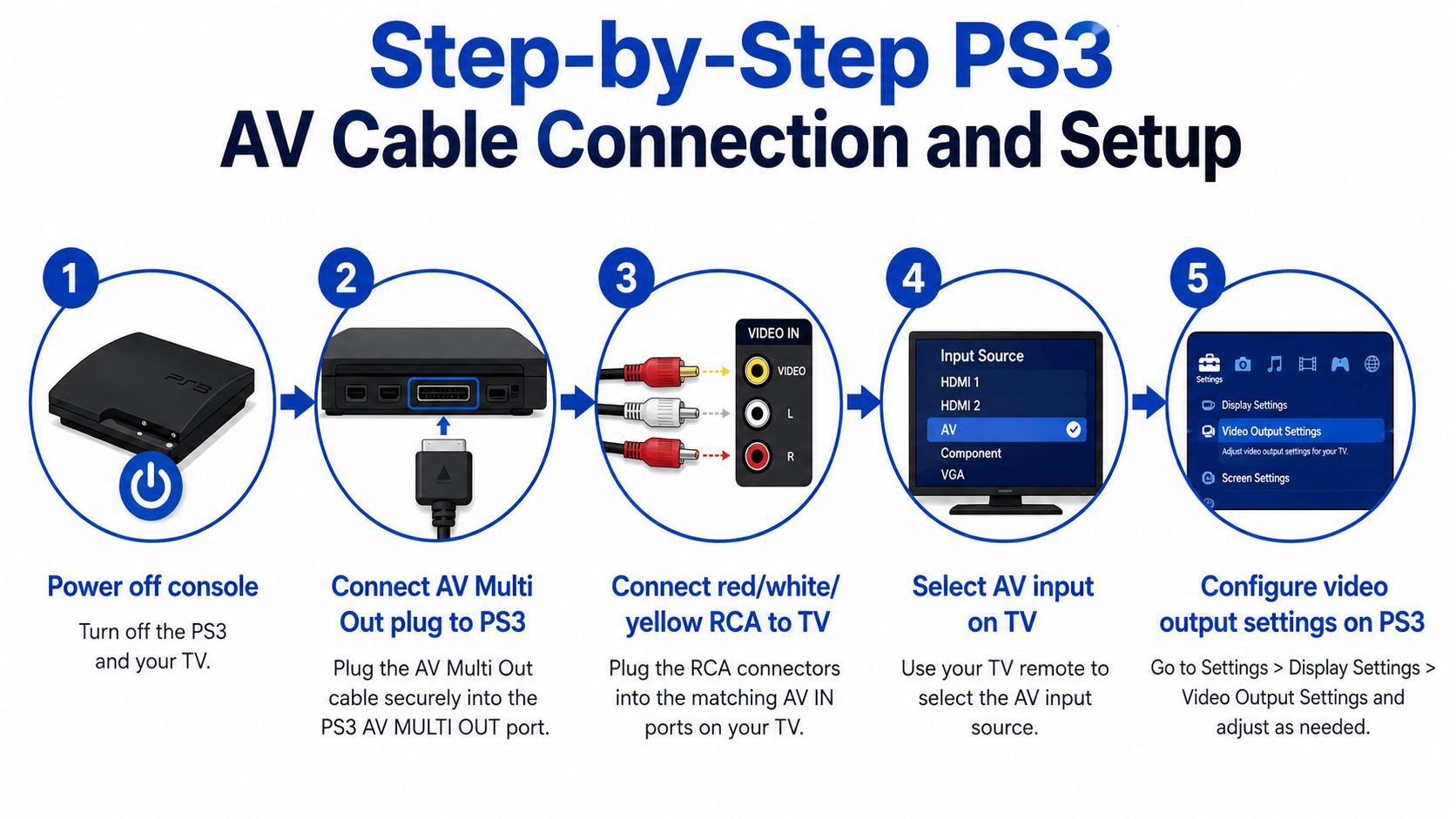
Start with the console fully powered off. Then align the AV Multi Out plug carefully and press it in straight, because angled insertion is how bent pins and flaky connections happen.
Next, match the TV input to the cable type. Composite goes to the yellow, red, and white RCA jacks, while component needs the separate Y/Pb/Pr inputs and the matching audio pair. If your setup includes a display stand or wall placement, this TV positioning guide from Giorgi Bros. Furniture is a useful reference for keeping viewing distance and cable slack sensible.
After the hardware side is settled, select the correct input on the TV before touching the PS3's video settings. That order saves time because the console can look dead when the TV is on the wrong source.
Then go into the PS3 dashboard and force the output mode that matches your cable, instead of trusting auto-detect. That matters most when a system remembers a previous display path and defaults to the wrong one. The PS3 also supports stereo analog audio through the same connector family, so if you're not using HDMI, make sure the red and white audio leads are seated all the way.
If the picture appears after a reset but goes missing again later, the issue is usually the video mode handshake, not the cable itself.
For a visual walkthrough alongside the connection steps, the embedded guide video below is worth keeping open while you work.
If you're building a bigger living-room setup, this 100-inch bedroom cinema setup guide can help you think about screen placement and source routing before you tuck the console back into a cabinet.
Troubleshooting Common PS3 AV Cable Issues
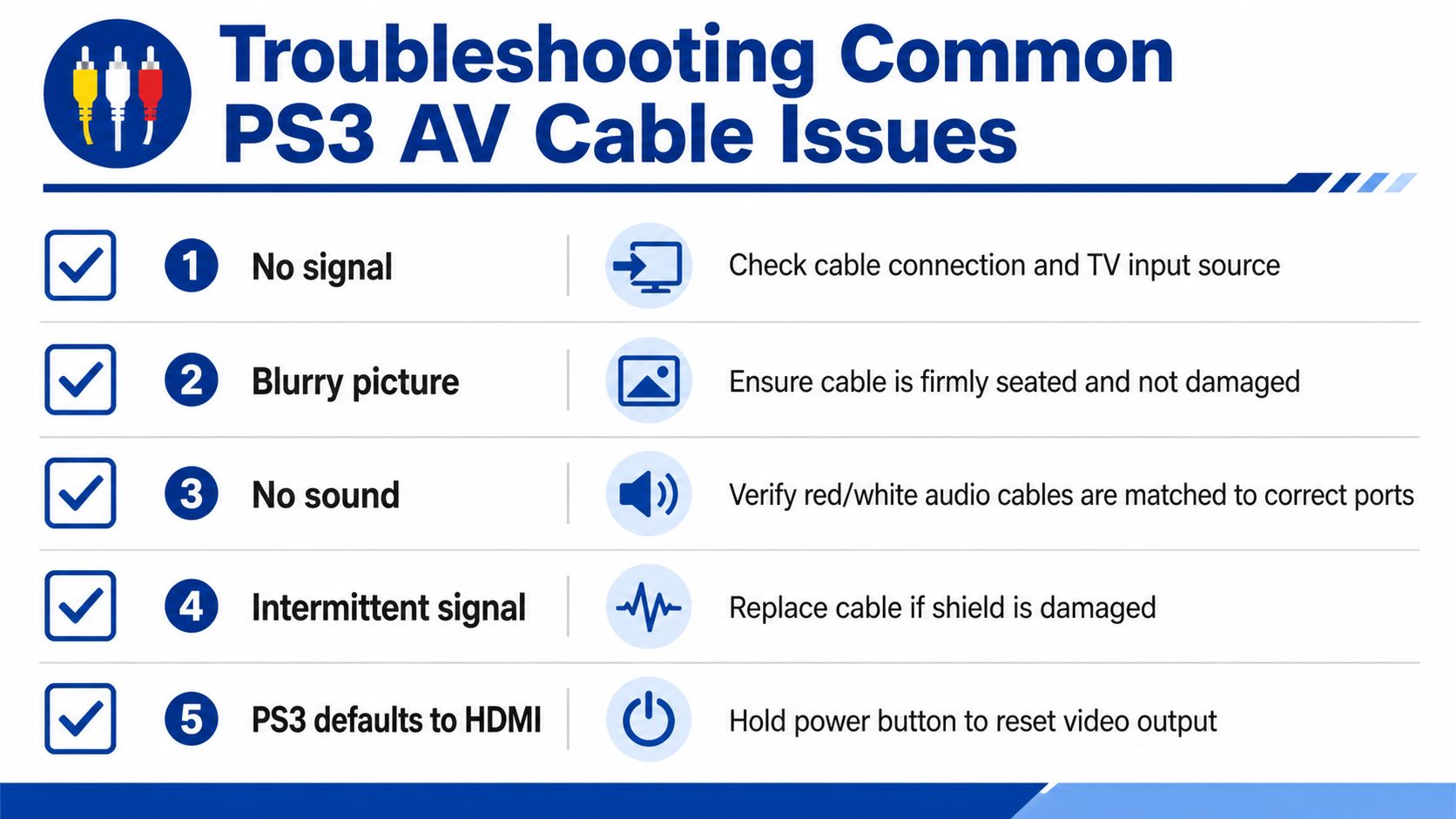
The fastest fixes are usually the simplest. A PS3 that looks broken is often just stuck on the wrong output path, or connected to a TV input that doesn't match the cable.
Symptom to fix mapping
- No signal. Check the cable connection and the TV input source.
- Blurry picture. Make sure the cable is seated firmly and isn't damaged.
- No sound. Verify that the red and white audio cables are matched to the correct ports.
- Intermittent signal. Replace the cable if the shield is damaged.
- PS3 defaults to HDMI. Hold the power button to reset video output.
A loose AV Multi Out connection is especially common because the plug can look seated even when it isn't fully locked in. Flickering or rolling video usually points to that kind of physical instability rather than a settings problem.
Washed-out color is a different problem. It often means the cable type and the TV input type don't line up well, which is why a component cable belongs in component jacks, not in a composite path. The signal is being interpreted differently, so the image can look flat even when the cable is technically “working.”
Practical rule: test the TV input first, then the console output mode, then the cable itself.
For a broader reference on display quality expectations, this is 1080p good explainer helps frame what a cleaner signal should look like on a modern panel.
Audio loss is usually not a hardware failure. If the picture appears but the speakers stay quiet, check whether the PS3 is still sending sound through HDMI instead of the analog leads.
HDMI and Adapter Alternatives for Modern Displays
A PS3 connected to the wrong display path can look fine at the plug and still disappoint on screen. The connector may fit, the console may boot, and the image can still come out soft, muted, or unstable if the signal type does not match the TV input.
For modern televisions that only offer HDMI, the cleanest setup is usually the one that keeps the conversion simple. The PS3 was released during a period when living-room gear was still shifting from analog video to fully digital connections, so a lot of buyers ended up with a mix of cable types and display expectations that do not line up well today.
Direct HDMI versus adapter-based conversion
A direct HDMI connection is the least fussy option on a display that supports it. It sends the console's digital output straight to the screen, which avoids the extra conversion step that cheap adapters often handle poorly.
Adapter-based conversion solves a different problem. It lets older analog output reach a HDMI-only display, but that extra handoff can introduce color shifts, added delay, weak audio handling, or a picture that looks clean at a glance and unstable during gameplay. Many low-cost converters are little more than pass-through boxes, and that is where the trade-off shows up in real use.
If you are considering an adapter route for a modern screen, this USB-C to HDMI adapter page is a useful reminder of how display adapters are usually marketed, even though a PS3 still needs the correct legacy output path on its side.
For readers comparing signal conversion setups more broadly, see how SDI to HDMI converters work to understand why some adapters preserve detail better than others.
A plain rule works best here. Use HDMI if your display accepts it and you want the least guesswork. Keep a quality analog cable only when the TV or monitor gives that path a proper input.
Smart Buying Tips for PS3 AV Cables
The smartest PS3 cable purchase starts with the TV, not the product title. A lot of listings throw around “HD” or “1080p” even when the cable only makes sense if the display accepts the right input and the console is sending the right signal.
What to check before you buy
- Length first. A 6-foot (1.8 m) cable suits most console-to-TV setups because it reaches without leaving extra slack to manage.
- Connector quality. Shielded wiring and a firm plug fit matter more than glossy packaging.
- Gold plating. It can help with durability, but it will not fix a mismatched signal type.
- Model fit. Confirm that the cable supports PS3 and, where needed, PS3 Slim compatibility.
- TV input match. Check whether your display has composite, component, SCART, or D-terminal before you buy.
If a listing claims composite can deliver a full-HD picture, ignore it. Composite is the fallback path, and the limit comes from the signal design itself. The picture only improves when the cable type matches the display input, not when the box uses louder wording.
For readers comparing analog and broadcast-style conversion gear, this SDI to HDMI converter guide is a solid reminder that signal conversion always introduces trade-offs, even when the hardware is well made.
Best buying habit: buy for the input on the TV you own now, not the screen you might upgrade to later.
Mismatch is the quiet failure here. A plug can fit, the console can power on, and the image can still look soft or unstable because the cable type does not match the PS3 AV Multi Out signal path correctly. That is the part many listings skip, and it is why a careful check of connector type matters more than the headline spec.
If you want a clean, no-nonsense setup that matches the gear in your room, check the available options at DigiDevice. You'll find display cables and adapters that make it easier to choose the right path for a PS3, and the right match usually matters more than chasing the loudest spec on the box.