

Are Smart Glasses Worth It for Everyday Use Today
Direct answer: Smart glasses are worth it today if you have a repeated need for hands-free audio, quick camera capture, voice assistance, captions, or glanceable information. They aren't worth buying as a phone replacement or an all-day augmented-reality display, especially if you need long battery life, a wide field of view, or completely conventional social behavior.
You're halfway through a commute when a notification arrives. Your phone is buried in a bag, your earbuds are already handling a call, and the route ahead has changed. Smart glasses promise to handle that moment with a voice prompt, open-ear audio, or a quick photo without making you reach for another device. The promise is compelling. The daily reality depends on whether the frames stay comfortable, socially acceptable, and useful after the novelty fades.
I've spent time comparing audio-focused eyewear with display-based AR glasses, and the practical dividing line is clear. The best models solve a small number of recurring problems elegantly. They become frustrating when buyers expect a tiny computer, cinema screen, camera, assistant, and phone replacement in one frame.
Updated for March 2026, this guide focuses on the question most buying pages skip: will you still want to wear them after three hours, during a commute, or in an office or café? I'll separate the main categories, identify the use cases that work, explain the battery and display compromises, and finish with a buying checklist.
For broader context on where wearable displays are heading, read DigiDevice's future of augmented reality. If you're already shopping, the store's AR smart glasses collection is a practical place to compare available form factors.
What Smart Glasses Actually Are and How They Differ
Smart glasses fall into three categories. The frame may look similar, but the hardware and daily experience differ sharply.
Audio and camera glasses
These are closest to earbuds built into ordinary eyewear. Open-ear speakers handle music, calls, navigation prompts, and voice responses. Microphones and a camera add hands-free capture or visual assistance.
They do not put a virtual monitor in front of your eyes. Their benefit is practical: you can ask a voice assistant a question, record a short cooking clip, or hear directions without sealing your ears with earbuds. The trade-off is that they still depend on a phone, companion software, and surroundings where open-ear audio remains audible.
Display-equipped AR glasses
Display glasses add a visual layer. A waveguide display directs light into the lens, placing text, images, or virtual screens within your view. Other products use birdbath optics, which can provide a larger perceived image but often make the frame feel less like normal eyewear, as explained in DigiDevice's guide to waveguide versus birdbath optics.
Terms such as nits and latency matter in practice. Nits describe brightness, which affects visibility in daylight. Latency is the delay between movement or input and the image you see. A display can look impressive indoors yet feel restricted outside when brightness, field of view, or response time falls short.
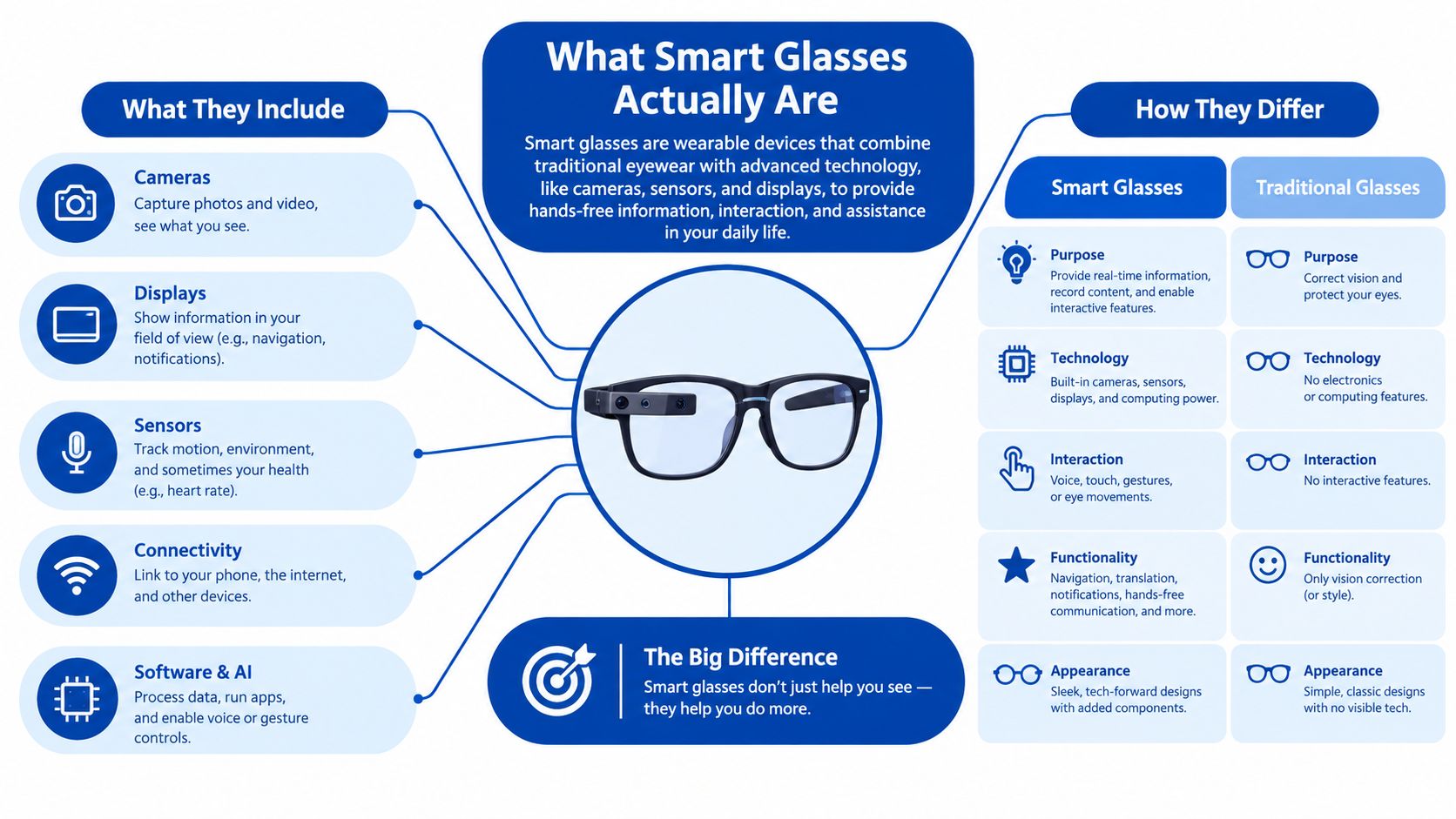
AI glasses
AI glasses often combine the hardware found in audio and camera models with a software layer. They can use microphones, cameras, a phone connection, and cloud services to answer questions, describe scenes, or manage voice interactions.
AI does not automatically mean AR. A pair can offer voice assistance without displaying anything. If virtual monitors for a laptop or console are the priority, look for a display model such as the Rokid Max AR 3D Smart Glasses rather than an audio-first frame.
The market's shipment mix shows the same divide. Global smart eyewear shipments reached 3.547 million units in Q2 2026, up 35.3% year over year. Audio and camera glasses accounted for 2.494 million units, compared with 505,000 AR/ER glasses and 548,000 VR/MR headsets, according to Q2 2026 global smart eyewear shipment data. Display-free designs still dominate purchases.
Use audio and camera glasses for hands-free interactions. Choose display AR glasses for virtual screens and visual overlays. Choose AI glasses when voice interaction is the main reason to wear connected eyewear.
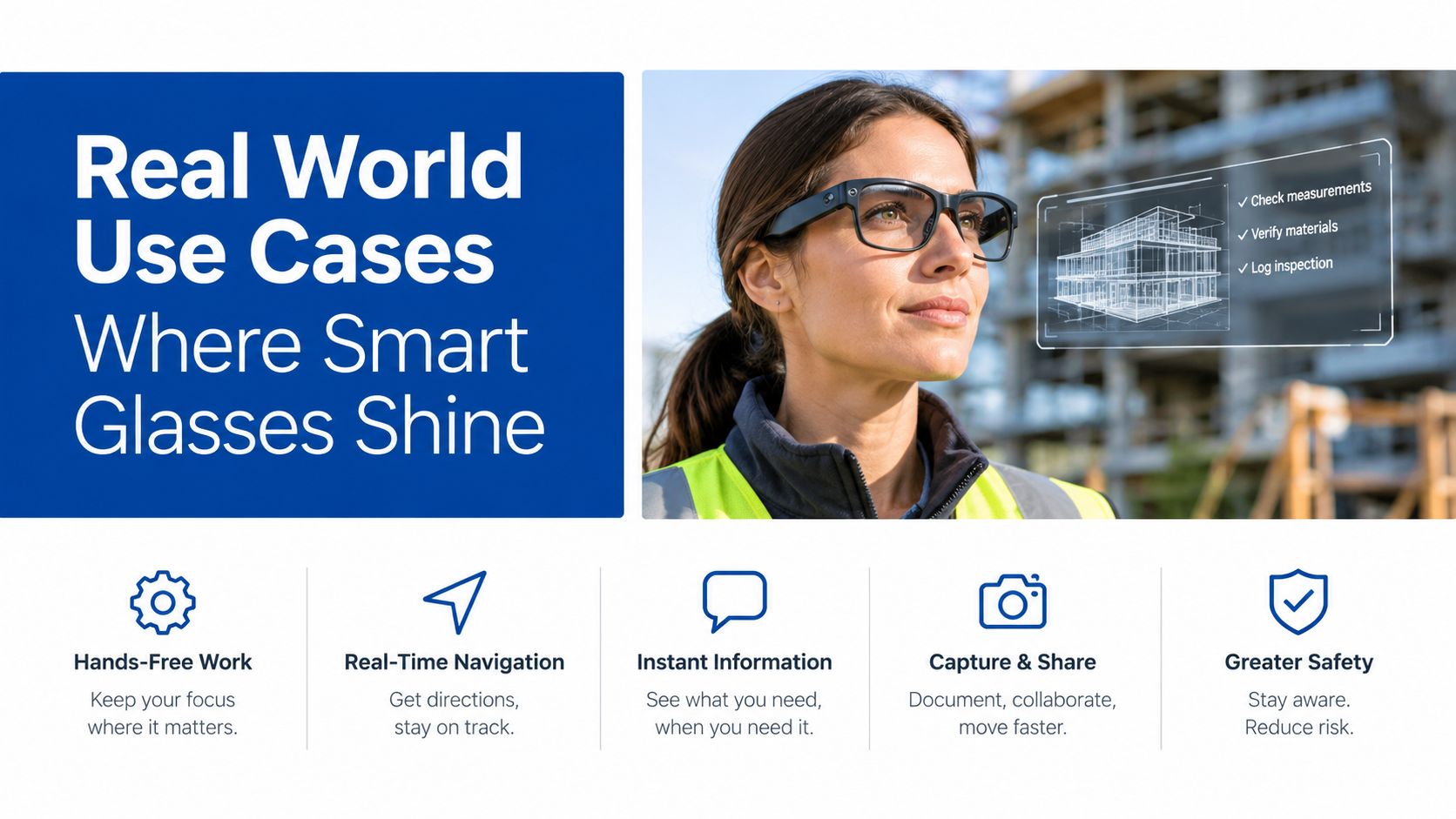
Real World Use Cases Where Smart Glasses Shine
Smart glasses deliver their strongest value when the interaction is short, repeated, and inconvenient to perform on a phone. They're less convincing when you expect continuous visual computing.
Glanceable assistance
A commuter can hear a navigation instruction without checking a screen. A cook can set a timer or ask for a conversion while keeping both hands on a recipe. Someone walking through a new area can receive a short prompt instead of repeatedly stopping to access a phone.
These moments don't require a large display. They require reliable microphones, clear open-ear audio, responsive controls, and a companion app that doesn't lose its connection.
Capturing moments without reaching for a phone
Hands-free cameras work best when speed and spontaneity matter. A creator can record a quick point-of-view clip, a parent can capture a short family moment, and a technician can document a repair while keeping both hands available.
That convenience comes with a social obligation. Recording should be obvious, appropriate, and limited to situations where people reasonably understand what's happening. The camera is useful because it removes friction, not because it gives permission to record indiscriminately.
Captions, translation, and context
Live captions can help during conversations, travel, or noisy environments. Translation can be valuable when you need a quick phrase or visual context rather than a full language lesson. These features depend heavily on software, language support, connectivity, and microphone performance, so the frame's headline AI feature isn't enough to judge the experience.
A display is most useful when it presents small amounts of information. Short captions, a name, a direction, or a reminder fits the format better than a page of text.
Audio without earbuds
Open-ear speakers let you hear music, podcasts, calls, or prompts while remaining aware of your surroundings. That makes audio glasses appealing for walking, light outdoor activity, and users who dislike the pressure or isolation of in-ear headphones.
The trade-off is privacy and sound leakage. In a quiet office, nearby people may notice what you're playing, and loud environments can reduce clarity. Audio glasses complement earbuds rather than making every other listening device obsolete.
Counterpoint Research reported that global AI glasses shipments rose 263% year over year in the first half of 2026, with display-less models representing 96% of shipments and Meta holding about 94% of that display-less segment, as reported by Android Authority's shipment coverage. The pattern points toward demand for lighter, simpler frames rather than bulky visual computers.
Practical rule: If you can name one task you'll perform every week without taking out your phone, smart glasses have a credible path to being worth the purchase.
The category becomes less convincing for continuous AR. Long reading sessions, complex editing, and full spatial applications still expose the limitations of battery, optics, input, and comfort. For a closer look at display-based work, see DigiDevice's best AR glasses for productivity and virtual monitors.
The Honest Trade Offs Battery Comfort and Display Limits
Battery life changes the answer more than almost any feature list. Audio and camera glasses can behave like a wearable accessory because their computing demands are intermittent. Display glasses consume more power whenever the screen is active, and the result is a much narrower window for sustained use.
Reporting in 2026 commonly places audio-plus-camera models at about 6 to 8 hours of mixed use, while display glasses often provide roughly 2 to 4 hours of active screen time. Under heavy continuous use, some display models can drop to around 90 minutes before the battery reaches 40%, according to this 2026 smart glasses buying guide covering battery and privacy.
| Criteria | Audio and Camera Glasses | Display AR Glasses |
|---|---|---|
| Battery pattern | Better suited to intermittent calls, audio, and capture | Shorter active display sessions |
| Main benefit | Hands-free audio, camera access, and voice control | Virtual screens, captions, and visual overlays |
| Display requirement | Usually none | Waveguide or birdbath optics |
| Best environment | Commuting, walking, casual capture, and calls | Desk work, gaming, travel, and controlled indoor use |
| Main compromise | Camera privacy, audio leakage, and phone dependence | Battery drain, brightness, field of view, and heavier frames |
Why the display still feels small
Recent display glasses are described as using waveguide displays around 600×600 resolution with a field of view near 20 degrees, according to the Mendeley display glasses dataset. That isn't a judgment on every model, but it explains why visual interfaces usually work best as a small window rather than a replacement for a laptop or phone.
A narrow field of view limits how much content you can see at once. You may need to move your head, scroll more often, or tolerate a virtual screen that feels less expansive than marketing imagery suggests. The experience can still be excellent for a focused monitor or notification panel, but it isn't the same as having a large display covering your vision.
For a practical explanation of this specification, DigiDevice's guide to field of view is worth reading before you compare AR glasses.
Comfort and software determine the long-term verdict
Weight distribution matters more than a frame's appearance in a product photo. Cameras, speakers, batteries, hinges, and display hardware all compete for space around your temples and nose. A pair can feel fine for a short demo yet become irritating during a long commute or work session.
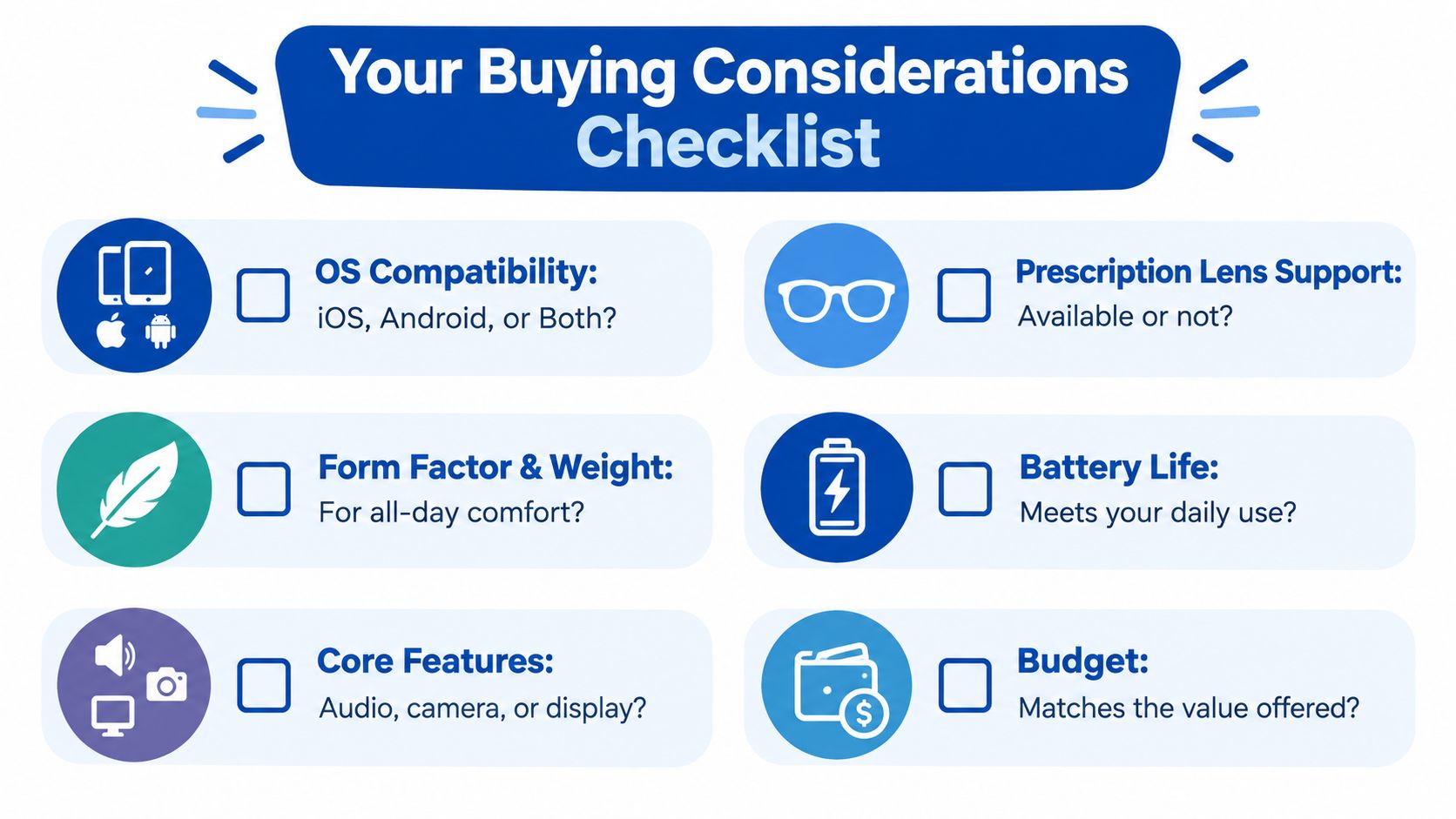
Prescription compatibility creates another filter. Confirm lens support before purchase, particularly if you use a complex prescription or need custom optical work. Also check the phone operating system, companion app, voice assistant support, charging method, and whether the features you care about work without a constant data connection.
The value comparison is simple. If you want audio, compare the glasses with earbuds. If you want a virtual monitor, compare them with a portable monitor or headset. Smart glasses earn their cost when the face-worn form factor removes enough daily friction to justify its compromises.
Privacy Social Acceptability and Everyday Wearability
A camera on your face changes the buying decision. The technical question is whether the camera records clearly. The social question is whether people around you trust that you're not recording them.
Cafés, offices, classrooms, clinics, and private homes all have different expectations. A visible recording indicator can help, but it doesn't remove the need to ask permission or put the glasses away when recording isn't appropriate. Some workplaces may ban camera-equipped eyewear regardless of whether you intend to use the camera.
Different designs create different trust profiles
Camera-heavy glasses offer hands-free capture and visual input, but they attract more scrutiny. Audio-first models are easier to explain because they resemble open-ear headphones built into a conventional frame. Display-first models may avoid a camera yet still raise questions if people can't tell what you're seeing.
The right pair isn't only the one with the most features. It's the pair whose features other people can understand and accept.
This is why camera-free designs can be a better choice for privacy-conscious buyers. You may give up visual AI or rapid capture, but you also reduce the number of settings where the glasses feel inappropriate. A product that stays in your drawer because you're uncomfortable wearing it has no practical value.
The three-hour test
The Vision Council's 2025 U.S. survey found that 14% of respondents already owned smart eyewear, while 40% would consider buying within 12 months, as reported by The Vision Council's smart eyewear insights. Interest is substantial, but ownership doesn't answer whether people tolerate the frames through a full workday.
Before you buy, test the likely routine rather than the launch-day excitement:
- Commute test: Would you wear them on public transport without constantly explaining the camera or display?
- Office test: Can you take a call or listen to audio without distracting colleagues?
- Comfort test: Do the nose pads, temples, and frame balance remain tolerable after several hours?
- Privacy test: Can you disable capture quickly, and will you remove the glasses in restricted spaces?
- Social test: Are you comfortable telling someone what the glasses can and can't do?
If the answer is no to several of these questions, choose a simpler product or wait. Comfort and trust are not secondary features. They determine whether the device becomes part of your routine.
How to Choose the Right Pair Before You Buy
Start with the job, not the frame. Write down the moment that currently makes you reach for your phone, then decide whether audio, a camera, or a display solves it with fewer steps.
Match the hardware to the task
For calls and audio, prioritize open-ear speaker quality, microphone pickup, controls, and connection stability. For hands-free video, inspect camera resolution, stabilization, recording controls, storage behavior, and the recording indicator. One Xiaomi launch report described glasses with a 12-megapixel camera, 2K video at 30 frames per second, a 45-minute continuous recording cap, and 8.6 hours of mixed-use battery life, giving buyers a useful example of why recording limits and mixed-use figures must be read together in coverage of Xiaomi's smart-glasses launch.
For AR, put field of view, brightness, resolution, latency, compatibility, and head tracking ahead of cosmetic features. Display glasses described with around 600×600 resolution and a field of view near 20 degrees can work well for focused content, but the limited viewing window should shape your expectations.
Run this pre-purchase checklist
- Compatibility: Confirm iOS or Android support, then check whether every desired feature works on your phone.
- Prescription support: Verify lens availability, frame limits, and whether your optician can handle the prescription.
- Wearability: Look for balanced weight, adjustable fit, hinge durability, and a frame you'll wear in public.
- Battery behavior: Separate mixed-use claims from continuous camera or display time.
- Optics: For visual models, compare brightness in nits, field of view, resolution, and latency rather than relying on screen-size language.
- Audio and microphones: Check call quality in traffic, wind, and indoor conversation, not just quiet-room demos.
- App ecosystem: Confirm firmware updates, voice features, permissions, sharing tools, and companion-app reliability.
DigiDevice also carries the Rokid Max AR 3D Smart Glasses, a display-oriented option for phones, consoles, and PCs. Review its connection requirements carefully, because a virtual screen is only useful when your source device and adapter setup cooperate.
For computer-focused workflows, compare the options in DigiDevice's AR glasses guide for Mac and Windows virtual monitors. The best purchase usually prioritizes reliable comfort and a clear use case over maximum resolution on a specification sheet.
Final Verdict Who Should Buy and Who Should Wait
Smart glasses are worth it now for early adopters who want hands-free audio and AI, content creators who regularly need quick point-of-view capture, and commuters who value short navigation or notification prompts. They also make sense for people who already enjoy open-ear audio and want that experience integrated into eyewear.
Buyers should wait if they expect all-day AR, a phone replacement, a wide virtual workspace, or long continuous display sessions. Display glasses remain constrained by battery budgets and viewing area, while camera-equipped models ask you to manage real privacy expectations every time you wear them.
The decisive question is still simple: what repeated weekly task will these glasses improve? If the answer is specific, such as taking calls while walking, capturing short clips, or viewing a focused virtual monitor, the form factor can justify itself. If the answer is “they look futuristic,” save your money until the hardware fits your routine better.
People Also Ask
Are smart glasses useful without a display?
Yes. Audio and camera glasses can handle calls, music, voice prompts, and hands-free capture without placing information in your field of view. They're often easier to wear socially and can offer better battery behavior than display-focused models.
Can smart glasses replace a phone?
Not completely. They still depend on a phone, companion app, network connection, or other source device for many functions, and their small displays, limited input, and battery constraints make them complementary tools.
Should privacy-conscious buyers avoid smart glasses?
They should consider audio-first or camera-free designs and check workplace and venue policies before buying. If recording indicators, consent conversations, or public attention would make you uncomfortable, a display-free camera-free model may be the more sustainable choice.
For buyers ready to compare a suitable pair, check the current smart glasses price and availability before ordering, and verify compatibility, lens support, battery expectations, and return terms.
DigiDevice offers a curated selection of AR smart glasses and practical electronics for people who want hands-free audio, virtual screens, and better mobile workflows without guessing from a spec sheet. Visit DigiDevice to compare the available options and choose the model that matches the task you'll use every week.